MG REST Client
A Visual Studio Code / Kiro extension for calling the Mongoose IDO Request Service REST API (V2 and V3)
with a full per-operation request builder, reusable connection profiles, and a Postman-compatible
test-collection workflow — assertions, value capture/chaining, response baselines, and data-driven
runs that also run in Postman/Newman.
Current release: 4.0.30.
Phase 4 V3 authoring and export: V2 defaults and golden serialization remain unchanged while the request builder, live IDO/method/property/parameter metadata discovery, managed collections, Postman/Newman export, reconstruction/import, data-rule generation, and standalone MCP execution support the deployed V3 contract. V3 success is derived from HTTP status plus normalized {Error} fields.
Features
Request builder
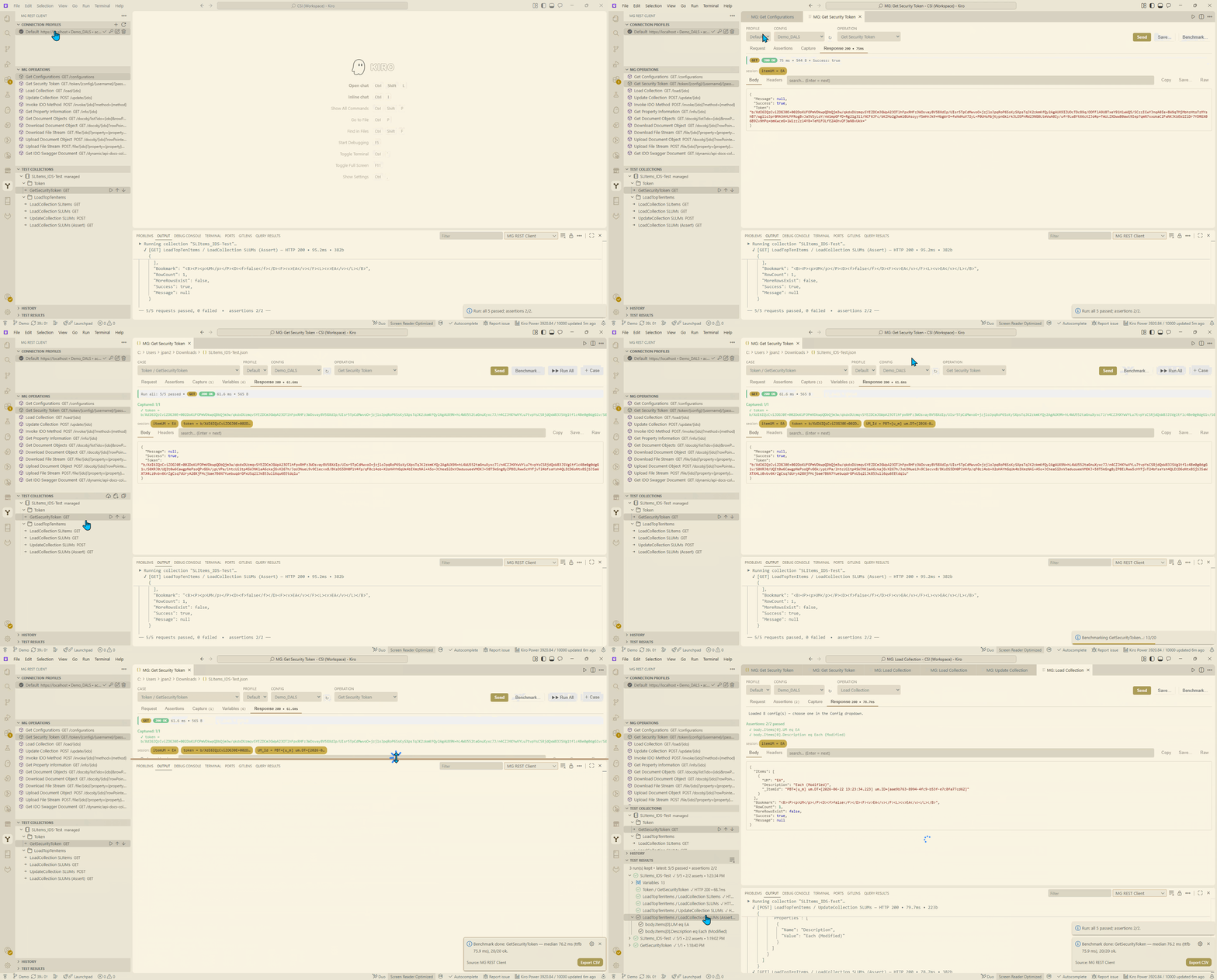
- Version-grouped MG Operations view — browse both V2 and V3 operation sets in the MG Operations view; the active profile's version is expanded by default, and clicking a leaf opens the builder with that operation and API version explicitly selected.
- All MG operations: GetConfigurations, GetSecurityToken, LoadCollection, UpdateCollection,
InvokeIDOMethod, GetPropertyInformation, GetDocumentObjects, Download/Upload DocumentObject,
Download/Upload FileStream, and Get IDO Swagger Document.
- Per-case operation & description — the Operation selector lives in the Request tab (it's a
per-case property, not a global toolbar setting); the selected operation's description shows as a
tooltip on the dropdown, and the resolved URL preview sits beside it (truncated, full string
on hover). Each case also has a Description tab for
free-text notes, saved in the collection and exported to Postman/Newman as the request description.
- Connection profiles — server, config, username, protocol, TLS-skip, and auth mode. Passwords
and tokens are stored in VS Code SecretStorage, never in settings JSON.
- Runtime config picker — override the profile's config per request; click ↻ to call
GetConfigurations and pick from the server's list. Used for the X-Infor-MongooseConfig header
and GetSecurityToken (tokens cached per profile + config).
- Searchable IDO combobox — filters live IDO metadata from the active V2 or V3 profile as you type.
- Properties picker — modal listing the active IDO's properties (V2
GetPropertyInformation or V3 /metadata/ido/{ido}/properties) with filter,
select-all/clear, Use *, and key/read-only/required badges.
- Method & custom-load combobox — invokable methods for Invoke IDO Method; custom load methods +
a Params… modal for
clmparam on Load Collection.
- Update Collection editor — Edit Changes… builds the
Changes body (Insert/Update/Delete,
property table with Set/Null, Pick record… to capture _ItemId) with live JSON preview + Copy.
For many records: collapsible change blocks with summaries, Duplicate, a Grid mode
(spreadsheet: rows = records, columns = properties, per-row action) and a shared Pick record
popup (with multi-select to add many Update/Delete changes at once) available in both views.
On the Request tab the Changes body shows as read-only pretty-printed JSON with any
{{variables}} resolved for preview (session > environment > collection; unresolved ones are
left as {{…}}) — edit it with
Edit Changes…, or flip the Edit raw toggle for advanced hand-editing (the raw {{…}}
template is what's sent/saved).
- Parameter reference — for Invoke IDO Method, a
# / Name / In-Out / Type table plus
Fill template. Parameters load on demand for the selected IDO from the active profile's V2
metadata collection or V3 method metadata endpoint and are cached the first time you open that IDO's
methods, so there's no slow whole-server index build; switching between methods of the same IDO is
instant. An optional prebuilt index (MG: Build/Refresh Parameter Index) is still used as an
offline fallback.
- Pre-send validation — required fields are checked before Send (IDO, Method for Invoke, valid
JSON body); an inline warning shows and Send is disabled (with the reason) until they're fixed.
- Automatic authentication — fetches and caches the token per session; re-auths on HTTP 401.
- Self-signed certificate support — per-profile "skip TLS verification".
- IDO Editor integration — when the Mongoose IDO Editor (
jeking.mg-ido-pro-editor) is installed,
Open in IDO Editor ↗ is available three ways: next to the IDO field, as an editor
title-bar action, and via right-click on a case in the Cases tree — each opens that IDO's
metadata in the editor. Conversely, the editor's Test in REST Client command pre-fills this
request form (operation / IDO / method / body). With mgRestClient.preferIdoEditorMetadata on, the
builder's IDO list, methods, properties, and parameter pickers are sourced from the workspace IDO
files (via the editor) instead of live REST — faster and offline, with automatic REST fallback.
Assertions, capture & variables
- Assertions / expectations — declarative checks per request (status / Success / time / body
JSON path / header; equals / contains / regex / exists / numeric). Checked on Send and on runs.
Saved requests embed an equivalent Postman test script, so the same checks run in Postman and
Newman/CI.
- Value capture & chaining — capture response values (by JSON path) into session variables
for later requests; exported as
pm.collectionVariables.set(…). A 🎯 From response picker
helps pick paths from the last response.
- Variables tab — edit collection variables, plus a Session variables editor to view/add/
edit/clear the runtime captured values (shared across open editors).
- Environments — named variable sets (Dev / Test / Prod) managed in the Environments view and
switched from the toolbar Env picker, so the same collection runs against different targets
with no edits. Import/export standard
*.postman_environment.json files (Newman -e parity).
An environment can also override {{config}} to retarget the database, or {{baseUrl}} to
retarget the server host — applied both on Run and on an interactive Send, resolved
through the full layer order (session > environment > collection > profile), so credentials stay on
the active profile while the host follows the same precedence as runs.
- Per-case config + token — each case can target a different config via its Config picker
(e.g.
{{config_2}}) and choose its Token variable (toolbar Token field, e.g. {{token_2}};
empty = pair with the config by convention config↔token, config_2↔token_2). At run/Send time
the token variable is preferred when it resolves (from a GetSecurityToken case capture or an
environment) — matching Newman — and only falls back to a live per-config fetch when unresolved.
The serialized request carries the chosen config/token vars, so cross-config/site integration runs
behave the same in the editor and under Newman.
- GetSecurityToken credentials — token cases expose Username and Password pickers whose
values are variable references only (chosen from env / collection / session vars; e.g.
{{username_2}} / {{password_2}}, default {{username}} / {{password}}). No secret is ever
stored in the collection. The serialized token URL is /token/{{config}}/{{username}}/{{password}}
so Newman can authenticate from its environment; the extension resolves the refs (case → env →
profile/SecretStorage) and passwords are masked in displayed/historied URLs.
- Variable precedence — session/captured > active environment > collection variables >
per-collection overrides > active-profile defaults. The active profile's fresh
token wins over a
stale collection token unless pinned. Runs warn about unresolved {{placeholders}}. The same
precedence applies in the editor's live Send and in collection runs (and matches Newman, where the
environment overrides collection variables — keep capture names distinct from environment keys).
Nested/indirect references resolve recursively — a variable whose value contains another
{{var}} (e.g. item = ZTEST-{{suffix}}) is expanded to completion (bounded, with cycle
protection), matching Postman/Newman.
Test Collections & the collection editor
- Test Collections view — collections as a folder/request tree. Managed (extension-created)
collections support New Folder, Rename, Duplicate, Delete, and drag-drop reorder; imported
collections are read-only until Enable Editing / Save Editable Copy. Edits preserve fields
the extension doesn't understand. Convert-time safety check — converting a collection to
editable first scans for request content MG editing can't preserve (pre-request/test scripts,
per-request auth, non-
raw bodies, custom headers); if any is found it stops with a list so you
can cancel or knowingly convert anyway (that content is regenerated from MG metadata when a case is
edited, so it would be discarded).
- Collection editor — opens a collection as one native editor with a left-hand case tree
(folders + cases, collapsible), the full request builder on the right, and a draggable splitter.
Per-case type dots (assertions/capture), a config tag, and a last-run/baseline badge.
Run All runs every case in order; reorder via drag-drop or Move Up/Down/Move-to-Root.
While a run is in progress the builder shows a busy overlay with "Running case X of N" progress
and disables Send/Save/Run All (so the case can't be edited or re-run mid-run); the response column
stays live so results stream in.
- Per-case config — each case can target a different Mongoose config; honored on Send and on
Run All (a token is fetched per config), so one collection can span multiple configs.
- Last-run badges — pass/fail (
✓/✗) and baseline (=/≠) badges on tree items, updated on
Send and Run All, and persisted across reloads. A case with no assertions passes on HTTP 2xx
(matching Postman/Newman, which never fail a request that has no test script); if such a response
reports Success:false it's flagged with a ⚠ warning badge (passed, with a caveat) rather than
failed.
- External-change aware — the tree refreshes automatically when collection files change outside
the IDE (plus a manual Refresh button); the open editor reloads external edits.
Response, baseline & diff
- Side-by-side response — the request builder and the response sit in a resizable split (stacking on narrow widths), so you see the response without switching tabs. A summary strip shows the case's assertions/captures/baseline/stop/config at a glance.
- Response views — Table (MG-aware: envelope summary + a filtered table for whatever the
operation returns — Load
Items, Get Property Information properties/keys/sub-collections,
Invoke output parameters, or any array response). A Columns picker shows/hides columns
(volatile _ItemId/Bookmark hidden by default) and headers are click-to-sort (remembered per
case). Long columns (e.g. _ItemId) are width-capped with hover tooltips and a copy button;
nested arrays (e.g. Properties) are omitted from the parent grid. Rows that contain nested arrays (e.g. UpdateCollection Changes/Properties)
can be expanded (▸) to show just those property grids (a 50/50 Name / Value grid), plus a
Copy row JSON action; flat list rows (LoadCollection) stay a plain table with no extra column.
Plus Body
(pretty/raw), Headers, and Baseline, with Copy and an overflow menu (Save response, Set
baseline, Diff vs baseline).
- Baseline regression — save a known-good response as a per-case baseline, then diff later
responses against it (native side-by-side diff). The Baseline tab is read-only by default with
an explicit Edit/Save/Cancel and a confirm-on-clear. Ignore fields (default
_ItemId, Bookmark)
exclude volatile keys from the compare/diff.
Running & CI
- Run a single request (inline ▶) or a whole collection; results go to the Test Results view
and the output channel.
- Data-driven runs (experimental) — iterate a request over a CSV/JSON data file (Newman
-d
compatible). See below.
- Pure Postman export — Export Collection writes a clean Postman file (extension
_mg
metadata stripped) that runs in Postman/Newman; the editable original is untouched.
- Benchmark mode — N-iteration performance test of one request with min/median/avg/p95/max/stddev
for total + TTFB, CSV export, and a keep-alive toggle.
Getting started
- Open the MG REST Client view in the activity bar.
- In Connection Profiles, click + to add a profile (server, config, credentials), then set
its password/token via the key icon, and Set Active Profile.
- In MG Operations, click an operation to open the request builder, fill in the fields, and
press Send. Use ↻ next to Config to pick a server config.
- Save… a request into a collection to build a reusable, runnable test suite.
(Developing the extension itself: npm install, npm run compile, F5 for the Extension
Development Host, npm test for the unit suite.)
Connection profiles
| Field |
Description |
| Server |
host or host:port of the Mongoose application server |
| Config |
Mongoose configuration name, e.g. CSI_DALS |
| Username |
Used for GetSecurityToken (credentials mode) |
| Auth mode |
credentials (fetch token via username/password) or token (paste a token/bearer) |
| API version |
Optional v2/v3 dialect selector; omitted defaults to V2 |
| Protocol |
HTTPS or HTTP |
| TLS |
Skip verification (self-signed certs) or verify |
Secrets are stored in SecretStorage and never written to settings.
Data-driven runs (experimental)
Run a request once per row of a data file (CSV or JSON), like Postman's Collection Runner and
Newman -d. Off by default — enable mgRestClient.enableDataDrivenRuns, then right-click a
saved request → "Run with Data File…" and pick a .csv/.json. Each row's values overlay the
request's {{variables}}; results are recorded as one run with a per-row entry.
Creating the data file — columns/keys are exactly the {{variables}} you want to vary. Do
not include connection variables (baseUrl, config, username, token — from the profile)
or values captured at runtime. Only the business inputs go in the file.
CSV (header row = variable names):
newItem,newUM,productCode
MG-TEST-001,BOX,FG
MG-TEST-002,CASE,FG
or JSON (array of objects):
[
  { "newItem": "MG-TEST-001", "newUM": "BOX",  "productCode": "FG" },
  { "newItem": "MG-TEST-002", "newUM": "CASE", "productCode": "FG" }
]
Remember the file per request (optional): add "dataFile": "data.csv" to the request's _mg
block (path relative to the collection) to skip the prompt; add "iterationCarry": true to carry
captured variables across rows.
In CI — export the collection (Export Collection, which strips _mg but keeps the request +
assertion/capture scripts) and run the same data file with Newman:
newman run my.postman_collection.json -d data.csv \
  --env-var "baseUrl=…" --env-var "config=…" --env-var "username=…" --env-var "password=…" \
  --reporters cli,junit --reporter-junit-export results.xml
Note: "Run with Data File…" iterates the selected request; newman run … -d iterates the
whole collection once per row. Per-request config overrides apply in the extension only; Newman
uses the single {{config}} variable.
Bundled sample
On first install the extension adds a sample collection to Test Collections as a reference
(mgRestClient.includeSampleCollection, default on). Removing it from the tree is permanent —
upgrades won't re-add it. Re-add anytime with MG: Add Sample Collection.
Collection JSON schema
Editing a *.postman_collection.json file gives validation + autocomplete for the extension's
_mg metadata (operation, assertions, captures, baseline, per-case config, dataFile,
iterationCarry) wherever it appears. The schema is additive — standard Postman fields are never
flagged.
Commands
| Command |
Description |
MG: New Request |
Open the request builder |
MG: Add/Edit/Delete Connection Profile, Set Active Profile, Test Connection |
Manage and verify profiles |
MG: Import Connection Profile (from descriptor) |
Create a profile from a connection descriptor JSON (e.g. the MCP MG_CONNECTION file); non-secret fields only — set the password/token afterwards |
MG: Set Profile Password/Token |
Store a secret in SecretStorage |
MG: Get Security Token |
Fetch + copy a token for the active profile |
MG: Build/Refresh Parameter Index |
Prebuild the whole-server IDO method-parameter index (optional; params otherwise load on demand per IDO) |
MG: Import Postman Collection / New Collection |
Add or create a collection |
MG: Generate Data-Rule Tests from IDO… |
With the MG IDO Pro Editor installed, analyze an IDO's Data Rules + validators (via the editor's mgIdo.api.analyzeDataRules API) and generate runnable test cases into a collection you pick, organized as one folder per tested rule/validator (required / in-list / in-collection checks from both the data rules and property validators). Rules gated on an activation condition are placed in isolated Only when: … groups that arrange their own environment: feature gates toggle AppFeatures.Active, and module-license gates enable SLOptionalModules.IsEnabled + assign the module to the login user via UserModules (resolving the user's UserId from UserNames), with a DiscardMetadataCache after setup and a full restore on teardown. Other conditions (setting/group) and UI-only rules are reported as notes |
MG: Generate Data-Rule Tests from Spec File… |
Generate the same data-rule test collection from a saved analysis-spec JSON file — the exact ido_analyze_datarules / mgIdo.api.analyzeDataRules output ({ ido, propertyValidators[], rules[], seedPlan }). No transformation: pick the file, pick the target collection, done. The file is strictly validated first and rejected whole (nothing generated) if it isn't a valid analysis spec. Also available as the specPath argument on the MCP generate_datarule_tests tool |
MG: Copy Data-Rule Spec Prompt |
Copy a ready-to-paste, AI-understandable prompt describing the analysis-spec format (the ido_analyze_datarules output) so an external tool/AI can produce a conforming spec file. Also available to agents as the MCP describe_datarule_spec_format tool. Both this and Generate Data-Rule Tests from Spec File… are on the collection editor's title-bar toolbar |
MG: Open C# Entry Point / Trace Method Backend / Forms Using this IDO (SL Dev Hub) |
Right-click a request case: with the SL Dev Hub extension (jeking.sl-dev-hub) installed, jump from the case to its backend — the implementing C# entry point for the IDO, the method's dependency trace (Invoke IDO Method cases), or the forms that use the IDO |
MG: Run Request / Run Collection / Run Folder |
Execute a request, a folder, or a whole collection (live Send engine) |
MG: Run with Data File… |
Iterate a request over a CSV/JSON data file (needs enableDataDrivenRuns) |
MG: New Folder, Rename, Duplicate, Delete, Move Up/Down/To Root |
Edit a managed collection's tree |
MG: Enable Editing / Convert to Editable… / Save Editable Copy |
Make imported collections editable |
MG: Edit Collection Variables |
Set persisted per-collection variable overrides |
MG: Export Collection / Reveal Collection File |
Share/export a pure Postman file |
MG: Lint Collection |
Check a collection for common issues |
MG: Analyze Test Coverage vs IDO |
Right-click a collection to report which of the IDO's data rules/validators its tests cover (covered/partial/missing, coverage %, gaps, and cases needing review). Needs the MG IDO Pro Editor to analyze the IDO. Also on the standalone MCP server as analyze_test_coverage (+ coverage_review_set for the review bucket). Both also accept an optional middleTier method surface (from the SL Dev Hub entry-point/trace tools) to additionally score InvokeIDOMethod coverage of the C# middle-tier logic |
MG: Benchmark Request |
Performance-test a saved request |
MG: Add Sample Collection / Refresh Test Collections |
Sample seeding / reload the tree |
MG: Clear Test Results / Clear History |
Clear stored results/history |
Settings
| Setting |
Default |
Description |
mgRestClient.profiles |
[] |
Connection profiles (non-secret fields) |
mgRestClient.activeProfileId |
"" |
Active profile id |
mgRestClient.requestTimeoutMs |
60000 |
HTTP request timeout (ms) |
mgRestClient.postmanCollections |
[] |
Imported collection file paths |
mgRestClient.collectionsGlob |
"" |
Optional glob (relative to open workspace folders) for auto-discovering additional collection files to show in Test Collections, on top of postmanCollections. Disabled by default (empty) — the tree shows only your registered collections. Set e.g. **/*.postman_collection.json to also surface collections in the open folder; only files that parse as a collection (item array) are added, and discovered paths never remove/override the explicit list |
mgRestClient.maxTestRuns |
10 |
Recent test runs to keep in the Test Results view |
mgRestClient.experimentalEditor |
true |
Open saved requests in the native collection editor |
mgRestClient.includeSampleCollection |
true |
Add the bundled sample collection on first install |
mgRestClient.enableDataDrivenRuns |
false |
Enable the experimental "Run with Data File…" action |
mgRestClient.preferIdoEditorMetadata |
false |
When the MG IDO Pro Editor is installed, load IDO metadata (IDO list, methods, properties, parameters) from the workspace IDO files instead of live Mongoose REST queries — faster and works offline; falls back to REST when an IDO isn't found in the workspace |
mgRestClient.storePostmanFormat |
true |
Store the full Postman format (per-case request + generated test-script event) alongside _mg when saving managed collections. Turn off to save lean files (just the _mg source of truth) for easier reading/maintenance — lean cases still Send/Run/Run-All (the request is reconstructed from _mg), and Export Collection / MG: Rebuild from _mg regenerate the full Postman format when you need Postman/Newman. Use MG: Convert to Lean to strip an existing collection |
mgRestClient.emitUnarrangeableDataRuleTests |
true |
When generating Data-Rule tests, if a rule's "For rows where…" filter can't be fully arranged over REST (e.g. it references a derived/computed property), generate the editability/trigger test best-effort anyway (arranging the settable predicates, noting the rest). On by default so no rule is silently dropped. Turn off to skip such tests with a note instead. The generator never sets a derived/not-settable column in the request body regardless |
mgRestClient.batchEditabilityTests |
true |
When generating Data-Rule tests, batch editability (Set-Property-Updateable/Enabled) checks that share the same activation gate and row filter onto one shared record — a single insert setting all those properties, one reload verifying each, one cleanup — instead of a throwaway insert per property. On by default (far fewer cases and much less live-DB churn on IDOs with many editable fields, e.g. SLItems). Turn off for one isolated record per property (clearer per-property pass/fail, but many more cases) |
mgRestClient.provisionMissingReferenceData |
false |
When generating Data-Rule tests, best-effort provision a missing single-key lookup domain: before loading a valid FK/domain seed value, insert a synthetic single-key row into its domain (tolerated if it already exists) and remove it in a Teardown, so the seed resolves even when the domain table is empty. Off by default (load-only). Only helps SIMPLE single-key lookups — a domain needing more required fields fails the tolerated insert (the Load still governs), and a sentinel row is written+removed even when the domain already has data. |
mgRestClient.middleTierAutoResolve |
true |
When merging the C# middle-tier analysis (SL Dev Hub analyze_middle_tier) into Data-Rule generation/coverage, if the first call returns nothing (SL Dev Hub's in-window index hasn't resolved the IDO's entry point yet), auto-trigger slDevHub.resolveRealGraph then slDevHub.reindex once and retry. On by default. Only runs on a cold window — once SL Dev Hub has a resolved graph (cached to disk) the first call succeeds and these are never invoked. Turn off to build SL Dev Hub's graph manually instead (generation then falls back to declarative-only until the graph is ready). |
Programmatic API (for other extensions)
Other VS Code extensions can run MG operations directly — no UI, no collection file — through this
extension's public API. Acquire it from the activated extension and call run() with a connection
descriptor (the API fetches/caches the token and re-auths on 401 for you):
const ext = vscode.extensions.getExtension('jeking.mg-rest-client');
const api = await ext.activate(); // MgRestClientApi

const res = await api.run(
  { baseUrl: 'https://host/IDORequestService/ido', config: 'CSI_DALS', username: 'sa', password: '***' },
  { operation: 'LoadCollection', ido: 'SLItems', query: { properties: 'Item,Description', filter: "Stat='A'", recordcap: '10' } },
);
if (res.ok) { const items = JSON.parse(res.body).Items; }

// Update / Invoke (body may be a string or an object — objects are JSON-stringified):
await api.run(conn, { operation: 'UpdateCollection', ido: 'SLItems',
  body: { Changes: [{ Action: 2, ItemId: '…', Properties: [{ Name: 'Description', Value: 'New', Modified: true, IsNull: false }], UpdateLocking: 0 }] } });
await api.run(conn, { operation: 'InvokeIDOMethod', ido: 'SLItems', method: 'SomeMethod', body: ['p1', 'p2'] });
Connection (MgApiConnection): baseUrl (full URL or host[:port]) or server + useHttps; config (required); optional apiVersion ("v2" by default; V3 uses the deployed /IDORequestService/v3 contract); then either username+password (credentials — the API calls GetSecurityToken and caches the token) or a pre-fetched token; optional insecure (default true) and timeoutMs (default 60000).
Request (MgApiRequest): operation (any name from api.listOperations(), case-insensitive),
ido, method (Invoke), query (URL params), body (string/object), filePath/savePath
(uploads/downloads), and optional per-request config.
Returns a normalized MgResponse ({ status, ok, success, message, body, headers, timeMs, sizeBytes, … });
it never throws for HTTP 4xx/5xx (network/timeout surfaces as status: 0). api.getToken(conn) fetches a
token on its own; api.listOperations() lists the valid operation names. The API reuses the same client the
UI uses, so behaviour matches Send/Run.
Security notes
- "Skip TLS verification" disables certificate checking for that profile — use only on trusted
internal networks.
- Tokens and passwords live in SecretStorage and are never echoed to the webview or logs.
- Export Collection strips the extension's
_mg metadata (including saved baselines) so shared
files don't leak response snapshots.
- The webview uses a strict Content-Security-Policy with a per-load nonce and loads no remote content.
Accessibility
Modals are exposed as dialogs (role="dialog"/aria-modal) with focus moved into them on open, Tab
trapped inside, Escape to close, and focus restored on close. Tab strips use
tablist/tab/tabpanel roles with aria-selected kept in sync for screen readers.
Design
See design/DESIGN.md and design/TASKS.md in the source tree.
Limitations
- OAuth 2.0 / ION API handshake is not performed (paste a bearer token manually).
- Postman pre-request and test scripts are not executed on import; only variable substitution + the
request (the extension generates assertion/capture scripts on export for Postman/Newman).
- Per-request config overrides and response baselines are extension features; in Newman the single
{{config}} variable applies and baselines have no equivalent.
| |

