Skip to content
| Marketplace
Sign in
Visual Studio Code>Linters>CDATA JS FormatterNew to Visual Studio Code? Get it now.
CDATA JS Formatter

CDATA JS Formatter

Jayanth p

|
20 installs
| (0) | Free
JS syntax highlighting and error detection inside XML CDATA sections.
Installation
Launch VS Code Quick Open (Ctrl+P), paste the following command, and press enter.
Copied to clipboard
More Info

CDATA JavaScript Highlighter

A small VSCode extension that adds JavaScript syntax highlighting and syntax error detection for JavaScript code written inside XML CDATA blocks.

This is useful when JavaScript is embedded inside:

<code><![CDATA[ js code ]]></code>

What It Does

This extension detects JavaScript code inside a CDATA block that is wrapped by a <code> tag and applies JavaScript-style editor highlighting.

Features

  • Highlights JavaScript keywords, variables, functions, operators, and values
  • Improves readability of embedded JavaScript inside XML
  • Shows syntax errors inside the JavaScript block
  • Works only when the CDATA block is inside a <code> tag
  • Does not modify the source file; it only improves editor highlighting and validation

Example

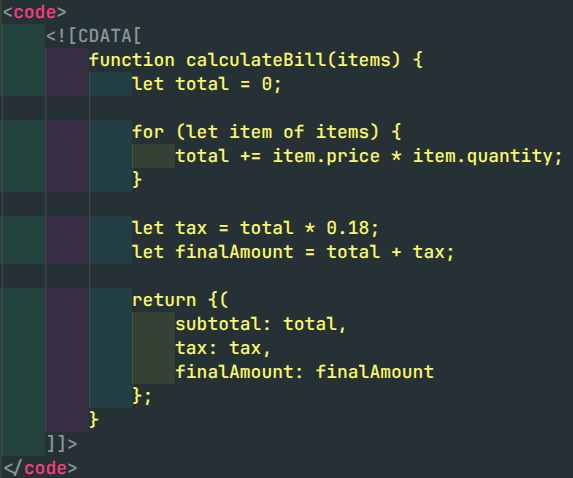
Before

Without this extension, JavaScript inside CDATA appears mostly as plain XML text.

Before screenshot

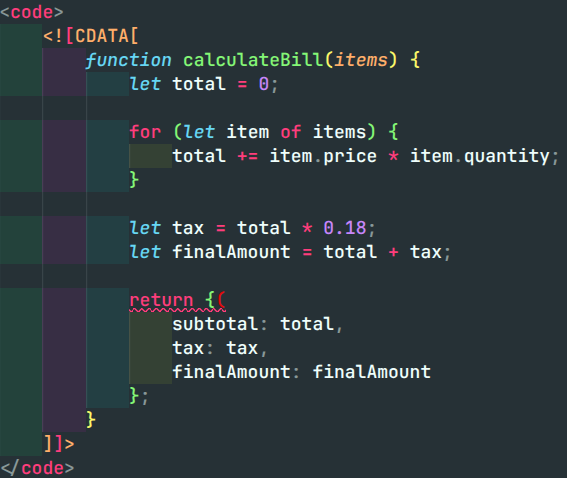
After

With this extension, JavaScript inside CDATA gets proper syntax coloring and syntax error highlighting.

After screenshot

Supported Format

<code>
  <![CDATA[
    // JavaScript code here
  ]]>
</code>

Use Case

This extension is useful for projects where JavaScript logic is stored inside XML configuration files, template files, or custom manifest files using CDATA blocks.

Notes

  • JavaScript highlighting is applied only inside CDATA.
  • CDATA must be wrapped inside a <code> tag.
  • The extension improves readability and helps identify syntax issues inside embedded JavaScript.
  • Contact us
  • Jobs
  • Privacy
  • Manage cookies
  • Terms of use
  • Trademarks
© 2026 Microsoft