CSS Reference Counter and Peek
A VS Code extension that shows how many times each CSS selector is used across your project. It displays an inline reference count above every CSS rule and supports Ctrl+Click navigation from HTML/JSX to CSS declarations.
Features
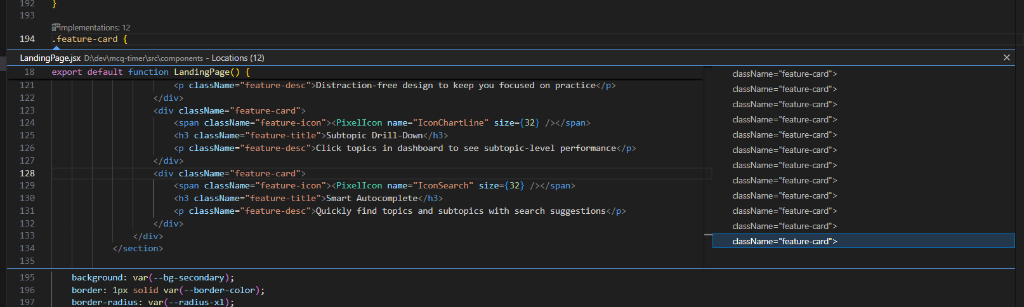
Inline Usage Count (CodeLens)
Displays implementations: N above each CSS rule in .css and .scss files. Selectors with zero usages are easy to spot, helping you identify and remove dead CSS. Hover over the count to see a per-selector breakdown — when a line has multiple selectors (e.g. .sidebar-nav-item.active .icon), the tooltip shows each one's count individually.

Go to Definition
Ctrl+Click on a class name inside class="..." or className="..." in HTML, JSX, TSX, or Vue files to jump directly to its CSS declaration.

Multiple Usage Count
Tracks usage across the entire project. A selector used in many places shows the total count.

Find All References
Right-click a CSS selector and choose "Find All References" to see every file where that class or ID is used.
A dedicated CSS Reference Counter panel in the Activity Bar with:
- Scan status — live spinner while scanning, checkmark when done
- Stats — number of CSS/SCSS files and selectors indexed
- Dead CSS — collapsible section listing all unused selectors grouped by file. Click any selector to jump to its definition.
- Excluded Folders — view, add, and remove exclude patterns directly from the sidebar
- Rescan Workspace — one-click rescan button
Dead CSS Detection
Find unused CSS selectors across your entire project. Dead selectors appear in:
- Sidebar — a collapsible "Dead CSS" section with unused selectors grouped by file, each clickable
- Editor — yellow warning underlines on unused selectors (auto-applied after each scan)
- Problems panel — listed as warnings with the
Unnecessary tag, so VS Code fades the text
You can also run CSS Reference Counter: Find Dead CSS from the Command Palette to generate a full Markdown report.
Smart Scanning
- Cached to disk — scan results persist between VS Code sessions. No full rescan on every startup.
- Delta scanning — only files modified since the last scan are re-scanned.
- Multi-root workspaces — all workspace folders are scanned.
- Live updates — edits and saves update counts in real-time.
- File creation, deletion, and renames are handled automatically.
SCSS Nesting Support
The parser resolves SCSS & parent selectors. For example, .foo { &.bar { ... } } correctly registers both .foo and .bar as selectors with accurate counts.
CSS Modules
Files named .module.css or .module.scss are automatically skipped from CodeLens counts (since CSS Modules use hashed class names at runtime). You can toggle this via the cssReferenceCounter.ignoreCssModules setting.
Supported Files
CSS declarations are read from .css and .scss files.
Usage detection in .html, .htm, .jsx, .tsx, .js, .ts, .vue, and .svelte files.
Detected Patterns
class="foo bar"className="foo" / className={'foo'}classList.add('foo') / .toggle() / .remove()clsx('foo', 'bar'), classnames(...), cn(...), cx(...), twMerge(...):class="{ foo: true }" (Vue)[class.foo]="cond" / [ngClass]="{...}" (Angular)class:foo={cond} (Svelte)document.querySelector('.foo')document.getElementById('bar')
Commands
| Command |
Description |
| CSS Reference Counter: Rescan Workspace |
Trigger a full workspace rescan |
| CSS Reference Counter: Find Dead CSS |
Find all unused selectors and generate a report |
| CSS Reference Counter: Clear Dead CSS Warnings |
Remove inline dead CSS warnings |
| CSS Reference Counter: Add Exclude Pattern |
Add a folder/pattern to exclude |
| CSS Reference Counter: Remove Exclude Pattern |
Remove an exclude pattern |
Settings
cssReferenceCounter.includedFileTypes
File extensions to scan for CSS class/id usage.
Default: ["html", "htm", "jsx", "tsx", "vue", "svelte", "js", "ts"]
cssReferenceCounter.excludePatterns
Glob patterns for files and folders to exclude from scanning.
Default excludes: node_modules, dist, build, .git, target, out, vendor, bower_components, .next, .nuxt, coverage, __pycache__, .venv, .svelte-kit, .angular, .cache, tmp, public/assets, and all *.min.js / *.min.css files.
Customizing Excluded Folders
You can manage excluded folders in two ways:
From the sidebar:
- Open the CSS Reference Counter panel in the Activity Bar
- Expand Excluded Folders
- Click ➕ to add a new pattern, or click a pattern to remove it
From settings:
- Open Settings (
Ctrl+,)
- Search for
cssReferenceCounter.excludePatterns
- Add your patterns
Or add directly in .vscode/settings.json:
{
  "cssReferenceCounter.excludePatterns": [
    "**/node_modules/**",
    "**/dist/**",
    "**/build/**",
    "**/.git/**",
    "**/target/**",
    "**/api/**",
    "**/my-backend/**"
  ]
}
Note: When you override this setting, it replaces the full default list. Make sure to include the base patterns you still want.
Bug Reports & Feedback
Found a bug or have a feature request? We'd love to hear from you!
When reporting a bug, please include:
- VS Code version (
Help > About)
- Extension version
- Steps to reproduce the issue
- Relevant output from the Output panel → Extension Host
Known Limitations
This extension uses static analysis (regex-based). The following are not supported:
- Tailwind CSS / utility-first frameworks — utility classes like
bg-red-500 are generated, not defined in your CSS files. Use the Tailwind IntelliSense extension instead.
- CSS-in-JS (styled-components, Emotion, vanilla-extract) — classes are generated at build time or via template literals.
- Dynamic class concatenation —
className={\prefix-${var}`}orclassList.add(getClass())` — can't be resolved statically.
- SCSS
@extend / @mixin — the generated selectors don't appear literally in source, so they won't be counted.
- CSS custom properties —
var(--foo) is not tracked as a selector usage.
License
MIT


