DeepSeek Harness for VS Code (dsh-vscode)
Before using this extension: start the DeepSeek Harness server from your terminal first — the extension connects to it inside VS Code.
npx @deepseek-ai/dsh web
中文版 | Publisher: Jager · Latest: 0.13.26
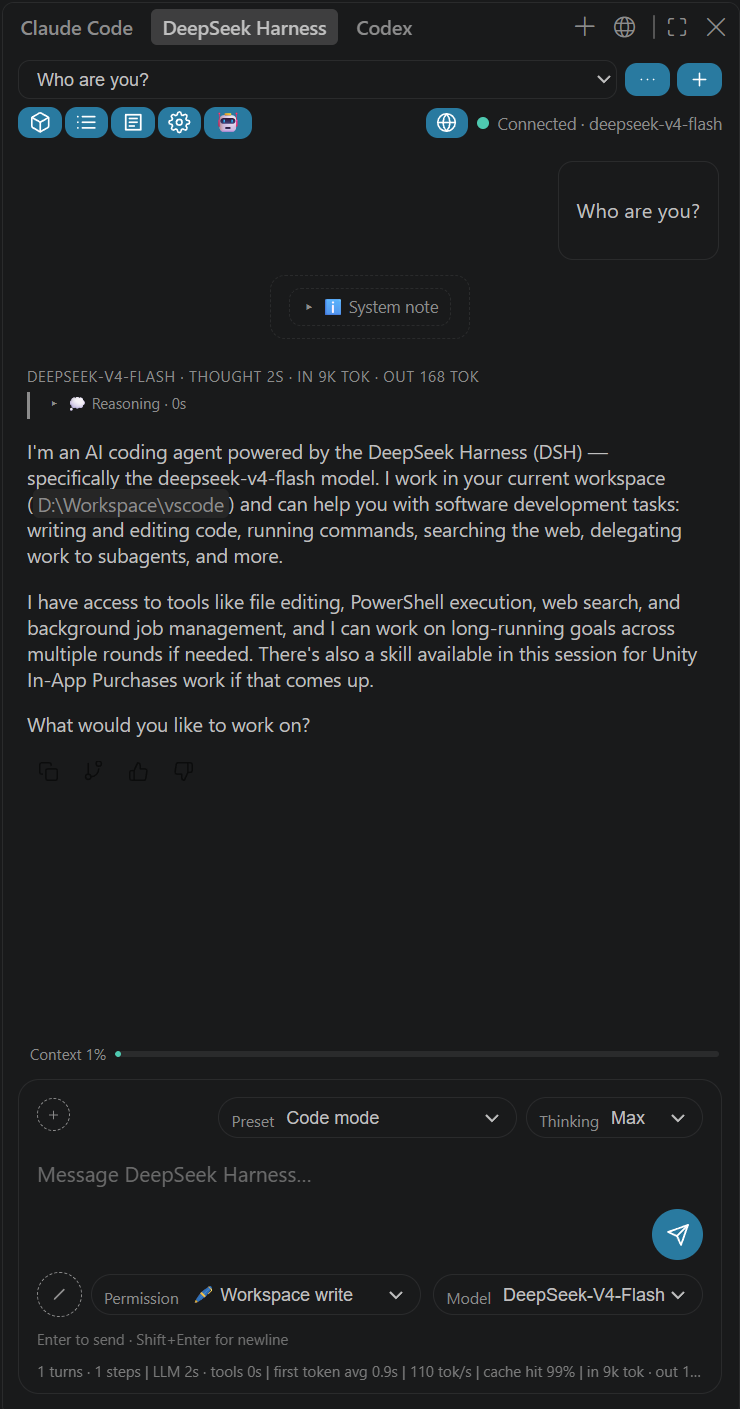
Use DeepSeek Harness (dsh) directly in VS Code, alongside ChatGPT / Copilot: the built-in @dsh chat participant, secondary sidebar / standalone chat windows, workspaces / jobs / trajectory / settings panels, turn-level Git rollback, and a multi-language UI (简体中文 / 繁體中文 / English / 日本語 / 한국어 / Deutsch / Français / Español / Português / ไทย / Bahasa Indonesia / Türkçe / Русский / العربية — follows the VS Code display language or switch manually).
Features
- Built-in chat participant
@dsh: type @ in the native Chat panel (Ctrl+Alt+I); streamed replies with tool calls and approval buttons; slash commands /new, /session <ID>, /preset <name>.
- Secondary sidebar tab: container appears in the Secondary Side Bar on VS Code ≥ 1.106 (falls back to the Activity Bar on older versions).
- Standalone chat window:
DSH: Open Standalone Chat Window.
- Modern chat UI: large rounded input box, pill toolbar (thinking depth / model / preset / permission), and a context meter ring at the top-right of the input box, right of the preset pill (web parity: click for "context used", the ~used / window reading, and the system-prompt / tool-definition / conversation breakdown with colour-coded bar segments and per-category token counts). Below the input box sit two session statistic pills (web parity):
4 turns 285 steps · 267 tok/s (click for session statistics — LLM time, tool time, average TTFT, output TPS) and 71M tok · 99.6% cache hit (click for token usage — exact total, cache hit, uncached input, cache read/write, output).
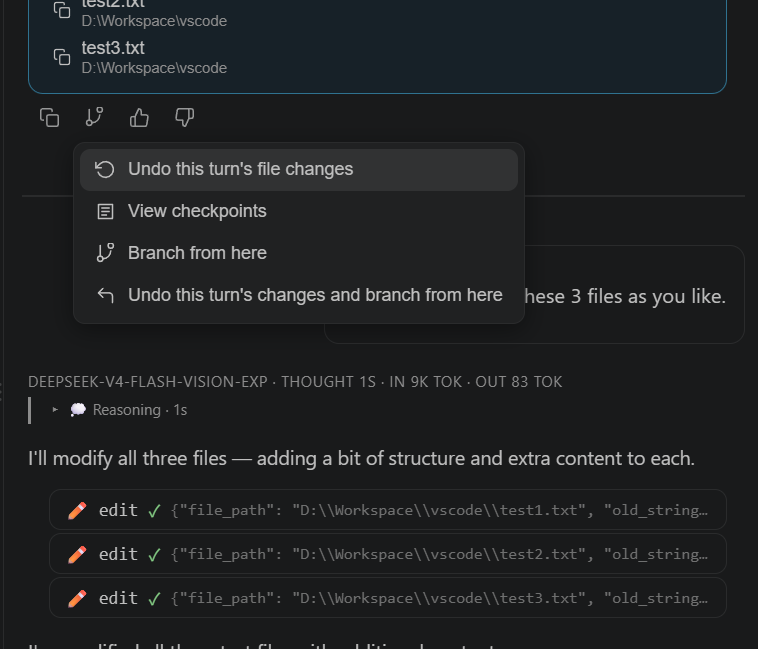
- Per-message actions (minimal line icons): copy (double-rectangle icon) / branch (forked line icon; menu: counter-clockwise arrow "Rewind here" · forked icon "Branch from here" · up-left fold "Branch and rewind earlier" · up-left arrow "Back to main") / thumbs up/down (line icons; native
messageFeedback with click-again-to-revoke, /feedback command fallback for older sessions) / message header shows model · thinking time · per-step tokens.
- Turn footer stats (web parity): a
Usage 25.8K tok pill (click for provider/model, cache hit rate, uncached input, cache read/write, output with reasoning share), a Ran for 5m 57s pill (click for total turn time, output TPS, time to first token), and the local clock of the closing message at the row's right end (HH:mm, M/D HH:mm for earlier days, Y-M-D HH:mm for other years). While the session is running, an earlier turn's action row and stats stay hidden and fade in on hover (only the settled latest turn shows them) — the web's data-actions-reveal behaviour.
- Step timeline (web ToolRow / ThinkRow parity): thinking and tool calls render as one-line process rows on a left rail —
思考 • <first line> (expanded while it streams, collapsed once thinking ends, manual toggles preserved) and Read/Write/Pwsh/Grep • <human summary> with a status dot, a running sweep animation, and the full arguments/result (plus image results) behind a click; rows appear live as each event arrives, each run of rows ends with a web-style summary line (1 command · read 1 file · searched 2 times) that folds or unfolds that run when clicked, and the activity line above the composer names the running action (tool title + summary) rather than a generic label. Long JSON no longer floods the row.
- Deliverable file cards (web
present parity): files the model delivers appear as cards at the turn tail — file name + description, an Open button (opens the file, or the HEAD→worktree diff for tracked files) and a ⋯ menu with "Open with default app" and "Reveal in File Explorer".
- Turn-level Git rollback (↩ button on each assistant turn + branch-menu entries): the DSH server-side plugin
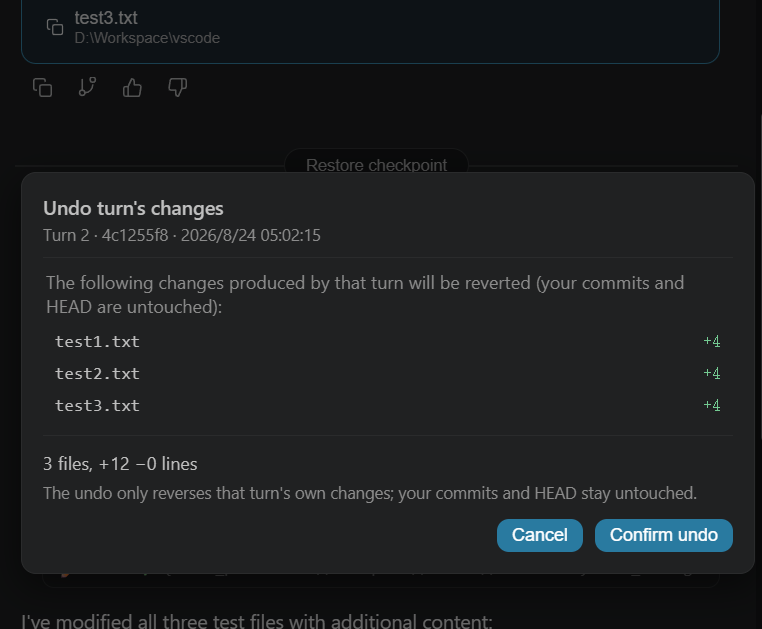
dsh-git-rollback snapshots the workspace's git state (tracked + untracked files) at every turn start into hidden refs (refs/dsh/checkpoints/<sid>, zero pollution of your branch history) and records them under .dsh/rollback; the button restores the workspace to the state before that turn. Commands /rollback [N], /redo, /checkpoints work in both the web command panel and the VS Code chat (rollback is non-destructive: the pre-rollback state is saved first, /redo restores it, ignored files are never touched). Each message's ⋯/branch menu also offers "Undo this turn's file changes" (preview-and-confirm review dialog, reverses only the files that turn changed — your own commits and HEAD stay untouched), "View checkpoints", and "Undo this turn's changes and branch from here". The web chat gets the same Copilot-style turn dividers and a floating restore dialog out of the box (plugin web half, served via the DSH client-modules pipeline).
- Collapsible reasoning (hidden by default) and per-turn tool summary ("Called N tools this turn").
- Deliverables box: files produced each turn listed at the end of the conversation, click to open.
- Session management: ⋯ menu with fork / rename (pre-filled title) / archive.
- Goals: progress card + 🎯 chip with edit / complete / clear.
- To-do panel (web TodoPanel parity, docked above the composer): checklist icon + "To-dos" + a per-status summary that only lists non-zero counts ("2 completed · 1 in progress · 1 pending"), collapsible list with the web's three status glyphs (green check ring / spinning gradient ring / dashed ring).
- Plan mode: 📝 chip appears after
/plan, click to exit.
- Attachments: auto-attach the active editor file (follows editor switches) + add file/folder (separate pickers); context is injected into the model but displayed collapsed.
- Subagents: status chips with recent-reply preview.
- Skills: available skills listed in the
/ menu (official skill.list).
- .claude / .codex / GitHub Copilot directories: CLAUDE.md / AGENTS.md auto-loaded by the DSH core;
.claude/commands, .claude/skills, .codex/skills (SKILL.md), .github/copilot-instructions.md, .github/instructions, .github/agents and .github/prompts are listed in the / menu and insertable.
- Permissions: read-only / workspace-write / full-access switch (official
/permission command).
- Cross-project sessions: per-folder @dsh sessions; multi-root follows the active editor;
dsh.participantSessionMode: global to share one session.
- Workspace browser (📁 button, web Workspaces parity): sessions grouped by workspace; add / rename / delete / reorder workspaces; per-group session ordering and archive; session content search (instant title matches + server content search with local fallback when the index is disabled); rows show waiting-for-approval / plan-review / question / running states.
- Background jobs panel (⚙️ button): bash / pwsh / subagent jobs for the current session with status, timings, and detail, live from session/jobs frames.
- Automation tasks panel (⏰ button, host-side
schedule/*, DSH 0.1.7+): every retained reminder with its rule text, next scheduled time and countdown, enabled / ended status, search and status filter; open a task for its instruction, frequency, time zone, linked session (jump straight to it), last delivery and its delivery records (newest-first with paging) and delete it after an inline confirmation. The catalog refreshes itself from the host's schedule/changed event; when the host has the schedule plugin disabled (the 0.1.7 default) the panel says so instead of erroring.
- Automation tasks panel (⏰ button, host-side
schedule/*, DSH 0.1.7+): every retained reminder with its rule text, next scheduled time and countdown, enabled / ended status, search and status filter; open a task for its instruction, frequency, time zone, linked session (jump straight to it), last delivery and its delivery records (newest-first with paging) and delete it after an inline confirmation. The catalog refreshes itself from the host's schedule/changed event; when the host has the schedule plugin disabled (the 0.1.7 default) the panel says so instead of erroring.
- Trajectory view (🧭 button, web Trajectory parity): turn-aware event ledger (seq · time · type · summary · token usage), click to expand the full event JSON, type filter. The header toolbar is all line icons (workspace / background jobs / automation tasks / trajectory / settings / subagent catalog) drawn at 15px; the Cordis plugin button keeps its 🧩 emoji, and the Activity Bar / Secondary Side Bar container and the chat view use a line-robot mark (media/robot.svg, masked to the theme icon colour by VS Code) in the theme's icon colour.
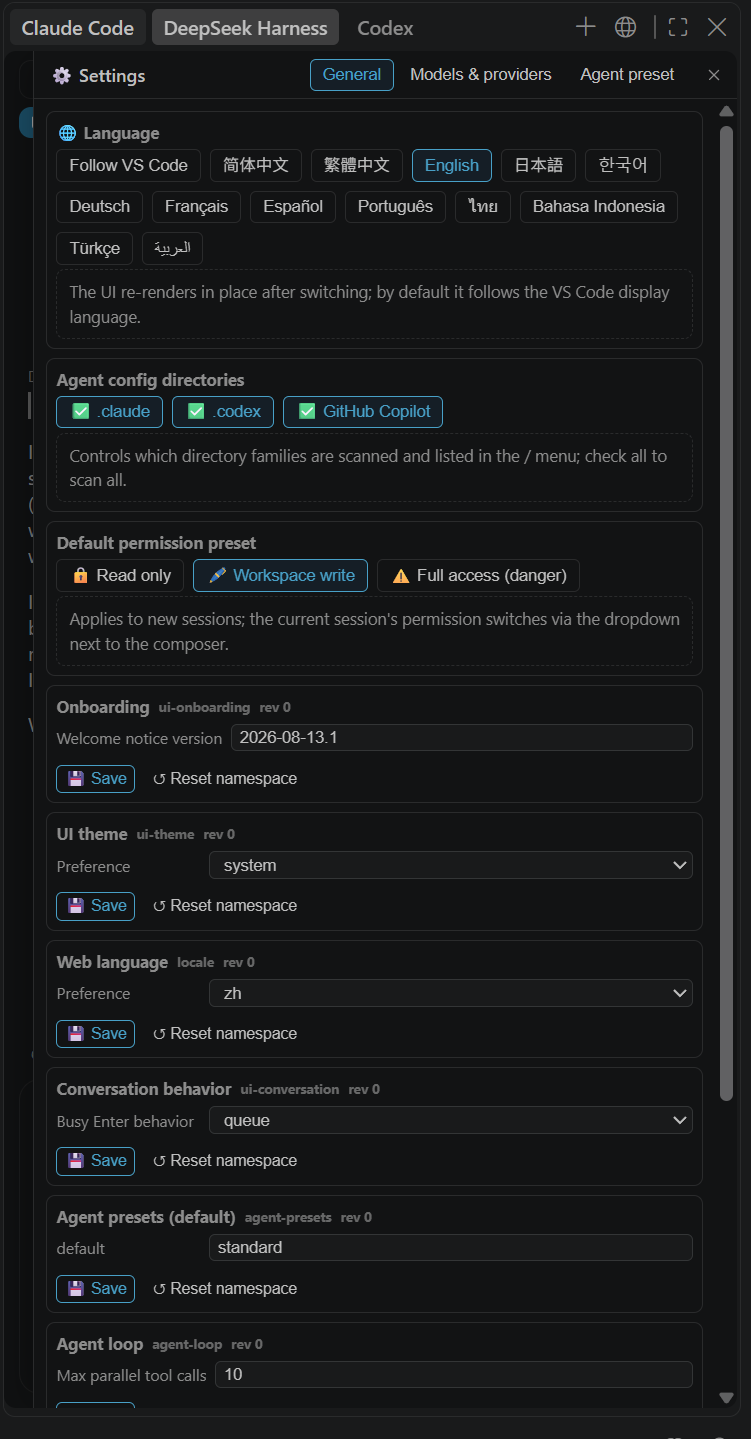
- Settings panel (⚙️ button, web Settings parity): general settings (schema-driven forms for every namespace, restart badges, per-namespace reset), models & providers (provider route directory + model catalog + endpoint model discovery), credential management (API key set/clear), agent preset authoring on hosts that still expose it — DSH 0.1.7 removed the preset authoring endpoints, so the copy / open-directory / delete buttons only appear when
settings/canOpenAgentPresetDirectory reports support and presets are otherwise read-only composition text.
- Subagent conversations: click a subagent chip to open its transcript; continuable children accept prompts (subagent.prompt) and interrupts (subagent.interrupt).
- Image attachments: 🖼️ add images (official image content-block channel), in both sending and history playback.
- Queued-message actions: queued messages can be edited / removed / steered (official session.updateQueue).
- Goal creation: the 🎯 chip creates a goal when none exists (goal.create with objective and round cap).
- One-click commit messages: the ✨ button in the Source Control title bar (
DSH: Generate Commit Message) reads the staged/unstaged git diff and generates a Conventional Commits-style message in a disposable session (archived immediately, never shown in the session list) with a lightweight model (default: the flash keyword matched against the DSH model catalog + low effort; configurable via dsh.commitModel / dsh.commitReasoningEffort), writing the result into the SCM input box and auto-cancelling on timeout or when the model requests extra interaction. The model switch is temporary — your default model and thinking depth are captured first and restored when generation ends, and the throwaway session is archived only after the answer arrives (DSH 0.1.7 blocks turns on archived sessions).
- i18n: Simplified Chinese / Traditional Chinese / English / Japanese / Korean / German / French / Spanish / Portuguese / Thai / Indonesian / Turkish / Russian / Arabic — follows the VS Code display language, or switch in place via
dsh.language / the 🌐 section of the settings panel.
Install
cd <this folder>
npm install
npm run package          # outputs Releases/dsh-vscode-<version>.vsix
VS Code → Extensions → … → Install from VSIX → pick the file in Releases\ → reload.
Prerequisites: VS Code ≥ 1.90 (built-in chat ≥ 1.95; secondary sidebar container ≥ 1.106); DSH CLI or npx fallback; model credentials configured (same as dsh web).
Usage highlights
- Enter to send, Shift+Enter for newline; while running the send button (paper-plane line icon) becomes stop (square line icon), typing turns it back into send (queued send).
/ button (bottom-left): command menu (plan / compact / goal / feedback / permission / skills / .claude). Most entries insert the command into the input (press Enter to run); Compact context runs /compact straight away and the conversation shows a live compaction row — a sweep while compacting, then "Compacted N history items (~T tokens)" with the summary expandable, and the compacted range collapses into that row (the same row appears for automatic compaction).+ button next to it: add file / add folder; the blue chip is the auto-attached active file.- Message actions: click the forked-line icon to open the branch/rewind menu — counter-clockwise arrow "Rewind here", forked icon "Branch from here", up-left fold "Branch and rewind earlier", plus "Undo this turn's file changes" / "View checkpoints" when the git-rollback plugin is active; branch sessions also show the up-left arrow "Back to main". The counter-clockwise arrow on each assistant turn (when the DSH server-side plugin is active) restores the workspace to the state before that turn.
- Session ⋯ menu: fork / rename / archive; preset pill at the top-right (new sessions only); thinking / model pills at the bottom-right.
- Source Control title bar: the ✨ button generates a Conventional Commits message from the current diff and fills the SCM input box (a picker appears when several repositories are open).
- Context menus: selection →
DSH: Send Selection to @dsh; file → DSH: Ask @dsh About This File.
Configuration
| Key |
Default |
Description |
dsh.url |
http://127.0.0.1:3080 |
DSH web server URL |
dsh.autoStart |
true |
On VS Code startup, start dsh web if the server is not running |
dsh.command |
dsh |
Start command; falls back to npx |
dsh.autoStartTimeoutSec |
60 |
Auto-start timeout (seconds) |
dsh.participantSessionMode |
per-workspace |
@dsh session scope: per-project / global |
dsh.openPanelOnStartup |
false |
Open the standalone window on startup |
dsh.defaultReasoningEffort |
"" |
Default thinking depth for new sessions (off/high/max, model-dependent) |
dsh.commitModel |
deepseek-v4-flash |
Model used to generate commit messages (resolved from the DSH model catalog; falls back to the session's current model) |
dsh.commitReasoningEffort |
low |
Reasoning effort for commit messages (low = no thinking on DeepSeek models, fastest) |
dsh.language |
auto |
UI language: auto / zh-cn / zh-tw / en / ja / ko / de / fr / es / pt / th / id / tr / ru / ar |
dsh.installRollbackPlugin |
true |
Auto-install the turn-level Git rollback server plugin into the DSH web profile (enables /rollback, /redo, /checkpoints) |
Turn-level Git rollback setup
- Automatic (default): the extension ships the
dsh-git-rollback server plugin (host + web client halves) and installs it into your DSH web profile (~/.dsh/profiles/web) on activation (idempotent, version-tracked). If your DSH server was already running, the extension offers a one-click restart when it detects the plugin is not loaded yet. The web client half is picked up automatically by the DSH client-modules pipeline on the next server start — no manual setup.
- Manual (web GUI users / other profiles): from the terminal,
dsh plugin --profile web add dsh-git-rollback (published on npm), then restart dsh web.
- Requirements: a Git repository as the session workspace; snapshots are taken at every turn start (turn/start) and survive server restarts via
.dsh/rollback records + hidden refs (refs/dsh/checkpoints/<sessionId>). Disable the auto-install with dsh.installRollbackPlugin: false.
Troubleshooting
- Nothing appears → reload the window; run
DSH: Show Diagnostics; check the extension runtime state for validation errors.
- "No registered data provider" → run
DSH: Repair Chat View (Reset View Locations) or Restart Extension Host.
- Service worker error in the webview → VS Code 1.100.x platform bug: update VS Code or clear
%APPDATA%\Code\Service Worker\CacheStorage.
- "agent preset is fixed" → started sessions cannot switch presets; the preset pill only shows for new sessions.
- Not connected → run
DSH: Start Server; check dsh.url.
- Server version: this build targets DSH 0.1.5-rc.1 and negotiates the changed attachment parameter names, so a 0.1.2-rc.1 server keeps working (commands, subagent prompts, streaming); upgrading the server to 0.1.5 additionally brings live streaming frames, V3 session logs, and the context breakdown projection.
- Server does not auto-start → the extension retries every 15 s and connects as soon as the server is up; see the
[server] log in the "DeepSeek Harness" output channel. If the error mentions 0xC0000142/EPERM, VS Code was launched from a DSH session or a restricted terminal (child process creation blocked) — launch VS Code normally, or set that session's permission to danger-full-access.
Development
npm install
npm run typecheck
npm run build
npm run package     # → Releases/
- Host:
src/extension.ts, src/dsh/* (API client, server manager, session store, chat participant, project-session mapping, commit message generation).
- UI:
src/webview/{channel,panel,window,ui}.ts + media/chat.css; icon media/icon.png.
- i18n:
package.nls.json + package.nls.zh-cn/zh-tw/ja/ko/de/fr/es/pt/th/id/tr/ar.json, l10n/bundle.l10n.json + bundle.l10n.zh-cn/zh-tw/ja/ko/de/fr/es/pt/th/id/tr/ar.json, the EN_TEXT dictionary in ui.ts + src/webview/texts/*.json.
- Server plugins: source lives under
plugins/<name>/ (all new DSH server plugins go there); npm run build compiles them and syncs the bundle into resources/<name>/ via tools/sync-plugins.mjs for packaging into the vsix. Unit tests: cd plugins/<name> && npm test.
DeepSeek Harness for VS Code (dsh-vscode)
使用前请先启动 DSH Web 服务:先在命令行中执行以下命令,安装并启动 dsh web,之后才能在 VS Code 中使用本插件。
npx @deepseek-ai/dsh web
English version | 发布者:Jager · 最新版本:0.13.26
在 VS Code 中直接使用 DeepSeek Harness(dsh),与 ChatGPT / Copilot 一样融入 VS Code 聊天体系:内置聊天参与者 @dsh、辅助侧栏 / 独立聊天窗口、工作区 / 后台任务 / 轨迹 / 设置面板、回合级 Git 回退,以及多语言界面(简体中文 / 繁體中文 / English / 日本語 / 한국어 / Deutsch / Français / Español / Português / ไทย / Bahasa Indonesia / Türkçe / Русский / العربية,跟随 VS Code 显示语言或手动切换)。
功能总览
- 内置聊天参与者
@dsh:VS Code 原生 Chat 面板(Ctrl+Alt+I)输入 @ 选择 dsh;助手回复流式渲染,含工具调用与审批按钮;支持 /new、/session <ID>、/preset <名> 斜杠命令。
- 辅助侧栏子 tab:VS Code ≥ 1.106 时容器直接出现在辅助侧栏(与 ChatGPT 等并列);旧版本自动回退到活动栏图标。
- 独立聊天窗口:编辑器区 WebviewPanel,命令
DSH: 打开独立聊天窗口。
- 现代聊天界面:大号圆角输入框、胶囊工具栏(思考深度 / 模型 / 预设 / 权限),以及输入框右上角、预设胶囊右侧的上下文进度环(与网页端一致:点击展开「上下文已用」读数 ~已用 / 上限,以及 系统提示词 / 工具定义 / 对话消息 三段彩色构成与各自 token 数)。输入框下方是两枚会话统计胶囊(与网页端一致):
4 轮 285 步 · 267 tok/s(点击展开 会话统计:模型用时 · 工具调用用时 · 首 token 平均 TTFT · 输出速度 TPS)与 71M tok · 缓存命中 99.6%(点击展开 Token 用量:精确总量 · 缓存命中 · 未缓存输入 · 缓存读取/写入 · 输出)。
- 消息操作条(每条回答下方,简约线条图标):复制(双层矩形图标)/ 分支(分叉线条图标,点击展开菜单:逆时针箭头"回退到此处" · 分叉图标"从此处新建分支" · 左上折线"分支并回退到更早位置" · 左上箭头"回到主线")/ 点赞、点踩(拇指线条图标;0.1.7 起走原生
messageFeedback,再点一次即撤销,旧会话回退到 /feedback 命令)/ 消息头显示模型名 · 思考耗时 · 本步 token 消耗。
- 回合尾统计(与网页端一致):
用量 25.8K tok 胶囊(点击展开 提供方/模型 · 缓存命中率 · 未缓存输入 · 缓存读取/写入 · 输出(含推理占比))、用时 5分57秒 胶囊(点击展开 本轮总用时 · 输出速度 TPS · 首 token 用时 TTFT),最右侧显示收尾消息的本地时间(当天 HH:mm,更早 M月D日 HH:mm,跨年 Y年M月D日 HH:mm)。会话运行中,历史回合的操作条与统计默认隐藏、悬停该条消息才淡入(网页端 data-actions-reveal 同款),只有已结束的最新回合常显。
- 过程时间线(与网页端 ToolRow / ThinkRow 一致):思考与工具调用渲染为左侧导轨上的一行——
思考 • <首行摘要>(流式期间展开,思考结束自动收起,手动开合会被保留)与 读取 / 写入 / Pwsh / Grep • <人类可读摘要>(状态点 + 运行中扫光),点击展开完整参数/结果(含图片结果);不再把整段 JSON 铺在行上。过程行随事件实时出现,每段末尾附一行网页端同款汇总(「执行了 1 条命令 · 读取了 1 个文件 · 搜索了 2 次」),点击即可折叠/展开该段;输入框上方的活动行同时说明当前动作(工具标题 + 摘要),不再是笼统的「执行工具…」。
- 交付文件卡(与网页端
present 一致):模型交付的文件在回合尾渲染为卡片——文件名 + 描述、打开 按钮(已跟踪文件直接打开 HEAD→工作区 diff)与 ⋯ 菜单(用默认应用打开 / 在资源管理器中显示)。
- 回合级 Git 回退(每条助手回答上的 ↩ 按钮 + 「分支/回退」菜单项):DSH 服务端插件
dsh-git-rollback 在每个回合开始时把工作区 git 状态(含未跟踪文件)快照到隐藏引用(refs/dsh/checkpoints/<sid>,用户分支历史零污染)并记录在 .dsh/rollback;点击按钮即可把工作区恢复到该回合之前的状态。/rollback [N]、/redo、/checkpoints 命令在 web 命令面板与 VS Code 聊天面板通用——回退非破坏性(先存保存点,/redo 可恢复,ignored 文件永不触碰)。每条消息的 ⋯/分支菜单另提供 「撤销本回合改动」(先预览后确认的审核弹窗,只反向应用该回合自身产生的文件改动——你自己的提交与 HEAD 完全不受影响)、「查看检查点」 与「撤销本回合变更并从此处新建分支」。网页端聊天开箱即用地获得同款 Copilot 风格回合分隔线与悬浮还原弹窗(插件 web 半区,经 DSH client-modules 管线分发)。
- 思考过程折叠:💭 思考过程默认收起,点击展开;工具调用每轮折叠为一行摘要"本轮调用 N 个工具"。
- 产物文件框:每轮结束在对话末尾显示生成的文件列表,点击在编辑器中打开。
- 会话管理:会话下拉旁的 ⋯ 菜单支持 分叉 / 重命名(预填当前标题)/ 归档(仍保留在服务器)。
- 目标(goal):goal 进度卡(目标 · 阶段 · 轮次 · 进度条)+ 🎯 目标模式芯片,点击可 修改 / 完成 / 清除目标。
- 任务清单(与网页端 TodoPanel 同款,停靠在输入框上方):清单图标 + 「任务」+ 只列非零状态的进度摘要(如「2 已完成 · 1 进行中 · 1 待处理」),点击折叠/展开清单;三种状态图标与网页端一致(绿勾圆环 / 旋转渐变圆环 / 虚线圆环)。
- 计划模式:/ 命令菜单选"计划模式"后出现 📝 芯片,点击退出;
plan/mode 状态实时同步。
- 附件:自动附加当前激活文件(跟随编辑器切换,蓝色芯片)+ 手动添加文件/文件夹(二选一菜单);发送时上下文注入模型,界面默认折叠为"📎 附件上下文"卡片,不展开文件内容。
- 子代理:对话底部显示子代理芯片(运行状态),点击查看最近回复。
- 技能:/ 菜单列出会话可用技能(官方 skill.list),点击插入提示词。
- .claude / .codex / GitHub Copilot 目录:CLAUDE.md / AGENTS.md 由 DSH 核心自动读取(菜单显示 ✅);.claude/commands 与 .claude/skills、.codex/skills(SKILL.md)、.github/copilot-instructions.md、.github/instructions、.github/agents、.github/prompts 均可在 / 菜单中查看并插入使用。
- 读写权限:权限胶囊切换只读 / 工作区可写 / 完全访问(危险),官方
/permission 命令。
- 跨项目会话:每项目(工作区文件夹)独立 @dsh 会话;多根工作区跟随活动编辑器;
/session <ID> 显式切换;dsh.participantSessionMode: global 可全局共用。
- 工作区浏览器(📁 按钮,网页端 Workspace 对齐):按工作区分组显示会话;添加 / 重命名 / 删除 / 上移下移工作区,组内会话排序与归档;会话内容搜索(标题即时匹配 + 服务器内容搜索,后端索引禁用时自动回退本地匹配);会话行显示 等待审批 / 计划待审 / 等待回答 / 运行中 状态。
- 后台任务面板(⚙️ 按钮):当前会话的 bash / pwsh / 子代理等后台任务清单(状态 · 起止时间 · 耗时 · 明细),随 session/jobs 帧实时刷新。
- 自动化任务面板(⏰ 按钮,宿主侧
schedule/*,需 DSH 0.1.7+):列出全部保留的提醒任务(规则文案 · 下次计划时间与倒计时 · 已开启/已结束),支持搜索与状态筛选;点开任务可看内容、提醒频率、时区、关联会话(一键跳转)、最近一次投递与其运行记录(新→旧分页),并可就地确认删除。目录随宿主 schedule/changed 事件自动刷新;宿主未启用定时任务插件(0.1.7 默认)时面板给出说明而不是报错。
- 自动化任务面板(⏰ 按钮,宿主侧
schedule/*,需 DSH 0.1.7+):列出全部保留的提醒任务(规则文案 · 下次计划时间与倒计时 · 已开启/已结束),支持搜索与状态筛选;点开任务可看内容、提醒频率、时区、关联会话(一键跳转)、最近一次投递与其运行记录(新→旧分页),并可就地确认删除。目录随宿主 schedule/changed 事件自动刷新;宿主未启用定时任务插件(0.1.7 默认)时面板给出说明而不是报错。
- 轨迹视图(🧭 按钮,网页端 Trajectory 对齐):按回合组织的事件台账(序号 / 时间 / 类型 / 摘要 / token 用量),点击展开完整事件 JSON,支持类型筛选。头部工具栏统一为线条图标(工作区 / 后台任务 / 自动化任务 / 轨迹 / 设置 / 子代理目录),15px、跟随主题图标色;Cordis 插件按钮保留 🧩 emoji,活动栏 / 辅助侧栏容器与聊天视图改用线条机器人图标(media/robot.svg,由 VS Code 按主题图标色蒙版着色)。
- 设置面板(⚙️ 按钮,网页端 Settings 对齐):常规设置(schema 驱动表单,全部命名空间,含"需重启"标注与命名空间重置)、模型与供应商(供应商路由目录 + 模型目录 + 发现模型端点探测)、凭据管理(API Key 写入 / 清除)、Agent 预设管理(在仍提供作者端点的宿主上可 查看组合文本 / 复制新预设 / 打开预设目录编辑 cordis.yml / 删除用户预设——DSH 0.1.7 移除了预设作者端点,此时按钮隐藏,预设只能查看组合文本)。
- 子代理对话:点击子代理芯片打开完整记录;continuable 子代理可直接追问(subagent.prompt)与打断(subagent.interrupt)。
- 图片附件:🖼️ 添加图片(官方 image 内容块通道),发送与历史回放均支持。
- 排队消息操作:排队消息条可 编辑 / 移除 / 插队(session.updateQueue 官方端点)。
- 目标创建:无目标时 🎯 芯片一键创建(goal.create,目标描述 + 最大轮数)。
- 一键生成提交信息:源代码管理(SCM)视图标题栏 ✨ 按钮(
DSH: 生成提交信息),读取 git 暂存/未暂存 diff,在一次性会话(生成期间隐藏、结束后归档,不占用会话列表)中用轻量模型按 Conventional Commits 风格生成提交信息并写入 SCM 输入框;模型与思考深度可配置(dsh.commitModel 为关键字,默认 flash,按目录匹配 / dsh.commitReasoningEffort),超时或模型请求额外交互时自动取消。模型切换是临时的——先记录你的默认模型与思考深度,生成结束即恢复;一次性会话在拿到结果之后才归档(DSH 0.1.7 对已归档会话会直接 block 回合)。
- 多语言:扩展与聊天界面支持简体中文 / 繁體中文 / English / 日本語 / 한국어 / Deutsch / Français / Español / Português / ไทย / Bahasa Indonesia / Türkçe / Русский / العربية——跟随 VS Code 显示语言,或通过设置
dsh.language / 设置面板 🌐 就地切换。
安装
方式一:安装 .vsix(推荐)
cd <本目录>
npm install
npm run package          # 生成 Releases/dsh-vscode-<版本>.vsix
VS Code 中:扩展 → … → 从 VSIX 安装 → 选择 Releases\ 下的 .vsix → 重载窗口。
方式二:开发模式(F5)
npm install
npm run watch
用 VS Code 打开本目录,按 F5 启动扩展开发宿主。
前置条件
- VS Code ≥ 1.90;内置聊天
@dsh 需要 ≥ 1.95;辅助侧栏容器需要 ≥ 1.106(旧版自动回退活动栏)。
- DSH CLI(
dsh),或允许扩展用 npx --yes @deepseek-ai/dsh@latest 自动启动服务器。
- DSH 已配置模型凭证(与
dsh web 一致)。
使用
| 入口 |
说明 |
内置 Chat @dsh |
输入 @ 选 dsh;DSH: 打开内置聊天 (@dsh) 或状态栏 DSH 图标可自动填入 |
| 辅助侧栏 tab |
视图 → 外观 → Secondary Side Bar(Ctrl+Alt+B) |
| 独立窗口 |
DSH: 打开独立聊天窗口 |
| SCM 提交按钮 |
源代码管理视图标题栏的 ✨ 按钮(DSH: 生成提交信息),多仓库时弹出选择 |
- 输入框:
Enter 发送,Shift+Enter 换行;运行中发送按钮(纸飞机线条图标)变为停止(方块线条图标),输入文字变回发送(消息排队)。
- 左下角
/ 按钮:命令菜单(计划模式 / 压缩上下文 / 设置目标 / 记录反馈 / 切换权限 / 技能 / .claude 命令与技能)。多数项插入命令到输入框(回车执行);压缩上下文点击即执行 /compact,对话内实时显示压缩行 —— 压缩中扫光,完成后显示「已压缩 N 条历史记录(约 T tokens)」且摘要可展开,被压缩的区间折叠进该行(自动压缩同样单列一行)。
- 左上角
+ 按钮:添加文件 / 添加文件夹(二选一);附件行蓝色芯片为自动附加的激活文件(× 移除)。
- 消息操作条:点击分叉线条图标打开分支/回退菜单 —— 逆时针箭头"回退到此处"(去掉本条及之后)、分叉图标"从此处新建分支"(保留到此)、左上折线"分支并回退到更早位置",以及 git-rollback 插件激活时的"撤销本回合改动 / 查看检查点";分叉会话另有左上箭头"回到主线"。
- 会话 ⋯ 菜单:分叉 / 重命名 / 归档;右上角"预设"胶囊(仅新会话显示);右下角"思考 / 模型"胶囊。
- 模式芯片:📝 计划模式(点击退出)、🎯 目标模式(点击管理目标)。
- 右键菜单:编辑器选中代码 →
DSH: 发送选中代码到 @dsh;文件右键 → DSH: 向 @dsh 询问此文件。
配置
| 配置项 |
默认值 |
说明 |
dsh.url |
http://127.0.0.1:3080 |
DSH Web 服务器地址(修改后需重载) |
dsh.autoStart |
true |
VS Code 启动时若服务器未运行则自动启动 dsh web |
dsh.command |
dsh |
启动命令;找不到时回退 npx |
dsh.autoStartTimeoutSec |
60 |
自动启动最长等待秒数 |
dsh.participantSessionMode |
per-workspace |
@dsh 会话范围:每项目 / 全局 |
dsh.openPanelOnStartup |
false |
启动时自动打开独立聊天窗口 |
dsh.defaultReasoningEffort |
"" |
新会话默认思考深度(off/high/max 等,取决于模型) |
dsh.commitModel |
deepseek-v4-flash |
生成提交信息所用的模型(从 DSH 模型目录解析,找不到时回退当前模型) |
dsh.commitReasoningEffort |
low |
生成提交信息时的思考深度(DeepSeek 模型上 low 表示不开思考,最快) |
dsh.language |
auto |
界面语言:auto / zh-cn / zh-tw / en / ja / ko / de / fr / es / pt / th / id / tr / ru / ar |
dsh.installRollbackPlugin |
true |
自动把回合级 Git 回退服务端插件安装到 DSH web profile(启用 /rollback、/redo、/checkpoints) |
回合级 Git 回退的安装
- 自动(默认):扩展随包携带
dsh-git-rollback 服务端插件(host + 网页端 client 两半),激活时幂等安装到你的 DSH web profile(~/.dsh/profiles/web,带版本标记增量更新)。若 DSH 服务器已在运行,扩展检测到插件未加载时会提示一键重启(仅限本扩展启动的服务器)。网页端 client 半区在下次服务器启动时由 DSH client-modules 管线自动发现,无需手动配置。
- 手动(web 界面用户 / 其他 profile):终端执行
dsh plugin --profile web add dsh-git-rollback(已发布到 npm),然后重启 dsh web。
- 前提:会话工作区是 git 仓库;每个回合开始(turn/start)自动快照,重启服务器后检查点依然可用(记录在
.dsh/rollback + 隐藏引用 refs/dsh/checkpoints/<会话ID>)。可设置 dsh.installRollbackPlugin: false 关闭自动安装。
故障排查
- 扩展没出现:确认已重载窗口;扩展面板查看运行时状态有无校验错误;命令面板执行
DSH: 显示诊断信息。
- 视图占位"没有已注册数据提供程序":执行
DSH: 修复聊天视图(重置视图位置),或命令面板 Restart Extension Host。
- Webview 报 Service Worker 错误:VS Code 1.100.x 平台缺陷,升级 VS Code 或清空
%APPDATA%\Code\Service Worker\CacheStorage。
- "agent preset is fixed":已开始的会话不可切换预设,预设胶囊只在新会话显示。
- 未连接:执行
DSH: 启动服务器;检查 dsh.url 端口。
- 服务器版本:本版本面向 DSH 0.1.5-rc.1,并会对改名的附件参数做协商,因此 0.1.2-rc.1 服务器同样可用(命令、子代理消息、流式输出);服务器升级到 0.1.5 后另有逐 token 流式帧、V3 会话日志与上下文构成投影。
- 启动时无法自动启动服务器:扩展会在 VS Code 启动时自动启动
dsh web(失败后每 15 秒重探,服务器上线即自动连接);具体失败原因见输出通道 "DeepSeek Harness" 的 [server] 日志。若报错含 0xC0000142/EPERM,说明 VS Code 是从 DSH 会话或受限终端启动的(子进程创建被拦截)——改用普通方式启动 VS Code,或把该会话权限调为 danger-full-access。
开发
npm install
npm run typecheck   # 类型检查
npm run build       # 构建
npm run package     # 打包到 Releases/
- 宿主代码:
src/extension.ts、src/dsh/*(API 客户端 / 服务器管理 / 会话存储 / Chat Participant / 项目会话映射 / 提交信息生成)。
- 界面:
src/webview/{channel,panel,window,ui}.ts + media/chat.css;图标 media/icon.png。
- 本地化:
package.nls.json + package.nls.zh-cn/zh-tw/ja/ko/de/fr/es/pt/th/id/tr/ar.json(贡献点)、l10n/bundle.l10n.json + bundle.l10n.zh-cn/zh-tw/ja/ko/de/fr/es/pt/th/id/tr/ar.json(宿主运行时)、ui.ts 的 EN_TEXT 词典 + src/webview/texts/*.json(Webview)。
- 服务端插件:源码统一放在
plugins/<name>/(以后所有新插件都建在此目录);npm run build 会自动编译并同步到 resources/<name>/(tools/sync-plugins.mjs)随 vsix 打包分发。插件单元测试:cd plugins/<name> && npm test。
| |

