Skip to content
| Marketplace
Sign in
Visual Studio Code>Other>Codex Usage (Business)New to Visual Studio Code? Get it now.
Codex Usage (Business)

Codex Usage (Business)

JackCarruthers-Vix

|
4 installs
| (1) | Free
Show Codex Business usage and spend-limit status in the VS Code status bar.
Installation
Launch VS Code Quick Open (Ctrl+P), paste the following command, and press enter.
Copied to clipboard
More Info

Codex Usage (Business)

Displays Codex Business usage and spend-limit information in the VS Code status bar.

The extension reads the same local credentials as the Codex CLI from ~/.codex/auth.json and requests usage directly from the ChatGPT usage API. Credentials remain in the local VS Code extension host and are never logged.

At a Glance

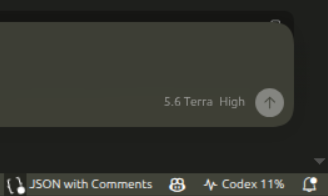
The status bar shows the current percentage of the applicable Codex spend limit.

Codex Usage status-bar item showing 11 percent usage

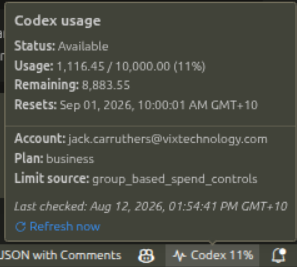
Hover over the status-bar item to see the usage, remaining allowance, reset time, account, plan, and a refresh link.

Codex Usage hover panel with spend-limit details and refresh link

Features

  • Compact current usage percentage in the status bar.
  • Warning state when a rate limit or spend limit has been reached.
  • Hover details for usage, remaining allowance, reset time, account, and plan.
  • Click-to-refresh status bar item and Codex Usage: Refresh command.
  • Automatic refresh every five minutes by default.

Development

npm install
npm run compile

Open this directory in VS Code and press F5 to launch an Extension Development Host. To install it normally, package it as a VSIX and install that VSIX in VS Code.

Settings

  • codexUsageBiz.accountDirectory: directory containing Codex auth files.
  • codexUsageBiz.accountName: optional named account, loaded as <name>.auth.json.
  • codexUsageBiz.dateLocale: optional date locale such as en-AU; defaults to the VS Code display language.
  • codexUsageBiz.refreshIntervalMinutes: automatic refresh interval; 0 disables it.
  • codexUsageBiz.requestTimeoutSeconds: API request timeout.
  • Contact us
  • Jobs
  • Privacy
  • Manage cookies
  • Terms of use
  • Trademarks
© 2026 Microsoft