Docassemble YAML
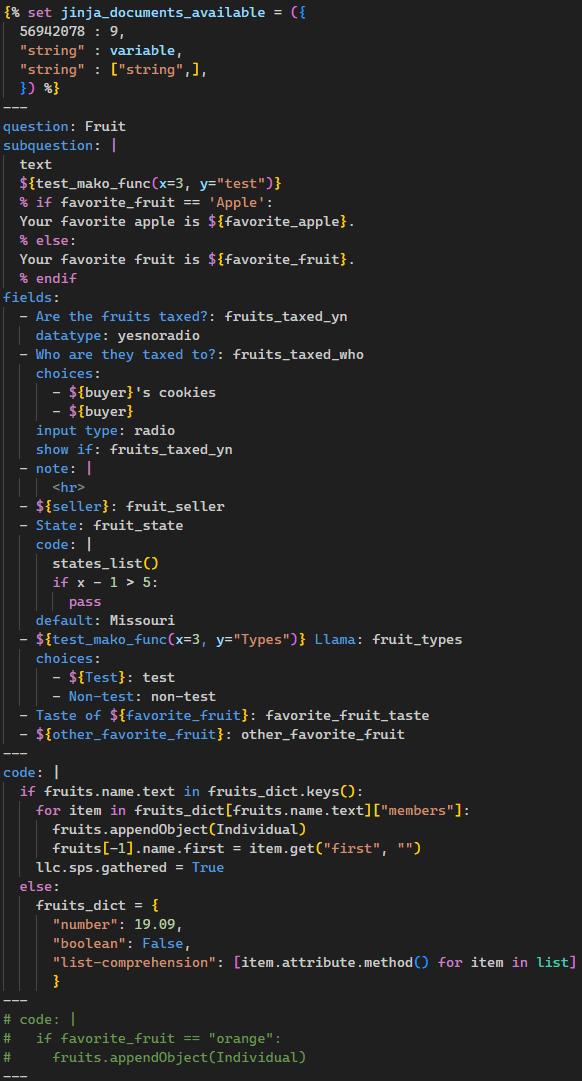
Provides syntax highlighting for Docassemble YAML files that incorporate Python, Mako, and Jinja.
The extension ships with the docassemble-lsp language server bundled inside the VSIX. It runs automatically when you open a Docassemble file — no separate install needed.
The language server provides diagnostics, completion, hover, definitions, references, symbols, formatting, and code actions. It is optional — without it the extension still provides full syntax highlighting.
Language Server
Python 3.10+ must be available on PATH or installed via the Python extension. The bundled server uses Python to launch even though its dependencies are self-contained.
Controlled by docassemble-lsp.importStrategy:
"useBundled" (default) — runs the server shipped in the extension. Dependencies are pure Python (no compiled extensions)."fromEnvironment" — runs python -m docassemble_lsp lsp from the active Python environment, or the docassemble-lsp.command string if set.
Settings
docassemble-lsp.enabled — enable or disable the language server.docassemble-lsp.importStrategy — "useBundled" (default) or "fromEnvironment".docassemble-lsp.command — shell command used when importStrategy is "fromEnvironment". Examples: docassemble-lsp lsp, /path/to/venv/bin/python -m docassemble_lsp lsp, uv run --project ~/Projects/docassemble-lsp docassemble-lsp lsp.docassemble-lsp.interpreter — Python interpreter override for "useBundled" or "fromEnvironment" (when no command is set). Defaults to the Python extension's active environment.docassemble-lsp.env — extra environment variables merged into the server process.docassemble-lsp.trace.server — protocol trace level for debugging.docassemble-lsp.showNotifications — controls when VS Code notifications are shown for language server errors and warnings. Values: "off" (default, no notifications), "onError" (notify on server start failures only), "onWarning" (notify on both start failures and missing Python), "always" (notify on all conditions).
Log Level
Set the server's log level via the env setting:
{
  "docassemble-lsp.env": {
    "DOCASSEMBLE_LSP_LOG_LEVEL": "DEBUG"
  }
}
Levels: DEBUG, INFO, WARNING (default), ERROR, CRITICAL.
Development
Build dependencies: uv or python3 + pip must be on PATH to build. The bundle script copies the Python server from lsp/src/ and installs its dependencies into bundled/libs/ using uv pip install (falling back to pip).
mise run //vscode:build  # bundles server, installs deps, compiles TypeScript
mise run //vscode:bundle:server  # bundle step only
mise run //vscode:package  # packages the VSIX
The bundled/ directory is git-ignored and regenerated on every build. The build is platform-specific — it embeds a specific CPython version, OS, and architecture, so contributors on a different platform must rebuild before running the real-LSP tests. The mise tasks handle this: both mise run //vscode:test and mise run //vscode:test:real-lsp depend on //vscode:build, so the bundle is rebuilt as a side effect of either — even though the default mock-server test never loads it.
Commands
Docassemble: Restart Docassemble Language ServerDocassemble: Show Docassemble Language Server OutputDocassemble: Show Docassemble Language Server Setup Help
Notes
- This extension still associates
.yml files with the docassemble language.
- On-type formatting only runs through the Docassemble LSP when the active document language id is
docassemble. If a docassemble file opens as plain yaml, switch the language mode before debugging formatter behavior.
- The TextMate grammars remain the base syntax layer for YAML, Python, Mako, and Jinja regions.
- The language server is additive and does not replace the grammar-based highlighting.
- A status bar item shows whether the language server is running, missing, disabled, or failed to start.
- The extension now declares itself as the default formatter for
[docassemble], enables editor.formatOnType, and defaults docassemble indentation to 2 spaces with editor.insertSpaces; user settings can still override those values.
Validation
mise run //vscode:test runs the default extension-host smoke suite.mise run //vscode:test:real-lsp runs the opt-in extension-host real-server path.- The extension-host suite includes an Enter/on-type regression test that verifies the client sends
textDocument/onTypeFormatting and applies the returned edit.
Headless tests
Tests pass --headless on all platforms by default. On Linux and Windows the VS Code window is fully suppressed. On macOS the window still appears because headless extension tests are not supported there (microsoft/vscode-test#290).
To opt out and show the window for debugging, set:
DOCASSEMBLE_LSP_SHOW_WINDOW=1 mise run //vscode:test
This controls the --headless flag — useful on Linux/Windows for debugging; no visible effect on macOS (the window is already visible).

