AIWorkHub for VS Code
An AI manager that runs Claude Code, Codex and Copilot as its workers.
It splits a large project into work cards, sends each card to the cheapest model that can do it, reviews every change against tests before it lands in your tree — and it is building AIWorkHub itself.
Proof, from this repository's own history: 1,984 commits since 2026-07-20, written through its own task loop · 347 work cards accepted into its own tree · 651 times a worker's change was sent back with code-level findings · 621 independent reviewer passes · 620 test files, about 262k lines of Python.
- Semantic edit: workers change hash-verified line ranges, never rewrite whole files.
- Review loop: mechanical gates and tests run first, then an independent reviewer reads the code; the manager accepts, returns with findings, or blocks — the same turn.
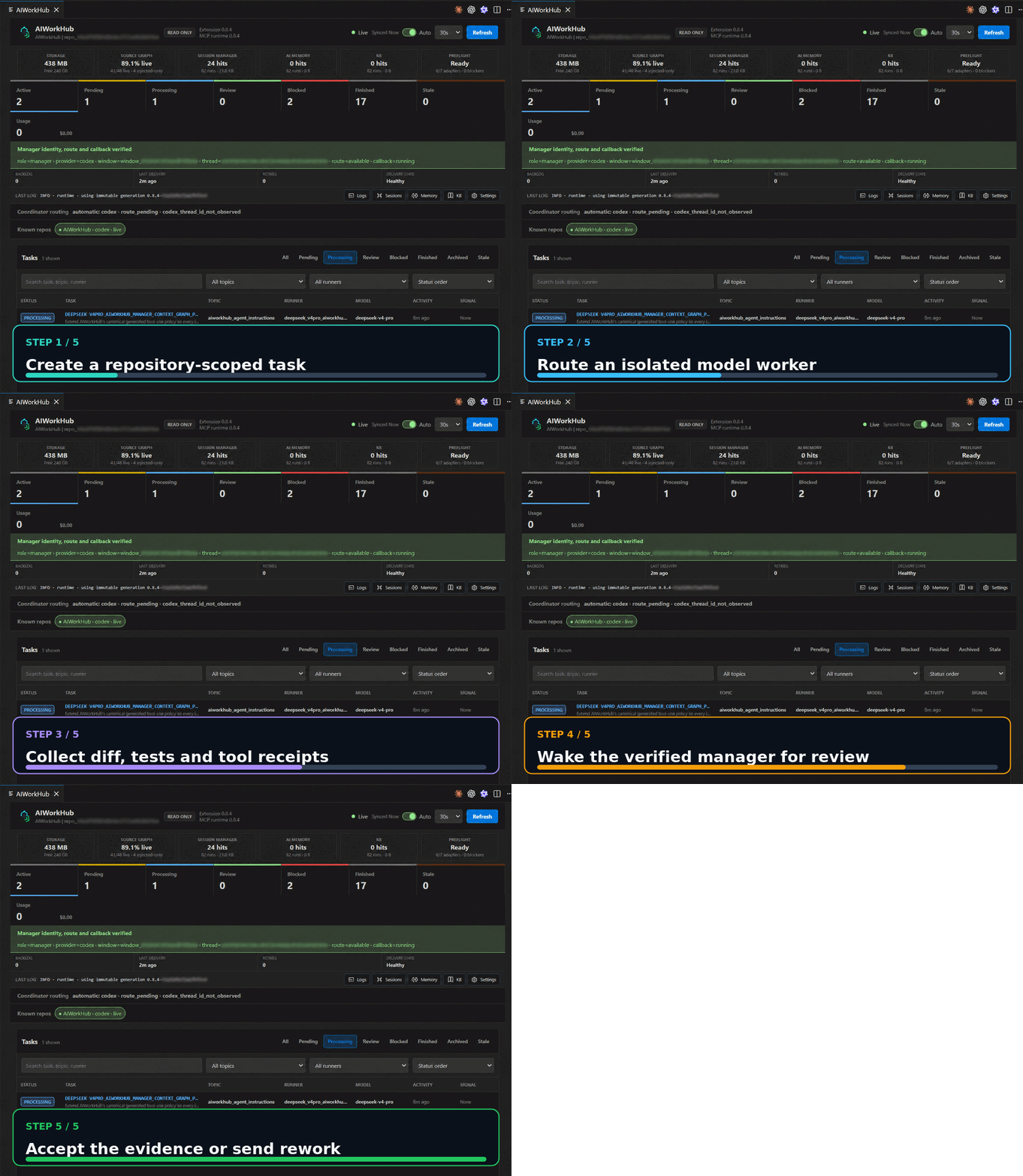 Create a bounded task, launch a model worker, inspect its evidence and accept or rework it.
The extension opens as a retained editor tab and runs one repository-scoped
MCP stdio runtime on the workspace host. It does not open a browser or require
an AIWorkHub cloud account, and it binds no port and exposes no LAN service
unless you start the opt-in WorkHub Mail listener on a host and port you name.
What's new in 0.12.82
- A shorter manager tool list: 129 tools instead of 181. The 50 tools no session used stay callable by exact name, so existing callers keep working.
- Accepting a card reuses a recipe run already made for that exact candidate instead of running it again.
- Manager Chat polls no longer time out on a slow health scan, and the accept neighbour lane runs only real test files.
Review automation
Automatic quality-review launch moves worker completion through a
system-owned correctness, security, and code-quality chain without
prematurely waking the manager. After every required lens passes, one
authenticated aggregate binds the candidate and reviewer evidence and emits
exactly one manager callback. Review automation never accepts or rejects the
implementation target; the verified manager receives only the completed
decision packet. Legacy review receipts remain compatible without blocking
later chains.
Detailed older history stays in the
changelog.
Architecture at a glance
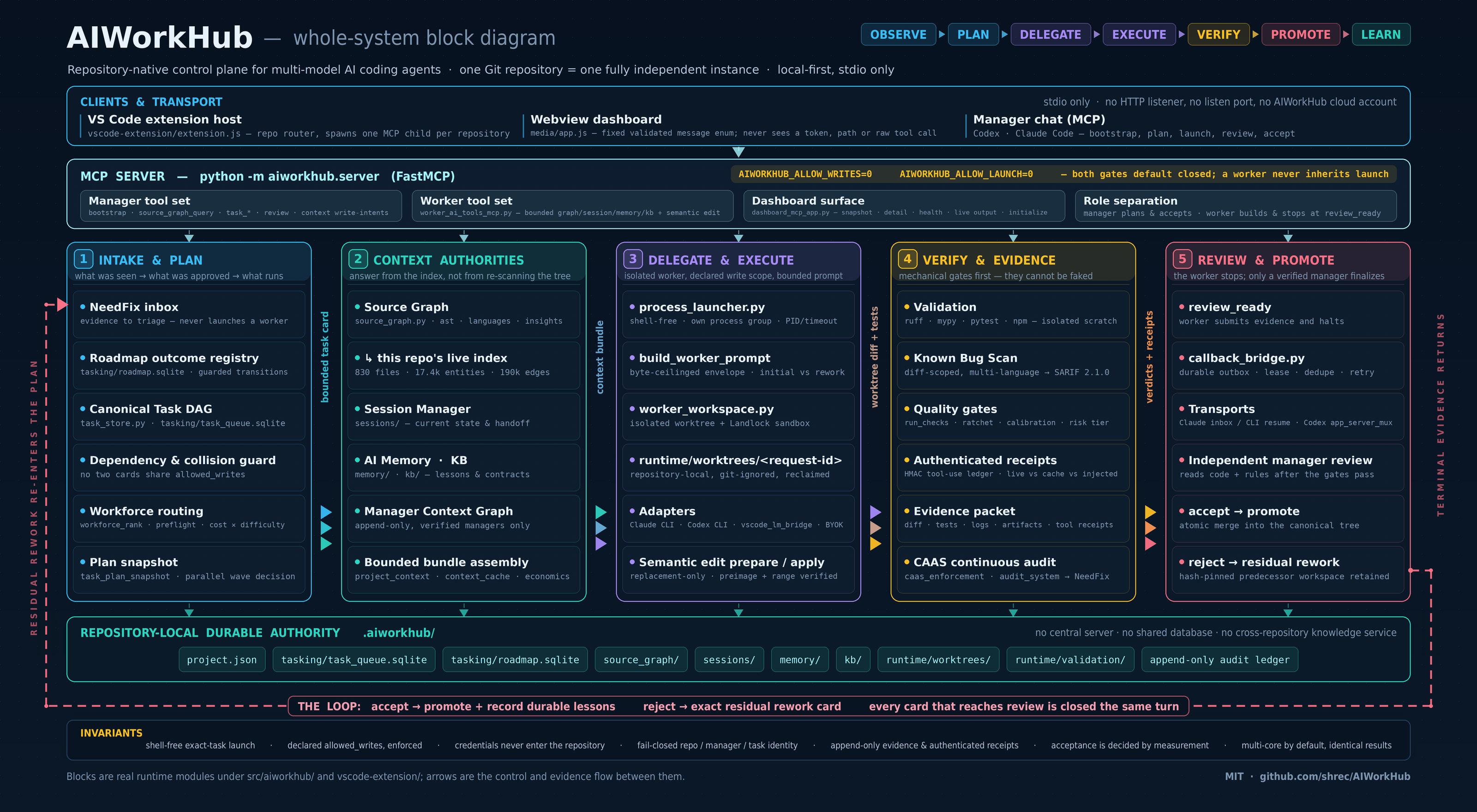 The complete AIWorkHub control plane, execution, evidence and improvement loop.
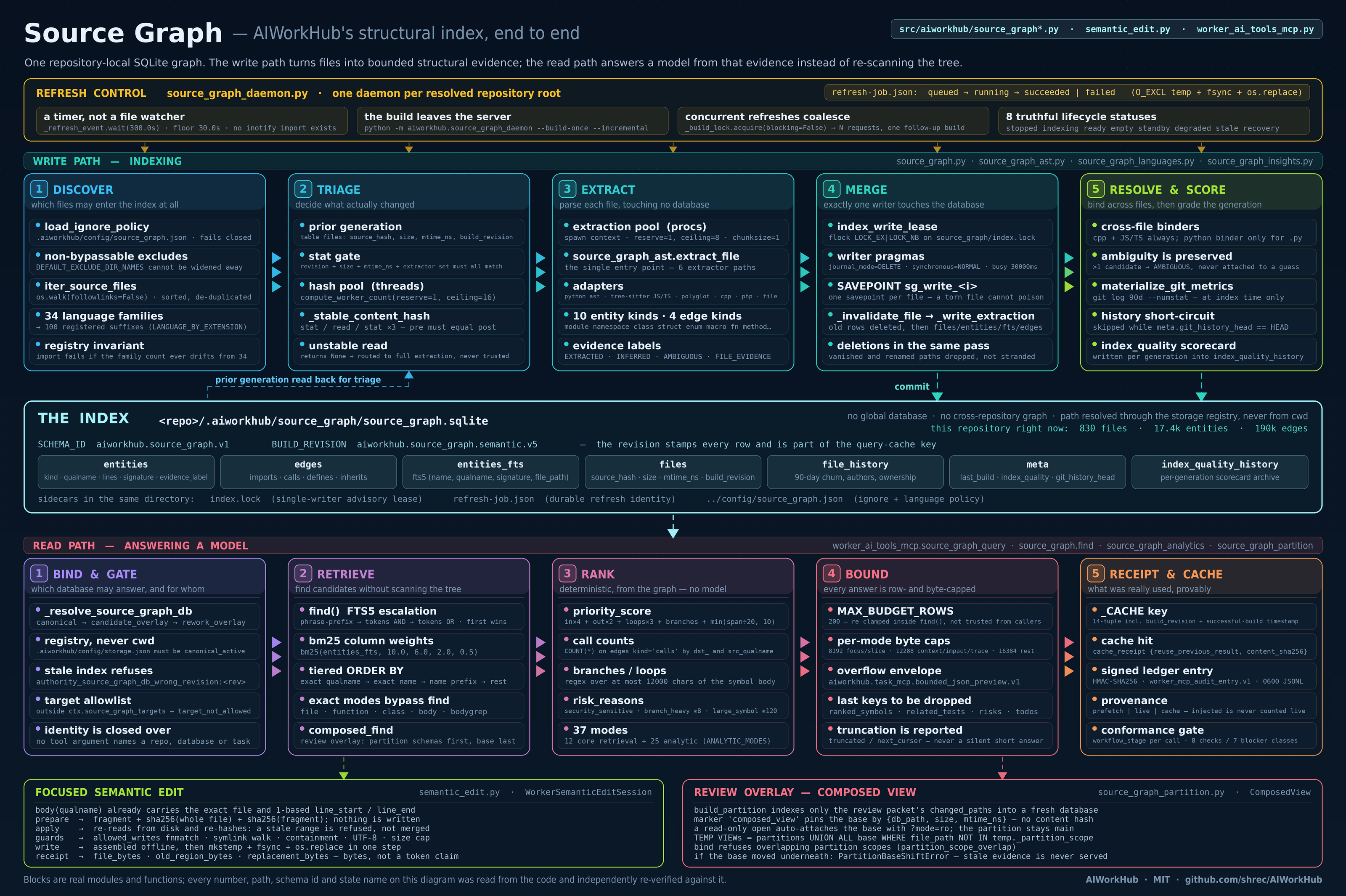 Incremental Source Graph refresh, index, query, semantic-edit and review-overlay paths.
Highlights
- Plan and inspect dependency-aware AI tasks from one operational dashboard.
- Delegate to supported local model adapters and track real terminal outcomes.
- Replace repeated raw-source discovery with a repository Source Graph covering
exactly 34 language/file families.
- Send focused code fragments through staged semantic edits and let the local
bridge assemble the hash-bound final envelope without model-side full-file
regeneration.
- Use exactly 37 currently exposed bounded Source Graph query modes for
symbols, calls, tests, impact, complexity, ownership, hotspots, gaps and
task-shaped context bundles.
- Preserve continuity through Session Manager, AI Memory and KB.
- Review diffs, tests, logs, artifacts, approval history and deterministic
Quality Evidence before acceptance.
- Run a changed-file Known Bug Scanner across C/C++/CUDA, Python,
JavaScript/TypeScript, Go, Java/Kotlin and PHP without treating heuristic
warnings as proven failures.
- Measure whether workers used Source Graph throughout the task through
authenticated tool-use receipts and continuous-use telemetry.
- Keep repositories isolated in separate
.aiworkhub/ authorities.
- Run on Linux (the canonical development and validation host), on WSL,
Remote-SSH and macOS as qualified client paths, and on native Windows only
at its measured coverage.
Operational dashboard
The retained dashboard combines the task DAG, live worker output, Review
Inbox, callback health, model readiness, tool-use statistics, storage
retention, Source Graph coverage and bounded viewers for logs, sessions,
AI Memory and KB. Settings remain repository-local under .aiworkhub/, so a
multi-window installation does not share task or context authority between
repositories.
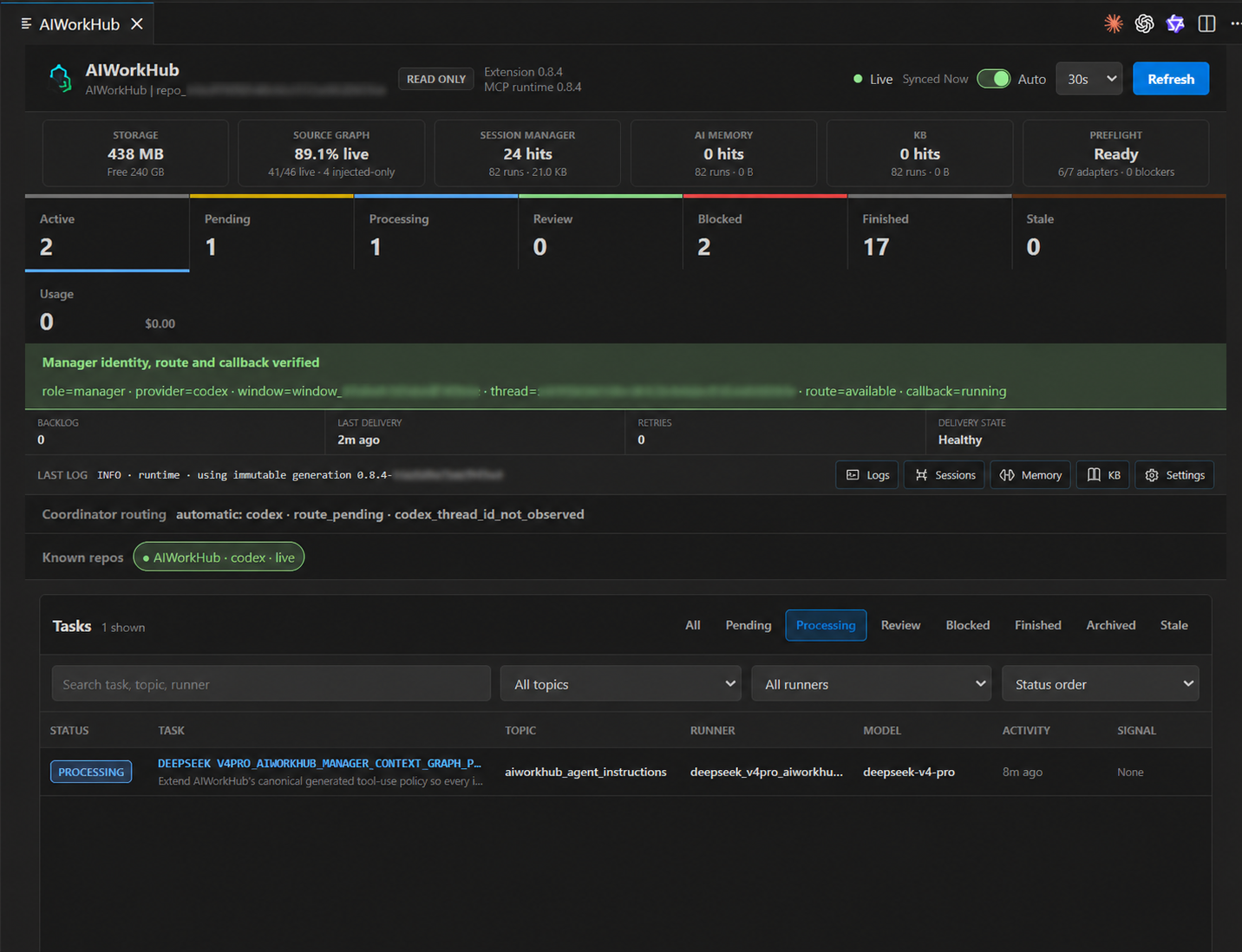 Tasks, callback health, source coverage, context stores, preflight and evidence in one retained editor tab.
Get started
- Install from the Marketplace (or install a release VSIX) and open a Git
repository in VS Code.
- Run AIWorkHub: Open Dashboard.
- Select the repository when using a multi-root workspace.
- Choose Initialize AIWorkHub on first use.
- Open a new Codex, Claude or MCP-capable chat after registration so the new
runtime tools are discovered by that chat process.
Initialization is explicit and idempotent. It creates repository-local state
only under .aiworkhub/ and starts the first Source Graph index in the
background.
For Claude Code, initialization also maintains the repository-local
.mcp.json server registration and the bounded AIWorkHub block in CLAUDE.md.
Open a new Claude chat after initialization or an AIWorkHub upgrade. That
direct chat is instructed to bootstrap as the manager, call manager Source
Graph before broad Read/Grep/Glob discovery, and re-query the graph when
its implementation or validation boundary changes. AIWorkHub-launched task
processes use the separate worker tool surface.
Run your first task
AIWorkHub is designed for a manager chat that delegates bounded work instead
of letting several models edit one checkout without coordination.
Start a new chat after initialization or upgrade and paste:
Use AIWorkHub as manager for the currently bound repository. Call
aiworkhub_manager_bootstrap first; verify repository identity, manager route,
callback, Source Graph and preflight. Do not edit or launch yet. Report what is
ready and what is degraded.
Then describe the desired outcome normally. Ask the manager to create bounded
cards and launch only independent, dependency-ready, non-colliding cards in
parallel. The MCP server also presents this lifecycle as a mandatory contract:
creating a task leaves it pending; exact claim plus launch establishes
processing; workers stop at review_ready; callbacks wake the current
verified manager; and only that manager accepts or rejects verified evidence.
- Check the dashboard header. Repository, MCP, Source Graph and callback
state should be ready; Preflight explains any unavailable optional
model adapters.
- Tell the manager what outcome you want. The manager creates a task card
with an exact objective, acceptance criteria, allowed writes, validation
commands and dependencies.
- The manager selects a ready adapter/model and launches the exact card.
Workers receive repository-scoped Source Graph, Session, Memory and KB
context and work in an isolated task workspace.
- Follow Live Output or continue other work. Terminal outcomes are durable
and the originating manager receives a callback when review is required.
- Open the task in Review. Inspect the bounded diff, tests, logs,
artifacts, tool-use receipts and independent reviewer evidence.
- Accept promotes the verified change and finalizes the task. Reject
records exact feedback and creates a bounded residual rather than silently
discarding the previous evidence.
Dependency cards remain pending until their prerequisites finish. Collision
checks prevent two active workers from owning overlapping write paths.
See the complete first-run and manager manual
for copy/paste planning/review prompts, Remote-SSH behavior and recovery after
an interrupted write acknowledgement.
Models and authentication
AIWorkHub does not proxy credentials or require an AIWorkHub account. It uses
models already authenticated in the corresponding editor or CLI. The table
lists observed runner families; Preflight reports which routes are actually
ready in this window. An optional adapter being unavailable does not block
otherwise ready models.
| Runner |
Typical adapter |
Requirement |
| Codex |
Codex CLI or VS Code Language Model |
Existing Codex login or one-time VS Code consent |
| Claude |
Claude Code CLI or VS Code Language Model |
Existing Claude subscription login or one-time VS Code consent |
| Copilot-hosted models |
VS Code Language Model |
GitHub sign-in and one-time model consent |
| DeepSeek |
VS Code Language Model or Copilot CLI fallback |
Provider visible in VS Code; fallback uses its own stored credential |
| GLM 5.3 |
VS Code Language Model or Copilot CLI fallback |
Provider visible in VS Code; fallback uses its own stored credential |
| Grok |
Observed Kilo/Grok worker route |
Existing provider login; Preflight reports whether that route is ready |
Source Graph and context
Source Graph is an incrementally refreshed structural repository index, not a
remote Sourcegraph service. It covers exactly 34 language/file families and
exposes exactly 37 currently exposed bounded Source Graph query modes.
Managers and workers start with low-token focus and slice queries, then
use calls, trace, impact, test mapping or typed bundles only when the task
needs them. Operations telemetry shows which modes were requested and
executed, returned evidence, workflow stage, latency, generation and
inter-call gaps.
Session Manager stores current state and handoffs; AI Memory stores durable
lessons; KB stores curated project facts; the optional Manager Context Graph
preserves bounded manager transcript evidence. All are repository-local and
have bounded viewers in the dashboard.
Commands
- AIWorkHub: Open Dashboard — open or reveal the retained editor tab.
- AIWorkHub: Select Repository — bind the dashboard in a multi-root window.
- AIWorkHub: Refresh Dashboard — refresh the current repository snapshot.
- AIWorkHub: Restart MCP Connection — replace only AIWorkHub's selected
repository MCP child.
Remote development
AIWorkHub is a workspace extension. In Remote-SSH, install it on the remote
extension host; its packaged Python runtime, MCP child and repository state run
beside the remote checkout. No port forwarding is required.
If the dashboard is not ready
- Connecting: use AIWorkHub: Restart MCP Connection once and inspect
the dashboard's last-log row. The extension restarts only its own child.
- A model is unavailable: open Preflight, confirm the provider is installed
and grant the one-time VS Code model consent when prompted.
- Source Graph is empty: initialize the repository, enable the required
language family in Settings and run a refresh.
- A chat cannot see tools: open a new chat after installation or upgrade so
that client performs MCP discovery against the current runtime.
- Windows upgraded from an old build: activation automatically migrates
legacy source/version
PYTHONPATH registrations to a host-stable packaged
runtime; no manual config.toml edit is required.
Trust and privacy
- Local stdio transport; no AIWorkHub network listener.
- Read-only and launch-disabled by default.
- Repository-specific state, route identity and audit trail.
- No AIWorkHub telemetry upload of prompts, source, credentials or memories.
- Explicit manager authority for context writes and task acceptance.
Read the full Getting Started guide,
Architecture,
Source Graph guide,
Manager Context Graph guide,
Security Policy and
Product Roadmap.
Development build
npm --prefix vscode-extension install
npm --prefix vscode-extension test
npm --prefix vscode-extension run package
code --install-extension vscode-extension/dist/aiworkhub-*.vsix
AIWorkHub is open source under the
MIT License.