Panel Todo
VS Code's AI-native todo list and issue tracker. Panel-based task capture with 38 MCP tools for Claude, Copilot, and other AI assistants.
Stop losing Claude's best ideas.
That suggestion Claude made while you waited for the build? It's gone now. Panel Todo captures every "also consider" and "you might want to" before they vanish—without leaving VS Code.
The Problem
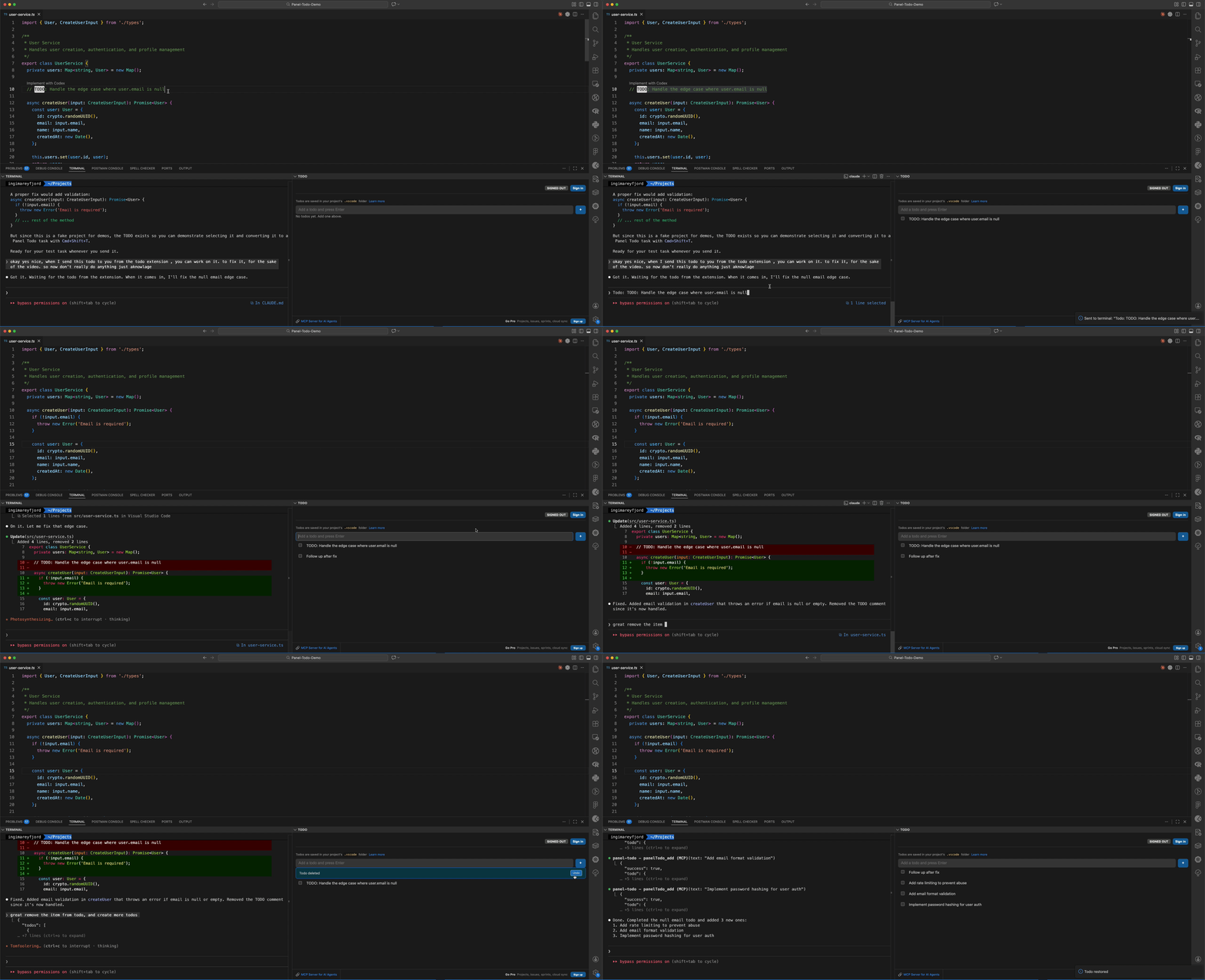
You're debugging with Claude. It fixes the bug, then adds: "While you're here, you might want to handle the edge case where user.email is null."
You nod. Good point. You'll do that right after—
Three weeks later, your app crashes in production. Null email. Claude told you. You forgot.
This happens constantly:
- The build finishes. What were you going to do? The thought is gone.
- Claude lists four improvements. You do one. The other three become ghosts.
- You switch machines. Your laptop knows what's next. Your desktop doesn't.
- You close VS Code. Tomorrow-you has no idea where to start.
AI assistants give you superpowers. But superpowers without memory just means you make bigger messes faster.
The Solution
Panel Todo lives in VS Code's panel—right next to your terminal. Type a task, press Enter, keep coding.
- Zero friction - No dialogs, no context switching, no app to open.
- Selection to todo - Highlight Claude's suggestion →
Cmd+Shift+T → instant task.
- AI-native - 38 MCP tools let Claude manage your backlog directly.
- Always there - Visible while commands run, builds complete, tests pass.
Free Features
Everything you need for fast task capture:
| Feature |
Description |
| Inline Add/Edit |
Type and press Enter. Click to edit. No dialogs. |
| Quick Complete |
Check the box, task fades away (with undo). |
| Selection to Todo |
Select Claude's output → Cmd+Shift+T → instant todo. |
| Export as Prompt |
Cmd+Shift+E copies todos as markdown for AI context. |
| Per-Workspace |
Each project keeps its own list. |
| Works Offline |
Zero network calls. All data stays local. |
| Local MCP |
Claude can add, list, and complete your todos. Setup guide |
Pro Features
Full issue tracking for serious projects:
| Feature |
Description |
| Cross-Device Sync |
Real-time WebSocket sync. Edit on laptop, see on desktop. |
| Multi-Project |
Create projects with custom keys (PT-123, WORK-45). |
| Issue Tracking |
Statuses (todo/in_progress/review/done), priorities, descriptions. |
| Sprint Management |
Plan sprints, track velocity, manage backlogs. |
| Tags & Labels |
Color-coded tags for categorization. |
| Issue Relationships |
blocks, blocked_by, relates_to, duplicates. |
| 38 MCP Tools |
Claude can manage issues, sprints, projects, and tags directly. |
| Device-Code Auth |
Sign in via browser. No passwords in VS Code. |
Pro MCP Commands
Your AI assistant becomes a project manager:
"Add a high-priority bug for the auth timeout"
"Move all in-progress issues to the current sprint"
"What's blocking the login feature?"
"Create a sprint for next week's release"
Quick Start
Free (Local)
- Install from VS Code Marketplace
- Open Panel (
Cmd+J / Ctrl+J)
- Click the Todo tab
- Type a task, press Enter
Pro (Cloud Sync)
- Run command:
Panel Todo: Sign In
- Complete browser authentication
- Your todos sync automatically
Keyboard Shortcuts
| Action |
Mac |
Windows/Linux |
| Add selection as todo |
Cmd+Shift+T |
Ctrl+Shift+T |
| Export as prompt |
Cmd+Shift+E |
Ctrl+Shift+E |
| Focus input |
Cmd+Shift+I |
Ctrl+Shift+I |
| Undo delete |
Cmd+Shift+Z |
Ctrl+Shift+Z |
Pricing
|
Free |
Pro |
| Local todos |
Yes |
Yes |
| Selection to todo |
Yes |
Yes |
| Export as prompt |
Yes |
Yes |
| Local MCP (5 tools) |
Yes |
Yes |
| Cross-device sync |
- |
Yes |
| Multi-project |
- |
Yes |
| Issue tracking |
- |
Yes |
| Sprints & backlog |
- |
Yes |
| Tags & relationships |
- |
Yes |
| Remote MCP (38 tools) |
- |
Yes |
|
Free forever |
€4.90/month |
Your Data
Free tier: All data stored locally in VS Code's workspace storage. Learn more. Zero network calls. No accounts. No tracking.
Pro tier: End-to-end encrypted sync. Your data is yours. See our Privacy Policy.
Troubleshooting
"Queued" indicator showing
If you see a yellow "⏳ Queued X" indicator, it means the VS Code extension host is busy or frozen. This commonly happens when:
- Claude Code or GitHub Copilot is processing large requests
- Many extensions are running simultaneously
- Large workspace is being indexed
Your changes are safe! Panel Todo saves pending operations locally and will sync them when the extension host recovers. You can also reload the VS Code window (Cmd/Ctrl+R) to speed up recovery.
Extension host frozen
If the extension host is completely frozen, Panel Todo will:
- Show a "Queued" indicator with the number of pending operations
- Retry operations every 5 seconds
- Persist operations to localStorage so they survive VS Code restart
This ensures your completed todos are never lost, even during extension host freezes.
Links
License
MIT

