Gotmpl YAML Highlighter
Syntax highlighting, hover docs, completion and diagnostics for *.yaml.gotmpl
files — helmfile and friends.
Why
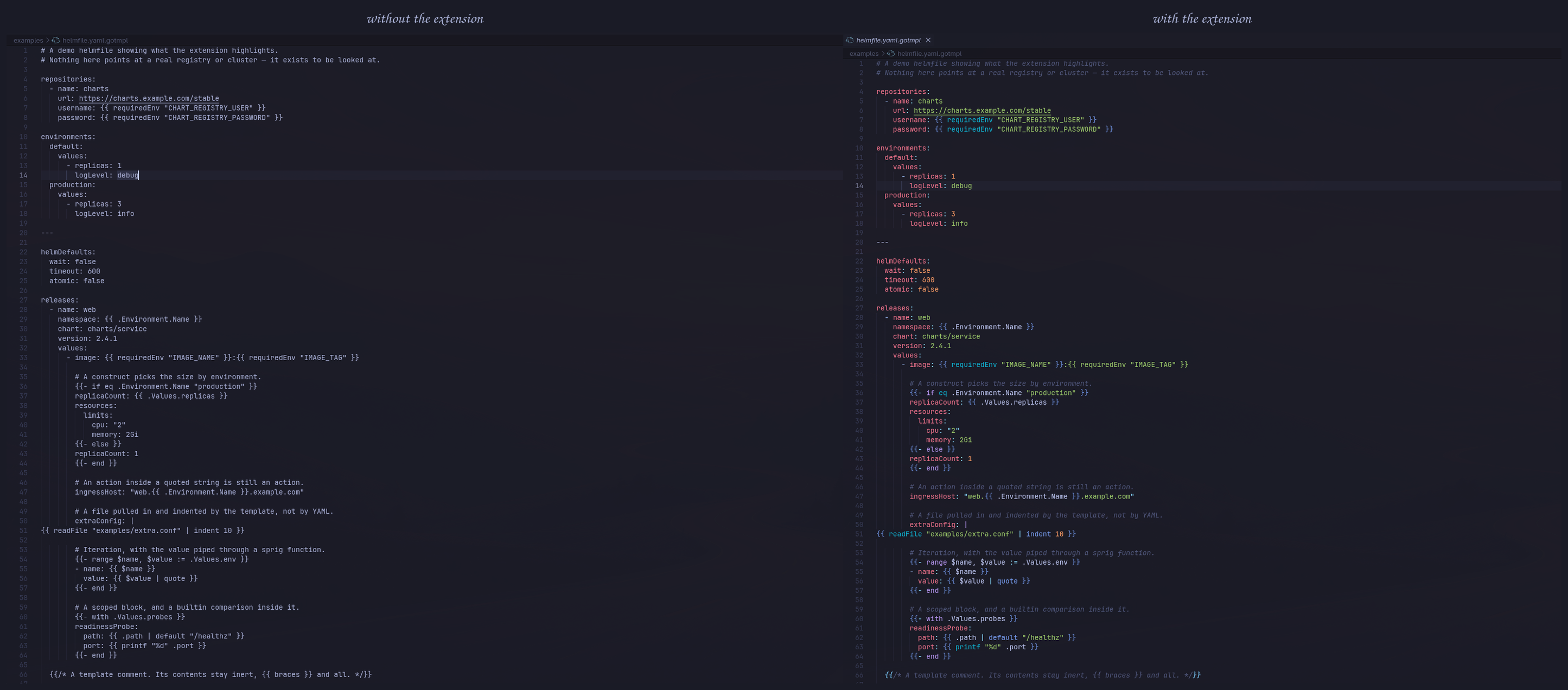
A helmfile.yaml.gotmpl file is two languages at once: YAML on the outside, Go
template inside {{ … }}. VS Code picks one language per file, and every
existing extension resolves that the same way — by declaring .gotmpl a
separate language. The consequence is not that the highlighting is poor; it is
that YAML disappears entirely. Keys, anchors, lists and comments stop being
distinguishable. Leaving the file as yaml loses the mirror image: to a YAML
grammar, {{ requiredEnv "IMAGE_TAG" }} is indistinguishable from any other
string.
This extension keeps both. The file's own grammar includes source.yaml
wholesale, and an injection grammar layers the Go template scopes on top of it.
What it does
Highlighting. YAML stays intact — keys, strings, anchors, comments, block
scalars. Template constructs get their own scopes: delimiters, trim markers,
control keywords, helmfile functions, sprig functions, Go builtins, strings,
numbers, true/false/nil, $variables, .Values.paths, pipes, template
comments. Actions are highlighted inside quoted strings and block scalars too,
not only at the top level.
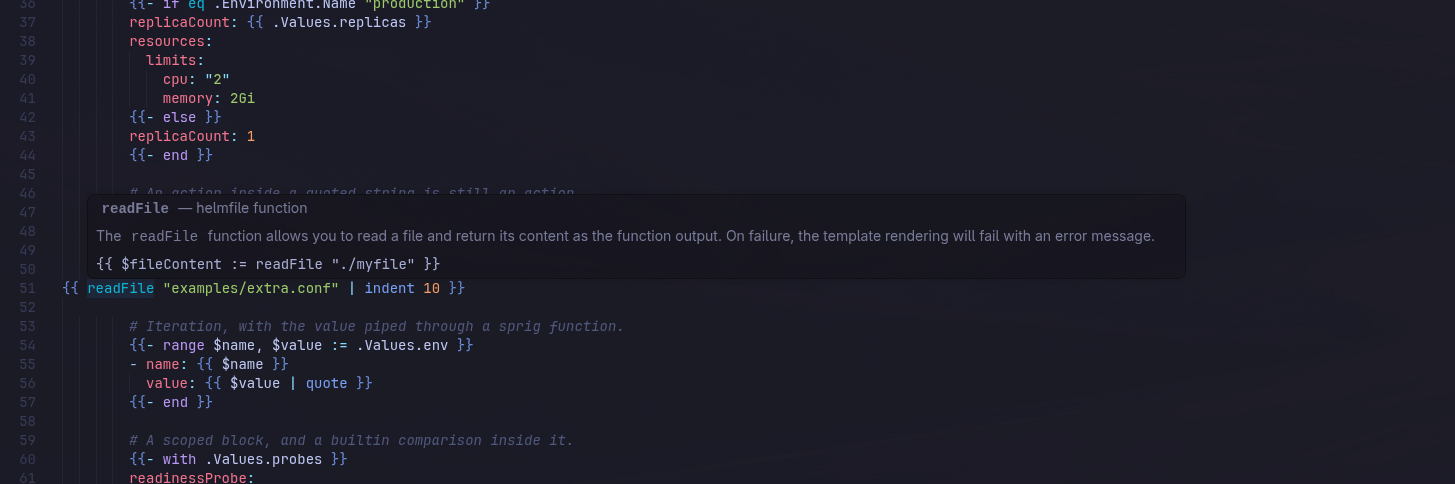
Hover. Point at a keyword or a function and see what it does, with an
example. The reference covers 216 functions, generated from the sprig and
helmfile documentation. Where helmfile overrides a sprig function — env and
get — the hover says so.
Completion. Inside {{ … }} you get functions from both sources and
snippets for paired constructs that arrive already closed. Outside an action
nothing is offered: the YAML side belongs to the editor.
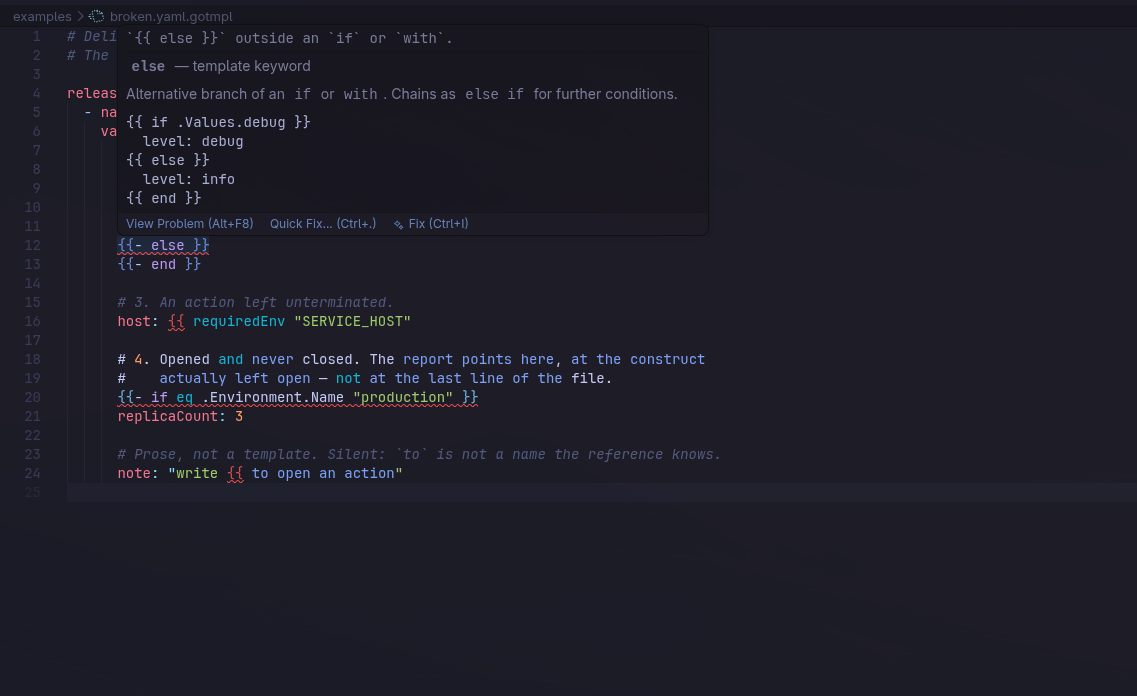
Diagnostics. An unclosed {{, a construct with no {{ end }}, a stray
end, an else outside if or with. On nested constructs the report points
at the one actually left open, and a quick fix offers to add the missing end
where the insertion point can be told from indentation.
What it does not do
- It sets no colors. Your active theme colors the scopes; the extension uses
conventional TextMate scope names precisely so your theme already knows them.
Highlighting density is therefore a property of your theme.
- It only handles
*.yaml.gotmpl. Other bases — .json.gotmpl,
.conf.gotmpl, .tpl, .tmpl — and Helm chart templates without the
.gotmpl suffix are out of scope.
redhat.vscode-yaml does not serve these files. They are their own
language, which is what keeps the template highlighting out of every other
YAML file you open. Comment toggling, indentation, folding and bracket
matching are provided here instead.- No YAML schema support, and not by omission. A helmfile template is not
valid YAML until it is rendered:
{{ readFile "x" | indent 16 }} sits at
column zero inside a block scalar, and the indentation only appears at render
time. A schema validates a parsed document, and there is none to parse.
- It does not format files or execute templates. It reads.
Known limits
{{ inside a quoted YAML string is ambiguous: "use {{ to interpolate" is
prose, "broken {{ requiredEnv "X" is a real unclosed action, and the only
thing separating them — a closing }} — is exactly what is missing. The tie is
broken on what follows the delimiter. So a literal "{{ if" inside a string
gets reported, and an unclosed action starting with something other than an
identifier ({{ 5, {{ "text") inside a string does not. Both are rare.
Development
npm install
npm run fetch-yaml-grammar   # copies VS Code's built-in YAML grammar for the tests
npm test                     # 106 scenarios, run outside the editor
npm run lint
npm run typecheck
npx @vscode/vsce package
The tests run the grammars through vscode-textmate — the same engine the
editor uses — and assert scopes by position, so a broken rule fails the run
rather than merely looking wrong on screen. The function reference is generated
by npm run build-reference and committed, so packaging never reaches the
network.
License
MIT

