Skip to content
| Marketplace
Sign in
Visual Studio Code>Other>Meta Tag PreviewNew to Visual Studio Code? Get it now.
Meta Tag Preview

Meta Tag Preview

Ideal Media Pro

| (0) | Free
Hover over HTML meta tags and title tags to see instant previews — SEO descriptions, Open Graph tags, and more.
Installation
Launch VS Code Quick Open (Ctrl+P), paste the following command, and press enter.
Copied to clipboard
More Info

Meta Tag Preview

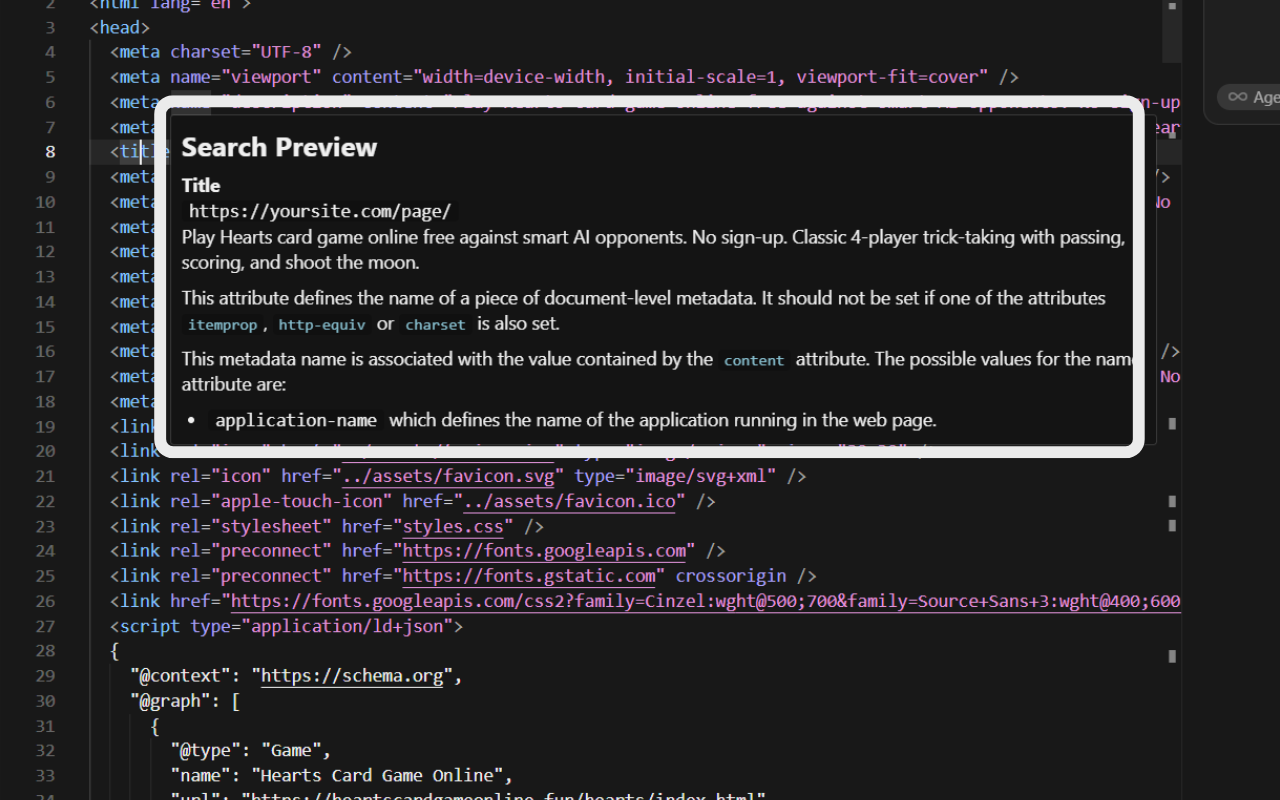
Hover over HTML <meta> tags and <title> tags to see instant previews directly in VS Code. No switching tabs, no copy-pasting URLs.

Features

  • Search Preview — hover over <title> or <meta name="description"> to see how your page might appear in Google results
  • Open Graph — inspect og:title, og:description, and other OG tags at a glance
  • Twitter Cards — preview twitter: meta tags
  • Robots & Viewport — see indexing rules and viewport settings explained
  • Any meta tag — displays name and content for unrecognized tags

Usage

Open any HTML file, place your cursor over a meta or title tag, and a hover tooltip shows a formatted preview.

screenshot

Requirements

VS Code 1.60.0 or higher.

License

MIT


Built by Ideal Media Pro — websites, local SEO, and Google Ads that get local businesses found.

  • Contact us
  • Jobs
  • Privacy
  • Manage cookies
  • Terms of use
  • Trademarks
© 2026 Microsoft