RAPTOR Tree VisualizerView RAPTOR retrieval trees as a radial graph — the official implementation's tree.pkl, a LlamaIndex persist directory, or this project's own *.raptor-tree.json. Installation Launch VS Code Quick Open ( Ctrl+P), paste the following command, and press enter.Copied to clipboard |

RAPTOR Tree Visualizer
View RAPTOR retrieval trees as a radial graph — in VS Code or as a standalone HTML page. Format-agnostic: it does not care which implementation built the tree.
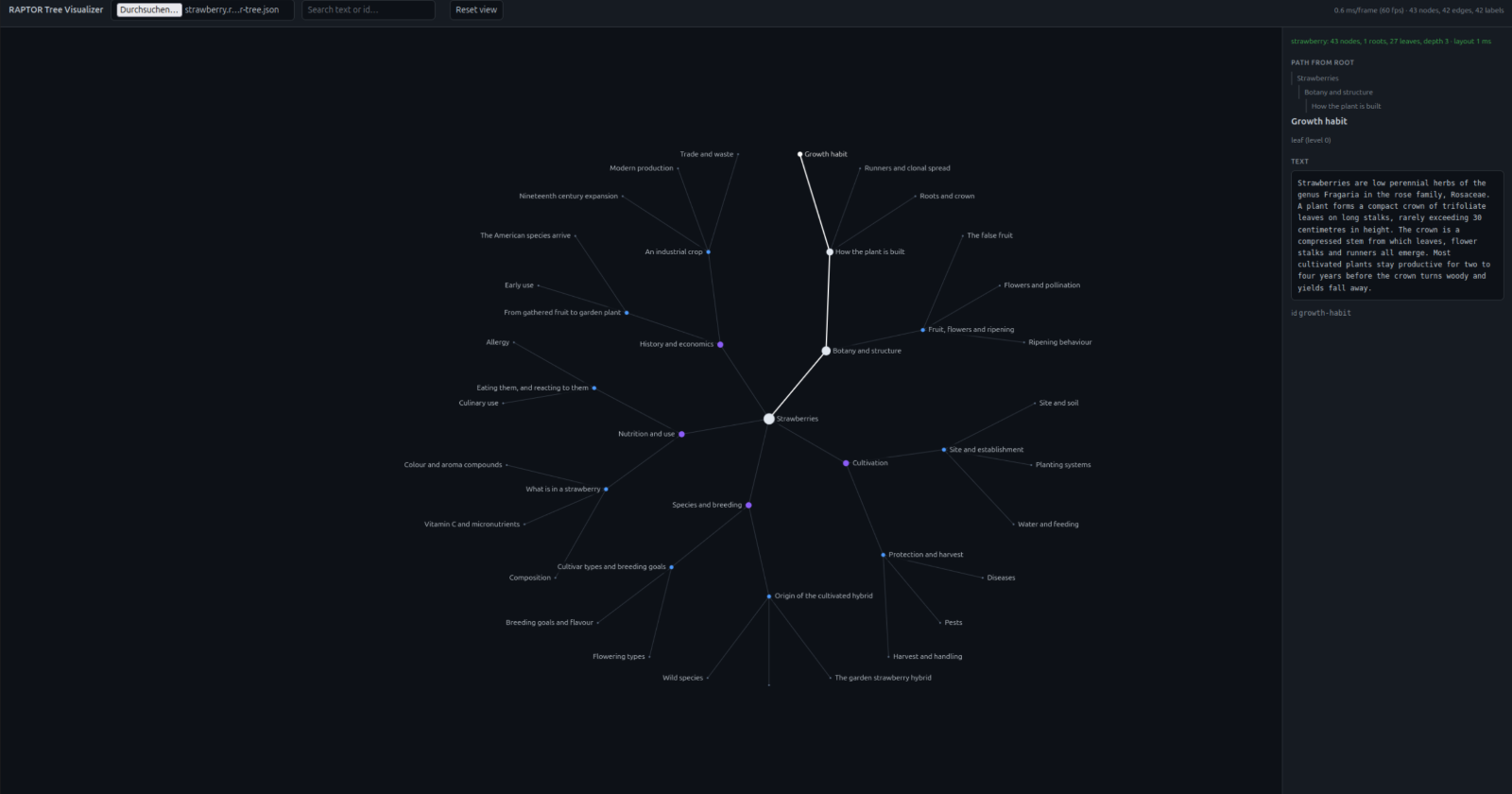
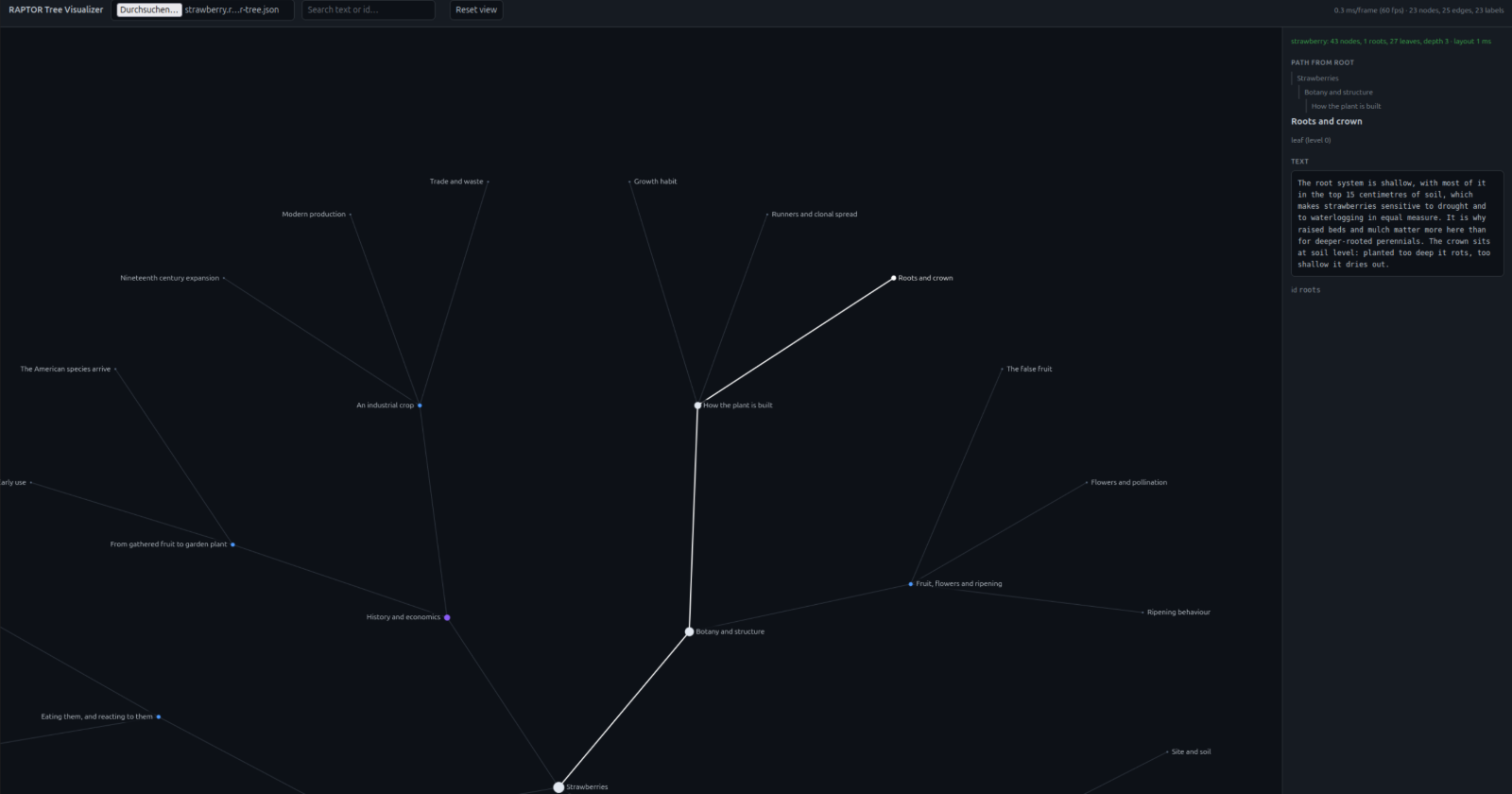
The bundled example, which is what you get when you open the page: 43 nodes about strawberries. A leaf is selected, so its path to the root is drawn in white and spelled out in the panel, above the node's full text. Why this existsYou cannot judge a RAPTOR tree without looking at it. Clicking through a tree of ~3,900 nodes for the first time surfaced 92 summaries where the model had reviewed its own output instead of summarising — one of them at the top level, where it stands in for an entire subtree. Nothing short of seeing the tree finds that. The problem: there is nothing to look at it with. There is no RAPTOR file formatEvery implementation stores something different, and two of three do not store the tree at all:
And no format-agnostic viewerAs of August 2026: So the goal is not "draw a tree" — it is open any RAPTOR tree, whatever built it. The formatOne file, Embeddings are not included. They multiply file size and are not needed to draw anything — in our test data they are 74 MB of a 123 MB source. A useful side effect: the adapters need no numerical libraries. Warnings, not refusalsThe validator separates two severities, and the distinction carries the design:
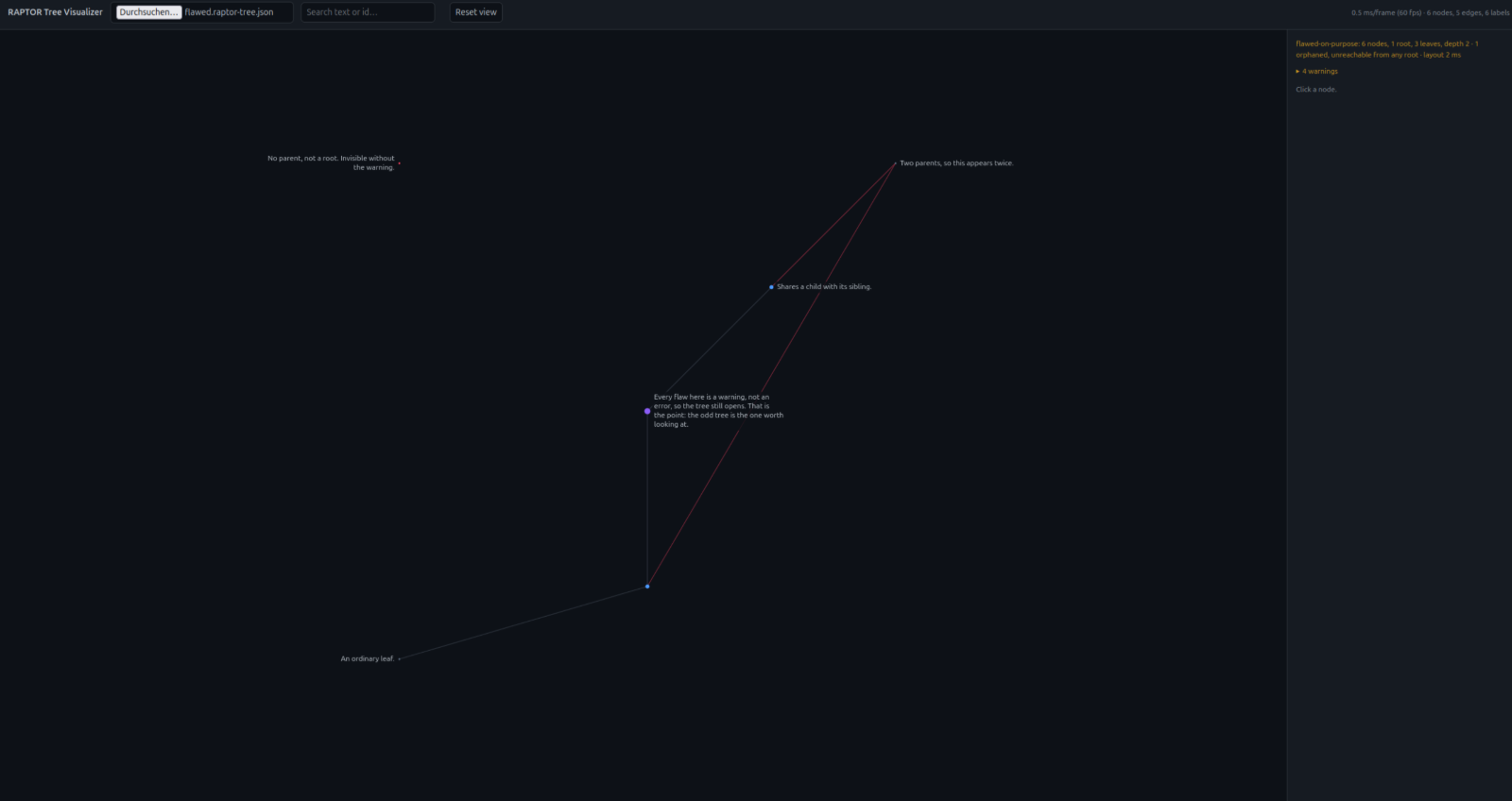
Refusing to render at the first inconsistency would defeat the purpose, because the odd tree is the one you want to see. In one real tree, 17 of 3,558 leaves have no parent. As an error that tree would not open and you would never learn which 17. As a warning: Those 17 came from just 7 documents — whole documents had been skipped during clustering. That is the class of finding this tool is for.
Sharing a tree you cannot shareYour corpus is probably confidential, but the structure of the tree usually is not — and
structure is what this tool renders and what a bug report is about. The result renders identically — the screenshots above were made this way — and reports
the same validation issues, because hiding a finding would misrepresent the original.
Ids are replaced by default: they are routinely built from source identifiers, and they
are shown in the detail panel. Nothing is shortenedA viewer you use to judge data has to be trusted not to change it. The Display is separate from data. Graph labels are truncated to fit the canvas — but the detail panel shows the full title and the full text, and issue reports list every affected node id rather than the first twenty. A truncated list of ids is worse than a long one: the ids are the part you can act on, and "and 40 more" cannot be looked up. UsageRequires Node 20+, and nothing else. Viewing a treeThen open http://localhost:5173. With no arguments it loads the bundled strawberry
example, so there is something to look at immediately — drop a A server is needed only because browsers refuse ES modules over Your trees should live outside the repository, since a real corpus is usually confidential
and The first root holding a matching file wins, so Drag to pan, wheel to zoom at the cursor, click to select, double-click to centre. Selecting a node highlights its path to the root; searching highlights hits in place, so you can see where in the tree a topic lives instead of reading a list of matches. Labels are click targets, not just decoration. A leaf is a two-pixel dot and its label is two hundred pixels wide, so hit-testing checks the drawn label rectangles before the dots — otherwise clicking a name you can plainly read does nothing until you zoom right in. In VS CodeThe extension registers a custom editor for A If you work with RAPTOR trees daily and want a double-click to be enough, claim That overrides the manifest's priority, so a double-click goes straight to the tree with no "Open Anyway" step. Set it per workspace rather than per user if the machine also holds pickles that are not trees. This also covers the save the patterns cannot: a custom editor is matched by filename, and
A LlamaIndex index needs its own way in, because it is a folder and a custom editor is
always backed by a document: run RAPTOR: Open LlamaIndex index… and pick the directory
To run it from a clone: Then press F5 in VS Code. That opens a second window — the Extension Development Host —
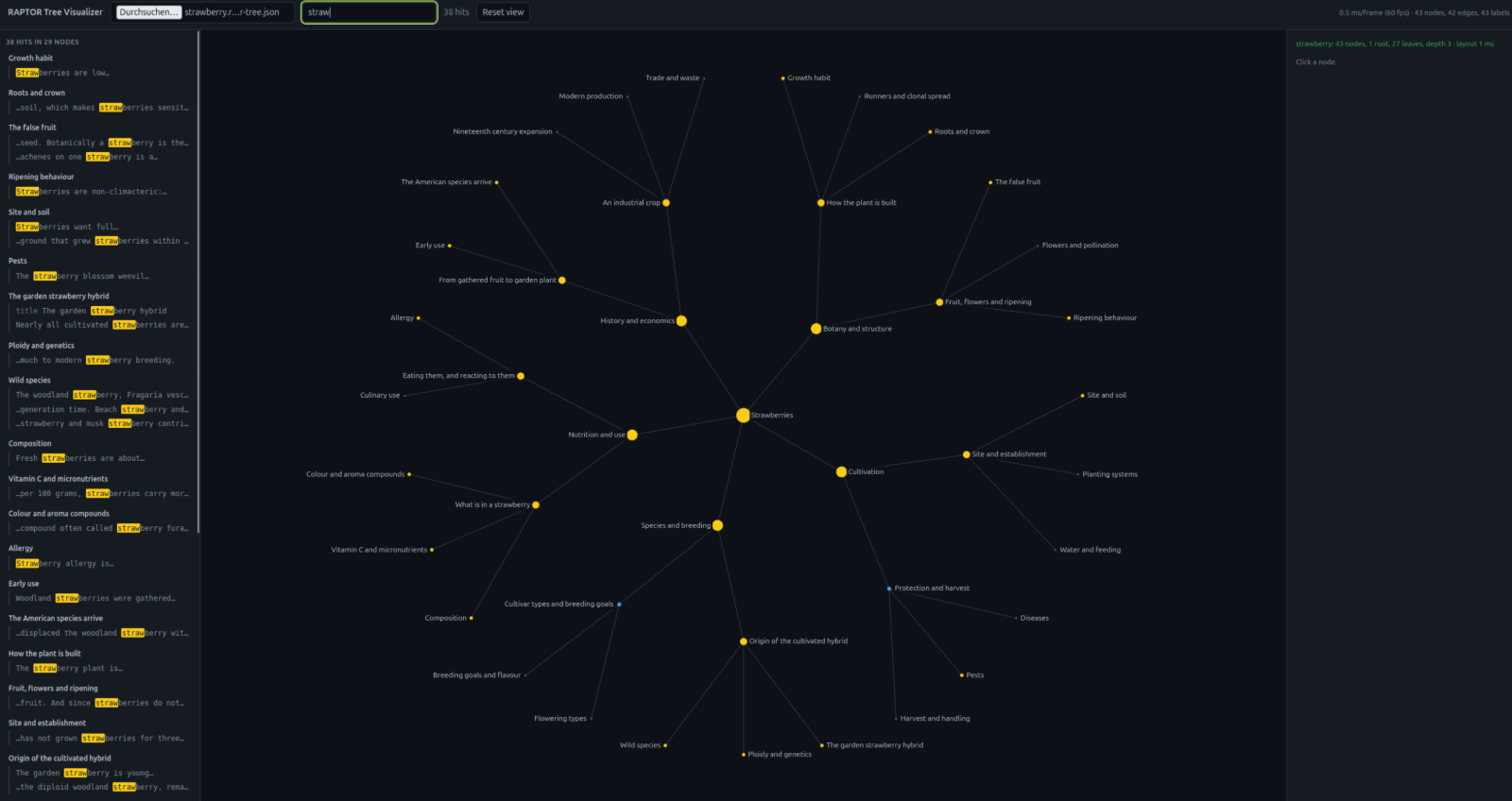
with the extension loaded; no installing and no packaging. Open any To build an installable The webview is a single bundled script under a strict CSP: SearchingSearching does two things at once, and they answer different questions. The graph marks every node containing a hit, which shows where in the hierarchy a term lives — and at which level of abstraction, since a summary matching a term is as visible as a leaf matching it. A results column lists every occurrence, grouped by node, one line each with a few words of context — the way an editor lists hits by file rather than just naming the files.
Thirty-eight occurrences in twenty-nine nodes. The list answers "what does it say", the graph answers "where in the hierarchy is it" — including that the root itself matches, so the term is discussed at every level of abstraction. Clicking a result opens that node and marks the occurrence green in its text; the other occurrences in the same node stay yellow. Enter and Shift+Enter step through the list without leaving the field.
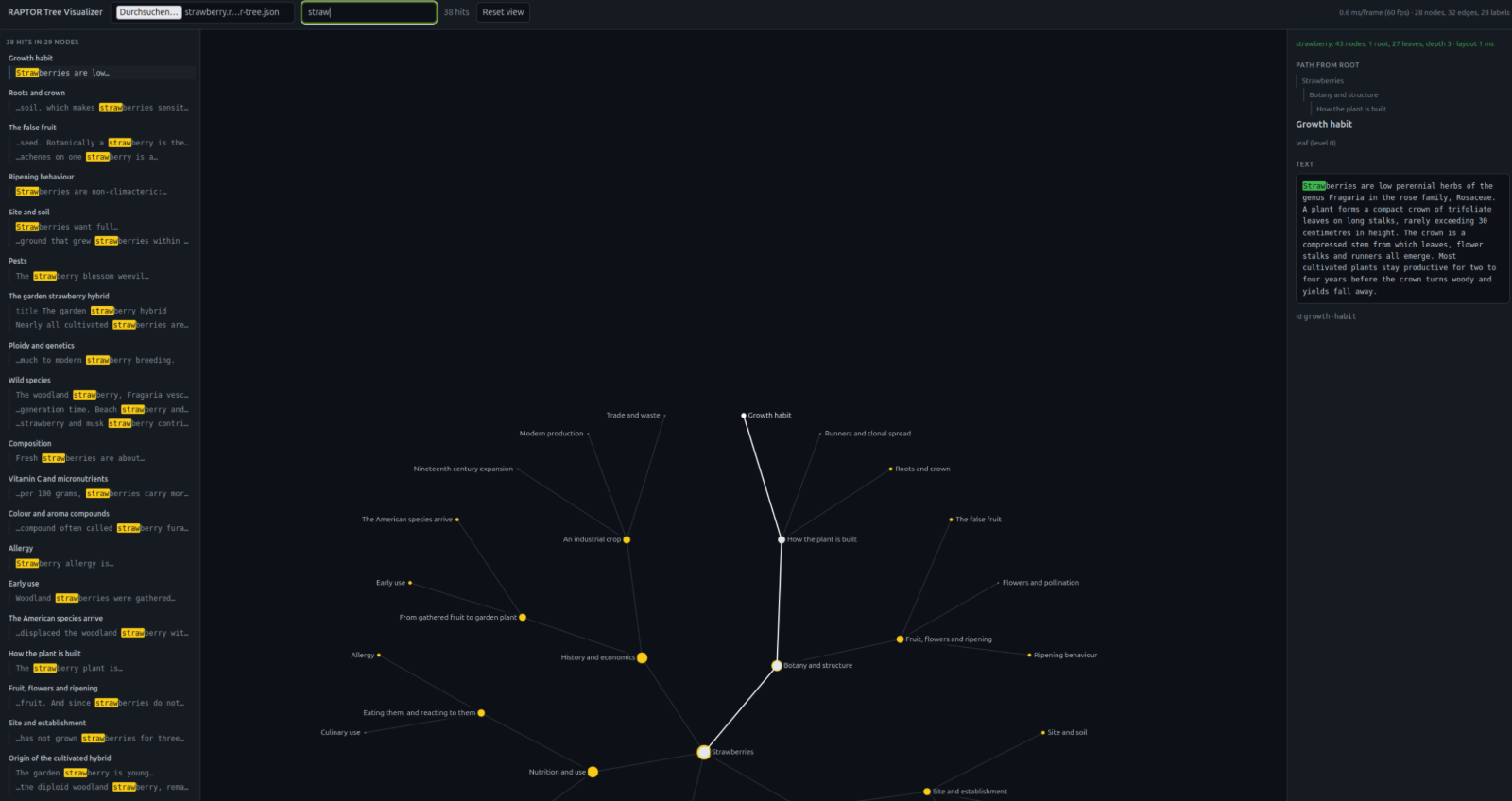
The same search after clicking the first result. The node is selected, its path to the root is drawn in white, and the exact occurrence is green in the text on the right — the rest of the tree keeps its yellow markers, so you do not lose the overview by looking at a detail. Two details worth knowing. The list is capped at 200 results, but the count is not — a search reporting "3,412 hits in 900 nodes · showing first 200" is telling the truth about both. And highlighting inside a node re-searches its text rather than filtering that capped list, so a node with fifty occurrences gets all fifty marked. Queries shorter than two characters are ignored, and the search is debounced by 120 ms: one pass over a 12,000-node tree costs about 25 ms, which is enough to make a field feel like it is lagging behind the typing.
Zoomed in, labels wrap over up to five lines and are dropped when they would collide, so what stays on screen is readable. How the layout is sizedLevel is radius, and each subtree gets an arc proportional to its leaf count, so dense branches get more room. The ring gap is derived from the leaf count rather than fixed: the outer circumference has to seat every leaf. With a constant gap, 11,346 leaves land 0.3 units apart and merge into a solid line that no amount of zooming separates. The opening zoom follows from the same number. If the whole tree fits with its leaves still a few pixels apart it is shown whole; otherwise the view starts about two rings deep, on the root. A large tree fitted to its extent is an unreadable ring, and a small tree zoomed to two rings is cropped for nothing.
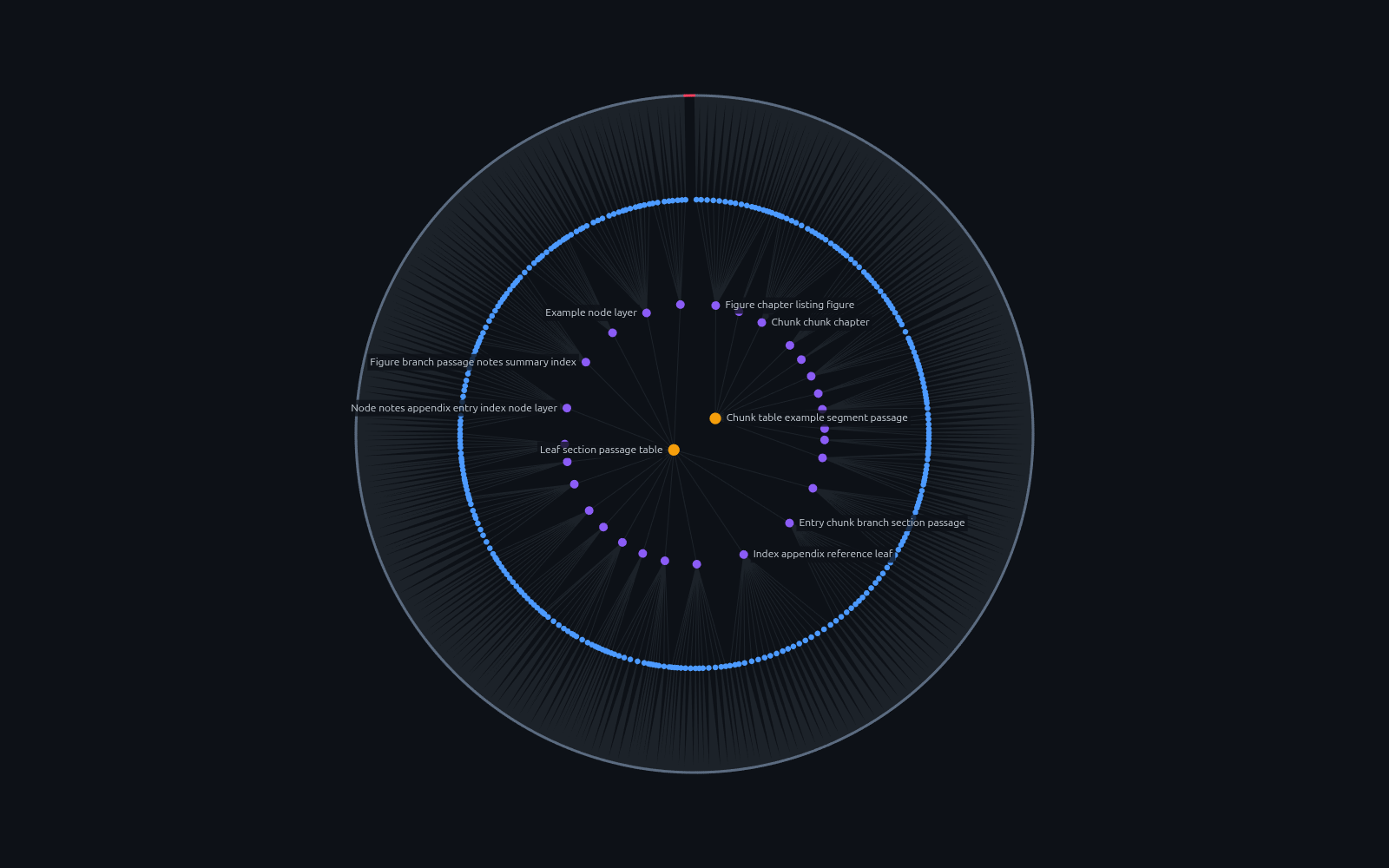
A real tree of 3,908 nodes: two roots in the centre, then 28 and 320 summary nodes, and an
outer ring of 3,558 leaves. The red mark at the top is 17 orphaned leaves hanging off
nothing. Contents redacted with
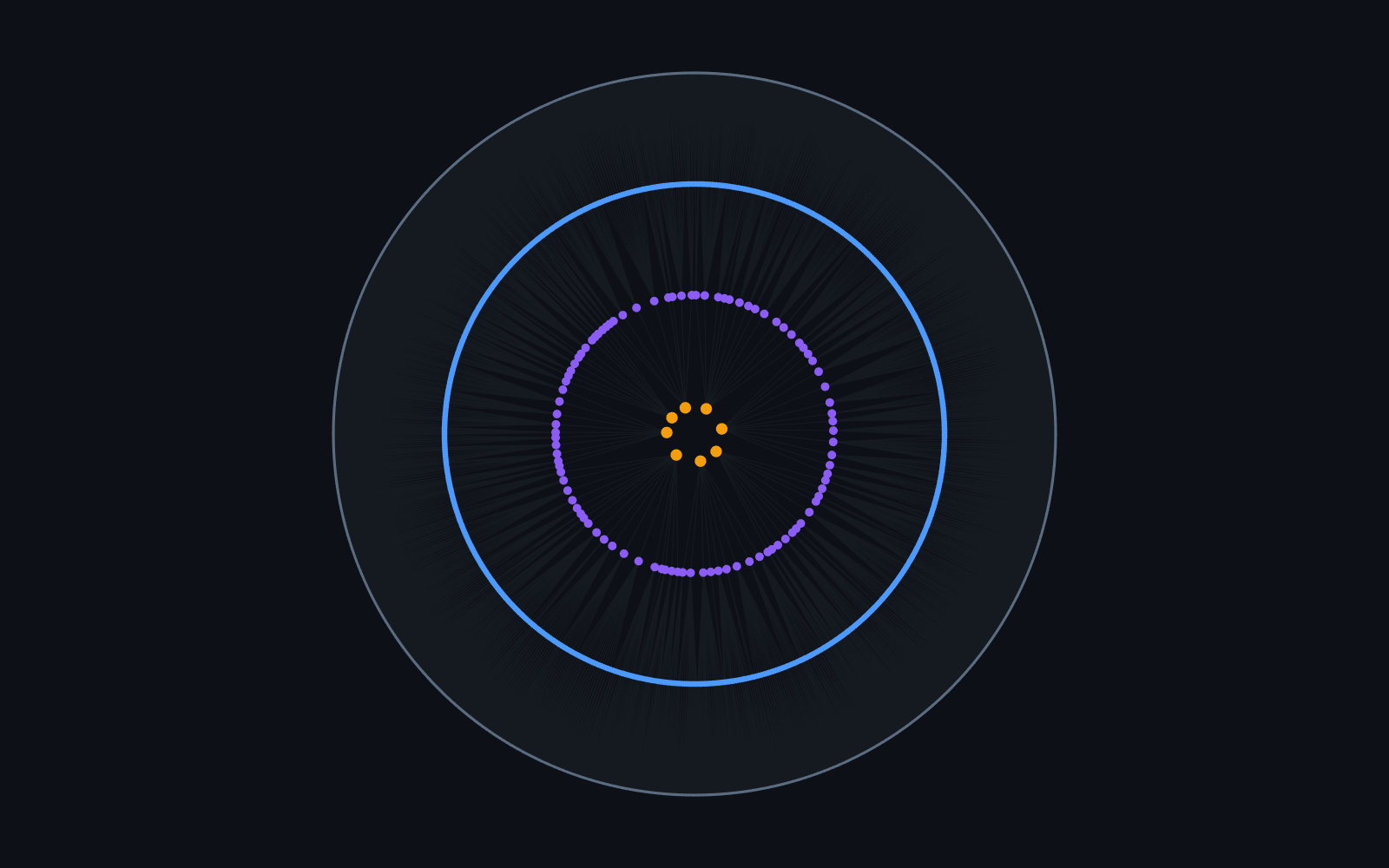
And at 12,485 nodes. Fully zoomed out, 1,035 mid-level nodes and 11,346 leaves become solid rings — that is what 12,000 nodes on a circle look like, and no layout hides it. Zooming in is what makes it readable, which is why the view does not start there. Measured on 12,485 nodes and 12,477 edges at 1600×900 (Ryzen AI 7 PRO 350, integrated graphics), 60 frames per zoom level:
Hit-testing a pointer move over all 12,485 nodes costs 0.18 ms, by comparing in world space — converting the cursor once instead of projecting every node. The budget for 60 fps is 16.7 ms per frame, so there is room to spare — no WebGL, and no spatial index. Culling is a plain loop over every node, because 12,000 visibility checks cost less than the structure that would avoid them. Edges and nodes are batched into one path per style; twelve thousand individual strokes would cost more than everything else combined. One consequence worth knowing: edge opacity falls as the edge count rises. Thousands of half-transparent lines converging on one ring otherwise accumulate into a sheet brighter than the nodes drawn on top of it — the structure disappears exactly when there is most of it to see. Labels are placed greedily against a collision list, ranked by selection, then level, then subtree size. Arc room alone is not enough to decide: it measures separation along the ring, but labels are wide, so two neighbours on a ring running horizontally across the view are far apart along the arc and still overlap. Convert JSONL node dumps into the format, one tree per input file: Field names differ between projects, so remap them as needed, and name trees explicitly when the filenames collide: Mapping Then check it: A pickled tree needs no options at all — node indices become ids, levels are recovered by
inverting A LlamaIndex index is a whole directory rather than a file — whatever
Only
Adapters
The reader picks itself from the path — Reading a pickle without executing it
So this project does not use Python's unpickler at all. The difference from a restricted
— and the test asserts the file was never created. Ten hardening cases (lengths claiming 2^62 bytes, truncated input, unknown opcodes, unfilled memo slots, protocol 0/1 text pickles) each fail in under half a millisecond with a message naming the opcode and byte offset, rather than allocating or looping. Protocols 2–5 are supported, which is every protocol One honest caveat: the reader cannot execute anything, but that is not a licence to trust a file's contents. A hostile pickle can still describe a tree designed to mislead you. Documentation
The last two are generated from one source, ContributingMissing a format? An adapter is one file that turns a source into One gotcha worth knowing: roots are the nodes at the highest level, not "every node without a parent". On real data the latter returns the actual roots plus every orphan, which silences the orphan warning and drops lone leaves into the centre of the layout. Licence |