Smart TODO Manager



A powerful VS Code extension that helps you track and manage TODO, FIXME, HACK, NOTE, and BUG comments across your entire codebase.
✨ Features
- 🔍 Smart Scanning - Automatically finds all TODO comments in your workspace
- 📁 Organized View - Groups TODOs by file in a clean, collapsible tree view
- 🎯 Quick Navigation - Click any TODO to jump directly to that line of code
- ⚡ Real-time Updates - Auto-refreshes when you save files
- 🗑️ Easy Deletion - Remove completed TODOs with one click
- 📊 Status Bar Counter - See your TODO count at a glance with color-coded warnings
- 🎨 Priority Support - Mark urgent TODOs with
TODO!!! for higher visibility
- 💬 Multi-Language Support - Works with JavaScript, Python, Java, C++, Go, Ruby, PHP, Swift, Kotlin, Rust, and more
📸 Screenshots
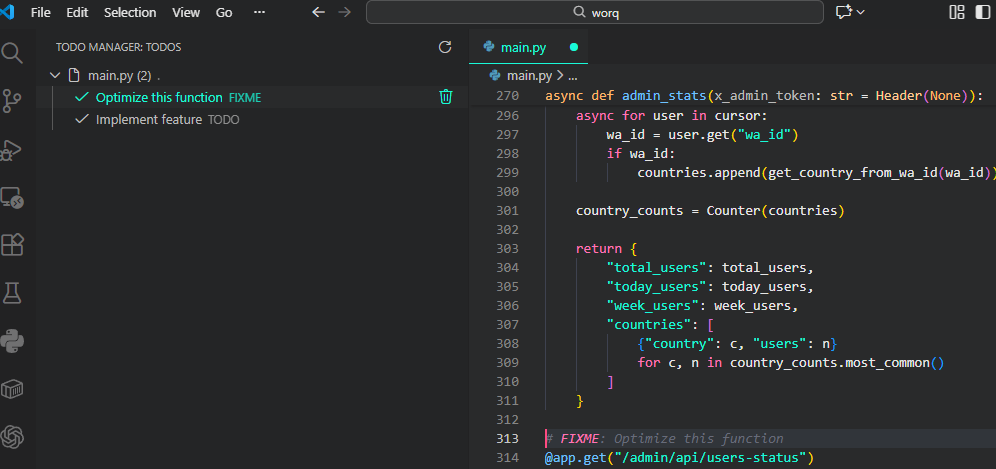
TODO Manager Panel
View all your TODOs organized by file in the sidebar:
📋 TODO Manager
  └─ main.py (3)
      ├─ ✓ TODO: Fix this bug
      ├─ 🔧 FIXME: Optimize performance
      └─ ⚠️ HACK: Temporary solution
Status Bar
Quick overview of your TODO count:
- ✓ 0-5 TODOs - Green (all good!)
- ⚠️ 6-20 TODOs - Yellow (getting busy)
- 🔴 21+ TODOs - Red (time to clean up!)
🚀 Installation
From VSIX File:
- Download the
.vsix file
- Open VS Code
- Press
Ctrl+Shift+P (or Cmd+Shift+P on Mac)
- Type "Install from VSIX"
- Select the downloaded file
From Marketplace (Coming Soon):
- Open Extensions view (
Ctrl+Shift+X)
- Search for "Smart TODO Manager"
- Click Install
📖 Usage
The extension recognizes these comment types:
// TODO: Add error handling
// FIXME: Memory leak here
// HACK: Temporary workaround
// NOTE: Important information
// BUG: This doesn't work properly
# TODO: Implement feature
# FIXME: Optimize this function
# TODO!!! Urgent - fix before release
/* TODO: Update colors */
/* FIXME: Responsive design */
Priority Levels
Add exclamation marks to indicate urgency:
// TODO: Normal priority
// TODO!! Medium priority (yellow)
// TODO!!! High priority (red)
Opening the Panel
- Click the checklist icon (📋) in the Activity Bar (left sidebar)
- Or press
Ctrl+Shift+P and type "View: Show TODO Manager"
Managing TODOs
- Navigate: Click any TODO to jump to its location
- Refresh: Click the refresh button (🔄) to manually scan
- Delete: Hover over a TODO and click the trash icon (🗑️)
- Auto-refresh: TODOs update automatically when you save files
⚙️ Supported File Types
- JavaScript/TypeScript:
.js, .ts, .jsx, .tsx
- Python:
.py
- Java:
.java
- C/C++:
.c, .cpp, .h
- C#:
.cs
- Go:
.go
- Ruby:
.rb
- PHP:
.php
- Swift:
.swift
- Kotlin:
.kt
- Rust:
.rs
- Web:
.html, .css, .scss, .vue
- Other:
.json, .md
🎯 Best Practices
Be Specific: Write clear, actionable TODOs
// ✅ Good: TODO: Add input validation for email field
// ❌ Bad: TODO: Fix this
Use Priority Wisely: Reserve !!! for truly urgent items
// TODO!!! Security vulnerability - fix before deploy
Include Context: Add why it's needed
// TODO: Refactor to async/await (callbacks causing callback hell)
Clean Regularly: Use the extension to identify and complete old TODOs
Team Conventions: Agree on when to use TODO vs FIXME vs HACK
🔧 Commands
| Command |
Description |
TODO Manager: Refresh |
Manually scan workspace for TODOs |
🛠️ Development
Building from Source
# Clone the repository
git clone https://github.com/ibrahimpelumi6142/smart-todo-manager.git
cd smart-todo-manager

# Install dependencies
npm install

# Package the extension
npm install -g @vscode/vsce
vsce package

# Install the .vsix file in VS Code
Testing
- Open the extension folder in VS Code
- Press
F5 to launch Extension Development Host
- Test the extension in the new window
🐛 Known Issues
- Large workspaces (10,000+ files) may take a few seconds to scan initially
- Multiline TODO comments are not currently supported
📝 Changelog
Version 1.0.0
- Initial release
- TODO, FIXME, HACK, NOTE, BUG detection
- File grouping and priority support
- Click-to-navigate functionality
- Auto-refresh on save
- Status bar counter
- Delete TODO functionality
🤝 Contributing
Contributions are welcome! Please feel free to submit a Pull Request.
- Fork the repository
- Create your feature branch (
git checkout -b feature/amazing-feature)
- Commit your changes (
git commit -m 'Add some amazing feature')
- Push to the branch (
git push origin feature/amazing-feature)
- Open a Pull Request
📄 License
This project is licensed under the MIT License.
💖 Support
If you find this extension helpful, please:
- ⭐ Star the repository on GitHub
- 🐛 Report bugs or suggest features via GitHub Issues
- 📣 Share it with your friends and colleagues
- ☕ Buy me a coffee
🙏 Acknowledgments
- Icon design inspired by modern task management apps
- Built with love for the VS Code community
- Thanks to all contributors and users!
Enjoy coding with Smart TODO Manager! 🚀
Made with ❤️ by Lasisi Ibrahim

