IFS Cloud Development Kit
The IFS Cloud Development Kit is a VS Code extension that brings first-class language support, AI-assisted development, and code generation tooling to IFS Cloud developers. It supports the full IFS Cloud DSL (Domain Specific Language) across 40+ file types. While currently packaged as a VS Code extension, the goal is to be IDE agnostic — supporting any editor that is compatible with the VS Code ecosystem (including Cursor).
Disclaimer
IFS Cloud Development Kit is a VS Code Extension that is currently in early preview (beta) and not yet officially released. It is still under active development, so features may change or be incomplete. For this reason, it is not recommended for production or daily use.
Information about support, usage, and availability of this extension and related components will be shared on our IFS Developer Portal in the future. Until the extension becomes generally available, we recommend using IFS Developer Studio for your daily usage and production application development.
This is currently only for testing purposes.
For now you can only generate code on the ongoing/latest IFS Cloud development track. We will introduce previously released target versions later on.
If you have suggestions or feedback on this VS Code extension as we work towards general availability, please share them with us through the IFS Community.
Getting Started
- Install the extension.
- Open a folder containing IFS Cloud source files
- Open the Command Palette (
Ctrl+Shift+P) and run IFS: Open Getting Started for a walkthrough of the extension.
- Download and set up the IFS code generator using IFS: Select Code Generator Target Version from the Command Palette.
- Right-click any supported file in the Explorer and choose IFS: Generate Code or IFS: Generate & Deploy Code.
- For AI assistance, open GitHub Copilot Chat and use the
IFSCloudAgent agent.
Requirements
- VS Code
1.105.0 or later
- Java 11 or higher runtime — required to run the IFS code generator JAR
- Node.js — required to run the local MCP that starts with the extension
- Oracle SQL Developer Extension or Oracle SQLcl — required for database deployment features
Features
Syntax Highlighting
Full syntax highlighting for 40+ IFS Cloud DSL file types, including:
.abnf .analysisdatasource .analysismodel .annotations4 .antlrtoken .app .bo .client .clnsource .dbchange .dbdictionary .ddlsource .dmlsource .entity .enumeration .fragment .genericmodel .javatemplateexpression .jsonschema .lobbydatasource .lobbyelement .mkd .offline .offlineexpression .outbound .parquetdatasource .plsql .plsql4 .plsvc .plsvt .pltst .pltst4 .projection .projectiontest .scheduling .sequence .sequence4 .sqldml .sqldml4 .sqldmltest .sqlfunctions4 .storage .storage4 .template .utility .views .views4 .xetrigger
Code Generation & Deployment
Invoke the IFS code generator directly from VS Code:
- IFS: Generate Code (
Ctrl+Shift+F7) — Runs the code generator on the active or selected file and shows generated output files.
- IFS: Generate & Deploy Code (
Ctrl+Shift+F8) — Generates code and immediately deploys it to the configured database.
- IFS: Deploy Code — Validates selected deployable files for illegal Unicode characters before deployment and proceeds only when validation passes.
- These actions are also available in the editor context menu, Explorer context menu, and IFS File Explorer context menu for supported files and artifact folders.
IFS File Explorer & Navigator
Version 0.0.8 adds a dedicated IFS File Explorer activity bar view for navigating IFS Cloud source trees in a structure closer to IFS Developer Studio.
- Organizes files by component → artifact type → file
- Supports artifact groups such as entities, utilities, enumerations, fragments, client pages, projections, reports, upgrade scripts, storage artifacts, and generated output
- Includes Reveal Active File in Tree (
Ctrl+Shift+1) for quickly locating the current editor file
- Includes a Navigator view that lists symbols for supported
.plsql, .plsvc, .pltst, .plsvt, .storage, .storage4, .views, and .views4 files
- Supports A-Z sorting or file-order navigation in the Navigator, with configurable symbol kinds
- Lets you open generated files in read-only mode to avoid accidental edits
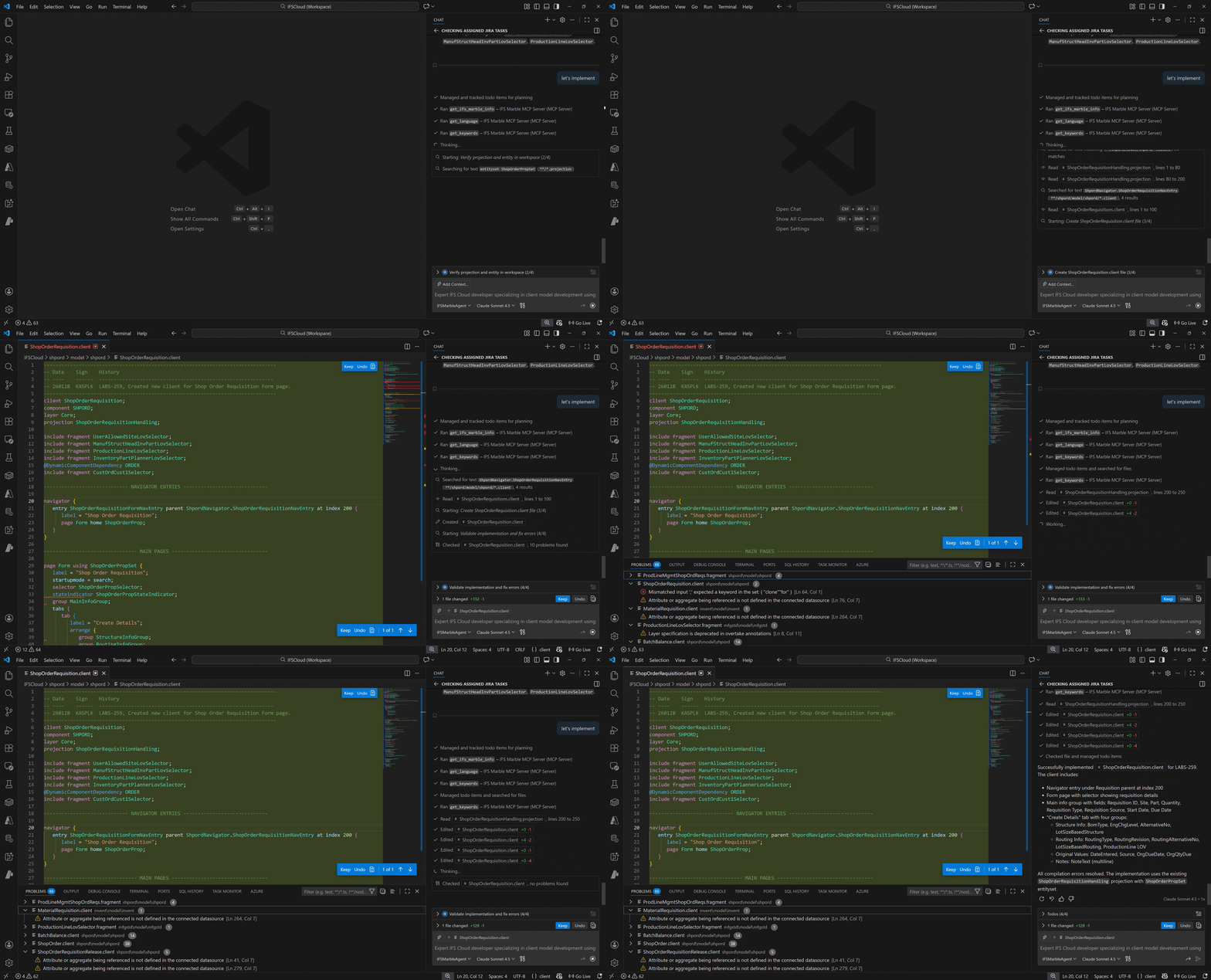
AI Chat Agents
Two purpose-built AI agents are included for use with GitHub Copilot Chat or Cursor:
- IFSCloudAgent — Full-featured expert agent for all IFS Cloud development tasks. Integrates with the MCP server, code generation tools, and all skills.
- IFSCloudBasicAgent — Lightweight variant optimized for free-tier AI models.
AI Skills
Domain-specific skills that give Copilot deep knowledge of IFS Cloud file formats:
| Skill |
Description |
client |
Creating and modifying .client UI files |
fragment |
Reusable .fragment elements for client and projection layers |
projection |
.projection data access layer definitions |
plsvc |
.plsvc server-side projection logic |
plsql |
.plsql PL/SQL business logic packages, entity APIs, and state machines |
business-object |
.bo business object file structure and dependencies |
test-automation |
.mkd test automation scripts (Script-A-Rest / SAR) |
customization |
customization supports development workflow with customizations |
MCP Server
An embedded Model Context Protocol (MCP) server exposes IFS Cloud language knowledge to AI tools:
get_supported_languages — Lists all supported IFS Cloud DSL languages.get_language — Returns detailed information about a specific language.get_keywords — Looks up keyword definitions for a given language.get_rules — Looks up grammar rules for a given language.
This server is automatically registered in Cursor workspaces and is available to the IFSCloudAgent.
Customization Project Setup
Getting started with Customization project setup
- Open a folder containing customization project.
- Open the Command Palette (
Ctrl+Shift+P) and run IFS: Set Core Files Location (Customization Support)
- Set the core files location (secondary files location path) and press enter which automatically loads the Core Files - Workspace.
- Right-click any supported file in the Explorer and choose IFS: Generate Code or IFS: Generate & Deploy Code.
- For AI assistance, open GitHub Copilot Chat and use any agents.
- Ability to configure secondary file locations via settings.conf
- Improved indexing for:
- Customization files
- Extended project structures
- AI context awareness
Database Integration
Commands
All commands are available via the Command Palette (Ctrl+Shift+P).
| Command |
Keybinding |
Description |
| IFS: Generate Code |
Ctrl+Shift+F7 |
Runs the code generator on the active or selected file and shows generated output files. Also available in the editor and Explorer context menus. |
| IFS: Generate & Deploy Code |
Ctrl+Shift+F8 |
Generates code and immediately deploys it to the configured database. Also available in the editor and Explorer context menus. |
| IFS: Generated Files |
— |
Opens a view listing the files produced by the last code generation run. |
| IFS: Select Default Database |
— |
Sets the default Oracle database connection used for deployment. The active connection is shown in the status bar. |
| IFS: Select Code Generator Target Version |
— |
Selects the target IFS Cloud version for code generation. |
| IFS: Deploy Code |
— |
Validates deployable files if illegal unicode characters are present |
| IFS: Open Getting Started |
— |
Opens the built-in Getting Started walkthrough for the IFS Cloud Development Kit. |
| IFS: Set Core Files Location (Customization Support) |
— |
Adds Secondary Location Path to settings.conf file |
| IFS: Add Commands |
— |
Adds IFS Cloud agents as commands to the current Cursor workspace. (Cursor only) |
| IFS: Add Agent Skills |
— |
Adds IFS Cloud AI agent skills to the current Cursor workspace. (Cursor only) |
| IFS File Explorer: Select Visible Components |
— |
Lets you filter the IFS File Explorer tree to specific components. |
| IFS File Explorer: Reveal Active File in Tree |
Ctrl+Shift+1 |
Reveals and selects the active editor file in the IFS File Explorer tree. |
| IFS File Explorer: Open Generated File (Read-Only) |
— |
Opens generated files in read-only mode from the IFS File Explorer. |
| IFS File Explorer: Configure Navigator Symbols |
— |
Controls which symbol kinds are shown in the Navigator view. |
Extension Settings
| Setting |
Default |
Description |
MarbleCodeGenerator.DeploymentProvider |
oracle-sql-developer |
Deployment provider to use for "Generate & Deploy" command |
MarbleCodeGenerator.SqlclExecutablePath |
"" |
Full path to the SQLcl binary used by the oracle-sqlcl provider |
ifsFileExplorer.components |
[] |
Limits the IFS File Explorer to the listed components. Leave empty to show all components. |
ifsFileExplorer.generatedRoot |
"" |
Overrides the generated output root. By default the explorer resolves ../build/gen relative to the workspace. |
ifsFileExplorer.revealActiveFile |
true |
Automatically reveals the active editor file in the IFS File Explorer. |
ifsFileExplorer.navigatorSortAZ |
true |
Sorts Navigator symbols alphabetically. Disable it to keep file order with section dividers. |
ifsFileExplorer.navigatorKinds.* |
true |
Controls visibility of supported symbol kinds in the Navigator view. |
Configure this in your VS Code settings to your preferred deployment provider.
Known Issues
This extension is currently in preview. Please report issues through your internal IFS development channels.
Release Notes
0.0.9
- Code generator downloads now use a bundled Java verification helper to validate signed JAR contents and signer fingerprints before replacing the active version.
- SQLcl deployments and connection tests now launch in thin mode to avoid OCI client version mismatch failures on machines with incompatible Oracle client libraries.
- Code generation now stops when the active file has error diagnostics and reports the blocking locations in the Code Generation output.
- Navigator reopen behavior no longer forces stale symbol selection when the tree view is hidden.
0.0.8
- Added the IFS File Explorer activity bar view for browsing IFS Cloud artifacts by component and file type.
- Added the Navigator view for supported PL/SQL, test, storage, and view files.
- Added file explorer commands for revealing the active file, filtering components, opening generated files read-only, and configuring navigator behavior.
- Added workspace settings for IFS File Explorer visibility, generated output root override, and navigator symbol presentation.
0.0.7
- RMB option to deploy code for the deployable files have been added with the illegal unicode characters validations
- Reinstated the rollbacked changes from the version 0.0.5
0.0.6
- Rollbacked the changes related to customization support from version 0.0.5 due to stability issues.
0.0.5
- Added full customization framework support.
- Introduced agentic support for customization development.
- Code generator updated for customization-aware generation.
- Added multi-root workspace support.
- Introduced secondary file locations via settings.conf through a command.
- Improved indexing for customization and extended project structures.
0.0.4
0.0.3
- Code generator is now downloaded and managed by the extension — no manual JAR installation required.
- IFS: Select Code Generator Target Version command to download and activate a code generator version.
- Background update check for rolling-track (early-access) versions.
- Two-stage JAR verification (signature integrity + certificate fingerprint pinning).
- Improved language server stability: no more crash-loop on missing or corrupt JAR.
- Added disclaimer section clarifying early-preview status.
0.0.2
- Getting started walkthrough with guided setup steps.
- Deployment provider selection: Oracle SQL Developer Extension (default) or Oracle SQLcl.
IFS: Select Default Database command and status bar indicator.- Database connection tree view with add / edit / delete / refresh commands.
0.0.1
Initial preview release.

