Claude Usage Tracker for Claude Code
Your Claude usage, in the sidebar next to the Claude Code panel — and it speaks
first.
Every other usage tool waits to be asked: a bar chart you open, a number you
hover over. This one comes to you. When you cross a threshold, a pixel Claude
character steps into the panel and says how much is left. When the moment passes,
the view disappears and the sidebar looks exactly as it did before.
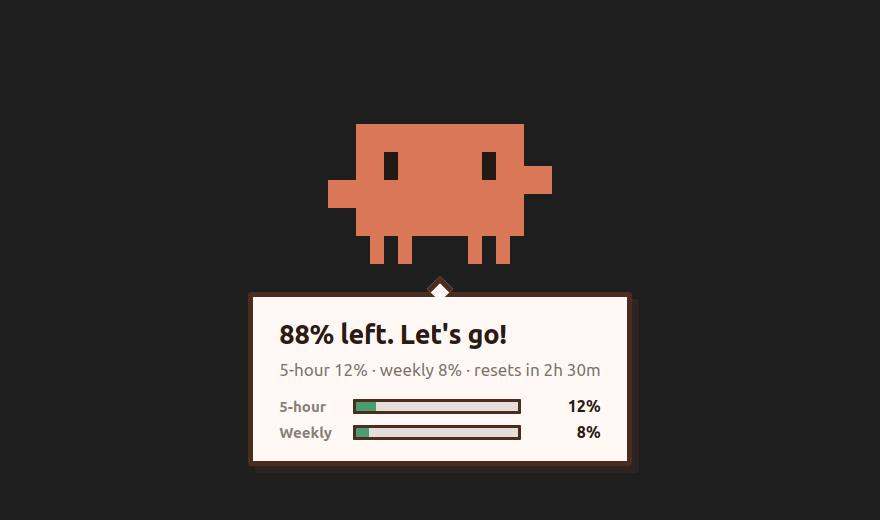
The same character, same lines. Shown here in the desktop app's full-screen
overlay; in VS Code it appears inside the sidebar panel.
What you see
Normally — one collapsed line. The view sits collapsed with a header that
reads 5h 12% · week 21%. Nothing moves, nothing interrupts.
At a threshold — a notification, not your whole screen. The desktop app
covers every monitor, because its job is to pull your eyes off what you're doing.
Inside the editor that's too much force. So the extension speaks in the corner
instead: a notification in the bottom right, exactly where a hover would appear,
carrying the character's own line. Set claudeUsage.alertInPanel to character
to get the sidebar view instead, or quiet for neither.
Why not open the hover itself? VS Code has no API for it. A StatusBarItem
exposes text, tooltip, color and command — nothing that says "show your
tooltip now". The notification is the only popup an extension can raise on its
own, and it lands in the same corner.
With the sidebar view — the character. When alertInPanel is character, a
second view appears above the collapsed line with the character and one sentence:
"90% 남았어. 시작하자!" or "5시간 사용량을 다 썼어!" It holds for a few seconds
and then the view removes itself — VS Code has no API to re-collapse a section, so
instead of collapsing, it stops existing.
In the status bar — always. Claude Code also opens as an editor tab, and no
extension can put a view inside one. So the same numbers sit on the right of the
status bar, where every window has room for them: a small pulse icon and
5h 12% · 7d 21%. Hover and the character is there, moving — the same pixel
Claude from the overlay, wearing the expression your current usage calls for and
animating as it does on screen: blinking when calm, sweating when it isn't. Above
the full breakdown and reset times. Click to read again now. Set
claudeUsage.statusBar to alertOnly to keep it quiet until a threshold, or
off to remove it.
Colors come from your theme. Severity is a green / yellow / red dot using the
editor's own chart colors, so it matches whatever theme you use, light or dark.
The status bar uses the same colors, and only turns into a warning block while an
alert is actually on screen.
Thresholds
Alerts fire at 50 / 70 / 90 / 100% of your five-hour window, and again for
the weekly limit. Each threshold fires once per window and resets when the window
does — crossing 70% doesn't re-announce every minute.
The threshold list itself is shared with the desktop app
(~/.config/claude-usage-tracker/settings.json). Whether this panel says
anything about them is claudeUsage.alertInPanel.
Requirements
- Claude Code, signed in on this machine.
The extension reads the OAuth token from
~/.claude/.credentials.json.
- VS Code 1.94 or newer.
- No account, no API key, no configuration to get started.
How it reads your usage
It calls the same endpoint Claude Code itself uses:
GET https://api.anthropic.com/api/oauth/usage
Authorization: Bearer <token from ~/.claude/.credentials.json>
anthropic-beta: oauth-2025-04-20
That returns real utilization percentages and reset times — not an estimate
derived from counting tokens in transcript files, which is what tools without
this endpoint have to do.
The token never leaves your machine except in that one request. It is not
logged, not written to disk by this extension, not sent anywhere else. Everything
this extension stores is a small state file under
~/.config/claude-usage-tracker/ recording which thresholds have already fired.
With the desktop app
The desktop app is optional.
The extension works alone. Running both is the intended setup, and they cooperate
on two things:
- One process asks the API. Whichever starts first takes a lease and polls;
the others read the result it leaves behind. Four VS Code windows and a tray
app do not make four requests a minute — they make one.
- One of them speaks. While this panel is visible it takes the alert; when
it isn't, the full-screen overlay does. You never get told twice.
Settings
| Setting |
Default |
What it does |
claudeUsage.pollIntervalSec |
60 |
How often to re-read usage, in seconds (15–600). Takes precedence over the desktop app's setting. |
claudeUsage.alertInPanel |
notification |
notification — a popup in the bottom-right corner. character — the character appears in the sidebar and then leaves. quiet — only the header and status bar change. off — never alerts. |
claudeUsage.statusBar |
always |
always — the numbers stay in the status bar. alertOnly — it appears only at a threshold. off — nothing in the status bar. |
claudeUsage.language |
auto |
auto follows VS Code's display language. English and Korean; every line is translated. |
Command: Claude 사용량: 지금 확인 (claudeUsage.refresh) — read the numbers
right now instead of waiting for the next poll. Also on the view's title bar as a
refresh button.
If it shows nothing
- The header is empty or says it can't read usage. Claude Code isn't signed
in on this machine, or
~/.claude/.credentials.json has no OAuth token. Run
claude once and sign in.
- You don't see the view at all. It lives in the Claude Code sidebar
container, not in the Explorer — and if you run Claude Code as an editor tab,
that container isn't on screen at all. Open the secondary side bar
(
Ctrl+Alt+B) and move Claude Code there, or just read the status bar, which
is there either way.
- Numbers stop updating for a few minutes. The usage endpoint rate-limits.
The extension backs off and slows its polling instead of hammering it; the last
known numbers stay on screen until a fresh reading arrives.
Source
MIT licensed, built in the open:
github.com/HosungJoo/claude-usage-tracker
· issues
Claude Usage Tracker for Claude Code (한국어)
Claude Code 패널 옆 사이드바에서 사용량을 보여주고, 먼저 말을 겁니다.
다른 사용량 도구는 물어봐야 답합니다 — 열어야 보이는 막대 그래프, 갖다 대야
뜨는 숫자. 이 확장은 먼저 나섭니다. 임계값을 넘으면 픽셀 클로드 캐릭터가 패널에
나와 남은 양을 말하고, 시간이 지나면 뷰가 사라져 사이드바는 알림 전과 똑같은
모양으로 돌아갑니다.
무엇이 보이나
평소에는 접힌 한 줄. 머리줄에 5시간 12% · 주간 21% 만 떠 있습니다.
움직이지도, 방해하지도 않습니다.
임계값에서는 화면 전체가 아니라 구석의 알림. 데스크톱 앱은 모든 모니터를
덮습니다 — 하던 일에서 눈을 떼게 만드는 것이 목적이니 그게 맞습니다. 하지만
편집기 안에서는 그 세기가 과합니다. 그래서 이 확장은 구석에서 말합니다:
오른쪽 아래, 말풍선이 뜨는 바로 그 자리에 알림이 뜨고 캐릭터의 대사를 그대로
전합니다. claudeUsage.alertInPanel 을 character 로 두면 사이드바 뷰가,
quiet 로 두면 둘 다 뜨지 않습니다.
말풍선 자체를 열면 되지 않나? VS Code에 그런 API가 없습니다. StatusBarItem
이 내주는 것은 text·tooltip·color·command 뿐이고, "지금 네 말풍선을
열어라"에 해당하는 것은 없습니다. 확장이 스스로 띄울 수 있는 팝업은 이 알림
하나뿐이고, 뜨는 자리는 같습니다.
사이드바 뷰에서는 캐릭터. alertInPanel 이 character 면 접힌 줄 위에 뷰가
하나 생기고 캐릭터가 한 문장을 말합니다 — "90% 남았어. 시작하자!",
"5시간 사용량을 다 썼어!". 몇 초 뒤 그 뷰는 스스로 사라집니다. VS Code에는
접힌 섹션을 다시 접는 API가 없어서, 접는 대신 없어지게 만들었습니다.
상태 표시줄에는 언제나. Claude Code는 에디터 탭으로도 열립니다. 에디터 탭
안에는 어떤 확장도 뷰를 붙일 수 없어서, 그렇게 쓰면 사이드바 뷰가 화면에 아예
없습니다. 그래서 같은 숫자를 상태 표시줄 오른쪽에도 둡니다 —
작은 아이콘 하나와 5시간 12% · 주간 21%. 갖다 대면 캐릭터가 움직이고
있습니다 — 오버레이에 나오는 그 픽셀 클로드가, 지금 사용량에 맞는 표정으로,
화면에서와 똑같이 움직입니다. 평온하면 눈을 깜박이고, 아니면 식은땀을 흘립니다.
전체 내역과 초기화 시각은 그 아래입니다. 누르면 그 자리에서 다시 읽습니다.
claudeUsage.statusBar 를 alertOnly 로 두면 임계값을 넘을 때만 나오고,
off 면 아무것도 두지 않습니다.
색은 테마가 정합니다. 심각도는 초록·노랑·빨강 점 하나로만 말하고, 편집기의
차트 색을 그대로 쓰므로 어떤 테마에서도 어울립니다. 상태 표시줄도 같은 색을
쓰고, 경고색 블록이 되는 것은 알림이 실제로 떠 있는 동안뿐입니다.
임계값
5시간 사용량의 50 / 70 / 90 / 100%, 그리고 주간 한도에서 각각 한 번씩
알립니다. 창이 초기화되면 다시 울릴 수 있게 리셋됩니다 — 70%를 넘었다고 1분마다
다시 말하지 않습니다.
임계값 목록 자체는 데스크톱 앱과 공유합니다
(~/.config/claude-usage-tracker/settings.json). 이 패널이 그것을 알릴지는
claudeUsage.alertInPanel 로 정합니다.
필요한 것
- 이 컴퓨터에 로그인된 Claude Code.
~/.claude/.credentials.json 의 OAuth 토큰을 읽습니다.
- VS Code 1.94 이상.
- 계정도, API 키도, 초기 설정도 필요 없습니다.
사용량을 읽는 방법
Claude Code가 스스로 쓰는 것과 같은 엔드포인트를 호출합니다:
GET https://api.anthropic.com/api/oauth/usage
Authorization: Bearer <~/.claude/.credentials.json 의 토큰>
anthropic-beta: oauth-2025-04-20
토큰 수를 세어 추정하지 않고, 실제 이용률과 초기화 시각을 그대로 받아옵니다.
토큰은 그 요청 말고는 이 컴퓨터를 떠나지 않습니다. 로그에 남기지 않고, 이
확장이 따로 저장하지도 않으며, 다른 곳으로 보내지 않습니다. 저장하는 것은
~/.config/claude-usage-tracker/ 아래의 작은 상태 파일 — 어떤 임계값이 이미
울렸는지 — 뿐입니다.
데스크톱 앱과 함께
데스크톱 앱은 선택입니다.
확장만으로도 동작합니다. 둘을 함께 쓰는 것이 의도한 구성이고, 두 가지를
맞춥니다:
- API는 한 프로세스만 부릅니다. 먼저 자리를 잡은 쪽이 조회하고 나머지는 그
결과를 받아 씁니다. VS Code 창 네 개와 트레이 앱이 떠 있어도 요청은 분당
네 번이 아니라 한 번입니다.
- 말하는 쪽도 하나입니다. 이 패널이 보이는 동안에는 패널이, 아니면 전체 화면
오버레이가 알립니다. 두 번 듣는 일은 없습니다.
설정
| 설정 |
기본값 |
하는 일 |
claudeUsage.pollIntervalSec |
60 |
사용량을 다시 읽는 주기(초, 15–600). 데스크톱 앱 설정보다 우선합니다. |
claudeUsage.alertInPanel |
notification |
notification — 오른쪽 아래 알림으로 뜸. character — 사이드바에 캐릭터가 나왔다 사라짐. quiet — 머리줄과 상태 표시줄 문구만 바뀜. off — 알리지 않음. |
claudeUsage.statusBar |
always |
always — 상태 표시줄에 숫자를 계속 띄움. alertOnly — 임계값을 넘었을 때만 나옴. off — 상태 표시줄에는 띄우지 않음. |
claudeUsage.language |
auto |
auto는 VS Code 표시 언어를 따릅니다. 한국어·영어 모두 번역돼 있습니다. |
명령: Claude 사용량: 지금 확인 (claudeUsage.refresh) — 다음 주기를
기다리지 않고 그 자리에서 읽습니다. 뷰 제목줄의 새로고침 버튼도 같은 일을 합니다.
아무것도 안 보인다면
- 머리줄이 비어 있거나 읽을 수 없다고 나옵니다. 이 컴퓨터에 Claude Code가
로그인돼 있지 않거나
~/.claude/.credentials.json 에 OAuth 토큰이 없습니다.
claude 를 한 번 실행해 로그인하세요.
- 뷰 자체가 안 보입니다. 탐색기가 아니라 Claude Code 사이드바 안에 있습니다.
Claude Code를 에디터 탭으로 쓰고 있다면 그 컨테이너가 화면에 아예 없습니다.
보조 사이드바(
Ctrl+Alt+B)를 열어 Claude Code를 그쪽으로 옮기거나, 어느 쪽이든
늘 있는 상태 표시줄의 숫자를 보세요.
- 몇 분 동안 숫자가 안 바뀝니다. 사용량 엔드포인트가 요청을 제한한 것입니다.
더 두드리는 대신 주기를 늦추고, 새 값이 올 때까지 마지막으로 읽은 숫자를
그대로 보여줍니다.
소스
MIT 라이선스, 공개 저장소:
github.com/HosungJoo/claude-usage-tracker
· 이슈

