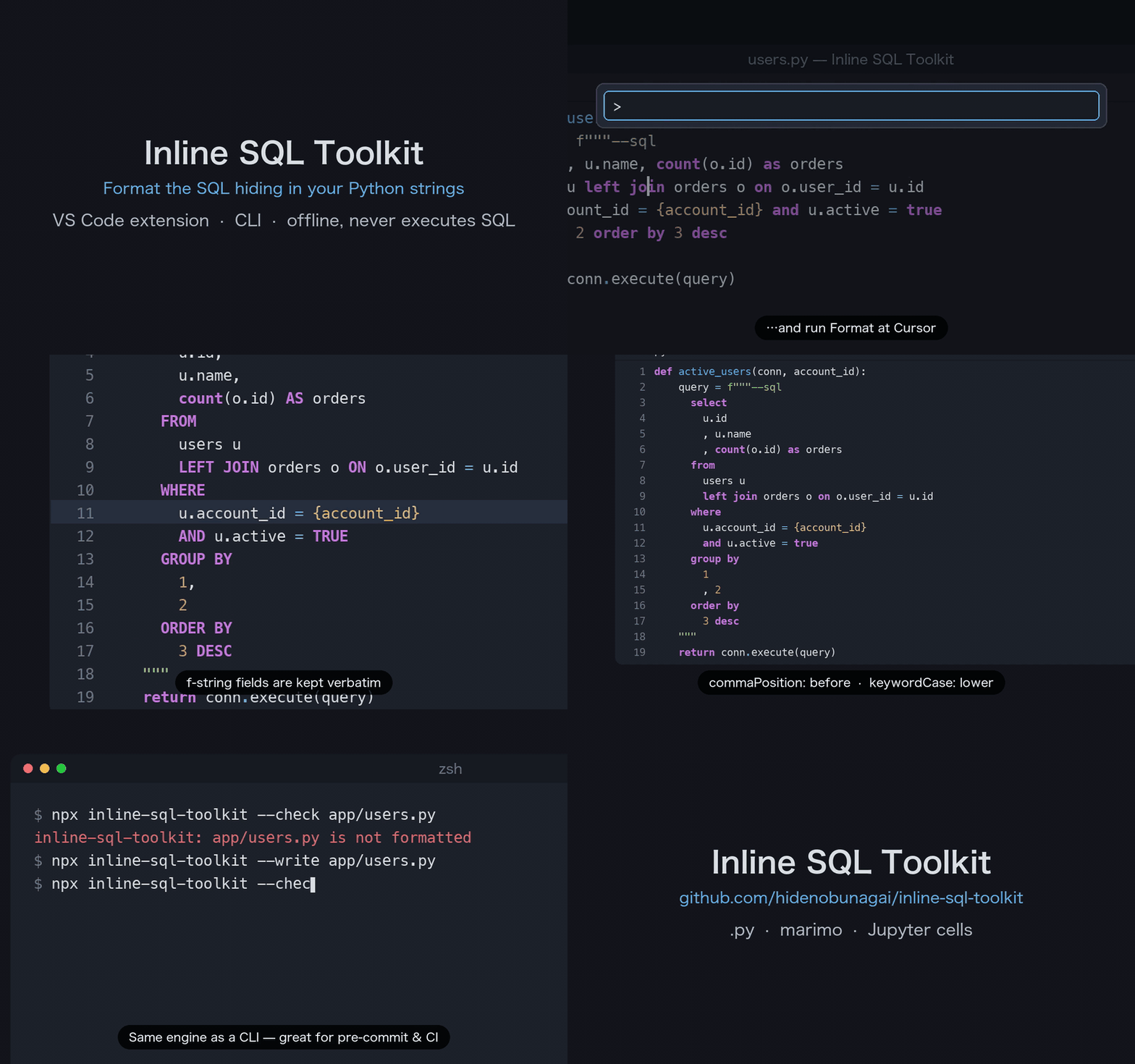
Inline SQL Toolkit highlights SQL embedded in Python strings and formats selected
SQL with the bundled sql-formatter layout engine. It supports ordinary .py
files, marimo
(.mo.py) programs, and Python cells in Jupyter notebooks. In marimo notebooks
the python and mo-python cell languages are supported. SQL-language cells
and notebook magic commands (%sql, %%sql, and similar magic syntax) are not
supported.
Requirements are VS Code 1.95 or newer. Formatting is
manual-only: this extension does not register a formatter provider, format on
save, format on type, or format ranges automatically. The accompanying CLI is
likewise an explicit invocation, not an automated background formatter. It never
executes SQL, validates SQL, infers a SQL dialect, connects to a database, or
sends source to the network. The formatter is best-effort; an unsafe candidate is
skipped while other safe candidates may still be edited.
In short, SQL is never executed by this extension. SQL is never validated by
this extension.
Architecture

Open the interactive architecture diagram (HTML)
Quick start
Open a supported Python document or notebook cell, place the cursor in one of
the examples below, and choose a command from the Command Palette.
Plain string
query = "SELECT id, name FROM users WHERE active = true"
Marker triple-quoted string
query = """--sql
select id, name
from users
where active = true
"""
Formatting keeps the --sql marker directly after the opening quote, indents
the SQL one level below the literal's base indent, and aligns the closing
triple quote with the base indent:
query = """--sql
  select id, name
  from users
  where active = true
"""
A marker on its own line is normalized to the opening quote, so both styles
produce the same output. With the default keywordCase: upper, keywords are
uppercased.
Complex f-string
account_id = get_account_id()
query = f"""--sql
SELECT id, name
FROM users
WHERE account_id = {account_id}
  AND status = {{'active'}}
"""
The f-string example demonstrates that Python replacement fields and escaped
braces remain Python source. Only the SQL portions are considered for layout;
the extension preserves the original f-string expressions and escapes.
Commands
The command IDs are shown for keybindings and automation integrations:
- Inline SQL: Format at Cursor (
inlineSql.formatAtCursor) formats the SQL
candidate containing the cursor.
- Inline SQL: Format Selection (
inlineSql.formatSelection) formats SQL
candidates intersecting the current selection.
- Inline SQL: Format All (
inlineSql.formatAll) formats every detected
candidate in the current document or notebook cell.
Each invocation checks the document version and the expected source text before
creating one WorkspaceEdit, so the operation is one undo step. VS Code does
not provide an atomic, versioned precondition for an edit that happens after
that check. Changes observed before the edit are rejected as stale; a change
that races after the check can still be applied because VS Code provides no
later atomic precondition.
Settings
inlineSql.format.keywordCase: upper (default), lower, or preserve.inlineSql.format.indentWidth: SQL indentation width from 1 to 8 spaces
(default 2).inlineSql.format.wrapAfter: preferred line width from 20 to 500 (default
88).inlineSql.format.useSpaceAroundOperators: add spaces around operators
(default true).inlineSql.format.replaceOrdinals: replace GROUP BY / ORDER BY ordinal
numbers (1, 2, ...) with the referenced select-list column (default
false). This rewrites the query rather than its layout, so it is opt-in.
GROUP BY copies the column's expression, because PostgreSQL, MySQL, and
SQLite resolve a GROUP BY name to an input column before an alias;
ORDER BY uses the alias when it is unique. An ordinal is kept when its
position is unknown (at or after * / t.*), when it follows UNION,
EXCEPT, or INTERSECT (ORDER BY), when the replacement would name
another output column, or when the expression is an aggregate without an
alias or calls a volatile function such as random().inlineSql.format.dialect: SQL dialect used by the formatter (sql,
mysql, postgresql, or sqlite; default postgresql).inlineSql.format.commaPosition: after (default) keeps a wrapping comma at
the end of the previous line; before moves it to the start of the next
line with a space after it (id / , name).inlineSql.format.keepFunctionsInline: re-join the formatter's line breaks
inside word(...) groups so SUM(...), COUNT(CASE ... END), and nested
calls stay on one line (default false). Newlines inside string literals and
comments are never removed.
The extension highlights inline SQL with an injected TextMate grammar: SQL
strings that start with -- sql (or a leading SQL keyword) are embedded as
meta.embedded.sql and colored with the theme's SQL rules. The grammar follows
the same approach as the popular inline-sql-syntax extension and works in
plain files and notebook cells alike. Because the highlighting is grammar-based,
a language server's semantic tokens can override it; if SQL highlighting
disappears, disable semantic highlighting for the language server
(editor.semanticHighlighting.enabled: false) or for the server itself.
Command line (CLI)
The inline-sql-toolkit command-line tool formats Python files or standard input using the exact same formatting engine and safety checks as the VS Code extension's Format All command. Unsafe candidates (such as unsupported literals, unparseable f-strings, or any candidate in a document with an unterminated string) are skipped rather than producing corrupt output.
Run directly via npx or install with bun add -d inline-sql-toolkit (or npm install -D inline-sql-toolkit):
npx inline-sql-toolkit [options] [files...]
When run without file arguments, the CLI reads Python source from standard input and prints the formatted result to standard output. Notebook files (.ipynb) are not supported by the CLI; use the VS Code extension for Jupyter and marimo notebook cell formatting. The CLI supports standard Python source files (.py, .mo.py) and stdin.
CLI Options
| Option |
Description |
Default |
-w, --write |
Rewrite files in place (no write if unchanged) |
off |
--check |
Exit with code 1 if any file would change |
off |
--dialect <name> |
SQL dialect: sql, mysql, postgresql, or sqlite |
postgresql |
--keyword-case <case> |
Case for SQL keywords: upper, lower, or preserve |
upper |
--indent-width <1-8> |
SQL indentation width in spaces |
2 |
--wrap-after <20-500> |
Preferred expression line width |
88 |
--no-space-around-operators |
Keep dense operators |
spaced |
--ordinals |
Replace GROUP BY / ORDER BY ordinals with column names |
off |
--no-ordinals |
Do not replace ordinals (overrides the configuration file) |
|
--comma-position <pos> |
Where a wrapping comma sits: after or before |
after |
--keep-functions-inline |
Keep SUM(...) / COUNT(CASE ... END) on one line |
off |
-c, --config <file> |
Configuration JSON file |
Nearest .inline-sql.json |
-q, --quiet |
Do not report skipped candidates on stderr |
report |
-h, --help |
Show usage help |
|
--version |
Show version number |
|
Exit codes: 0 on success, 1 when --check finds unformatted files, and 2 on usage, configuration, I/O, or formatting errors.
A detected SQL candidate that cannot be formatted safely is left as it is and does not change the exit code. Unless --quiet is given, the CLI prints one line per affected file on stderr, such as inline-sql-toolkit: app.py: skipped 2 SQL candidates (UNSUPPORTED_LITERAL x2); SUPPORT.md lists the reason codes.
Configuration file (.inline-sql.json)
The CLI automatically searches for a .inline-sql.json file in the current working directory and its parent directories. The configuration structure matches VS Code settings:
{
  "format": {
    "keywordCase": "upper",
    "indentWidth": 2,
    "wrapAfter": 88,
    "useSpaceAroundOperators": true,
    "replaceOrdinals": false,
    "dialect": "postgresql",
    "commaPosition": "after",
    "keepFunctionsInline": false
  }
}
Precedence order is CLI flags > configuration file > default values.
Detection and supported syntax
Formatter detection is source-level: it examines Python tokens and the literal
characters in the source, rather than evaluating the string value. A candidate
is found when either condition holds:
The first logical, non-blank line starts with -- sql or --sql after
horizontal whitespace. Matching is case-insensitive and the marker text is
preserved. On format, a marker on its own line moves to sit directly after
the opening quote ("""--sql), so both input styles produce one output.
After removing only physically present ASCII space, tab, CR, and LF
characters, the source starts with one of SELECT, WITH, INSERT,
UPDATE, DELETE, MERGE, CREATE, ALTER, DROP, TRUNCATE, or
EXPLAIN, followed by a word boundary. The two source characters \n are
not treated as whitespace before the keyword. The keyword must be written
entirely in upper or lower case (SELECT / select, never Select), and
it must open a recognizable statement so that prose and bare values are
left alone:
SELECT is followed by a FROM clause or by a select-list expression
(*, a number, a string, a parameter, a function call such as now(),
CASE, ...), so SELECT 1 matches but Select an option does not.WITH name AS (, INSERT INTO, UPDATE table SET, DELETE FROM,
MERGE INTO, CREATE/ALTER/DROP followed by an object kind such as
TABLE, VIEW, or INDEX, TRUNCATE [TABLE] table, and EXPLAIN
followed by a statement.
Inside this shape check, the escapes \n, \r, \t, and a
backslash-newline count as whitespace. Use the --sql marker for any
statement that does not fit these shapes.
Standalone plain and raw strings, f-strings, and raw f-strings (f, rf, and
fr, in either case) are supported with single, double, and triple delimiters
(', ", ''', and """). A parseable candidate in a supported literal is
also the candidate used by the syntax highlighting grammar.
The following are intentionally skipped: bytes and byte strings (b/rb),
implicit or explicit string concatenation, t-strings, f-strings whose
replacement field reuses the literal's own quote (f"{row["id"]}"), dynamic or
non-literal SQL, and SQL-language cells. The extension does not run a Python
parser: it scans string literals only. A document with an unterminated string
literal is not formatted at all, because the scan can no longer tell code from
string text; other syntax errors outside a literal do not stop formatting. Concatenation covers adjacent
literals even across comments or \ line continuations, and any literal joined
with + or +=, whatever the other operand is. A candidate that cannot be
restored without changing Python source is reported as unsafe and is not
edited. Before any edit, the formatted SQL is lexed again and compared with
the original: apart from whitespace and keyword case, every string, quoted
identifier, number, operator, and comment must be unchanged and in the same
order, or the candidate is skipped (FORMATTER_FAILED).
A single-quoted literal stays on one line and keeps its leading and trailing
spaces, because the string may be joined to other text at runtime.
Skipping a literal
To exclude a specific SQL literal from formatting, add an # inline-sql: skip pragma comment (case-insensitive, matched with /\binline-sql:\s*skip(?![\w-])/i). Other comments such as # noqa: E501 or # type: ignore may share the same comment line.
You can place the pragma in either of two ways:
- Trailing comment on the closing line: on the line where the literal ends (the closing quote line).
q = "select a,b from t"  # inline-sql: skip
q = """--sql
select   a,
         b
from t
"""  # inline-sql: skip
- Dedicated comment line immediately preceding the literal: on the line directly above where the literal starts, containing only whitespace followed by the
# inline-sql: skip comment.
# inline-sql: skip
q = """--sql
...
"""
query = (
    # inline-sql: skip
    """--sql ..."""
)
Notes on skipping behavior:
- On triple-quoted strings, any text after the opening quotes (such as
"""--sql # inline-sql: skip) is part of the string body, not a Python comment, so a pragma placed there has no effect.
- A trailing comment on a preceding statement (e.g.
a = "select 1" # inline-sql: skip) does not affect a literal starting on the next line (b = "select 2"). Dedicated comment lines must consist only of whitespace and the comment.
- A pragma applies per line, not per literal: a trailing pragma skips every literal that ends on that line, and a dedicated pragma line skips every literal that starts on the next line. For example,
a, b = "select 1", "select 2" # inline-sql: skip skips both literals; put them on separate lines to skip only one.
- Syntax highlighting is powered by TextMate grammar and is not affected by
# inline-sql: skip. Only formatting excludes the literal.
- When running Format at Cursor on a skipped literal, the command reports
NO_SQL_CANDIDATE.
- Both CLI
--check and --write honor # inline-sql: skip with the exact same rules: skipped literals are never formatted, never reported on stderr as skipped candidates, and do not cause --check to fail.
Trust, privacy, and offline behavior
In an untrusted workspace the extension provides highlighting only. The three
formatting commands remain visible, but formatting is disabled: no analysis
runs, no Code Actions are offered, and no edits are applied until the
workspace is trusted. SQL is not written to disk, logged, telemetered, sent
over the network, passed to a shell/database, or executed. The bundled
sql-formatter code runs offline and is a layout engine, not a SQL validator.
Troubleshooting
- No candidate found: confirm the source uses a supported literal and that
the first logical line has
-- sql/--sql, or that a listed keyword is at
the source-level start with a word boundary.
- Unsupported literal or unsafe f-string: remove concatenation, bytes or
t-string syntax, and close every string literal in the document. Complex f-string
expressions are skipped when their source spans cannot be restored exactly.
- Formatting is unavailable: use a trusted workspace and check the
diagnostic reason shown by the extension (
WORKSPACE_UNTRUSTED,
INVALID_CONFIGURATION, or PROCESS_FAILED).
- SQL looks different than expected: formatting does not validate SQL or
infer a dialect. Adjust the settings above and review the source-level
candidate before applying the one-step edit, or exclude the literal with
# inline-sql: skip.
For security reporting, see SECURITY.md. For source-free bug
reports and diagnostic reason codes, see SUPPORT.md. Licensing and
component provenance are in THIRD_PARTY_NOTICES.md.

