Event Horizon
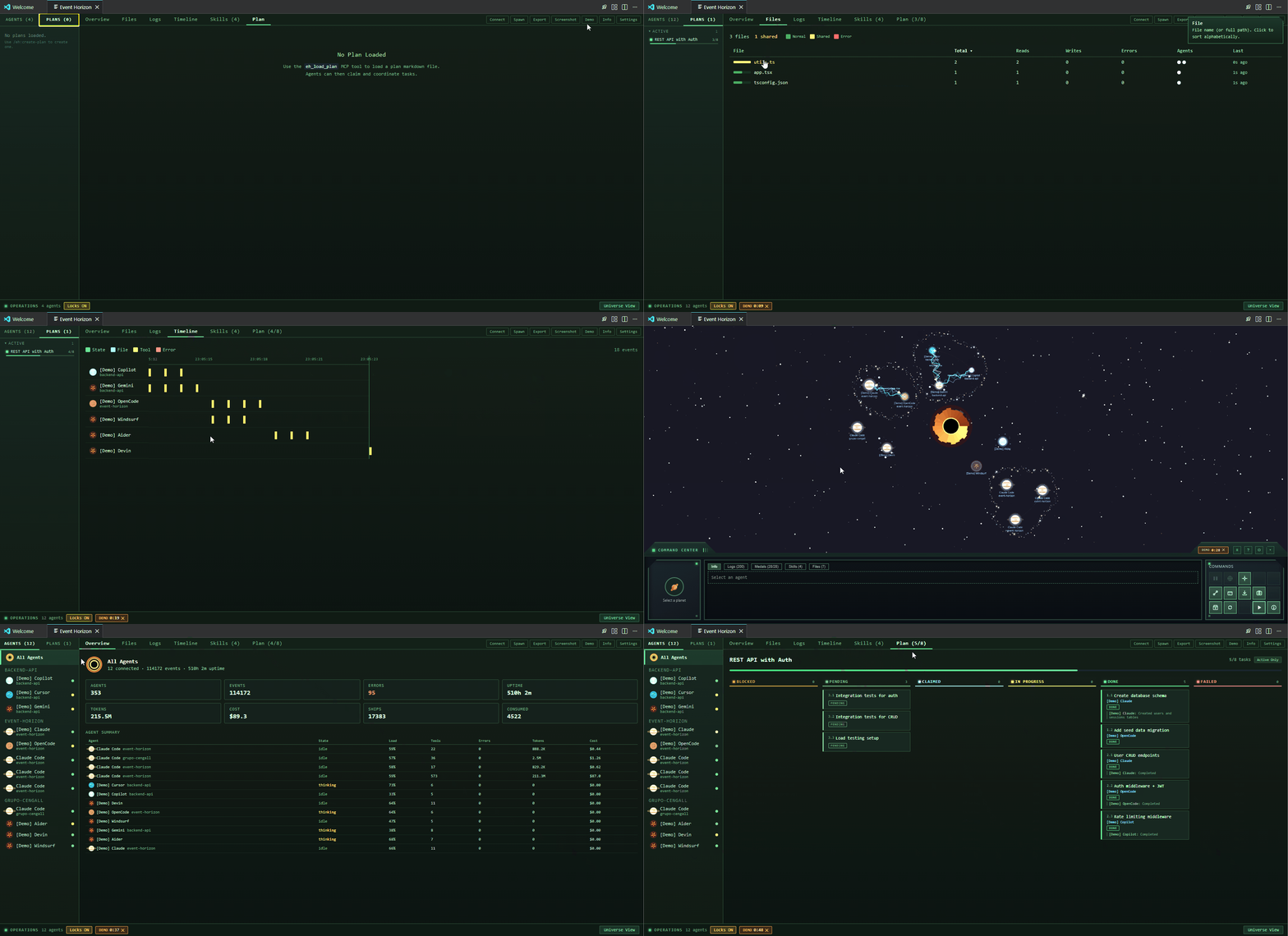
Event Horizon is a VS Code extension that visualizes AI coding agents as a living cosmic system. Instead of viewing logs, terminals, or raw agent output, developers observe agent behavior in real time through an interactive universe.
Demo

The Origin
I asked Claude a simple question:
"If you could choose a visual representation of yourself as an AI agent, working, evaluating input, 'thinking' (computing), how would you represent yourself and your fellow AI agents collaborating?"
Claude's answer became this project:
"The interaction between celestial bodies in a universe is an excellent way to showcase it. Each agent is a planet — a massive entity that consumes energy, emits output, and exerts gravitational influence on its surroundings. Tasks orbit agents like moons. Data flows between agents as spaceships traversing curved arcs through space. And at the center of it all, a black hole — the singularity where completed work collapses, pulling everything toward it.
This metaphor works because it scales naturally. One agent is a lonely planet. Five agents become a solar system. The visual language — size, color, orbital speed, surface type — encodes real information without requiring labels or dashboards."
The cosmic metaphor resonated because it maps naturally onto how AI agents actually behave. An agent processing a complex task concentrates resources and grows in influence — just like a planet's gravitational pull scales with its mass. When an agent spawns subagents, those smaller processes orbit the parent in a clear hierarchy — moons around a planet. When two agents work in the same codebase, the data they exchange traces visible arcs through space — ships following bezier curves between worlds. And when work completes, it collapses inward toward the singularity at the center, the black hole that silently records everything the system has consumed.
From that answer, Event Horizon was born.
Celestial Bodies
Planets — Each AI agent appears as a planet. The visual style encodes the agent type:
- Gas giants (Claude Code) — Large planets with visible ring systems and storm bands. Slow, massive, deliberate.
- Rocky planets (OpenCode) — Solid, steady worlds with an even rhythm. Deterministic tool-based agents with predictable output.
- Icy worlds (Copilot) — Bright, reactive planets with a quick shimmer reflecting rapid-fire suggestions.
- Volcanic planets (Cursor, others) — Hot, restless surfaces that never fully settle.
- Planet size scales with agent load — busier agents grow larger. Brightness increases with activity.
Waiting Ring — When an agent is waiting for user input (e.g. an AskUserQuestion prompt or a permission dialog), an amber pulsing ring appears around the planet. The ring breathes in and out to draw attention. It clears automatically when the agent resumes work after the user provides input.
Moons — Active subagents orbit their parent planet as small blue moons. Each subagent spawn creates a new moon at a different orbital distance and speed. When the subagent completes, the moon disappears.
Spaceships — Data transfers between agents are visualized as triangle ships flying curved bezier arcs between planets. Each ship leaves a colored trail matching the agent type. The arcs curve safely around the central black hole. Ships also appear automatically between cooperating agents (see Agent Cooperation below).
Asteroid Belts — When multiple agents share a workspace, their planets are clustered together and surrounded by an irregular asteroid belt. The belt is an organic blob shape (not a perfect circle) made of scattered rocks with glowing highlights. The contour adapts to the cluster's shape, staying clear of planet labels and moon orbits.
File Collision Lightning — When two or more agents edit the same file simultaneously, a continuous lightning stream arcs between their planets. Multiple jagged bolts (cyan, white, pale blue) with glow effects and endpoint sparks persist as long as both agents are actively touching the same file. The collision detection uses a 10-second sliding window — if both agents touch the same file path within that window, lightning fires. The arcs are redrawn every frame with random jitter for a crackling, electric look.
Black Hole — The singularity at the center of the universe. A layered disc (dark core, glowing accretion rings, outer halo) that exerts gravitational pull on nearby objects. Click anywhere in space to spawn astronauts that drift and spiral toward it.
Command Center
A StarCraft-inspired control panel at the bottom of the viewport with chamfered corners and LED indicators. Three sections:
- Agent Identity (left) — Selected agent name, type icon, and live state indicator
- Metrics (center) — 5x2 grid showing Load, Tools, Prompts, Errors, Success%, Subagents, Tasks, Top Tool, Uptime, Last Active. Tabs for Info / Logs / Medals.
- Controls (right) — Command buttons: Pause, Isolate, Center, Connect, Spawn, Demo, Info
Workspace Grouping
When multiple agents share a workspace (same or nested directories), Event Horizon automatically clusters their planets together and wraps them in an irregular asteroid belt. This makes workspace relationships immediately visible — you can tell at a glance which agents are collaborating on the same project. Solo agents orbit independently outside any belt.
Agent Cooperation
When multiple agents are running in the same workspace, Event Horizon detects this and visualizes their collaboration as ships flying between their planets at random intervals (3–10 seconds). This works across agent types — a Claude Code planet and an OpenCode planet will exchange ships if they share a workspace.
Cooperation is inferred from the agents' working directories:
- Same folder — Two agents running in the same directory are assumed to be collaborating on the same project.
- Nested folders — An agent in
/project and another in /project/packages/core are considered part of the same workspace.
- Shared VS Code workspace — In multi-root workspaces, agents in different folders that belong to the same
.code-workspace are detected as cooperating.
Each agent reports its working directory when it connects:
- Claude Code sends
cwd in every hook payload.
- OpenCode captures the
directory and worktree from its plugin context.
- As a fallback, the extension host assigns the primary VS Code workspace folder to any agent that doesn't report its own.
File Collision Detection
When two agents edit the same file within a 10-second window, a lightning stream crackles between their planets. This visualizes real-time file contention — useful for spotting when multiple agents are stepping on each other's changes.
File paths are extracted from each agent's tool-use payloads:
- Claude Code —
file_path from Read, Write, Edit, MultiEdit tool inputs
- OpenCode —
path from file.edited, file.watcher.updated events, and file_path from tool inputs
- Copilot —
file_path from read_file, write_file, edit_file, insert_edit_into_file tool inputs
Only the file path string is extracted — file content is never captured or transmitted.
Achievements
Certain actions and milestones unlock achievements, displayed as medals in the Command Center. Some achievements have multiple tiers with escalating thresholds (I through VI), shown with colored borders progressing from gray to diamond. Medals persist across sessions.
Supported Agent Ecosystems
| Agent |
Status |
Integration |
| Claude Code |
Supported |
One-click hook installation via Connect wizard. Hooks added to ~/.claude/settings.json. |
| OpenCode |
Supported |
One-click plugin installation via Connect wizard. Plugin written to ~/.config/opencode/plugins/. |
| GitHub Copilot |
In Progress |
Hook-based integration via .github/hooks/. See notes below. |
| Cursor |
Planned |
Connector ready, integration coming soon. |
Hook & Event Support Matrix
The table below shows which lifecycle events each agent supports and how they map to Event Horizon's internal AgentEvent types.
| Hook / Event |
Claude Code |
GitHub Copilot |
OpenCode |
AgentEvent |
Visual Effect |
| SessionStart |
SessionStart ✅ |
SessionStart ✅ |
session.created ✅ |
agent.spawn |
Planet appears + pulse wave |
| SessionEnd |
SessionEnd ✅ |
❌ Never fires (see below) |
session.deleted ✅ |
agent.terminate |
Planet removed |
| Stop (per-turn) |
— |
Stop ✅ |
— |
agent.idle |
Planet slows, green glow |
| UserPromptSubmit |
UserPromptSubmit ✅ |
message.updated (role=user) ✅ |
task.start |
Thinking ring + moon spawns |
| PreToolUse |
PreToolUse ✅ |
PreToolUse ✅ |
tool.execute.before ✅ |
tool.call |
Blue tool-use glow |
| PostToolUse |
PostToolUse ✅ |
PostToolUse ✅ |
tool.execute.after ✅ |
tool.result |
Returns to thinking ring |
| SubagentStart |
SubagentStart ✅ |
SubagentStart ✅ ⚠️ |
— |
task.start |
Moon spawns on parent planet |
| SubagentStop |
SubagentStop ✅ |
SubagentStop ✅ |
— |
task.complete |
Moon lands |
| Notification |
Notification ✅ |
— |
— |
message.receive |
— |
| PermissionRequest |
PermissionRequest ✅ |
— |
permission.asked ✅ |
agent.waiting |
Amber pulsing ring |
| PermissionReply |
— |
— |
permission.replied ✅ |
message.receive |
Clears waiting ring |
| Stop (Claude) |
Stop ✅ |
— |
— |
task.complete |
Planet returns to idle |
| TaskCompleted |
TaskCompleted ✅ |
— |
— |
task.complete |
Planet returns to idle |
| SessionStatus |
— |
— |
session.status ✅ |
task.progress / task.complete |
Planet rotation speed change |
| SessionCompacted |
PreCompact ✅ |
PreCompact (untested) |
session.compacted ✅ |
message.receive |
— |
| SessionUpdated |
— |
— |
session.updated ✅ |
message.receive |
— |
| FileEdited |
— |
— |
file.edited ✅ |
file.write |
Lightning arc if collision |
| FileWatcherUpdated |
— |
— |
file.watcher.updated ✅ |
file.read |
Lightning arc if collision |
| CommandExecuted |
— |
— |
command.executed ✅ |
message.receive |
— |
| LSP Diagnostics |
— |
— |
lsp.client.diagnostics ✅ |
message.receive |
— |
| TodoUpdated |
— |
— |
todo.updated ✅ |
message.receive |
— |
| InstructionsLoaded |
InstructionsLoaded ✅ |
— |
— |
message.receive |
— |
| ConfigChange |
ConfigChange ✅ |
— |
— |
message.receive |
— |
| WorktreeCreate |
WorktreeCreate ✅ |
— |
— |
message.receive |
— |
| WorktreeRemove |
WorktreeRemove ✅ |
— |
— |
message.receive |
— |
| TeammateIdle |
TeammateIdle ✅ |
— |
— |
agent.idle |
Planet slows, green glow |
| Error |
PostToolUseFailure ✅ |
— |
session.error ✅ |
agent.error |
Red error glow |
OpenCode events not mapped (infrastructure/TUI-only, no visualization value): installation.updated, lsp.updated, shell.env, server.connected, session.diff, message.removed, message.part.updated, message.part.removed, tui.prompt.append, tui.command.execute, tui.toast.show.
Known Limitations
Claude Code
- Subagent permission completion not signaled — When a subagent requests permission (e.g. to run a Bash command), the
PermissionRequest hook fires and the waiting ring appears. However, Claude Code does not fire any hook when the user grants or denies the permission. The only signal is PostToolUse, which fires when the tool finishes executing — not when the user approves it. This means the waiting ring stays visible for the entire duration of the tool execution, not just during the approval prompt. This is a known limitation on Claude Code's side. Once a permission completion hook is added upstream, Event Horizon will use it to clear the ring immediately after approval.
OpenCode
GitHub Copilot
SessionEnd never fires (bug reported). Closing a Copilot chat tab does not trigger any hook. There is no reliable way to detect session termination — the VS Code tab API doesn't expose which session a tab belongs to, so we can't link a tab close to a specific agent. Copilot planets currently persist until the extension reloads. A future workaround may use an inactivity timeout to garbage-collect stale agents.
Stop fires per-turn, not per-session. Every time Copilot finishes a response, Stop fires. This is fundamentally different from Claude Code, where SessionEnd signals a true session teardown.
SubagentStart uses the subagent's session_id, not the parent's. This means subagent events arrive with a different session ID than the parent agent. The parent can be identified by correlating with the preceding PreToolUse where tool_name = "runSubagent".
- Payload field names are
snake_case: session_id, hook_event_name, tool_name, tool_input, tool_response, tool_use_id, agent_id, agent_type, transcript_path, stop_hook_active, source.
windows field in hook config is ignored. VS Code runs the command field directly through PowerShell on Windows, regardless of whether a windows override is present. Commands must be PowerShell-safe.
Getting Started
Install Event Horizon from the VS Code Marketplace (or from a .vsix file), then:
Open the view: Click the globe icon in the sidebar, or Ctrl+Shift+P then Event Horizon: Open Universe.
Connect an agent: Click Connect in the Command Center, choose your agent, click Install.
- Claude Code — Adds curl hooks to
~/.claude/settings.json. Start a Claude Code session and the planet appears automatically.
- OpenCode — Installs a plugin to
~/.config/opencode/plugins/. Restart OpenCode after connecting.
Spawn an agent: Click Spawn to open a new terminal running the selected agent CLI.
Demo mode: Click Demo to see the universe populated with simulated agents.
Development
Everything below is for contributors building Event Horizon from source. See CONTRIBUTING.md for full guidelines.
Prerequisites
- Node.js 18+
- pnpm —
npm install -g pnpm or corepack enable && corepack prepare pnpm@latest
Building
pnpm install
pnpm build
Running the Extension Locally
- Build (from repo root):
pnpm build
- Run: Press F5 to open the Extension Development Host.
- Open the universe, connect agents, or run the demo.
Package a .vsix: cd apps/vscode && pnpm run package:vsix
Seeing Changes After Edits
- Rebuild:
pnpm build
- In the Extension Development Host: Ctrl+Shift+P > Developer: Reload Window
Documentation
License
MIT License with Commons Clause — see LICENSE for details.