
Tootega AsciiDoc
The complete AsciiDoc editor for Visual Studio Code.
WYSIWYG, code and split editing on one document · live view · typeset formulas · export to HTML, PDF, Markdown and DocBook —
all inside VS Code, nothing to install, nothing sent anywhere.
Why Tootega AsciiDoc
Most AsciiDoc tooling for VS Code gives you a text editor and a preview. Tootega AsciiDoc gives you an editor:
you can write in a rich view, in the source, or in both at once, and the document underneath is always the same
.adoc file — saved, diffed and versioned by VS Code like any other text file.
|
|
| Three modes, one document |
Visual (WYSIWYG), Code (highlighted AsciiDoc with find/replace and go-to-line) and Split (both, side by side, editable on either side). Switch at any time; nothing is converted, nothing is lost. |
| A cursor that works both ways |
In Split mode the side you are not typing in shows a ghost caret where you are. Click in the view and the code follows; move in the code and the view scrolls to the spot. |
| The toolbar is the same everywhere |
Bold, lists, headings, tables, links, images, admonitions, footnotes, anchors, formulas… every button works in the visual editor and as a text edit in the code editor. |
| Formulas typeset for real |
stem, latexmath and asciimath are rendered by the extension's own TeX/AsciiMath engine into MathML — live in the editor and in your HTML/DocBook exports. |
| Export without a toolchain |
HTML 5, PDF, Markdown and DocBook 5 come from a C library compiled to WebAssembly and run in a worker thread. No Ruby, no Java, no Asciidoctor install, no network, no telemetry. |
| Native VS Code citizen |
Grammar, snippets, outline, folding, links, hover, completion, image paste, diagnostics in the Problems panel, side preview with two-way scroll sync, settings in your language. |
| Bilingual |
Brazilian Portuguese and international English, following your VS Code display language. |
The editor
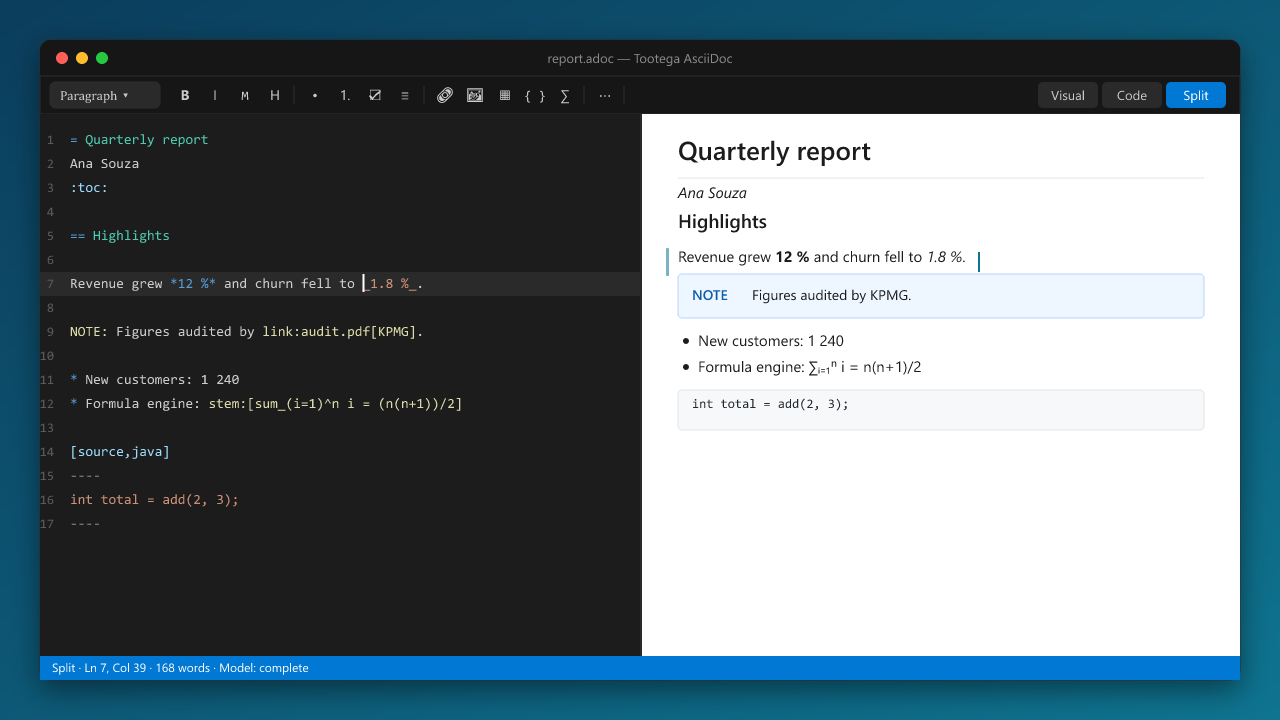
- Visual mode edits the document as you will read it: headings, paragraphs, lists (bulleted, numbered, tasks,
description), tables with row/column tools, admonitions, examples, sidebars, quotes, code blocks with highlighting
and a language selector, images resolved against
:imagesdir:, includes shown as blocks you can open, formulas,
comments, attributes — every AsciiDoc block has a place on screen and round-trips back to the same source.
- Code mode is a real AsciiDoc editor: syntax highlighting, bracket pairs, find/replace with regex, go to line,
and the same toolbar acting on the text (
Ctrl+B, Ctrl+I, Ctrl+K, list and heading shortcuts).
- Split mode shows both over the same document. Edit on either side; the other updates in a moment, with the
shared cursor keeping your place.
- Structure panel with the heading tree, undo/redo across modes, and contained dialogs for links, images
(with width/height), tables, cross references (with the document's anchors suggested), footnotes, attributes,
keyboard/button/menu macros, anchors and formulas (with a live preview).
- Nothing is lost: what the visual model does not represent is carried as written — list styles, block options,
roles, attribute lines — so a document edited in Visual mode serializes back to the AsciiDoc you would have typed.
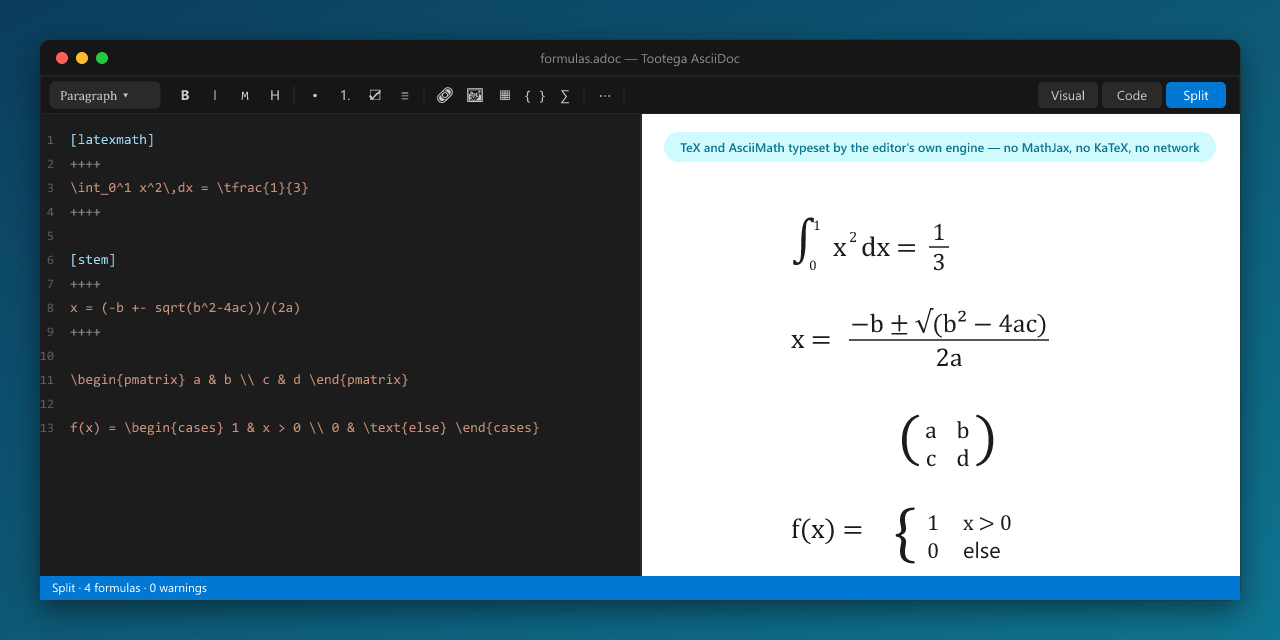
The math engine is written for this editor: a TeX lexer, macro expander (\def, \newcommand, \let, delimited
parameters…), recursive-descent parser, a symbol table of about 1 000 math and 650 text commands, the full function
and environment surface you expect from KaTeX (fractions, roots, accents, sized delimiters, big operators with
limits, matrices, cases, align, gather, equation, extensible arrows, colour, styles, phantoms, enclosures,
tags…) and an AsciiMath parser to the same tree. The output is MathML Core, laid out by VS Code's own renderer,
with Latin Modern Math shipped in the package so formulas look the same on Windows and Linux.
No third-party math library is bundled or downloaded. The engine is checked against KaTeX's MathML as a test oracle
(289 of 328 corpus formulas structurally identical, every remaining difference documented); unknown commands render
as marked errors with a readable warning — never silently.
Export
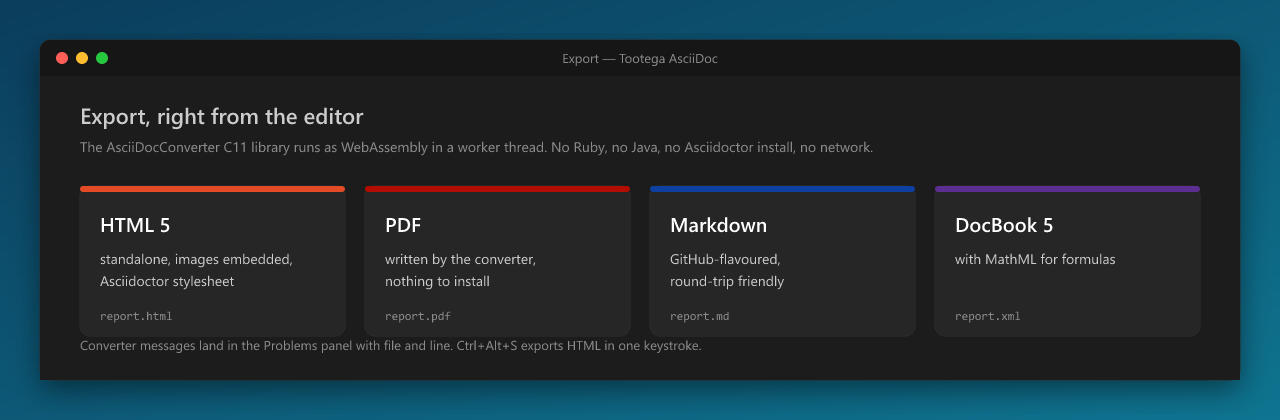
Export from the title bar, the context menu or Ctrl+Alt+S (HTML). The converter is the
AsciiDocConverter C11 library compiled to WebAssembly and run in a
worker thread, so the editor never freezes and the same bytes produce the same output on every platform.
- HTML 5 — standalone, Asciidoctor stylesheet, images embedded as data URIs, formulas as MathML, optional
custom stylesheet.
- PDF — written directly by the converter; page size configurable; nothing else to install.
- Markdown — GitHub-flavoured.
- DocBook 5 — with
<inlineequation>/<informalequation> MathML.
Converter messages (with file and line) go to the Problems panel; the output can open automatically.
- Local and offline. Parsing, rendering, formulas and export all run inside VS Code. No service calls.
- Instant feedback. The visual model updates per keystroke; the split view re-parses with a short debounce so
typing stays smooth on long documents; the code editor virtualises long files.
- Light. One
.vsix of about 3 MB, including the WebAssembly converter and the math font. The webview bundles a
single React and the engine's stylesheet; the host is one file.
- Safe by construction. The webview runs under a strict Content Security Policy; export reads only inside your
workspace unless you allow otherwise; the extension never writes to a file you did not ask for.
Commands
| Command |
What it does |
| New AsciiDoc document |
File › New File… or the palette: creates a file with a skeleton in your language and opens it in the editor. |
| Edit full elements sample |
Opens an editable copy of a complete sample covering every AsciiDoc element — the fastest tour of the editor. |
| Open with Tootega / Show source |
Switch between the Tootega editor and the native text editor. |
| Visual / Code / Split, Toggle structure |
Editor modes and the heading panel. |
| Preview to the side, Lock preview, Refresh |
Live view next to the native editor (Ctrl+K V), scroll-synced both ways. |
| Export to HTML / PDF / Markdown / DocBook |
Also in the editor title bar and the Explorer context menu. |
| AsciiDoc cheat sheet |
The syntax the editor reads and writes, in your language. |
Settings live under tootegaAsciidoc.* (default mode, language, preview sync, image paste folder, export options, PDF
page size, diagnostics and more), with descriptions in Portuguese and English.
Compatibility
- VS Code 1.97 or later, Windows and Linux (macOS works where VS Code runs; the math font is bundled, so no system
font is required).
- File types:
.adoc, .asciidoc, .asc, .ad — Tootega is the default editor; "Reopen With…" gives you the text
editor at any time.
- Installs alongside the official Asciidoctor extension (both contribute the
asciidoc language; "Reopen With…"
picks the editor for a file).
Contributing and building
Development notes, architecture and the build/packaging rules are in
Docs/DEVELOPMENT.md. The editor
engine is the open TootegaWebUI repository; the converter is
AsciiDocConverter.
License
MIT — © Tootega Pesquisa e Inovação. Latin Modern Math is distributed under the GUST Font License (see
media/fonts/GUST-FONT-LICENSE.txt).
| |

