Java Dark Theme
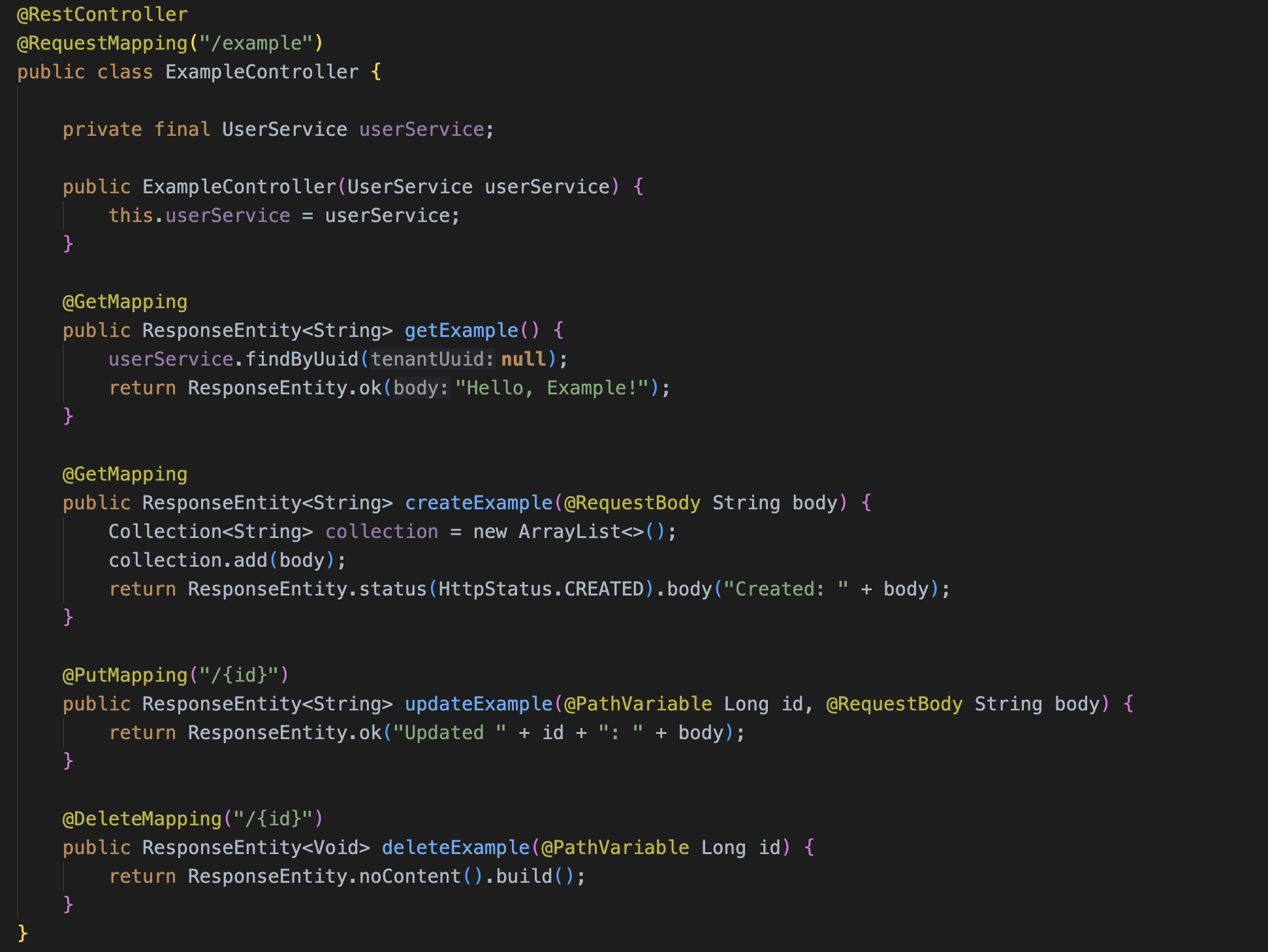
An IntelliJ-inspired dark theme for Java and Kotlin in VS Code
Inspired by IntelliJ's default dark theme, this is a theme for Java files. Is it perfect? No. But it's very close.
Color Palette
| Element |
Color |
| Background |
#1E1E1E |
| Foreground / Text |
#A9B7C6 |
| Keywords |
#CC7832 |
| Strings |
#6A8759 |
| Annotations |
#BBB529 |
| Numbers |
#6897BB |
| Method declarations |
#56A8F5 |
| Constants |
#9876AA |
| Comments |
#808080 |
| Javadoc |
#629755 |
Installation
- Open VS Code
- Go to Extensions (
Cmd+Shift+X / Ctrl+Shift+X)
- Search for "Java Dark Theme"
- Click Install
- Press
Cmd+K Cmd+T / Ctrl+K Ctrl+T and select Java Dark Theme
Recommended Settings
If you even want to match the font, install JetBrains Mono and add the following to your settings.json:
{
  "[java]": {
    "editor.fontFamily": "'JetBrains Mono', monospace",
    "editor.fontLigatures": true,
    "editor.semanticHighlighting.enabled": true
  },
  "[kotlin]": {
    "editor.fontFamily": "'JetBrains Mono', monospace",
    "editor.fontLigatures": true,
    "editor.semanticHighlighting.enabled": true
  }
}
Alternative: Manual Configuration
If you prefer not to install the extension, you can add the following directly to your settings.json (Cmd+Shift+P / Ctrl+Shift+P → "Preferences: Open User Settings (JSON)"):
{
    "[java]": {
        "editor.fontFamily": "'JetBrains Mono', monospace",
        "editor.fontLigatures": true,
        "editor.semanticHighlighting.enabled": true
    },
    "[kotlin]": {
        "editor.fontFamily": "'JetBrains Mono', monospace",
        "editor.fontLigatures": true,
        "editor.semanticHighlighting.enabled": true
    },
    "editor.semanticTokenColorCustomizations": {
        "rules": {
            "method:java": { "foreground": "#A9B7C6" },
            "function:java": { "foreground": "#A9B7C6" },
            "parameter:java": { "foreground": "#A9B7C6" },
            "variable:java": { "foreground": "#A9B7C6" },
            "property:java": { "foreground": "#9876AA" },
            "field:java": { "foreground": "#9876AA" },
            "property.static:java": { "foreground": "#9876AA", "fontStyle": "italic" },
            "field.static:java": { "foreground": "#9876AA", "fontStyle": "italic" },
            "annotation:java": { "foreground": "#BBB529" },
            "annotationType:java": { "foreground": "#BBB529" },
            "method.declaration:java": { "foreground": "#56A8F5" },
            "function.declaration:java": { "foreground": "#56A8F5" },

            "method:kotlin": { "foreground": "#A9B7C6" },
            "function:kotlin": { "foreground": "#A9B7C6" },
            "parameter:kotlin": { "foreground": "#A9B7C6" },
            "variable:kotlin": { "foreground": "#A9B7C6" },
            "property:kotlin": { "foreground": "#9876AA" },
            "field:kotlin": { "foreground": "#9876AA" },
            "property.static:kotlin": { "foreground": "#9876AA", "fontStyle": "italic" },
            "field.static:kotlin": { "foreground": "#9876AA", "fontStyle": "italic" },
            "annotation:kotlin": { "foreground": "#BBB529" },
            "annotationType:kotlin": { "foreground": "#BBB529" },
            "method.declaration:kotlin": { "foreground": "#56A8F5" },
            "function.declaration:kotlin": { "foreground": "#56A8F5" }
        }
    },
    "editor.tokenColorCustomizations": {
        "textMateRules": [
            {
                "scope": ["source.java", "source.kotlin"],
                "settings": { "foreground": "#A9B7C6" }
            },
            {
                "scope": [
                    "storage.type.java",
                    "entity.name.type.java",
                    "entity.other.inherited-class.java",
                    "storage.type.kotlin",
                    "entity.name.type.kotlin",
                    "entity.other.inherited-class.kotlin",
                    "entity.name.type.class.kotlin",
                    "entity.name.type.interface.kotlin",
                    "entity.name.type.enum.kotlin",
                    "entity.name.type.object.kotlin",
                    "support.type.kotlin",
                    "storage.type.class.kotlin",
                    "storage.type.generic.java"
                ],
                "settings": { "foreground": "#A9B7C6" }
            },
            {
                "scope": [
                    "storage.type.annotation.java",
                    "punctuation.definition.annotation.java",
                    "entity.name.type.annotation.java",
                    "meta.declaration.annotation.java entity.name.type.class.java",
                    "meta.declaration.annotation.java entity.name.type.java",
                    "meta.annotation.java entity.name.type.class.java",
                    "meta.annotation.java entity.name.type.java",
                    "meta.annotation.java entity.name.type",
                    "meta.annotation.java entity.name.type.interface.java",
                    "storage.type.annotation.kotlin",
                    "punctuation.definition.annotation.kotlin",
                    "entity.name.type.annotation.kotlin",
                    "meta.annotation.kotlin entity.name.type.class.kotlin",
                    "meta.annotation.kotlin entity.name.type.kotlin"
                ],
                "settings": { "foreground": "#BBB529" }
            },
            {
                "scope": [
                    "keyword.control.java",
                    "keyword.operator.java",
                    "storage.modifier.java",
                    "storage.type.primitive.java",
                    "keyword.other.import.java",
                    "keyword.other.package.java",
                    "keyword.control.kotlin",
                    "keyword.operator.kotlin",
                    "storage.modifier.kotlin",
                    "storage.type.builtin.kotlin",
                    "keyword.other.import.kotlin",
                    "keyword.other.package.kotlin",
                    "keyword.other.kotlin",
                    "storage.type.object.kotlin",
                    "keyword.kotlin",
                    "keyword.control.flow.kotlin",
                    "keyword.control.return.kotlin",
                    "keyword.control.exception.kotlin",
                    "keyword.control.loop.kotlin",
                    "keyword.control.conditional.kotlin"
                ],
                "settings": { "foreground": "#CC7832" }
            },
            {
                "scope": [
                    "variable.language.this.java",
                    "variable.language.super.java",
                    "variable.language.this.kotlin",
                    "variable.language.super.kotlin"
                ],
                "settings": { "foreground": "#CC7832" }
            },
            {
                "scope": [
                    "constant.language.java",
                    "constant.language.kotlin"
                ],
                "settings": { "foreground": "#CC7832", "fontStyle": "bold" }
            },
            {
                "scope": [
                    "string.quoted.double.java",
                    "string.quoted.single.java",
                    "string.quoted.double.kotlin",
                    "string.quoted.single.kotlin",
                    "string.template.kotlin",
                    "meta.template.expression.kotlin"
                ],
                "settings": { "foreground": "#6A8759" }
            },
            {
                "scope": [
                    "constant.character.escape.java",
                    "constant.character.escape.kotlin"
                ],
                "settings": { "foreground": "#C08A50" }
            },
            {
                "scope": [
                    "constant.numeric.java",
                    "constant.numeric.integer.kotlin",
                    "constant.numeric.float.kotlin",
                    "constant.numeric.long.kotlin",
                    "constant.numeric.double.kotlin"
                ],
                "settings": { "foreground": "#6897BB" }
            },
            {
                "scope": [
                    "meta.method.identifier.java entity.name.function",
                    "meta.method.identifier.java entity.name.function.java",
                    "entity.name.function.declaration.java",
                    "meta.function.kotlin entity.name.function",
                    "meta.function.kotlin entity.name.function.kotlin",
                    "entity.name.function.declaration.kotlin",
                    "entity.name.function.kotlin"
                ],
                "settings": { "foreground": "#56A8F5" }
            },
            {
                "scope": [
                    "variable.other.definition.java",
                    "variable.other.field.java",
                    "meta.class.body.java variable.other.java",
                    "variable.other.property.kotlin",
                    "variable.other.field.kotlin",
                    "meta.class.body.kotlin variable.other.kotlin"
                ],
                "settings": { "foreground": "#9876AA" }
            },
            {
                "scope": [
                    "variable.other.constant.java",
                    "variable.other.constant.kotlin"
                ],
                "settings": { "foreground": "#9876AA", "fontStyle": "italic" }
            },
            {
                "scope": [
                    "punctuation.definition.template-expression.begin.kotlin",
                    "punctuation.definition.template-expression.end.kotlin",
                    "variable.other.template.kotlin"
                ],
                "settings": { "foreground": "#CC7832" }
            },
            {
                "scope": ["entity.name.type.type-parameter.java"],
                "settings": { "foreground": "#507874" }
            },
            {
                "scope": [
                    "comment.line.double-slash.java",
                    "comment.block.java",
                    "punctuation.definition.comment.java",
                    "comment.line.double-slash.kotlin",
                    "comment.block.kotlin",
                    "punctuation.definition.comment.kotlin"
                ],
                "settings": { "foreground": "#808080", "fontStyle": "italic" }
            },
            {
                "scope": [
                    "comment.block.javadoc",
                    "comment.block.javadoc keyword.other",
                    "comment.block.javadoc entity.name.type",
                    "comment.block.kdoc.kotlin",
                    "comment.block.kdoc.kotlin keyword.other",
                    "comment.block.kdoc.kotlin entity.name.type"
                ],
                "settings": { "foreground": "#629755", "fontStyle": "italic" }
            }
        ]
    }
}
Notes on IntelliJ Similarities & Differences
This theme is inspired by IntelliJ IDEA's Dark theme, but there are some known differences:
- Spring Boot & framework annotations (e.g.
@SpringBootApplication, @Autowired) may appear white instead of yellow in some situations, depending on how the Java language server resolves them.
- Custom annotations you define yourself may not always be highlighted in yellow — this depends on VS Code's semantic token support.
- Method call colors differ slightly: IntelliJ does not color regular method calls, but some are colored differently here depending on the TextMate grammar resolution.
- Overall feel is very close to IntelliJ, especially for standard Java/Kotlin syntax.
Screenshots
Coming soon

