Skip to content
| Marketplace
Sign in
Visual Studio Code>Other>Angular LensNew to Visual Studio Code? Get it now.
Angular Lens

Angular Lens

Hatuos

|
1 install
| (0) | Free
A lightweight way for staying up to date with Angular releases
Installation
Launch VS Code Quick Open (Ctrl+P), paste the following command, and press enter.
Copied to clipboard
More Info

A wizard holding an Angular Lens emblem

Angular Lens

Browse Angular releases and support timelines from the VS Code Activity Bar.


Table of Contents
  • About
  • Features
  • Getting Started
  • Development
  • Data Sources

About

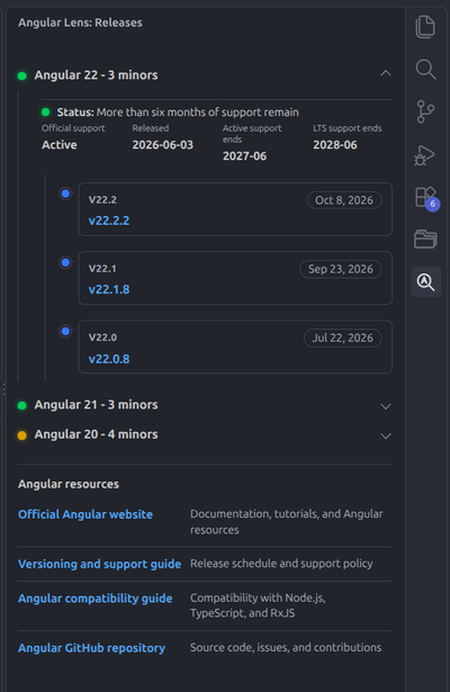
Angular Lens is a lightweight VS Code extension for checking stable Angular releases without leaving your editor. It groups versions by supported major and minor release, and links each version to its official GitHub release page.

Angular Lens release list

Features

  • Browse stable releases across supported Angular major versions.
  • See the latest patch for each minor version, grouped by major.
  • Check each major's official support status, release date, and active and LTS support end dates.
  • Get a simple indicator of how much LTS support remains.
  • Open release pages and changelogs directly from the release list.

Getting Started

Angular Lens requires VS Code 1.90 or later and an internet connection to retrieve Angular release and support information.

  1. Open Angular Lens from the Activity Bar.
  2. In the Releases view, select Load stable releases.
  3. Expand a major version to browse its minor releases and support information.

You can also run Angular Lens: Open Releases from the Command Palette to open the release list in an editor tab.

Development

You need Node.js and pnpm.

pnpm install
pnpm compile

Open the project folder in VS Code and press F5 to launch the Extension Development Host.

Data Sources

  • Release versions and publish dates: npm registry
  • Supported versions and support dates: Angular release policy
  • Release details and notes: Angular releases on GitHub

Angular Lens fetches publicly available release and support information from these sources and presents it for convenience; it does not redistribute Angular's source code. Angular Lens is an independent project and is not affiliated with, endorsed by, or sponsored by Google or the Angular team. Angular is a trademark of Google LLC; all trademarks and source materials remain with their respective owners.


See LICENSE for license information.

  • Contact us
  • Jobs
  • Privacy
  • Manage cookies
  • Terms of use
  • Trademarks
  • Your Privacy Choices
  • Consumer Health Privacy
© 2026 Microsoft