FDE — Forward Deployed Engineering for VS Code



One sidebar for everything a forward deployed engineer juggles on an engagement, built around
the fde Claude Code plugin:
| View |
What it shows |
Actions |
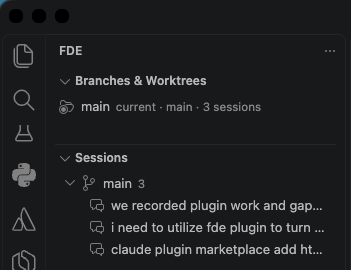
| Branches & Worktrees |
Every git worktree of the open repo: branch, dirty state, ahead/behind, sessions, PR |
Add, open in new window, remove (guarded), start a Claude Code session |
| Sessions |
Local Claude Code sessions grouped by worktree, newest first, live "active" badge |
Resume in a terminal, open transcript, copy id |
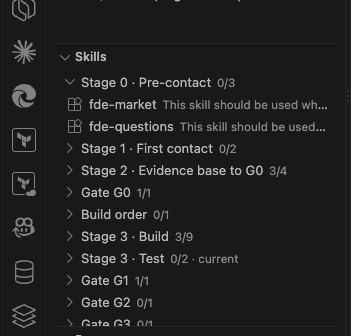
| Skills |
The fde plugin's skills, grouped by pipeline stage and coloured by what the engagement workspace says has happened |
Run /fde:<skill> in the active session, open the file, copy the slash command |
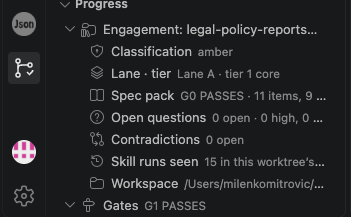
| Progress |
The engagement: classification, lane and tier, gate log, what is blocking, what to run next; plus session tasks, commits since base, PR status |
Click a gate to open gate-log.md, click a suggestion to run it |
| Pipeline (editor panel) |
The plugin's workflow map as a graph — stages, skills, gates — with each node coloured by its state and execution |
Select a node for artifacts, runs and gate line; run a skill; open an artifact |
A status bar item summarises the current worktree, active session count, and the last gate
recorded. When the optional Claude Code hooks are installed, finishing a session pops a
notification with a Resume button.
Screenshots
| Worktrees & Sessions |
Skills |
Progress |
 |
 |
 |
Requirements
- Claude Code installed and on
PATH (claude) — the Sessions,
Skills, and Pipeline views all read its local state and launch it in a terminal.
- The
fde Claude Code plugin installed, for the Skills view,
the Pipeline graph, and engagement/gate tracking on the Progress view. Without it, Worktrees and
Sessions still work standalone.
- A git repository open in the workspace, for the Worktrees and Progress views.
Install
Search "FDE - Forward Deployed Engineering" in the VS Code Extensions view, or:
code --install-extension htecgroup.fde-vscode
If you have access to the source repo, each tagged release's .vsix is also attached to its
GitHub release:
gh release download -R htecgroup/fde-vscode -p '*.vsix' --clobber
code --install-extension fde-vscode-*.vsix --force
Then run Developer: Reload Window. To upgrade, run the same commands. Every push to
main also uploads the .vsix as a workflow artifact; a tag vX.Y.Z that matches
package.json creates the release.
The pipeline view
Open it with FDE: Show Engagement Pipeline or the graph button on the Skills and Progress
views. It renders the graph from the plugin's references/workflow-map.md and colours it from
disk:
| Colour |
Meaning |
| grey |
not started — no artifact, no run |
| yellow |
a session invoked the skill, but none of the artifacts it owns exist yet |
| green |
the skill's artifact is on disk, or the gate's latest line is PASSES / FUND |
| red |
the gate's latest line is BLOCKED / KILL |
| orange |
DEFER |
| blue bar |
a sensible next step, in the spirit of /fde:fde-next |
Nothing is inferred that is not on disk. A build that looks complete but has no G1 line in
gate-log.md shows the demo gate as artifact on disk, not passes, and the suggestion
names that gap. The router never routes past a blocked gate: with G0 BLOCKED, the next step
is what unblocks it.
The vault tab
The second tab of the same panel shows the workspace the way fde-vault describes it: a
citation graph. One node per markdown file under .fde/<slug>/, an edge for every relative
link, node size by how often a file is cited, colour by kind (evidence, discovery, spec items,
ADRs, spec pack, gaps, dossier), and a status ring read from each spec item's and ADR's own
Status: line — green for done / Accepted, orange for proposed, dashed grey for
withdrawn, deferred or superseded.
Above the graph, progress is summarised from the same read:
| Card |
Reads |
| Spec items |
specs/*.md Status: lines — done over active (withdrawn and deferred excluded), with a bar |
| Decisions |
adr/*.md Status: lines — proposed means no human has accepted it yet |
| Evidence |
rows in source-inventory.md, bullets under each tag in claims.md |
| Open questions |
table rows in open-questions.md; Assumed (unverified) counts as open |
| Contradictions |
items under ## Open and ## Resolved |
| Links |
every relative link, and the ones whose target is not on disk |
| Vault |
file count, empty skeletons, and whether index.md was regenerated after the last change |
Click a node to see what cites it and what it cites, double-click to open the file, drag to
pin it. The legend toggles kinds; "evidence hubs" hides the heavily cited evidence files so the
spec-to-ADR structure is readable. Nothing is rewritten: broken links are reported, as
fde-vault does, because the right fix is usually a missing target rather than a wrong link.
How it works
- Worktrees come from
git worktree list --porcelain and git status --porcelain=v2 per worktree.
- Sessions are read from Claude Code's own transcripts in
~/.claude/projects/<cwd-slug>/*.jsonl. Only the head and tail of each file are read for the list.
- Skills are read from the install path Claude Code records in
~/.claude/plugins/installed_plugins.json, so only the live version of the plugin is listed even though the cache keeps older versions. Plugin skills are invoked as /<plugin>:<skill>. Set fde.skills.source to all to also list project .claude/skills, .claude/commands, user skills, and every plugin.
- Engagement state is read from
.fde/<slug>/ in the current worktree: gate-log.md (both the pipe-line and the markdown-table form), evidence-base/classification.md, adr/0002-stack-selection.md (last Lane: / Tier: lines win, so a superseded ADR reads correctly), spec-pack.md, evidence-base/open-questions.md, evidence-base/contradictions.md, and specs/README.md. Skeleton files with headings only do not count as artifacts.
- Execution is read from this worktree's transcripts:
Skill tool calls ({"skill":"fde:fde-ingest"}) and typed slash commands (<command-name>/fde:fde-spec</command-name>). Transcripts are scanned once and cached by size and mtime.
- The optional workflow file
.claude/fde-workflow.yaml still works for a plain phase checklist (see FDE: Create Example Workflow File).
- Progress notifications use two Claude Code hooks (
SessionStart, Stop) that append to ~/.claude/fde/events.jsonl. Install them with FDE: Install Claude Code Hooks; they only touch .claude/settings.local.json.
- GitHub PR and check status is off by default. Enable
fde.github.enabled to look up the PR for each branch via the built-in GitHub authentication provider.
The extension never edits transcripts, the engagement workspace, or git history. Every
mutating action runs git or claude in the open, and worktree removal refuses dirty trees
unless you choose Force Remove.
Settings
| Setting |
Default |
Purpose |
fde.claudeHome |
~/.claude |
Where Claude Code keeps projects, skills, plugins |
fde.claudeCommand |
claude |
Command launched in terminals |
fde.sessions.activeWindowSeconds |
120 |
Transcript modified within this window = active |
fde.sessions.maxAgeDays |
30 |
Older sessions are hidden |
fde.worktrees.defaultParentDir |
.. |
Where new worktrees are created, relative to the main worktree |
fde.github.enabled |
false |
PR and check lookup |
fde.skills.source |
plugin |
plugin: only the plugins in fde.skills.plugins. all: everything |
fde.skills.plugins |
["fde"] |
Plugin names to list in plugin mode |
fde.skills.showUserScope |
true |
In all mode, include ~/.claude skills and plugins |
See CONTRIBUTING.md for development and the release process.
License
MIT — provided as is, without warranty of any kind; use it at your own risk. See the
LICENSE file for the full text. Installing any extension through the VS Code
Marketplace is also subject to its own Terms of Use,
linked in the Marketplace's footer.
| |

