DrawMeDatabase Pro
Tools on top of DrawMeDatabase, the free extension that draws the database schema of Laravel, Symfony, Prisma, Drizzle and SQL projects from their code. Everything DrawMeDatabase does stays free; DrawMeDatabase Pro adds:
Stacks
With DrawMeDatabase 1.8.0, DrawMeDatabase Pro works on Prisma, Drizzle and SQL projects too. The tools that write the code of a framework are offered where they apply; elsewhere they are left out of the menus, greyed in the Tools view of DrawMeDatabase with the reason, and their command tells why (before asking for a license).
|
Laravel |
Symfony |
Prisma |
Drizzle |
SQL |
| Schema canvas, path between two tables, saved views, inspector |
✓ |
✓ |
✓ |
✓ |
✓ |
| Compare with a branch or two versions |
✓ |
✓ |
✓ |
✓ |
✓ |
| Time machine: the commits |
✓ |
✓ |
✓ |
✓ |
✓ |
| Time machine: the migrations |
✓ |
|
✓ prisma/migrations (or the migrations.path of prisma.config.ts) |
✓ the out of drizzle-kit |
✓ the migrations of the SQL tool |
| What a migration changes |
✓ |
|
|
|
|
| Table designer, Add columns |
✓ migration |
✓ entity |
|
|
|
| Eloquent models |
✓ |
|
|
|
|
| Exports (SQL, DBML, PlantUML, TypeScript, HTML) |
✓ |
✓ |
✓ |
✓ |
✓ |
| Compare with a database |
✓ and the migrations not run yet |
✓ and the versions not executed |
✓ |
✓ |
✓ |
| Schema checks |
✓ |
✓ |
✓ (1) |
✓ (1) |
✓ (1) |
(1) Without the checks that do not apply there: no reserved words on Prisma and Drizzle, which quote every name; no table naming on Prisma, whose tables are named after its models; no unknown reference for the tables Supabase manages (auth.users); the checks of Laravel's migrations stay for Laravel.
Compare with a branch and the time machine read the schema of each commit where it was then: a Prisma schema moved into prisma/, split into prisma/schema/, or a Drizzle schema whose drizzle.config.ts changed is found at its older place. Laravel projects with a schema dump (php artisan schema:dump) get the SQL types of the dump in the exports and the comparison with a database.
Schema time machine
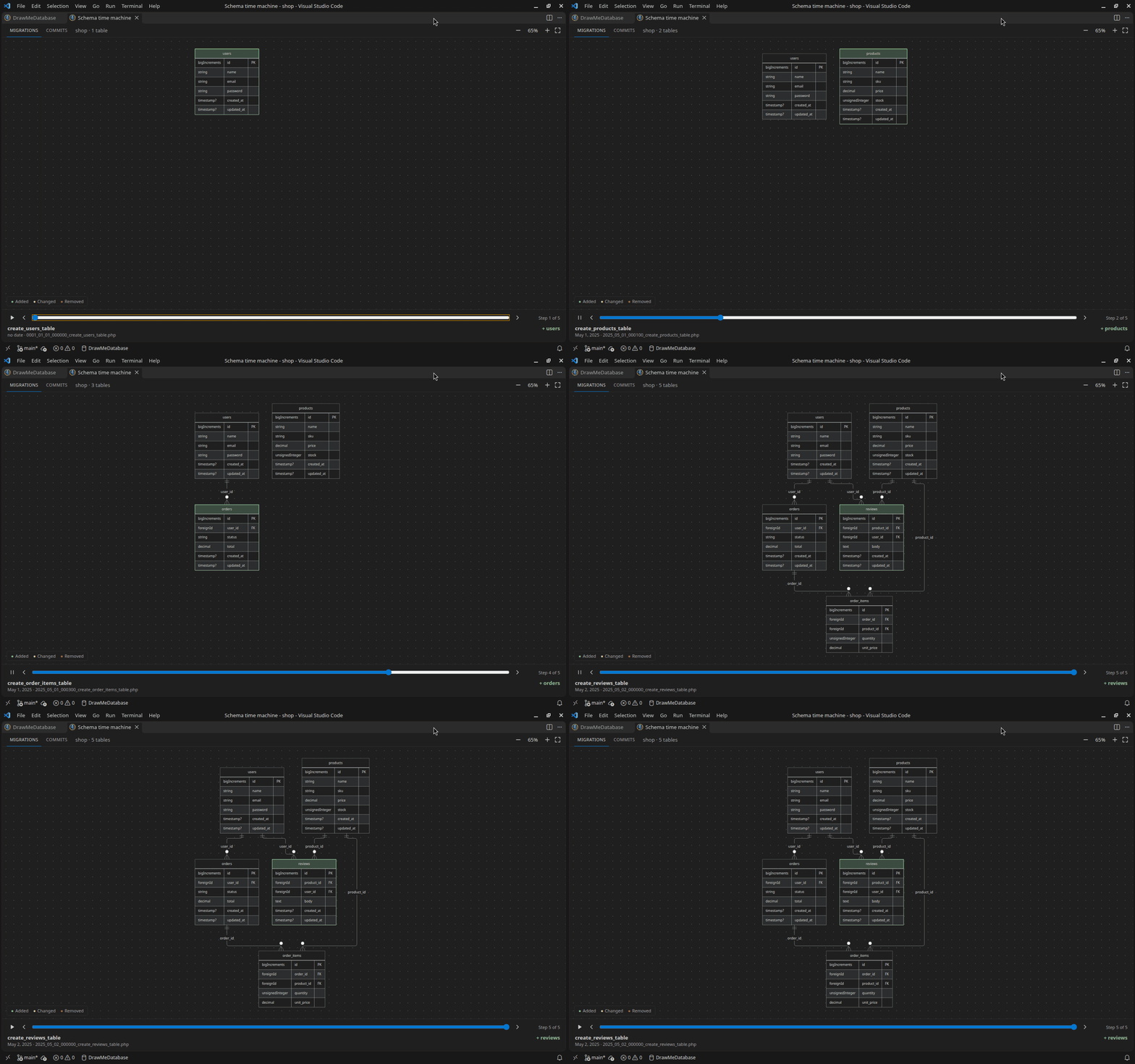
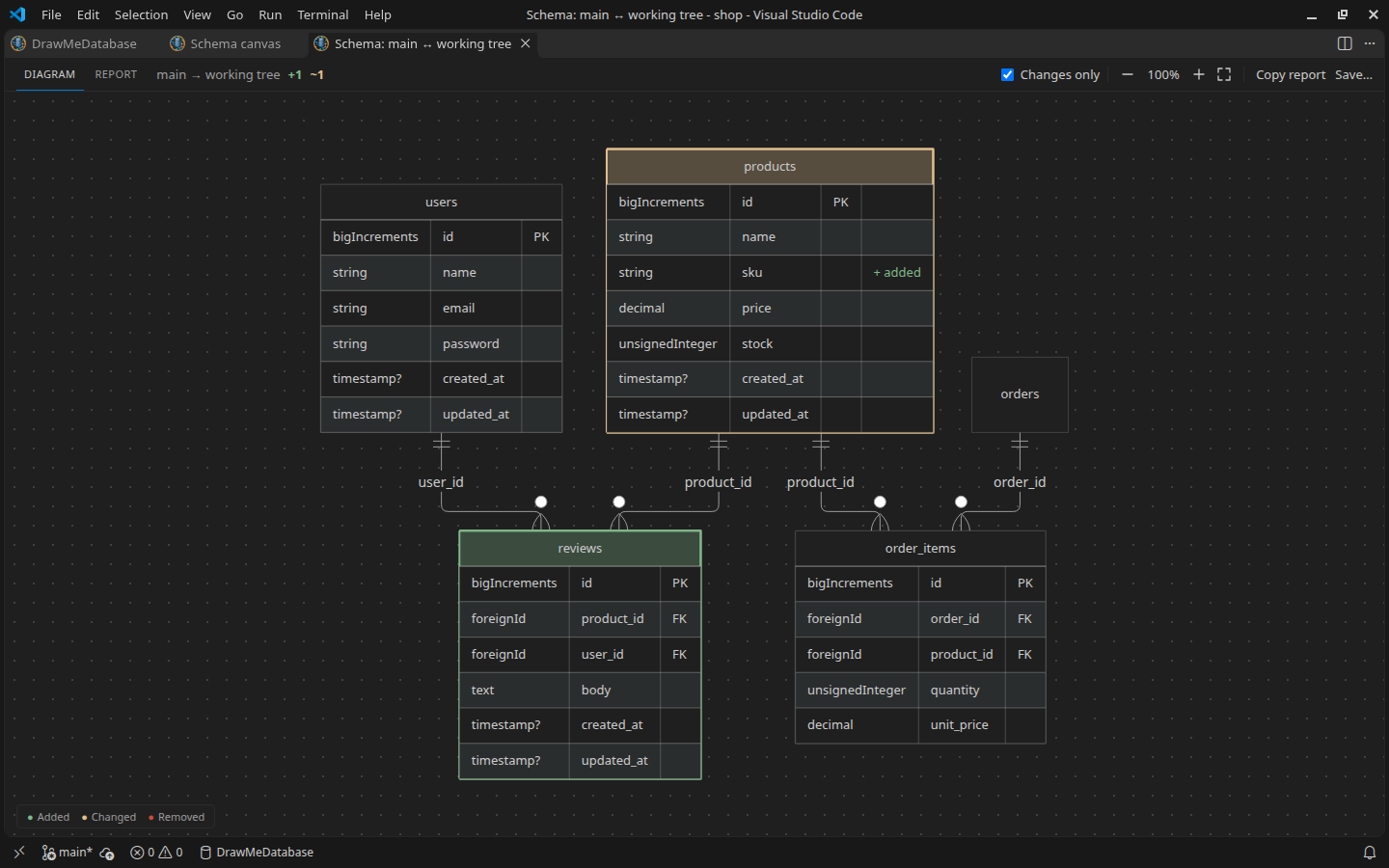
Replay the history of the schema: a slider goes through the migrations, in the order Laravel runs them (or prisma migrate, drizzle-kit, Supabase, Flyway, dbmate... for the SQL migrations of a Prisma, Drizzle or SQL project), or through the commits that changed the schema files (migrations, entities, Prisma or Drizzle schema, SQL), then the working tree. At each step the diagram shows the schema of that moment, with the tables and columns added, changed and removed marked. Play replays every step. The commits are read from git; nothing is written.
DrawMeDatabase Pro: Open the Schema Time Machine, or the Tools of the options panel of the diagram.
Git status of every column
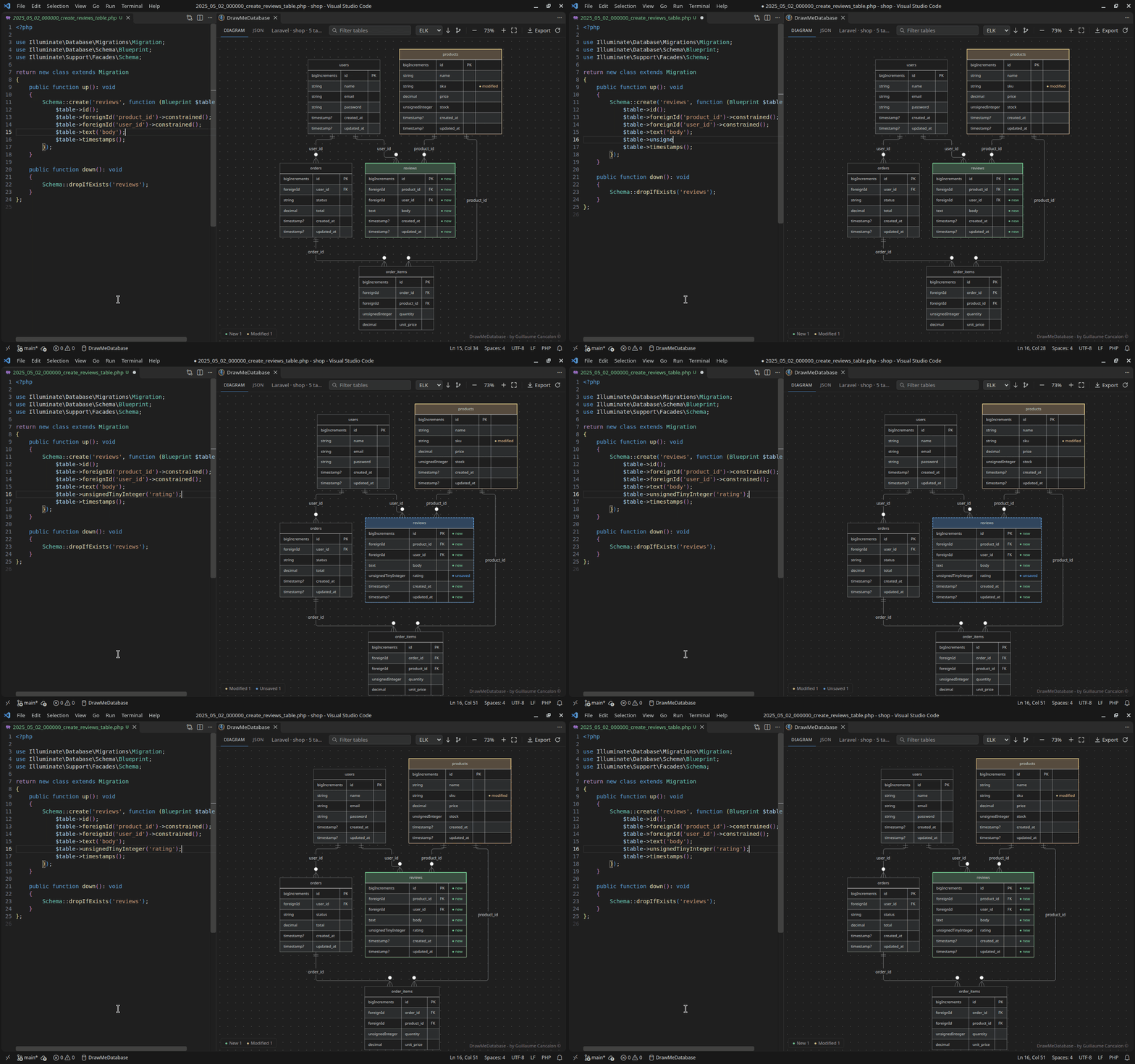
The diagram of DrawMeDatabase shows the git status of the tables; with Pro it shows the status of every column too, live: new, modified, or changed in an editor and not saved yet (setting DrawMeDatabase.showColumnGitStatus).
Schema canvas
A second view of the schema, next to the Mermaid diagram, where everything moves:
- drag the tables (they snap to the grid, Alt for free moves) and the links (their vertical segment; double-click puts it back)
- the git status of every table and every column: new, modified, or changed in an editor and not saved yet
- a click on a table highlights its links and its neighbours; double-click opens its migration or entity; right-click adds columns or generates its model
- auto layout, undo and redo (Ctrl+Z, Ctrl+Shift+Z), search (Ctrl+F), keys only, export as SVG or PNG
- the layout is kept per project, and Share the layout saves it in
.vscode/drawmedatabase-layout.json for your team
- live: it follows your edits like the diagram
- its own options panel: keys only, column types, git status, grid, layout, appearance, exports
DrawMeDatabase Pro: Open the Schema Canvas, or the layout button of the diagram.
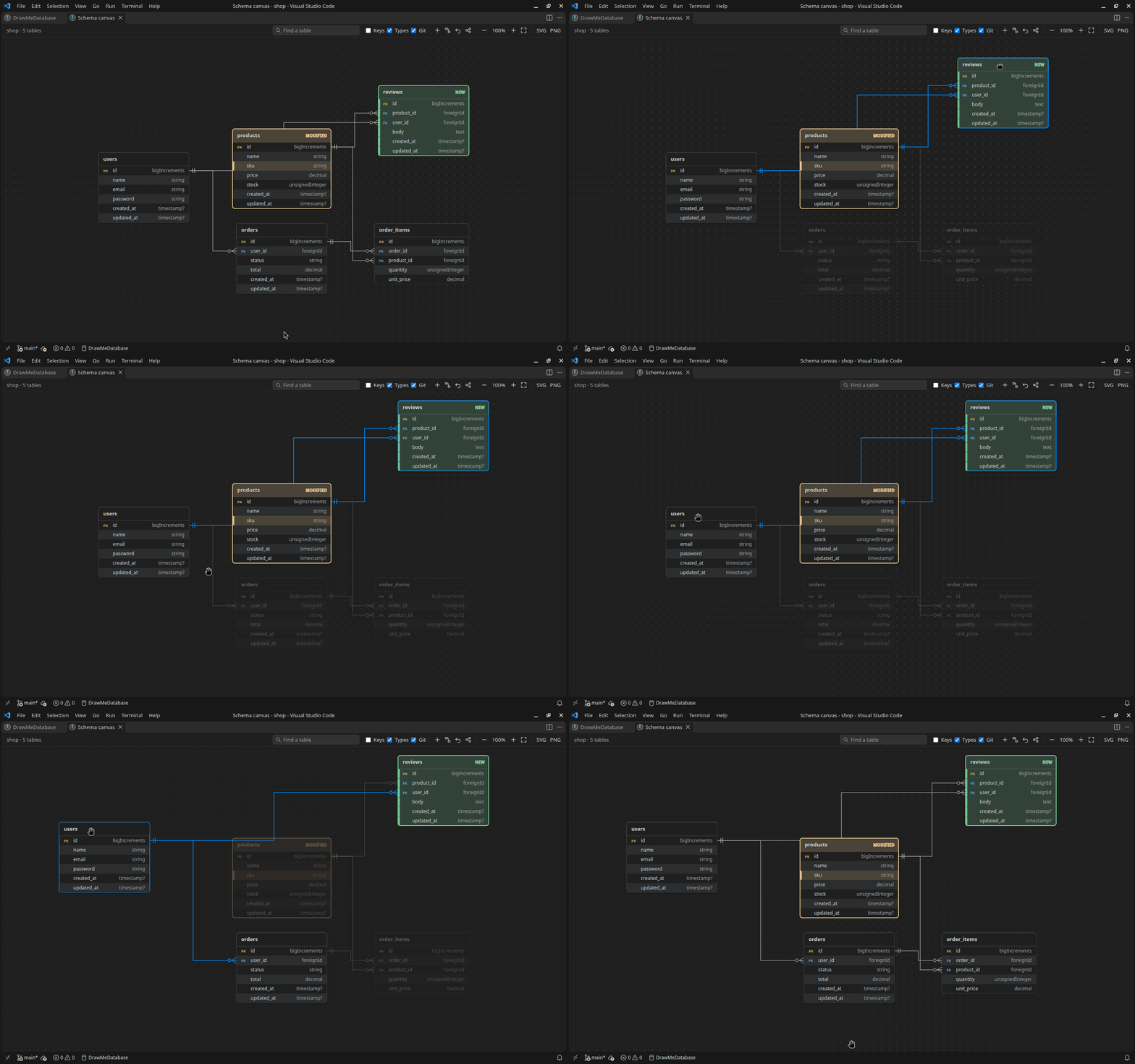
Table designer
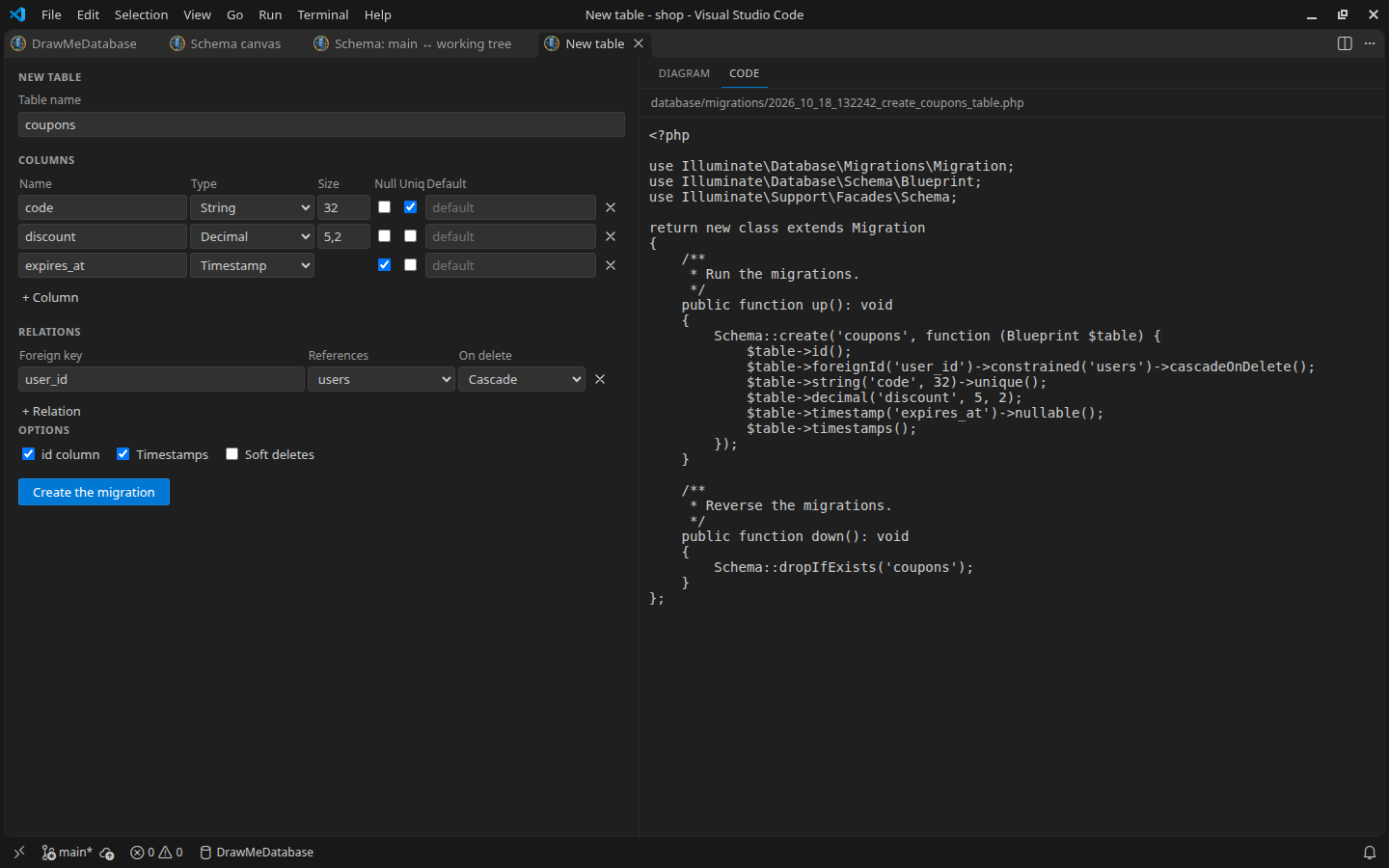
Describe a new table, or new columns of a table: names, types, sizes, nullable, unique, defaults, foreign keys and their ON DELETE, timestamps, soft deletes. The preview shows the table among the tables it is linked to, and the code that will be written:
- Laravel: the migration (
database/migrations/..._create_orders_table.php, or ..._add_..._to_orders_table.php)
- Symfony: the Doctrine entity and its repository, or the new properties and their accessors added to the entity
Pro writes no Prisma, Drizzle or SQL code: on these projects the designer is not offered.
DrawMeDatabase Pro: Design a New Table… (also the + button of the diagram), Add Columns to a Table….
Schema comparison
What changed in the schema between the working tree and a branch, a tag or a commit, or between two of them: added tables and columns in green, changed ones in orange, removed ones in red. The Differences tab lists them table by table; the Report tab gives them in Markdown, with a Mermaid diagram, to paste in a pull request.
Everything the code declares (migrations, entities, Prisma or Drizzle schema, SQL) is compared: the type, length, precision and scale, unsigned, nullable, default, unique and enum values of each column, the ON DELETE / ON UPDATE of the foreign keys, and the indexes, added, removed or changed (an index now unique). On the diagram, the change of a foreign key or an index is noted on the column it starts with.
For Laravel, Show What This Migration Changes (right-click on a migration) compares the schema before and after it.
Database drift
Compare the code with a real database: the migrations never run in production, the column changed by hand, the index added in a hurry, the foreign key whose ON DELETE is not the one of the code. The connection is typed in the Connect to a Database form of the sidebar of DrawMeDatabase Pro (below), which DrawMeDatabase Pro: Compare with a Database…, the Tools of the diagram and New connection… of the Database Connections view open.
A form in the sidebar, in the colors of your theme: the DrawMeDatabase Pro container of the Activity Bar (its icon: a database and a plug), with Database Connections above the form, which gets most of the height of the side bar.
- Connection URL: paste
postgresql://app:p%40ss@db:5432/shop?schema=sales&sslmode=require (or mysql://, mariadb://, sqlite:, Prisma's file:./dev.db) and the fields fill themselves, whatever the field held; its password goes to the password field and out of the URL. IPv6 hosts ([::1]), encoded characters, sslmode / ssl-mode (no-verify too), Prisma's sslaccept, sslrootcert and schema are read; an SSL parameter Pro does not know requires TLS and is said under the field. A URL that cannot be read is told there, its password taken out of it.
- Fill from .env: the connection of the .env files of the project, and which file and keys it came from (
Filled from .env.local: DATABASE_URL.); its password stays on the side of the extension, shown as The one of the .env.
- The fields: a name, the type (PostgreSQL, MySQL, MariaDB, SQLite), host and port (the default port of each type), database, schema (PostgreSQL), user, password (Show / Hide), SSL (off, required, or the certificate and the host checked, with an optional CA file); for SQLite, the file and Browse…. Each field is checked when you leave it, its message under it.
- Test connects in a read-only session and says what answered, within 15 seconds:
PostgreSQL 17.6: connected, 13 tables in public, read only., or why not (the password refused, the database missing, a user the server accepts over TLS only, TLS refused...), the field at fault marked. Its answer stays with the connection it was asked for: a connection loaded meanwhile waits for it.
- Save keeps it for the workspace, the password in the secret storage of VS Code: a saved password is never shown again, the form says Saved in the secret storage of VS Code with Change. A saved password is only sent to the server and the user it was saved for: change the host, the port, the type or the user (or paste the URL of another server) and the form asks for the password, and Save asks whether it replaces the saved connection or saves a new one. Compare with the Code opens the comparison; Delete…, New, Cancel.
- A click on a saved connection of Database Connections loads it into the form; right-click, or its inline button, compares it with the code at once.
- Once the trial has ended, the form says why and how to keep using it, like the other tools of Pro. A project written for a database Pro cannot read (SQL Server, MongoDB...) is told so, and Compare with the Code is greyed.
The comparison
- MySQL, MariaDB, PostgreSQL and SQLite (SQLite with VS Code 1.101 or later)
- What is compared: the tables, the columns (type, nullable, default, auto-increment, primary key, enum values), the indexes, and the foreign keys with their
ON DELETE / ON UPDATE
- No false alarm: what the database does by itself is not reported — display widths (
int(11)), the precision of dates, serial or identity (and the unique index MySQL's SERIAL adds), the length Laravel gives strings (Schema::defaultStringLength() included), the index MySQL and Doctrine add to a foreign key, the dimensions of PostgreSQL arrays, what PostgreSQL writes back in defaults (its casts: lower('ABC'::text), timezone('utc'::text, now()); interval '30 days' as '30 days'::interval; '1 hour' as '01:00:00'), the leading zeros MySQL drops from a bit string, the names of the indexes and keys, the tables of the frameworks (migrations, doctrine_migration_versions, messenger_messages: setting drawMeDatabasePro.drift.ignoreTables) and of the migration tools (_prisma_migrations, __drizzle_migrations, schema_migrations, flyway_schema_history...). The types of Prisma (scalar and native types, enums, lists), Drizzle (column builders, enums, arrays), the SQL (any dialect) and the tables of a Laravel schema dump are compared as the database holds them; Prisma's many-to-many tables as prisma migrate creates them on each database (a unique index on MySQL, MariaDB and SQLite, a primary key on PostgreSQL since Prisma 6). With Prisma's relationMode = "prisma" (PlanetScale), the database has no foreign keys by design: the relations are relations of the code only, never reported missing, and the comparison says so once. A database migrated by Laravel 13 on MySQL 8.4, MariaDB 11 or PostgreSQL 17 shows no difference, and so does one created by the migrations of Prisma, Drizzle, Supabase or a Laravel schema dump.
- Not compared, and said once at the top of the Differences tab and in the report: the relations Prisma emulates (
relationMode = "prisma"), and the indexes on an expression (lower(email)), which Pro does not read from the database
- On the diagram: what is missing from the database in red, what differs in orange, what is only in the database in green, with a note on each column; the Differences tab lists them table by table; the Report tab gives them in Markdown, for an issue or a pull request; Refresh reads the database and the code again, after
php artisan migrate for instance
- Migrations not run yet: a migration that
php artisan migrate has not run yet is not drift. Pro reads the migrations table of the database: what such a migration explains is greyed on the diagram with its name, set apart in the Differences tab and in its own section of the report, and counted apart (2 pending). Symfony: the versions that doctrine_migration_versions does not list are named, with the tables their SQL changes
- Read only: only the catalog is read (
information_schema, pg_catalog, sqlite_master), and the names in the table of the migrations run (migrations, doctrine_migration_versions), never the data, in a read-only session that the server itself enforces
- Connections: saved for the workspace, never in the settings; the password goes to the secret storage of VS Code. Or From the .env of the project (Laravel's
DB_CONNECTION or DB_URL, Symfony's DATABASE_URL, the DATABASE_URL of Prisma, Drizzle and SQL projects, also in .env.local and .env.development, and their SQLite file:./dev.db): read when you ask, never saved unless you Save it. Forget a Database Connection… removes a connection and its password. A database behind SSH: ssh -L 3307:127.0.0.1:3306 server, then mysql://app@127.0.0.1:3307/shop. A read-only user is enough (SELECT; on MariaDB, which shows the ON DELETE of the foreign keys only to a user with more, they are then not compared, and the comparison says so).
- A keybinding or a task can compare with a database without the form (the form opens when the password is missing or refused):
{ "key": "ctrl+alt+d", "command": "DMDBPro.compareWithDatabase", "args": { "url": "postgresql://app@127.0.0.1:5432/shop" } }
"args": { "source": "env" } compares with the database of the .env of the project.
Exports
The Export menu of the diagram gets SQL (MySQL, PostgreSQL, SQLite), DBML (for dbdiagram.io), PlantUML, TypeScript types, and an HTML documentation of the schema (tables, columns, relations, source files and the diagram, in one file that works offline). Its diagram moves and zooms like the one of DrawMeDatabase: the mouse wheel zooms at the pointer, a drag moves it, buttons and keys (+ − 0 F, arrows) fit it to the window, show it at 100 % or in full screen; it prints whole.
The exports carry what your code declares (migrations, entities, Prisma or Drizzle schema, SQL), in the types of each database (Prisma's String is VARCHAR(191) on MySQL and TEXT on PostgreSQL, its enums and Drizzle's pgEnums are enum types on PostgreSQL, arrays are JSON outside of PostgreSQL), with lengths and precisions, unsigned, default values (useCurrent() included), enum values, comments, auto-increments, unique, full text and spatial indexes, and the ON DELETE / ON UPDATE of the foreign keys. A Prisma, Drizzle or SQL schema exported for another database than its own never gets a default written for its own: now() and the UUIDs are ported, a cast literal ('n/a'::text) is written without its cast, and any other expression (timezone('utc'::text, now()), auth.uid()) is left out with a comment. A bit string default is written as each database takes it (b'1', B'1', '1' in SQLite), and MySQL's SERIAL stays a 64-bit integer in the other databases. The SQL scripts are tested on MySQL 8.4, PostgreSQL 17 and SQLite.
Schema checks
Problems of the schema in the Problems panel, at the line of the migration or the entity:
| Check |
Default |
Finds |
missing-primary-key |
warning |
A table without primary key (info for a pivot table) |
nullable-primary-key |
error |
A primary key column that accepts NULL |
missing-foreign-key |
warning |
A <table>_id column without foreign key to that table |
foreign-key-type-mismatch |
error |
A foreign key whose type does not match the referenced column |
unknown-reference |
error |
A relation to a column missing from its table (warning for a whole table: maybe a package table) |
fk-table-created-later |
error |
Laravel: a foreign key to a table that a later migration creates: php artisan migrate fails on MySQL (errno 150) and PostgreSQL |
duplicate-migration-timestamp |
warning |
Laravel: two migrations with the same timestamp, run in the order of their names |
migration-older-than-base |
warning |
A new migration dated before the last migration of the default branch: it runs before it on a new database, after it on the existing ones. Silent without a default branch (a shallow clone) |
set-null-on-not-null |
error |
ON DELETE SET NULL (or ON UPDATE) on a NOT NULL column |
fk-target-not-unique |
error |
A foreign key to a column that is neither the primary key nor unique: MySQL 8.4 and PostgreSQL refuse it |
fk-without-index |
warning |
Laravel on PostgreSQL (info on SQLite): a foreign key without an index. Off on MySQL and MariaDB, which index foreign keys, and when the database is unknown; never for Symfony, whose Doctrine indexes every join column |
redundant-index |
info |
An index whose columns start another index, the primary key or a unique key |
reserved-word |
warning |
A table or column named like a reserved word of MySQL, PostgreSQL or SQLite |
naming-table, naming-column |
info |
Names not in snake_case, table names not plural (or singular, setting drawMeDatabasePro.checks.tableNames) |
orphan-table |
off |
A table with no relation to or from another one |
On Prisma and Drizzle projects, reserved-word is off (prisma migrate and drizzle-kit quote every name), and so is naming-table on Prisma (its tables are named after its models); on SQL projects, reserved-word only knows the words of the database of the project when it is known. A reference to a table Supabase manages (auth.users, storage.objects) is no unknown reference on these stacks. The types of the foreign keys are compared as the database holds them (Prisma's Int and SQL's int4 are 32-bit integers).
Settings: drawMeDatabasePro.checks.rules sets the severity of each check, or off ({ "redundant-index": "off" }), and wins over the defaults of each stack; drawMeDatabasePro.checks.database the database of the project (else, for Prisma, Drizzle and SQL, the one DrawMeDatabase 1.8.0 reads in the code: the provider of Prisma, the dialect of drizzle.config.ts, the SQL itself; else the one of the .env: the scheme of DB_URL or DATABASE_URL, else Laravel's DB_CONNECTION; for Prisma, Drizzle and SQL the scheme of DATABASE_URL, POSTGRES_URL or DB_URL; nothing is kept); drawMeDatabasePro.checks.baseBranch the default branch (else origin/HEAD, origin/main, origin/master, main or master).
Large schemas
- Find How Two Tables Are Related: the shortest chain of foreign keys between two tables, shown on the diagram
- Saved views: named sets of tables, kept in
.vscode/drawmedatabase-views.json to share them with your team, and listed in the Saved Views view of the DrawMeDatabase sidebar
Laravel models
Generate an Eloquent Model: the model of a table, with $fillable, casts, soft deletes and its belongsTo, hasMany, hasOne and belongsToMany relationships.
Inspector of the tables
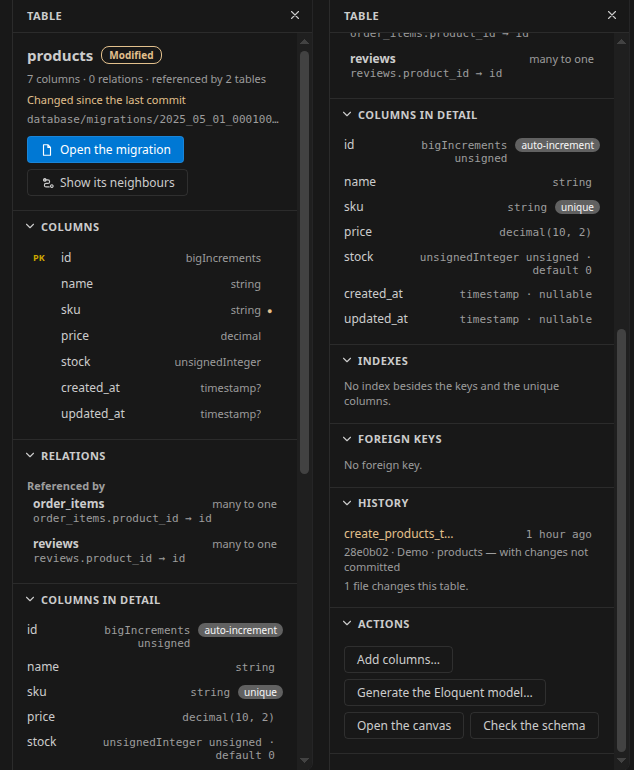
A click on a table in the diagram shows what DrawMeDatabase knows about it; DrawMeDatabase Pro adds:
- Columns in detail: lengths and precisions, unsigned, default values,
ON UPDATE CURRENT_TIMESTAMP, enum values, comments, auto-increment and unique columns
- Indexes (unique, full text, spatial) and foreign keys with their
ON DELETE / ON UPDATE
- History: the migrations that create or change the table (or its entity, its Prisma or Drizzle schema, its SQL file), with their last commit, author and date, and the ones not committed yet
- Actions: add columns (Laravel, Symfony), generate the Eloquent model (Laravel), open the canvas, check the schema
In the options panel of the diagram
With DrawMeDatabase 1.6.0 or later, the tools of DrawMeDatabase Pro and its exports are in the options panel of the diagram, with the state of the license (trial days left, buy or enter a key). Pro also unlocks the palettes (light and dark versions), the custom colors and the fonts there. The Pro panels follow the appearance and the language chosen there: light or dark theme, palette, custom colors, font and text size, English or French.
With DrawMeDatabase 1.7.0 or later, DrawMeDatabase Pro adds three views to the Activity Bar. Its own container, DrawMeDatabase Pro, holds the first two, so that the form gets the height it needs (the DrawMeDatabase container already has four views); the third is in the DrawMeDatabase container, after Schema, Tools, Exports and License. Views can be dragged elsewhere, as any view of VS Code.
- Database Connections: the connections saved for the workspace (the last one used first), From the .env of the project when it has one, and New connection…. A click loads it into the connection form (the .env fills it); right-click or its inline button: Compare with the Code, Forget the Connection… (and its password, once confirmed).
- Connect to a Database, under it: the connection form (see Database drift).
DrawMeDatabase Pro: Show the Database Connection Form and New Database Connection open it from the Command Palette.
- Saved Views, in the DrawMeDatabase container: the saved views of the project and their tables. A click shows the view in the diagram, a click on a table opens its migration or entity; the tables no longer in the schema are greyed. + saves a new view, Delete the View… removes one from
.vscode/drawmedatabase-views.json (for your team too, once confirmed). The view follows the file, when a git pull changes it for instance.
The items are in the language of DrawMeDatabase (English or French), the names of the views in the one of VS Code. Once the trial has ended, the items stay, greyed with a lock: a click tells how to keep using Pro, and a connection can still be forgotten.
Known limitations
- Compare with a database: an index on an expression (
lower(email)) is not compared, on any database; a default expression that PostgreSQL rewrites by the precedence of its operators (a * b + c kept as ((a * b) + c)), or a negative interval, ago or an ISO 8601 interval, is reported as a different default.
- Prisma
relationMode = "prisma": the SQL export still writes the foreign keys of the relations.
- MySQL's
SERIAL is exported to PostgreSQL as a 32-bit INTEGER when DrawMeDatabase cannot tell the database of the schema (a SQL file with nothing of MySQL in it).
- Time machine and Compare with a branch: at most 16 older commits are read to find where a Prisma, Drizzle or SQL schema was before it moved; at a reference with several Laravel schema dumps but not the one of the working tree, the first one by name is read.
- What DrawMeDatabase does not give yet (DrawMeDatabase 1.8.0): the length of Drizzle's
bit({ dimensions }) (an export to MySQL or MariaDB then has a BIT without its length), Prisma's list default @default([]) (reported as missing on PostgreSQL), Drizzle's withTimezone (compared as a timestamp), and the width of a tinyint(1) of a Laravel schema dump (its Eloquent model gets no boolean cast).
License
DrawMeDatabase Pro has a free 14-day trial. Then DrawMeDatabase Pro: Buy a License and Enter a License Key…. A license is perpetual, with 12 months of updates: it covers, for ever, every version released within 12 months of its purchase. The later versions need a new license, at the current price: buy it once your updates have ended, as its 12 months of updates start when its key is created. Or keep the version you have, which goes on working (Install Specific Version… in the Extensions view); Show the License Status tells until when your updates run. The key stays in the secret storage of VS Code and is checked about once a week; DrawMeDatabase Pro has no telemetry. The license agreement is in the LICENSE.md file of the extension. The open source software it includes (the layout of the canvas, the database drivers) and their licenses are listed in THIRD-PARTY-NOTICES.md.
Support: guillaume.cancalon@gmail.com
| |

