GraphLens
Interactive architecture visualizer for Angular projectsTransforms code entropy into structured, navigable graphs Marketplace • Start Guide • Demo • GitHub Community • Issues • Discussions • Roadmap📢 Updates
Table of Contents
1. Definition & PurposeGraphLens™ is a professional static analysis and architecture visualization tool built for Frontend Developers, Software Architects, Analysts, and QA Specialists working with Angular. In large-scale Web projects, connections between modules, routes, and components often become invisible and tangled. This increases codebase entropy, leading to "spaghetti code", excessive cognitive load, and reduced development efficiency. GraphLens solves this by performing automated analysis of your project and visualizing its architecture in the form of structural tree views and interactive graphs. It provides seamless, real-time information and navigation through project entities, helping gain control over the codebase. It acts as an explorer and visualizer for Angular workspace, helping you to:
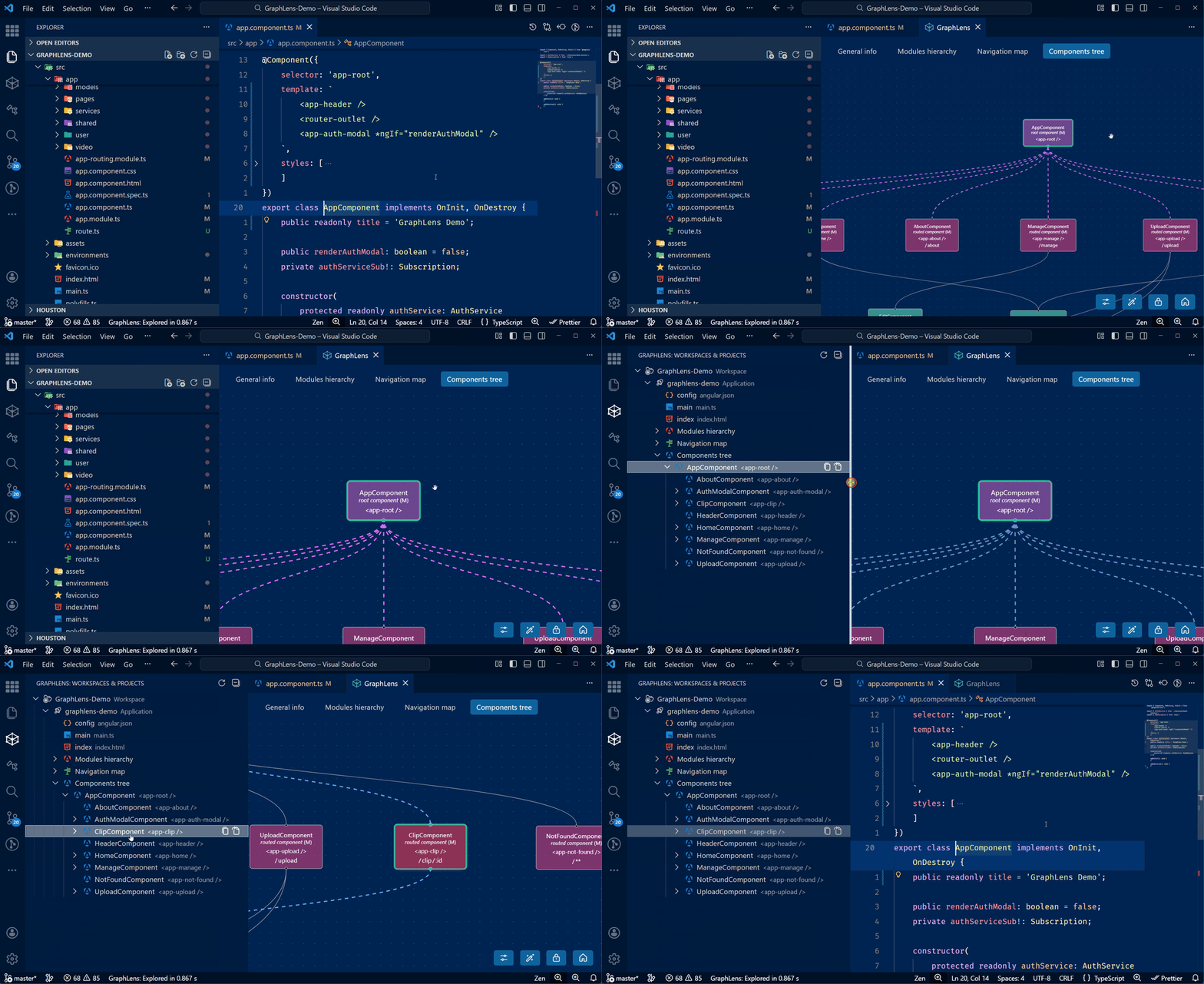
DisclaimerGraphLens is currently in Public Beta. While we strive for stability, occasional inaccuracies in analysis or graph rendering may occur in projects with non-standard configurations and complex code patterns. GraphLens supports Angular v2+ projects utilizing 2. Features2.1. How It WorksGraphLens activates automatically if an The extension scans your VS Code workspace and explores Angular projects and program entities1: Modules, Components, Directives, and Routes. It analyzes Angular metadata properties (imports, declarations, exports, etc.) to resolve relationships between program entities. Based on collected data, it builds interactive directed graphs for three abstraction levels2 of architecture: Module Hierarchy, Navigation Map, and Component tree. GraphLens fully supports both classic NgModules and modern Standalone API architectures. However, the scope of analysis is currently restricted to the Angular program entities mentioned above. The analysis is performed entirely without AI models. All processing is performed locally – your project data never leaves your machine. The analysis results are deterministic, reproducible and consistent given the same input. Under identical conditions you will always get an accurate "snapshot" of your project's reality. Quick demonstration
2.2. CommandsCommands are accessible via the custom command palette Key Commands:
A detailed list of commands is also available in the Features -> Commands tab within the extension description. 2.3. TreeView Panel in Activity BarThe GraphLens side panel with cube icon provides a Tree view of your Angular workspaces and projects: Key features:
2.4. WebView Panel as Portal for GraphsThe main workspace of the extension is an interactive graphs. Key features:
2.5. Manual RefreshThe graphs do not update automatically upon file save. To reflect changes in your code:
3. RequirementsTo ensure GraphLens works correctly, your environment must meet the following criteria: 3.1. VS Code VersionRequires Visual Studio Code v1.85.0 or newer. 3.2. Trusted WorkspacesThe extension executes analysis scripts, so it will not function in Restricted Mode. Please ensure your project folder is added to Trusted Workspaces. 3.3. External DependenciesCritical: For a complete dependency graph analysis, external dependencies must be installed. Please run 3.4. TypeScript Language ServerGraphLens leverages VS Code's built-in capabilities to find definitions and references.
4. Current Limitations
5. RoadmapA detailed development roadmap for this year is available here – Roadmap 2026. 6. FAQDoes it support Standalone API / Components?— Yes! GraphLens fully supports the Modern Angular API, including Standalone API / Components. It parses the `imports` array in your component metadata to build the dependency graph. Will it work with React, Vue, or Svelte?— Currently, GraphLens is designed exclusively for Angular v2+. Focusing on a single framework allows the extension to provide better quality of analysis of working projects. Is there an extension for other code editors?— Currently, no, but it is planned for mid-term future releases. 7. Core Philosophy 🌀Every software system exists within its own "solution space" – an infinite field of variations and changes. The essence of programming is the continuous evolution of the system and the search for right solutions within this space. In an ideal world, this evolution should unfold harmoniously, much like the Fibonacci sequence spiraling outward, where each new cycle of development naturally builds upon the solid foundation of the previous one, maintaining strict structural and semantic balance. However, the reality for long-living projects is different. Scaling, shifting requirements, continuous search for solutions, and inevitable trade-offs generate excessive software entropy – a massive, complex, and practically chaotic labyrinth of invisible connections and hidden pitfalls. This is how "shadow architecture" forms. Under these conditions, finding the right solutions demands heavy cognitive load; over-analyzing complex dependencies becomes a daily struggle even for senior developers, and business costs constantly increase. Strict principles, patterns, and technologies like Angular exist to purposefully narrow possible variations and standardize development processes. Yet, under the weight of business demands and scale, systems inevitably grow more complex. All these aspects are united by the new concept of "Code Liquidity" – a codebase's ability to be accessible, comprehensible, and ready for rapid change in response to new tasks. Just as a highly liquid financial asset can be quickly converted into real value, liquid code can be easily, predictably, and cost-effectively transformed to meet new business requirements. Essentially, all methodologies, principles, patterns, and quality metrics boil down to one primary goal – keeping code in a liquid state. Frameworks serve precisely this purpose – establishing standards and boundaries to increase codebase liquidity. But without the ability to see the complete picture within a reasonable timeframe, overall system liquidity plummets rapidly under the inevitable weight of entropy. This is especially relevant today in the era of AI code generation: when advanced models can produce thousands of lines in seconds, maintaining human control over the generator and resulting architecture becomes a critical condition for project success. GraphLens is an automated analysis and visualization tool for Angular projects, acting as a point of synergy between the code editor and the framework. Much like a real telescope focuses the light of distant cosmic objects, GraphLens gathers information about your Angular workspace, allowing you to peer into the very center of the architectural cosmos and transform the entropy of complex relationships into a structured and cognitively accessible form. The tool provides a new, faster interface – a visual environment through which take place the reading, perception, and navigation of the project's actual structure and architecture. GraphLens is a tool that gives developers the freedom to easily explore the system and expand their control over its codebase. By revealing the hidden geometry of connections as interactive graphs, GraphLens helps you comprehend the current state of the system, organize and channel software entropy into the right flow, regain control over the project, and ensure your project maintains the highest level of code liquidity. 8. Feedback & ContributionThe project is proprietary, but the project will evolve together with the community. This is a public repository created for feedback:
If you find GraphLens useful, please consider leaving a review on the Marketplace. It helps immensely! 9. LicenseGraphLens™ is proprietary software. Copyright © 2025–2026 Synergy Spectrum Labs LLC. All Rights Reserved. This extension is licensed under the GraphLens End-User License Agreement (EULA)
See the full License agreement file for details. The Demo code is provided under the MIT License. 📚 Notes & Terminology
Created with respect for human ingenuity ✨🚀 |