A drag-and-drop form designer for GoForms,
a Windows Forms-style GUI framework for Go.
Drag a button onto a form, and the designer writes the Go that puts it there.
Drag it somewhere else, and it rewrites those lines. The file it edits is
ordinary Go you can read, diff and review — not a resource blob you are never
meant to open.
What it does
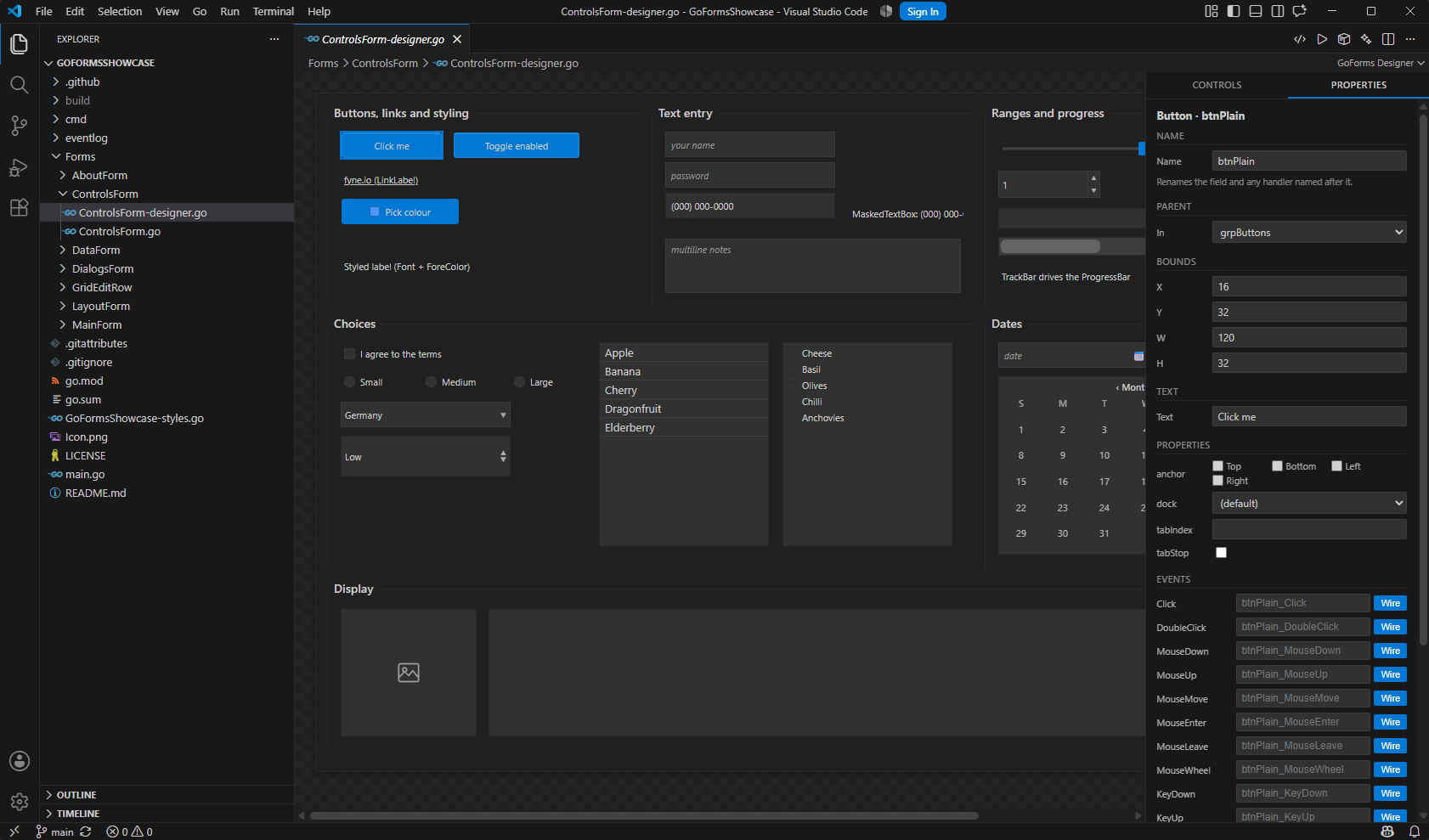
Edits forms visually. Open any *-designer.go file and it becomes a
canvas with a toolbox of 34 controls, each drawn to approximate its real
on-screen look rather than as a labelled box. Drag to move, drag the edges to
resize, Ctrl or Shift click to select several and move them together. Edges
snap to their neighbours' left, right and centre with a guide line drawn
where they line up.
Keeps your code separate from the generated code. A form is split the way
a WinForms form is split into Form1.cs and Form1.Designer.cs: layout in
MainForm-designer.go, your handlers in MainForm.go. The designer only ever
writes the first, so it cannot eat what you wrote.
Writes event handlers for you. Every control lists its own events first,
then the ones inherited from Control — Click, MouseDown, KeyPress, GotFocus
and the rest. Wiring one generates a fully typed handler stub in your file
and adds the import it needs, respecting the alias if you import the package
under one. Re-wiring an event rewrites the line that is already there instead
of leaving two handlers running.
Edits properties with the right editor per type. A checkbox for booleans,
a spinner for numbers, a dropdown for enums, a row of checkboxes for flag
sets like Anchor. Renaming a control renames its field, every reference to
it, and any handler still named after it.
Tidies up after itself. Every edit ends with a cleanup pass that removes
what the edit made redundant: setters a later call already overrides, stacked
wirings of one event, a control added to a container twice, duplicate field
declarations. Only the statements it models are touched; anything it does not
recognise is left exactly as you wrote it.
Has undo of its own. Ctrl+Z and Ctrl+Y inside the designer, with a
snapshot history the extension keeps itself — the file is written directly
rather than through the editor's document, so the editor's undo never sees
these changes.
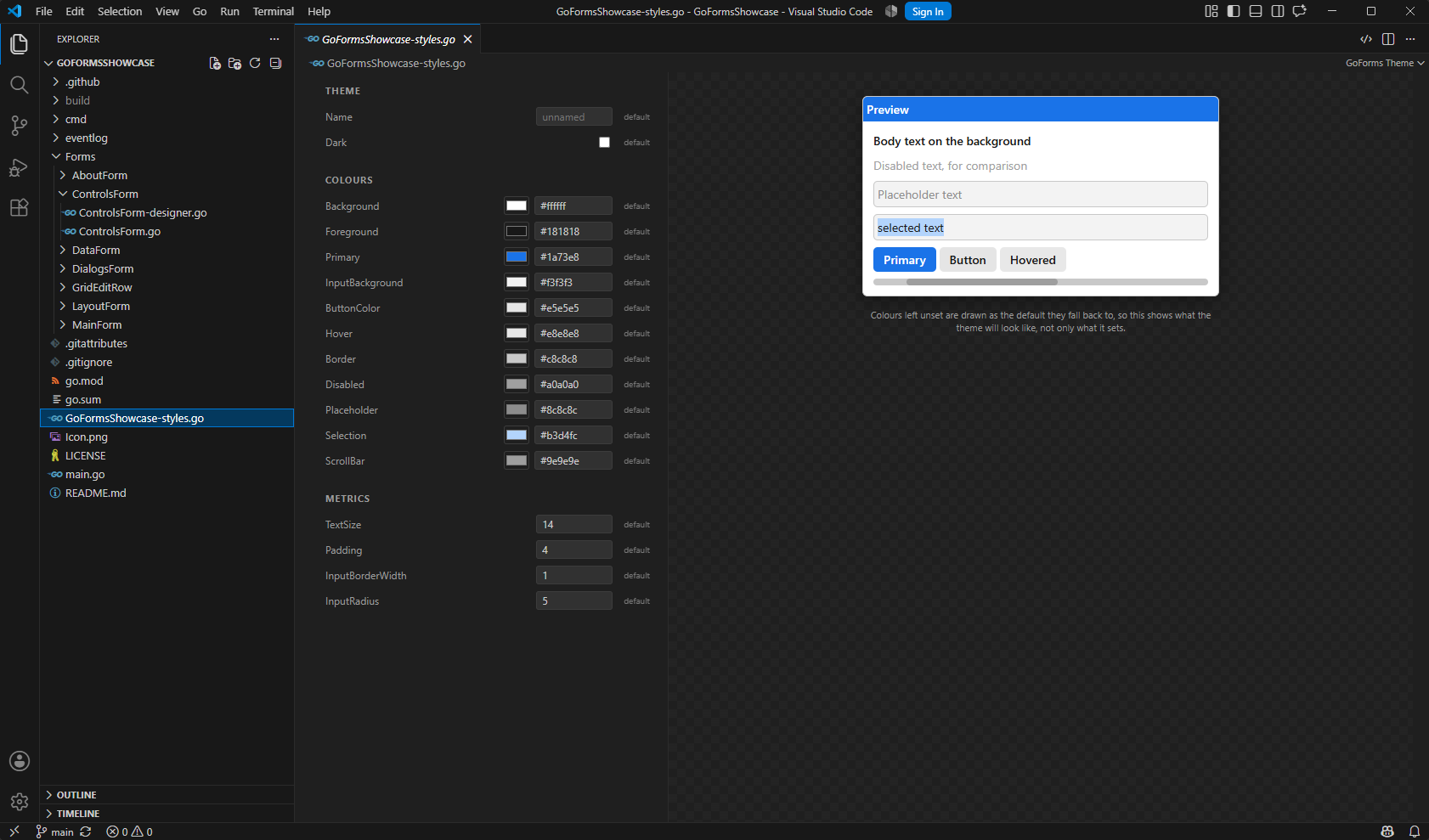
Themes. A project's <name>-styles.go opens as a visual theme editor: a
picker and a hex box per colour, numbers for the metrics, and a live preview
showing them together. A field left out keeps the framework default, and that
unset state is reachable again from every row.
Scaffolds projects and forms. Create a new project — empty, a worked
example, one aimed at the browser, or one aimed at Android — and get a
correct go.mod, a main.go, a first form, build tasks and a .gitignore. Add a
form to any folder from the Explorer's right-click menu.
Builds and runs the project. One command each for the desktop, the
browser and Android, plus a local server that opens a WebAssembly build in
your browser and a one-click install of an Android APK onto a connected
phone. Every step runs as a plain process in a terminal panel, so a failure
is the compiler's own message with a clickable file and line.
Nothing needs the network beyond what Go itself downloads once.
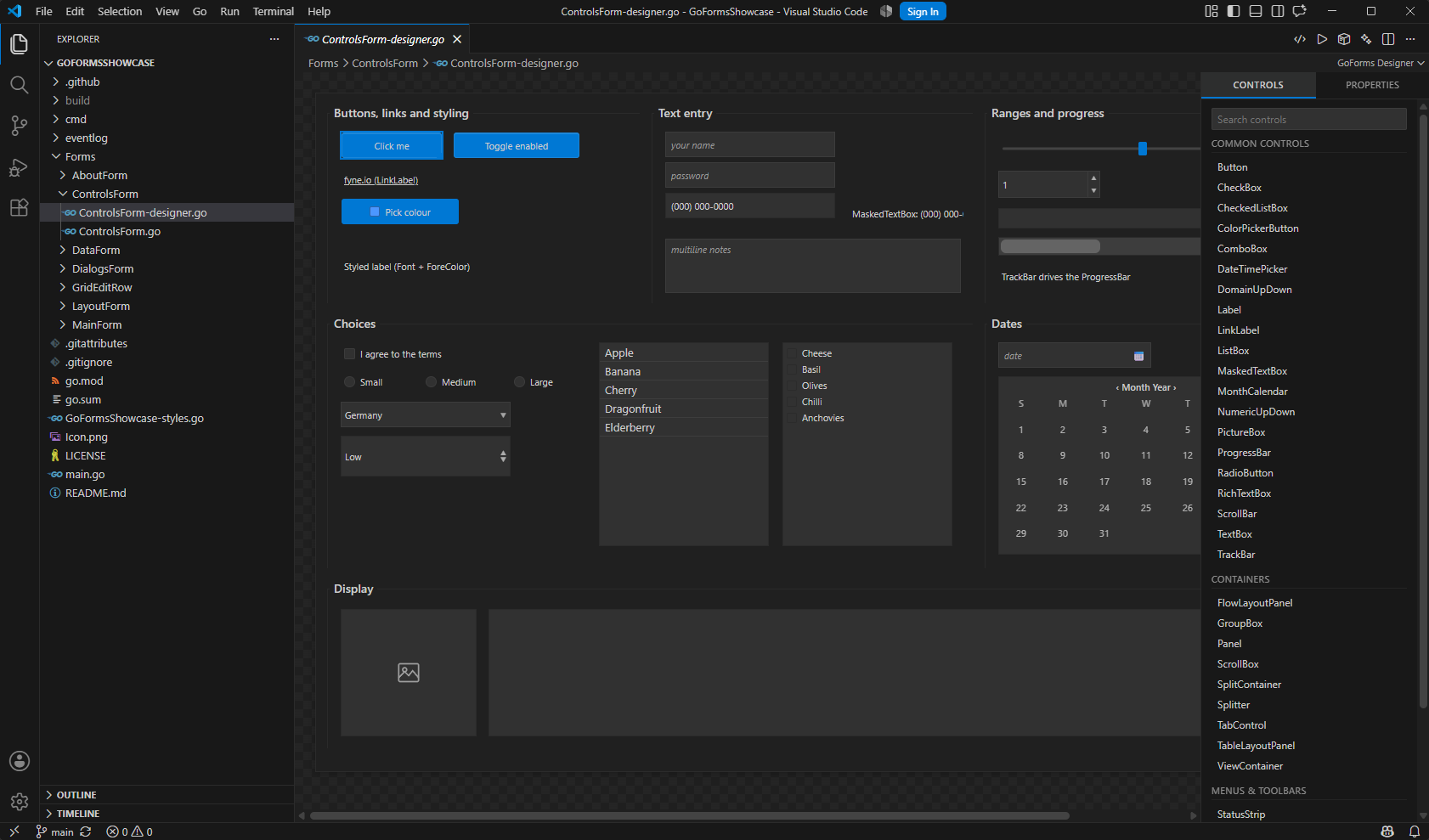
The toolbox holds 34 controls, grouped the way Visual Studio groups them, with
a search box. Clicking a type adds it to the form, or into whichever container
is selected.
Commands
All of these are in the command palette (Ctrl+Shift+P). Most are also on a
menu: the status bar has GoForms on the left, the designer's toolbar has
run, run-in-browser and build, *-designer.go files have Open as Text and
Tidy in the editor title bar, and a folder's right-click menu in the Explorer
has New Form and New Theme.
Making things
| Command |
What it does |
| GoForms: Create New Project… |
Scaffolds a project — go.mod, main.go, a first form, build tasks, a .gitignore. Asks for a template (empty, example, web, android) and a look. Also a button on the Explorer's welcome screen when there is no project open. |
| GoForms: New Form… |
Adds a Forms/<Name>/ pair: the designer file and the hand-written one. |
| GoForms: New Theme… |
Writes <project>-styles.go into a project created without one, from the same starting points the wizard offers, and adds the SetTheme call to main(). |
Components — a Timer, the four dialogs — are in the toolbox under
Components, and land on the tray below the form rather than on it. They
have properties and events like anything else; a Timer you cannot see is a
Timer you cannot rename, configure or delete without leaving the designer.
Editing
| Command |
What it does |
| GoForms: Open Visual Designer |
Opens the current *-designer.go as a canvas. |
| GoForms: Open as Text |
The same file back as Go source. |
| GoForms: View Code (F7) |
Jumps from the designer to the form's handlers, writing the file if it is not there yet. |
| GoForms: View Designer (Shift+F7) |
Jumps back. The same two keys Visual Studio uses. |
| GoForms: Tidy Designer File |
Runs the cleanup pass by hand, for a file edited outside the designer. |
| GoForms: Edit Theme |
Opens a project's <name>-styles.go as the visual theme editor. |
| GoForms: Open Theme as Text |
The same file back as Go source. |
Running and building
| Command |
What it does |
| GoForms: Run… |
Asks where — desktop, browser or Android — and does the whole thing. This is what the status bar entry runs. |
| GoForms: Run on Desktop |
go run .. Also the play button on the designer's toolbar. |
| GoForms: Debug |
Starts the app under Delve, so a breakpoint in a Click handler stops with the form still on screen. Also F5, and the bug icon on the designer's toolbar. |
| GoForms: Add Debug Configuration |
Writes the launch configurations into an existing project. New projects already have them. |
| GoForms: Run in Browser (WebAssembly) |
Builds for js/wasm, serves it on a loopback port and opens it. One step, because a browser cannot launch a .wasm off the disk. |
| GoForms: Build… |
Asks which target to build: desktop, WebAssembly or Android. |
| GoForms: Build for Desktop |
go build into build/desktop/. |
| GoForms: Build for WebAssembly |
Compiles for the browser and assembles the loader page into build/wasm/. |
| GoForms: Serve WebAssembly Build in Browser |
Serves an existing build without rebuilding it. |
| GoForms: Stop the WebAssembly Server |
Closes the local server. It also closes when the window does. |
| GoForms: Build for Android (APK) |
Packages an APK into build/android/. |
| GoForms: Install APK on Connected Device (adb) |
Installs the newest APK on a phone over adb. |
Finding things
| Command |
What it does |
| GoForms: Check Setup |
Reports which Go was found and everywhere it looked, whether the helper builds, and what is present for WebAssembly and Android. |
| GoForms: Set Framework Path… |
Points a project at a local GoForms checkout. |
| GoForms: Set Android NDK Path… |
For an NDK somewhere the search does not cover. |
| GoForms: Set fyne CLI Path… |
Likewise for the fyne tool. |
| GoForms: Open Setup Guide |
The bundled guides for the Android NDK, the fyne CLI and WebAssembly. |
Snippets
The canvas is for layout. The other half of the work — a handler, a dialog
raised in code, a control added to a container at runtime — is typing, so
there are snippets for it. Type gf in any Go file to see all 35.
| Prefix |
|
gfform gfmain |
a whole form, and the main() that runs it |
gfhandler gfwire |
a handler with the right EventArgs type, and the .Handle(…) that connects it |
gfbutton gflabel gftextbox gftextarea gfpassword gfcheckbox gfradio gfcombo gflistbox gfgrid gftree |
one control each: construct, place, add |
gfgroupbox gfpanel gftabs |
containers |
gfanchor gfdock |
resize behaviour |
gfmsgbox gfinputbox gfopenfile gfsavefile |
dialogs |
gfshow gfshowdialog gfclose |
opening and closing a second form |
gfmenu gftoolbar gfstatusbar gfcontextmenu |
the window's furniture |
gftimer gftheme gfload gfclosing |
a timer, a theme, and the two form events |
Each control snippet writes all three lines a control needs — construct, place,
add — because a control that is constructed and never added is the mistake that
produces an empty form.
Things worth knowing
- Escape selects the form. A form covered edge to edge by a docked control
has no background left to click, so Escape is the way back to its own
properties — title, width, height.
- Three modes sit above the canvas. Zoom draws the form at 50–200%, or
fits it to the window; it changes nothing about the form. Lock still
lets you select and inspect but refuses every drag and resize. Tab order
numbers the controls where they sit and lets you click through the form in
the order you want Tab to visit them, instead of setting
tabIndex one spin
box at a time.
- Renaming a control renames everything. The struct field, every reference
to it, and any handler still named after it.
- Ctrl or Shift click extends the selection. Dragging any member then moves
the whole group, and edges snap to their neighbours with a guide line drawn
where they line up. With more than one selected, the panel offers the
WinForms Format commands — align, centre, same size — all measured against
the last control you clicked.
- Undo is the designer's own. Ctrl+Z and Ctrl+Y inside the canvas. The file
is written directly rather than through the editor's document, so the
editor's undo never sees these edits and the extension keeps its own history.
- Docked controls are drawn where they will really be, not at their stored
coordinates, and marked with a dashed outline — dragging one has no effect,
which is what the outline is telling you.
- A control the catalogue does not model is left alone. The cleanup pass
only touches statements it understands, so hand-written setup inside
initializeComponent survives.
- F7 and Shift+F7 move between the two halves of a form — the layout the
designer writes and the handlers you write — the same keys Visual Studio
binds them to. F7 on a form with no code file yet writes it.
- F5 debugs. A new project ships with the launch configurations; an
existing one gets them from GoForms: Add Debug Configuration. It needs
the Go extension, which supplies the debugger.
- The interface is available in Russian, and follows VS Code's display
language — no setting of its own. The setup guides have been bilingual
since 0.10.0.
- The first run needs Go and takes a moment: the helper that parses and
rewrites your files is compiled then, into the extension's storage.
- Nothing here needs the network. The designer, the theme editor, the
snippets, the setup guides and the WebAssembly loader page all ship inside
the extension, and the webviews are served under
default-src 'none', so
there is no font or script to fail to arrive. The two things that do need a
connection are Go fetching your project's modules the first time, and
downloading the Android NDK — both are yours to do, once. Turn on
goforms.build.offline to have builds run with GOPROXY=off, so a module
missing from the cache fails by name instead of hanging.
Requirements
- VS Code 1.85 or newer, on Windows, Linux or macOS.
- A Go toolchain. It is needed the first time the designer runs, to build the
small helper that parses and rewrites designer files.
- Nothing else for editing, scaffolding, or a desktop or WebAssembly build.
An Android build additionally needs the fyne command-line tool and the
Android NDK. Neither is downloaded for you, both are looked for everywhere
they are normally installed, and the guide explaining where to put them ships
inside the extension — run GoForms: Open Setup Guide. GoForms: Check
Setup reports what this machine has.
Getting started
Run GoForms: Create New Project… from the command palette — or press the
Create GoForms Project button on the Explorer's welcome screen — and
answer three questions: where the project goes, which template, and how it
should look. Open the MainForm-designer.go it created — the designer opens
with it — and drag a control onto the canvas. Wire its Click event from the
Events panel, and the handler stub appears in MainForm.go for you to fill in.
Press the run button on the designer's toolbar to see it.
There is also a walkthrough: Help → Get Started → Get Started with
GoForms.
An existing GoForms project needs none of that: open any designer file.
If it cannot find Go
A GUI editor does not run a login shell, so it inherits the desktop session's
PATH rather than the one your shell profile builds. That is why Go can work
in your terminal and still be invisible to the editor.
The extension looks in its own setting first, then the Go extension's
setting, then GOROOT, then PATH, then the usual install locations on each
platform, verifying each candidate by running it. If yours is somewhere else,
point the goforms.goPath setting at it once. GoForms: Check Setup lists
everywhere it looked.
Links
MIT licensed.

