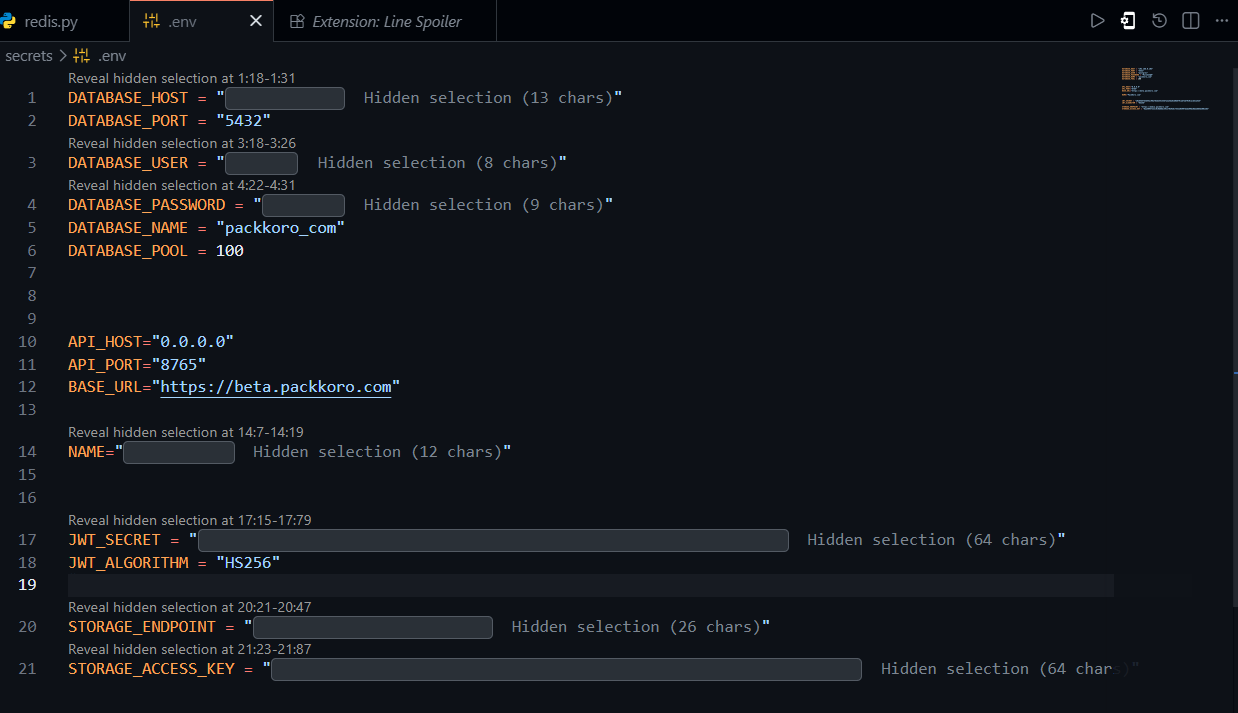
Hide secrets while streaming. Reveal them only when you're ready.
Line Spoiler is a VS Code extension built for live coding, demos, and screen sharing. Select any text — a token, password, API key, or connection string — and hide it with a single command. The rest of your file stays fully visible so your audience can follow along. When you're ready to show the secret, click the Reveal hidden selection CodeLens above it.
Features
Precise hiding — hide only the exact characters you select, not the whole line.
File structure stays intact — viewers can follow your code while secrets are masked.
CodeLens reveal — a clear Reveal hidden selection button appears above every hidden area.
Per-block or bulk reveal — reveal one hidden area at a time or all at once.
Persistent state — hidden selections survive closing and reopening VS Code.
Usage
Open a file that contains secrets, such as .env, .env.local, or a config file.
Select the exact secret value you want to hide.
Right-click and choose Line Spoiler: Hide Selected Secret Area, or run it from the Command Palette (Ctrl+Shift+P / Cmd+Shift+P).
Share your screen — the hidden area is masked and the rest of the file is visible.
Click Reveal hidden selection above a hidden area whenever you're ready to show it.
Commands
Command
Description
Line Spoiler: Hide Selected Secret Area
Masks the current selection
Line Spoiler: Reveal Hidden Selection At Cursor
Reveals the hidden area under the cursor
Line Spoiler: Reveal All Hidden Selections
Removes all masks in the active file
All commands are also available in the editor right-click context menu.
Known Limitations
Hidden selections are stored as character offsets. If the file changes heavily while VS Code is closed, a restored hidden area may shift.
Editing text that falls inside a hidden selection removes that selection to prevent incorrect masking.
Reveal is triggered through the CodeLens button above the hidden area, not by clicking on the masked text itself.