Skip to content
| Marketplace
Sign in
Visual Studio Code>Programming Languages>Arg2PNew to Visual Studio Code? Get it now.
Arg2P

Arg2P

Giuseppe Pisano

|
1 install
| (0) | Free
Structured argumentation in Prolog: write theories (ASPIC+, ABA, abstract frameworks), see their errors as you type, solve queries and browse their argument graphs.
Installation
Launch VS Code Quick Open (Ctrl+P), paste the following command, and press enter.
Copied to clipboard
More Info

Arg2P for VS Code

Structured argumentation in Prolog with Arg2P: write theories (ASPIC+, ABA, abstract frameworks), see where they do not parse as you type, solve queries and browse their argument graphs, in the editor.

A theory and its solver

Theories

A theory is a .arg2p file: its syntax is highlighted, and its syntax errors show as you type, as problems of the document. Its profile (graphBuildMode(aba)., say) tells the framework it is read in: see Profiles.

% Tweety, the bird that does not fly
f1 :=> bird(tweety).
r1 : bird(X) => flies(X).
f2 :=> -flies(tweety).

The solver

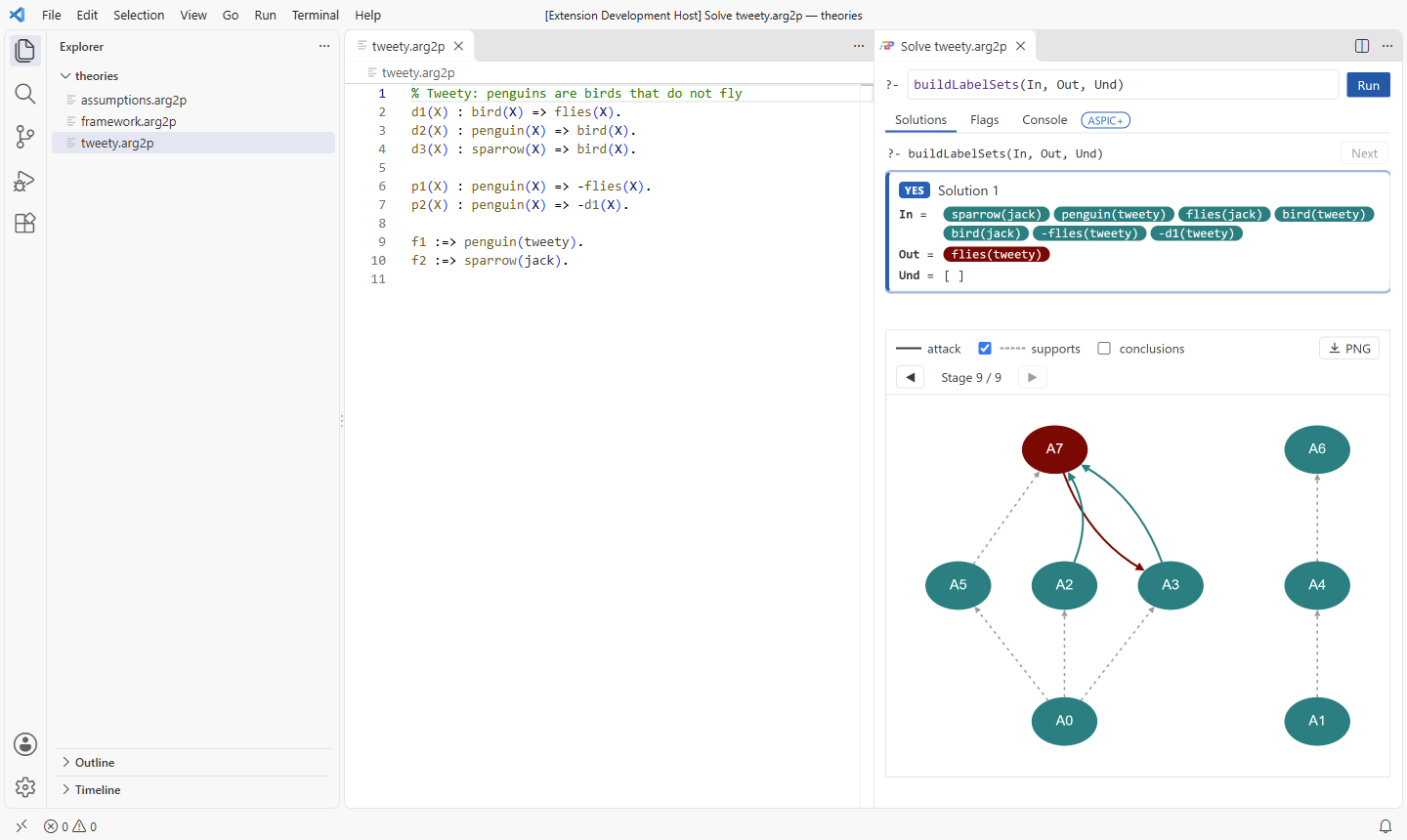
Arg2P: Open the Solver (the ▷ of the editor of a theory) opens its solver beside it (or under it: arg2p.solver.position):

  • the query, solved with Run (or Enter), one solution at a time (Next), Stop to stop it (the query alone: the other solvers and the language server go on);
  • the argument graph of a solution, the stages of its computation, and the popup of each argument;
  • for an abstract framework (graphBuildMode(abstract).), its drawing instead: what is drawn is written in the theory, the theory edited is drawn again, and each argument tells its label, what attacks it and what it attacks;
  • the flags, the profile first, each with the value in effect and where it comes from;
  • what the theory prints.

Solving a theory that does not parse takes to where it does not, in its editor. The solver keeps the query, the flags and the switch Parallel of each theory.

Parallel solving and the federation

Parallel, among the actions of the solver, solves the query on the parallel solver of Arg2P: any theory, flags and query, on the workers of this device and of the devices linked to it (on this device alone, concurrently, with none). The graph of a solution is that of the last stage of its computation.

The view Arg2P Federation (in the explorer, or Arg2P: Show the Federation) shows the name of this device and its 4-digit code, and the devices of the same local network running the extension: type the code shown on one to link to it. It lists the devices linked with their workers, and shows a QR code for phones: scanned on the same network, its page asks for the code, and the phone lends its workers while the page stays open (the page loads Arg2P from jsDelivr). arg2p.federation.enabled turns it off: the language server then neither listens nor is heard.

The language server

The extension runs the language server of Arg2P on the JVM: on the Java the settings name (arg2p.java.path), or else on the Java runtime the package for a platform bundles, or else on that of JAVA_HOME, or else on java on the path (21 or later). arg2p.java.options are the options of the JVM: -Xmx8g, say, for the heap of large graphs. Both are user settings alone: a workspace cannot set them. Arg2P: Restart the Language Server starts it afresh.

AI assistants

The language server is also the MCP server of Arg2P, which the extension registers for the assistants of VS Code (Copilot agent mode, VS Code 1.101 or later): they solve theories with its tools rather than guessing what they conclude; explore shows the solver of a theory in the chat. It runs on the Java of the language server. Its tools, and the other assistants: see AI assistants.

Settings

Setting
arg2p.java.path The java running the language server (user settings)
arg2p.java.options The options of the JVM running it (-Xss512m, user settings)
arg2p.flags The flags a theory is first solved with
arg2p.solver.position Where the solver opens: beside the theory (beside) or under it (below)
arg2p.federation.enabled Whether the devices nearby see this one, and phones join it (true, user settings)
arg2p.federation.name The name of this device, as the others see it (the name of the host by default, user settings)
  • Contact us
  • Jobs
  • Privacy
  • Manage cookies
  • Terms of use
  • Trademarks
  • Your Privacy Choices
  • Consumer Health Privacy
© 2026 Microsoft