Git Drafts for VS Code
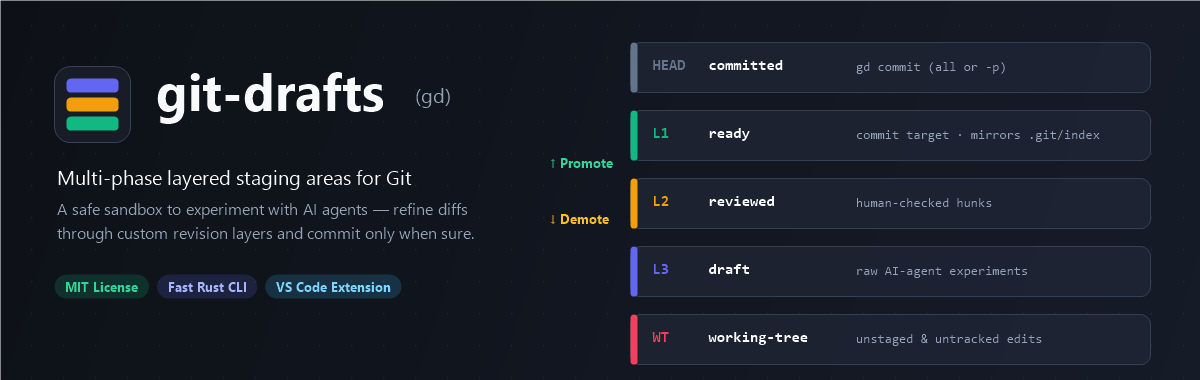
Multi-phase layered staging areas for Git — a safe space to experiment with AI agents before committing.
Stop forcing messy AI-agent edits into a single Git staging area. Git Drafts integrates directly into Source Control and adds a dedicated Git Drafts Activity Bar view, diff-editor hunk controls, and bidirectional .git/index sync powered by gd.
Features
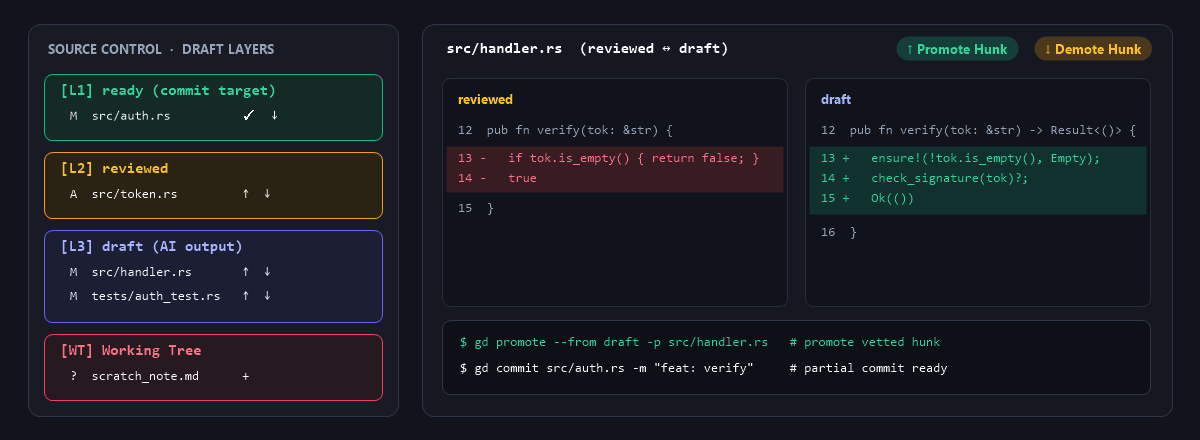
- Seamless Source Control Integration: Adds a Draft Layers tree directly inside VS Code's built-in Source Control sidebar plus inline actions (
Stage to Top Draft, Stage to Layer..., Demote from Ready ↓) on built-in Git items.
- Bidirectional
.git/index Mirror: [L1] ready stays synced with Git's Staged Changes — stage/unstage from either Git Drafts or built-in Git seamlessly.
- Activity Bar Pipeline View: Visual stack of your revision layers (
HEAD ← ready ← reviewed ← draft ← WT) with file count badges, Promote ↑ / Demote ↓, + Layer, Undo, and .git/index mirror toggle.
- Multiselect Batch Actions: Select multiple files (
Ctrl+Click / Shift+Click) to Stage, Promote ↑, Demote ↓, Drop, or partially Commit in one click.
- Diff Editor Hunk Controls: When viewing any
git-drafts side-by-side diff, promote or demote the hunk at your cursor directly from the editor title bar (Promote Hunk ↑ / Demote Hunk ↓).
- Status Bar Counter: Live summary (
Drafts: ready(1) · reviewed(0) · draft(2)) in the status bar.
- 1-Click AI-Agent & MCP Setup: Generate
AGENTS.md, .agents/skills/git-drafts/SKILL.md, and .vscode/mcp.json powered by the built-in gd mcp server with role-based guardrails.
AI-Agent Workflow & Built-in MCP
Click AI Agents in the Draft Pipeline toolbar (or run Git Drafts: Setup Agent Instructions & MCP) to equip Copilot, Claude, Cursor, Gemini, or Codex:
- Choose target files:
Recommended (AGENTS.md, Skill, .vscode/mcp.json, plus any detected configs) or All.
- Choose MCP role guardrail:
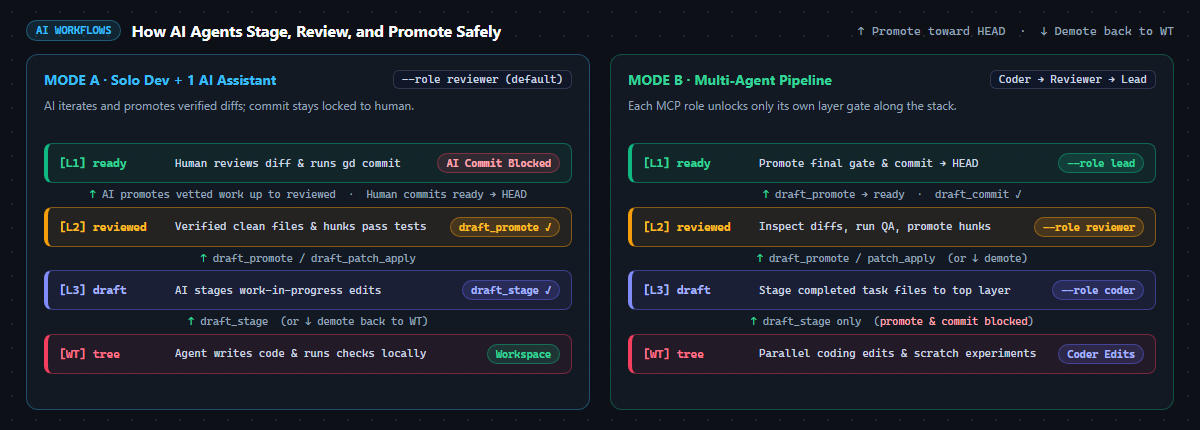
- Reviewer (Default): AI can inspect diffs, stage edits into
draft, and promote verified changes to reviewed — draft_commit is blocked so you stay in charge of committing.
- Coder: Restricted to the top
draft sandbox layer only.
- Lead: Full pipeline access including
draft_commit.
Zero-Step Setup
No manual CLI install required — on first launch, the extension automatically downloads the prebuilt gd binary for your platform (Linux, macOS, or Windows, including Remote-SSH) if it is not already on PATH.
(Optional standalone CLI install: cargo install --git https://github.com/Girgis98/git-drafts.git)
Quick Start
- Open any Git repository in VS Code.
- In Source Control, click
.git under Not Initialized (or run Git Drafts: Initialize Draft Layers).
- Stage AI-agent edits to
draft, inspect diffs (reviewed ↔ draft), promote verified files or hunks up (↑) to ready, and commit all or selected files when you're sure.
Extension Settings
gitDrafts.executablePath: Path to the gd binary (default: "gd", with automatic fallback to ~/.cargo/bin/gd and <workspace>/target/release/gd).
License
MIT
| |

