BiDi Fix for Claude Code
Fixes bidirectional text (RTL/LTR) rendering in Claude Code for Right-To-Left languages.
The Problem
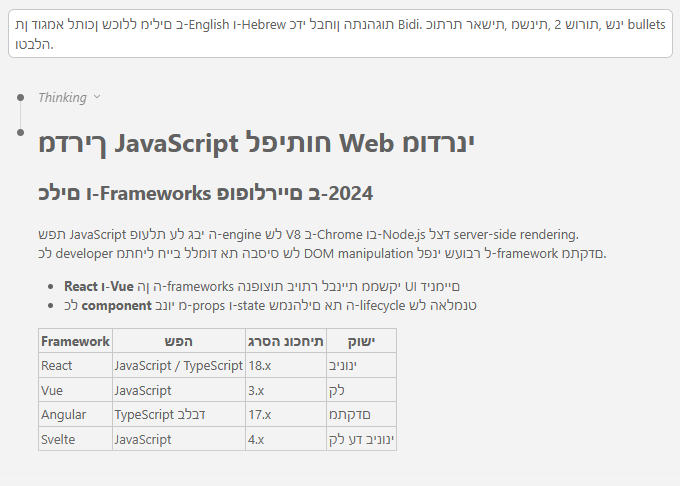
Claude Code's WebView applies a global CSS rule that forces all text to render left-to-right:
* { direction: ltr; unicode-bidi: bidi-override }
This breaks bidirectional text - Hebrew and Arabic appear mirrored or unreadable.
Before (broken)
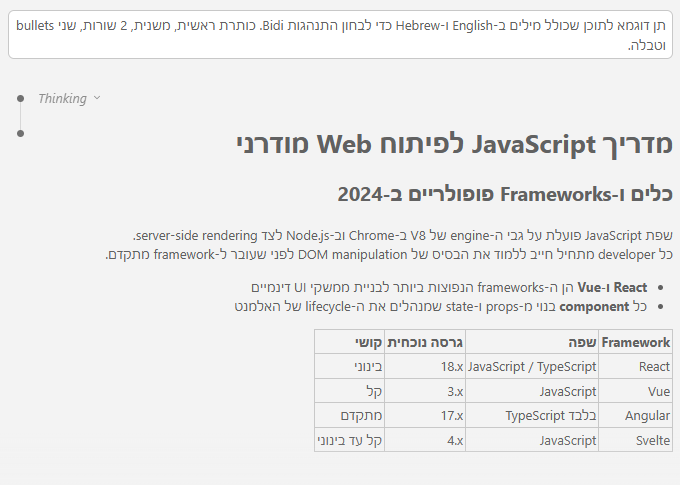
After (fixed)
How It Works
The extension patches Claude Code's WebView files with:
- CSS - Overrides
unicode-bidi on text elements so the browser's BiDi algorithm can detect text direction automatically
- JavaScript - Ratio-based RTL detection that correctly handles mixed LTR/RTL content, sets direction on paragraphs, headings, lists, tables, blockquotes, and user message bubbles
The JS engine handles cases that CSS alone cannot:
- Mixed content like
REST API - מערכת שלמה (English-first but Hebrew-majority)
- Tables and lists that need layout direction changes (padding, bullet position, alignment)
- Headings that should inherit direction from their following content
- Code blocks are always kept LTR
Installation
From Marketplace
Search for "BiDi Fix for Claude Code" in the Extensions panel.
From VSIX
- Download the
.vsix file from Releases
- In VS Code/Cursor:
Ctrl+Shift+P (Mac: Cmd+Shift+P) > Extensions: Install from VSIX...
- Select the downloaded file
Usage
The extension auto-applies on startup when Claude Code is detected. After the first install, you'll see a prompt to reload the window.
Commands
Open the Command Palette (Ctrl+Shift+P (Mac: Cmd+Shift+P)) and search for:
| Command |
Description |
| BiDi Fix: Apply Patch |
Manually apply the patch |
| BiDi Fix: Remove Patch |
Remove the patch and restore originals |
| BiDi Fix: Check Patch Status |
Check if the patch is currently applied |
After Claude Code Updates
When Claude Code updates, its WebView files are replaced. The extension detects this and re-applies the patch automatically on the next startup.
What Gets Patched
The extension appends CSS and JS to two files inside the Claude Code extension directory:
webview/index.css - BiDi CSS overrideswebview/index.js - RTL detection and direction-setting logic
Original files are backed up (.bidi-backup) before any modification. The Remove Patch command restores from these backups.
All injected code is wrapped in clear markers (/* BIDI-FIX-START */ / /* BIDI-FIX-END */) for easy identification.
Supported Languages
Any Right-To-Left script, including:
- Hebrew (עברית)
- Arabic (العربية)
- Persian/Farsi (فارسی)
- Yiddish (ייִדיש)
- And other RTL scripts (Urdu, Pashto, etc.)
Compatibility
- VS Code 1.85.0+
- Cursor (all versions)
- Claude Code extension (any version)
Security
- Zero npm dependencies
- No network access
- Only modifies files within the Claude Code extension directory
- Injected code runs in Claude Code's existing WebView sandbox
- Fully auditable - 4 small files, plain JavaScript
Contributing
Issues and PRs are welcome.
License
MIT


