🎨 Flatwhite — A warm, minimal theme for VS Code
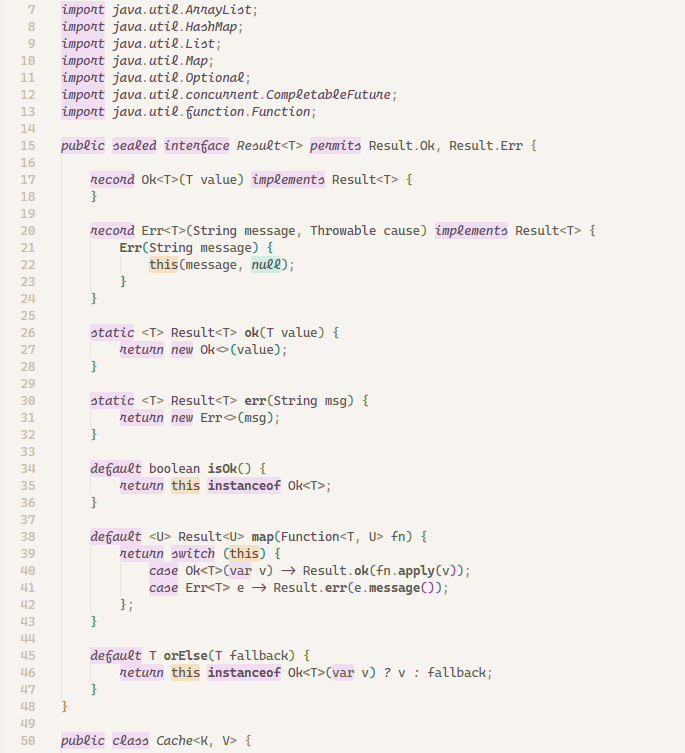
Most syntax themes color your code by changing text color. Flatwhite does something different: it highlights keywords, strings, and constants with colored backgrounds — the way you'd mark up a printed page with a highlighter pen. 🖊️ Available in light and dark variants.
The result is a calm, readable editor where structure jumps out without ever feeling aggressive, while keeping a constant 6:1 contrast between text and background colors 🤓 (easy on the eyes).
Ported from one of my fav ❤️ themes for Atom — flatwhite-syntax by Dmytro Biletskyy.
📸 Preview
JavaScript
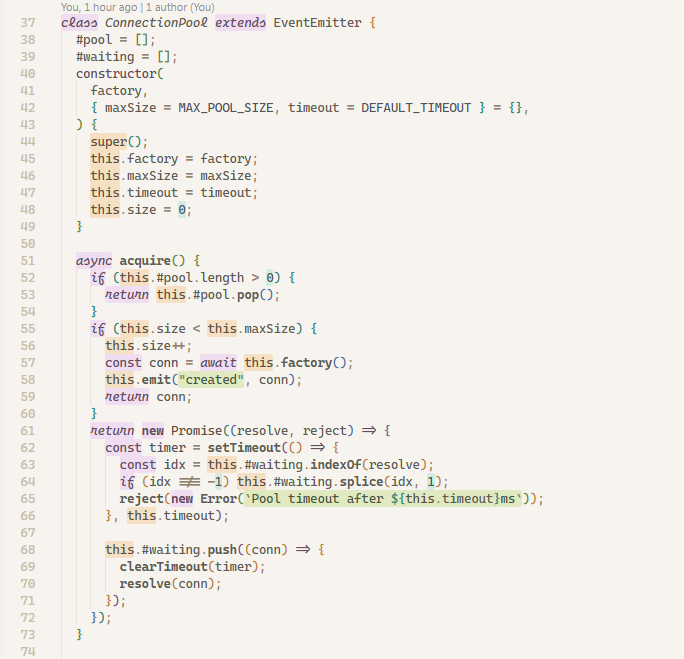
Python
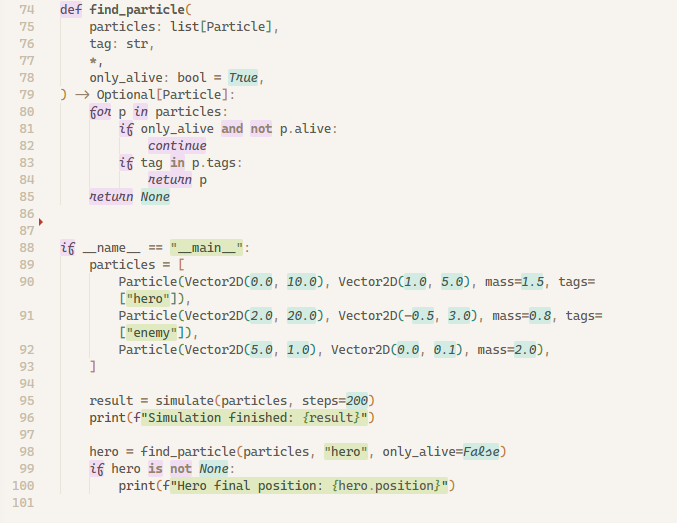
Java
🚀 Installation
From the VS Code Marketplace
- Open the Extensions panel (
Ctrl+Shift+X)
- Search for Flatwhite
- Click Install
- Open the Command Palette (
Ctrl+Shift+P) → Preferences: Color Theme → Flatwhite (or Flatwhite Dark)
From source
git clone https://github.com/gabecarra/flatwhite-theme
Open the cloned folder in VS Code and press F5 — this launches an Extension Development Host window with the theme already active.
🎨 Color palette
All colors are derived from the original flatwhite-syntax palette.
| Role |
Hex |
| 🟫 Editor background |
#F7F3EE |
| ⬛ Base text |
#605A52 |
| 🩶 Comments |
#B9A992 |
| 🟣 Purple marker |
rgba(206, 92, 255, 0.15) |
| 🟢 Green marker |
rgba(132, 189, 0, 0.19) |
| 🩵 Teal marker |
rgba(0, 189, 163, 0.15) |
| 🔵 Blue marker |
rgba(117, 163, 255, 0.20) |
| 🟠 Orange marker |
rgba(240, 140, 0, 0.18) |
| 🔷 UI accent |
#7A4E8A |
Flatwhite Dark uses the same marker hues at a higher opacity against a warm dark ground.
| Role |
Hex |
| 🟫 Editor background |
#2A2520 |
| ⬜ Base text |
#D9D2C7 |
| 🩶 Comments |
#8A8172 |
| 🟣 Purple marker |
rgba(206, 92, 255, 0.26) |
| 🟢 Green marker |
rgba(132, 189, 0, 0.26) |
| 🩵 Teal marker |
rgba(0, 189, 163, 0.26) |
| 🔵 Blue marker |
rgba(117, 163, 255, 0.26) |
| 🟠 Orange marker |
rgba(240, 140, 0, 0.26) |
| 🔷 UI accent |
#9B5FAE |
🌐 Language support
Flatwhite applies marker highlighting to the following languages. Full means all string types, comment styles, and language-specific features (e.g. key coloring) are handled. Good means standard strings and comments work; uncommon constructs noted below may not be highlighted.
| Language |
Maturity |
Notes |
| JavaScript / JSX |
✅ Full |
Template literals, block/line comments |
| TypeScript / TSX |
✅ Full |
Same scanner as JS |
| Python |
✅ Full |
Triple-quoted strings, # comments |
| Java |
✅ Full |
Text blocks ("""), block/line comments |
| JSON / JSONC |
✅ Full |
Key highlighting (blue) |
| YAML |
✅ Full |
Key highlighting (blue), # comments, Docker Compose files |
| Rust |
✅ Full |
Raw strings (r"...", r#"..."#), block/line comments |
| Go |
🟡 Good |
Raw string literals (backticks) included |
| C |
🟡 Good |
|
| C# |
✅ Full |
Verbatim (@"...") and interpolated ($"...", $@"...") strings |
| C++ |
✅ Full |
Raw strings (R"delim(...)delim") included |
| PHP |
✅ Full |
Heredoc / nowdoc (<<<EOT) included |
| Visual Basic |
🟡 Good |
|
| SQL |
🟡 Good |
Keywords matched case-insensitively |
| R |
🟡 Good |
|
| Markdown |
🟡 Good |
Headings, bold, links, blockquotes, code spans/blocks |
| HTML |
🟡 Good |
Tag name highlighting, HTML comments |
| CSS |
🟡 Good |
Property name highlighting |
| Shell |
🟡 Good |
Heredocs, $VAR/${VAR} variable highlighting |
Want to add a language? See src/languages/ADDING_LANGUAGES.md. 🙌
📝 Changelog
1.5.4
- 📝 Updated the changelog with the 1.5.x releases
1.5.3
- ✨ ALL_CAPS constants in JavaScript and TypeScript now get a blue marker
- 🐛 Fixed editor selection being barely visible over marker highlights (light and dark themes)
1.5.2
- 🐛 YAML: URLs (
scheme://...) are no longer highlighted as numbers
1.5.1
- 🐛 YAML: fixed plain unquoted values being colored like keys
- 🐛 YAML: numbers inside block scalars (
key: |) and hyphenated codes like HR-18 are no longer highlighted as numbers
1.4.2
- ✨ YAML scanner now also applies to Docker Compose files
- 🎨 Increased foreground contrast across the light theme's marker tokens (keywords, strings, regex, numbers, constants, Markdown) for better readability against their highlighted backgrounds
- ✨ Added Shell language support (heredocs,
$VAR/${VAR} variable highlighting)
1.4.0
- ✨ Added Flatwhite Dark theme variant — same marker palette at higher opacity against a warm dark background
- ✨ Rust, C++, C#, and PHP scanners upgraded to Full maturity:
- Rust: raw strings (
r"...", r#"..."#, br"...")
- C++: raw strings (
R"delim(...)delim")
- C#: interpolated strings (
$"...", $@"...", @$"...")
- PHP: heredoc / nowdoc (
<<<EOT ... EOT;)
- 🐛 Fixed keyword markers being overridden by VS Code's semantic highlighting (e.g. Python
and/or/not)
1.3.0
- ✨ Added HTML and CSS language support (tag name and property name highlighting)
- ✨ Added JSX tag handling to JavaScript and TypeScript
- 🐛 Fixed
NUMBERS regex matching trailing characters
🙏 Credits
Original design and color palette by Dmytro Biletskyy — flatwhite-syntax for Atom.
This port recreates the marker-highlight concept in VS Code using the TextEditorDecorationType API (since VS Code's theme engine does not render background in tokenColors).
📄 License
MIT
| |

