AI Context Manager

Keep a .context/ folder that maps your codebase for AI assistants. Modules describe what each part of your project does, which files belong to it, and when it was last updated — so any AI can orient itself instantly.
Works with Claude Code, Cursor, Copilot, Windsurf, and any AI that can read/write files.
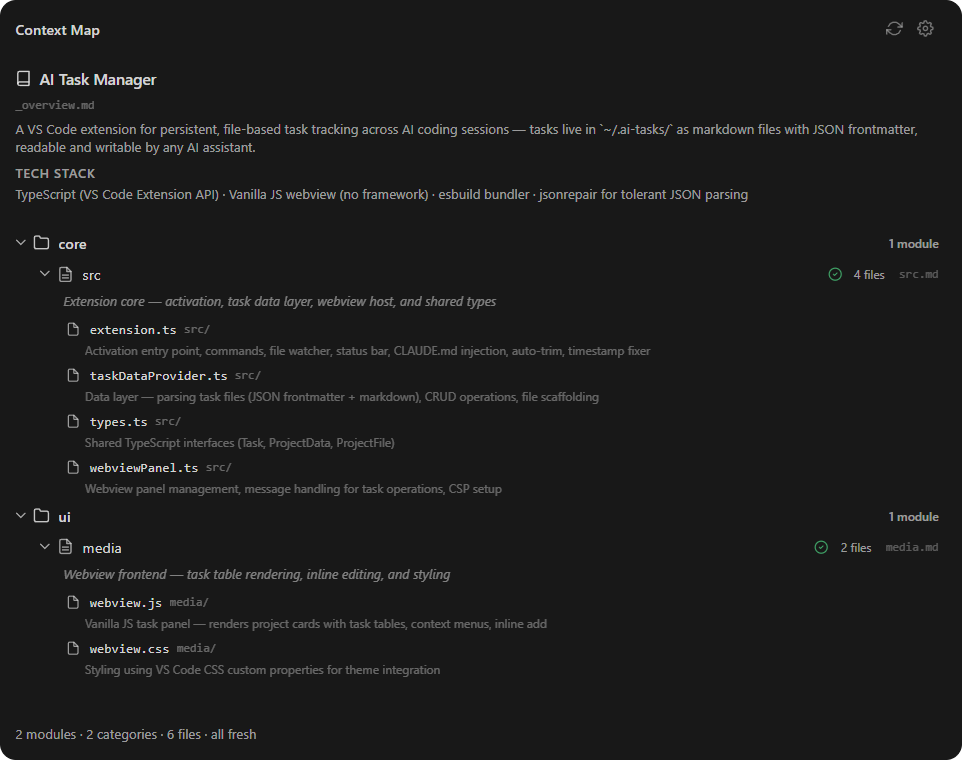
How it works
- Install — optionally adds context management instructions to your CLAUDE.md
- Open a project — prompted to initialise a
.context/ folder if none exists
- Scan — auto-detects your project structure and creates module files
- Work — AI reads
.context/ to understand the codebase, updates it after changes
- Stay fresh — staleness tracking flags modules whose source files changed since the last update
Context lives in .context/ inside your project — git-trackable, human-editable, per-project.
Features
- Per-project context —
.context/ folder lives alongside your code
- Auto-scan — detects project structure and creates categorised module files
- Staleness tracking — flags modules when their tracked source files change
- AI-agnostic — any tool that reads files works, no vendor lock-in
- CLAUDE.md integration — auto-injects instructions so Claude reads and updates context
- Live updates — file watcher picks up
.context/ changes instantly
- Status bar — shows module count and staleness at a glance
- Tree view UI — browse categories, modules, and tracked files in a sidebar panel
.context/ structure
.context/
├── _overview.md          ← project summary and module index (AI reads first)
├── _config.json          ← scan settings, file extensions, category mappings
├── frontend/
│   ├── components.md     ← module file (JSON frontmatter + markdown docs)
│   └── routing.md
├── backend/
│   └── api.md
└── shared/
    └── utils.md
---
{
  "module": "components",
  "category": "frontend",
  "description": "UI components and their interfaces",
  "lastUpdated": "2026-02-23T12:00:00.000Z",
  "files": [
    { "path": "src/components/Button.tsx", "description": "Primary button" }
  ]
}
---

Detailed documentation about this module — architecture notes, patterns, gotchas.
Settings
| Setting |
Default |
Description |
aiContextManager.contextFolder |
.context |
Name of the context folder in the workspace root |
aiContextManager.autoInitPrompt |
true |
Prompt to initialise .context/ when opening a workspace without one |
Commands
- Toggle AI Context Manager — open/close the panel
- AI Context Manager: Initialise .context/ — scan project and create module files
- AI Context Manager: Refresh Staleness — re-check all modules for staleness
Requirements
VS Code 1.85+ (or compatible: Cursor, Windsurf, VSCodium)
Bugs & Feedback
Open an issue on GitHub
License
MIT with Commons Clause

