Firestore Data Manager - Firebridge
Stop switching between Firebase Console and your editor. Manage Firestore directly in VS Code.
Firebridge brings the power of Firebase Firestore to your code editor with an intuitive interface that combines the best of spreadsheets, tree explorers, and JSON editors. View, query, edit, and understand your Firestore data—without leaving VS Code.
🌐 Website: https://www.firebridge.app
Why choose Firebridge?
- Stay in your editor - No more Firebase Console tab switching
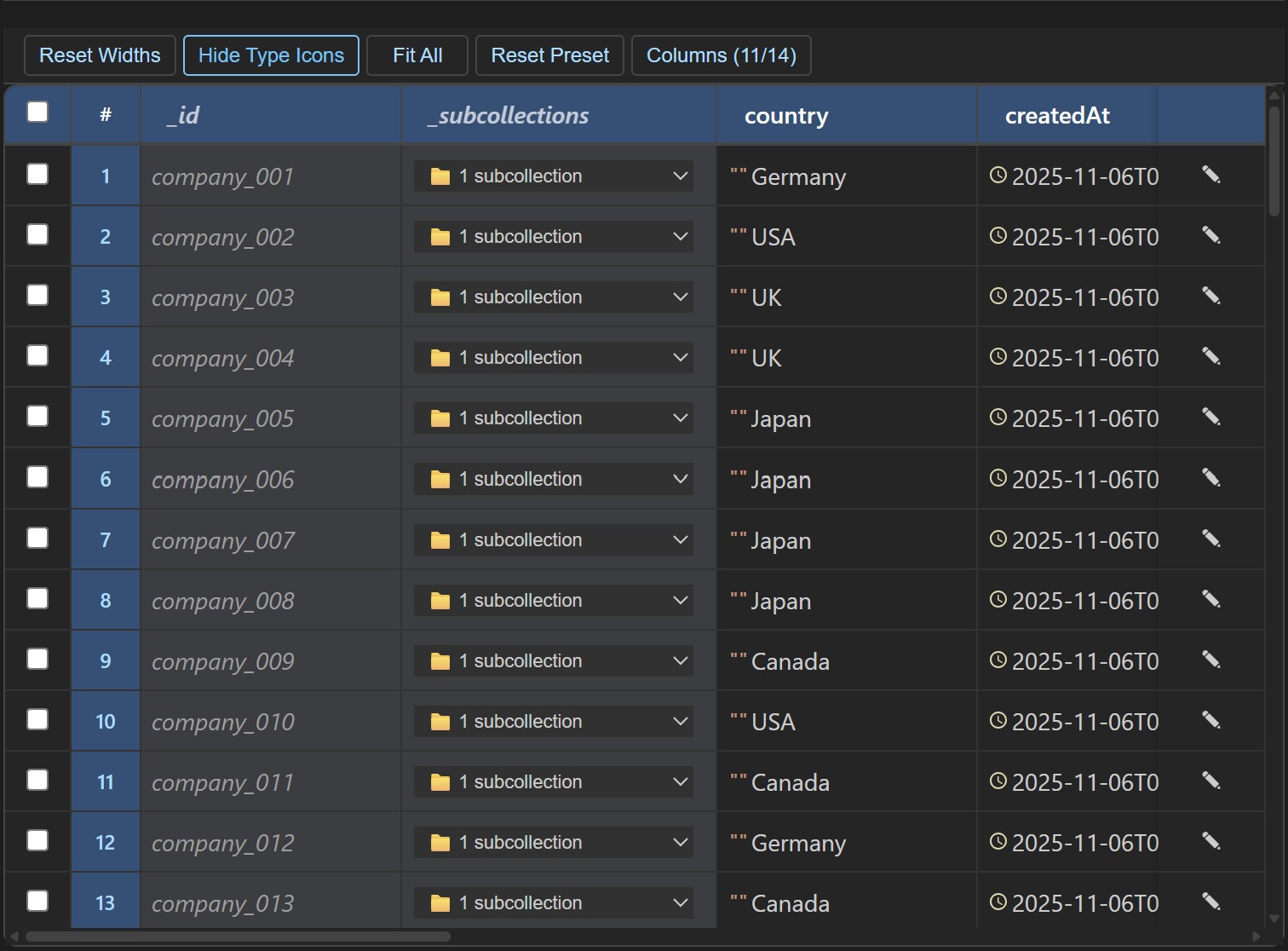
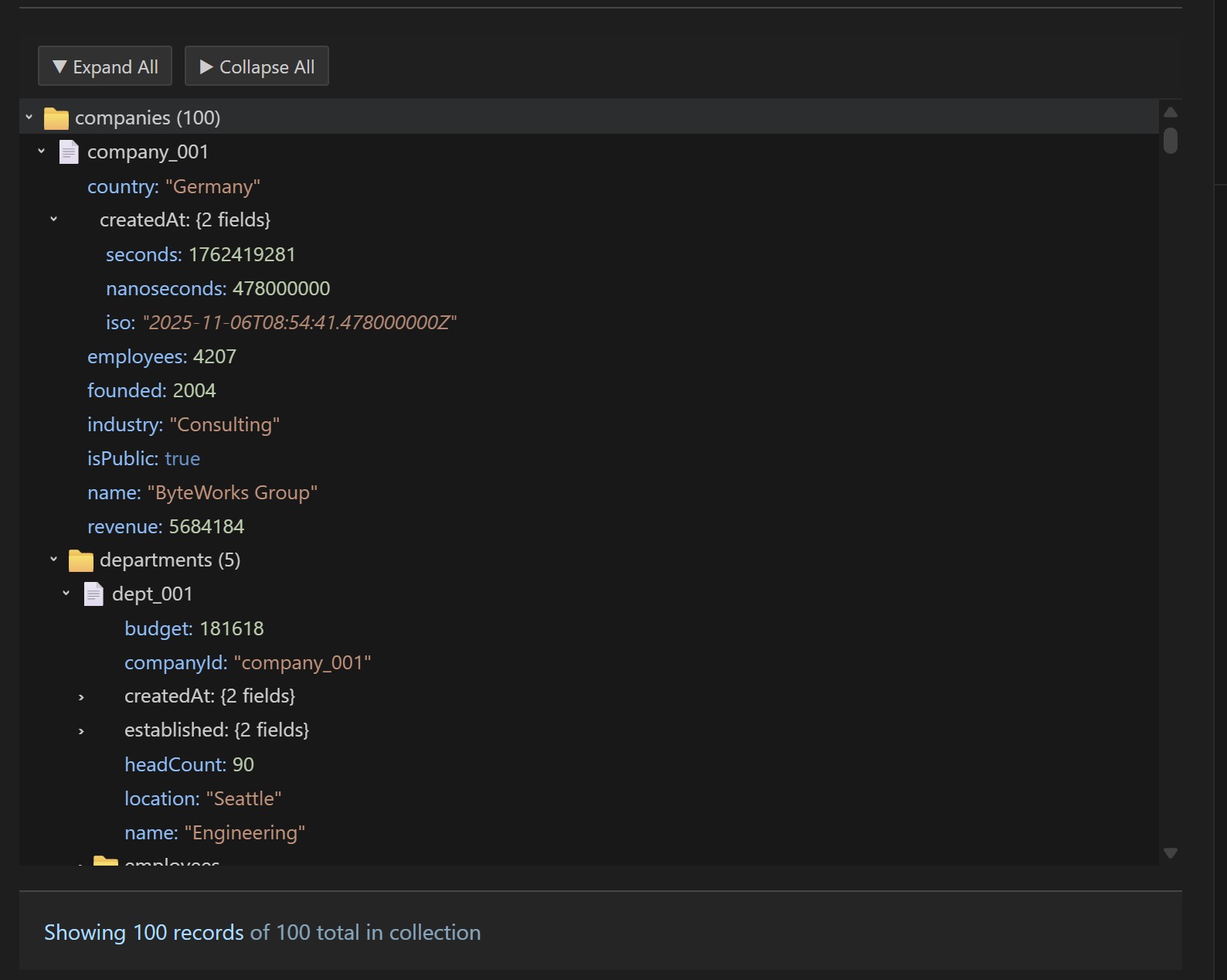
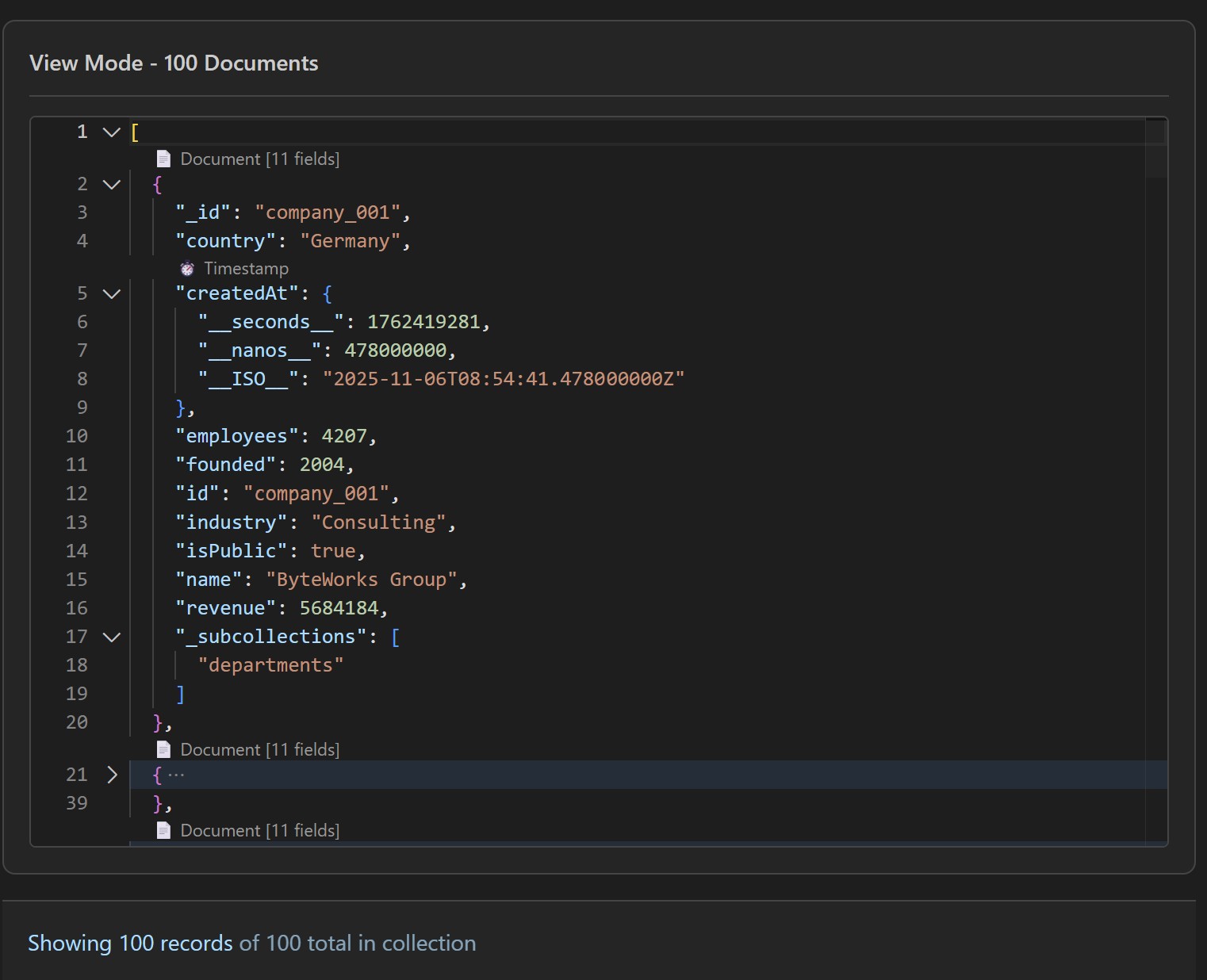
- Multiple perspectives - Grid (spreadsheet), Tree (hierarchy), JSON (raw)
- Full type support - Timestamps, GeoPoints, References, Bytes—all with dedicated editors
- Local development - Works seamlessly with Firestore Emulator
- Intuitive queries - Visual query builder + AI natural language support
✨ Three Viewing Modes
Choose the view that fits your workflow:
| Feature |
Grid View |
Tree View (Webview) |
Tree View (Sidebar) |
JSON View |
| Best for |
Spreadsheet-style bulk edits |
Exploring nested structures |
Quick navigation |
Raw data & power users |
| Editing |
Inline cell editing |
Direct field editing |
Click to expand |
Full JSON control |
| Performance |
⚡ Fastest for many fields |
🌳 Best for hierarchies |
Best for speed |
💻 No overhead |
| Pagination |
100 docs max |
100 docs max |
10 docs max |
N/A |
| Arrays |
Shows count |
Expandable |
Limited view |
Full control |
| Subcollections |
Not visible |
Navigate directly |
Navigate directly |
Manual paths |
📊 Built-In CRUD Operations
✅ Create - New documents with type-aware fields and auto-generation
✅ Read - Browse, search, filter, sort, and export to JSON/CSV
✅ Update - Inline editing with real-time validation and copy-paste
✅ Delete - Collections and documents with confirmation
✅ Bulk Operations - Select multiple documents for batch updates
✅ Export/Import - Copy entire documents or export as JSON for version control
🔍 Visual Query Builder
No more struggling with Firestore query syntax.
✨ Features:
- Type-aware field selectors
- Visual query builder interface
- Optional: Natural language via Copilot Chat
- Index Management - Get direct links to create missing composite indexes when needed
- Automatic Index Detection - Tells you exactly which index you need for complex queries
🚀 Built for Developers
🤖 AI-Powered Queries (Optional)
- Natural language queries via
@firebridge agent in Copilot Chat
- Example: "@firebridge Show me users who signed up last week"
- Automatic TypeScript/JavaScript code generation from natural language
💻 Multi-Language Code Generation
- Auto-generate Firestore query code in multiple languages:
- Web: TypeScript, JavaScript, Python
- Mobile: Dart (Flutter), Swift, Kotlin
- Backend: Java, C#, Go, Rust, PHP, Ruby
- Perfect for scaffolding and documentation
- Copy code snippets for immediate use in your app
⚡ Developer-Friendly
- Firestore Emulator support for local development
- Multi-database management
- Firebase Admin SDK integration
- Support for most common Firestore data types
📚 Supported Data Types
All standard Firestore types with dedicated editors:
| Type |
Editor |
Example |
| String |
Text input |
"Hello" |
| Number |
Numeric input |
42, 3.14 |
| Boolean |
Toggle |
true / false |
| Timestamp |
📅 Date/Time picker with microsecond precision |
2025-01-30T14:30:45.123456Z |
| GeoPoint |
🗺️ Map selector with lat/long input |
(37.77, -122.42) |
| Reference |
🔗 Path selector with document browser |
users/john_doe |
| Bytes |
🔐 Hex editor with text conversion |
48656C6C6F |
| Array |
Expandable list |
[1, "two", true] |
| Map |
Nested object tree |
{ key: value } |
| Null |
Empty value |
null |
🎯 Common Use Cases
🏢 Content Management
Browse published articles, edit metadata, manage release dates—all without leaving your code editor.
👥 User Management
View user profiles, update status fields, export lists for analytics or email campaigns.
📦 E-commerce
Manage products, inventory, and orders. Filter by status or date range with visual query builder.
⚙️ Configuration
Edit app settings, feature flags, and system configuration in real-time with type validation.
🚀 Quick Start (3 Minutes)
Step 1️⃣ - Install
Search "Firebridge" in VS Code Extensions and click Install.
Step 2️⃣ - Connect Your Firebase Account
Get a service account from Firebase Console:
- Go to Project Settings → Service Accounts
- Click Generate new private key
- Save the JSON file
# Open VS Code Settings (Ctrl+, or Cmd+,)
# Search "Firebridge"
# Set firebridge.serviceAccountPaths to your JSON file
# Reload the window (Cmd+R / Ctrl+R)
Done! Click the Firebridge icon in the Activity Bar to start browsing your database.
💡 Local Development? Use the Firestore Emulator instead of a service account. See Full User Guide for setup.
Prefer Google OAuth instead of service account?
- Open Command Palette and run Firebridge: Sign In with Google OAuth
- Complete browser sign-in
- Select a project from the picker (or enter one manually)
- To switch projects later:
- Click the account button in the Firebridge explorer title, then choose Switch OAuth Project, or
- Run Firebridge: Switch OAuth Project from Command Palette
📋 Comparison: Before & After
Without Firebridge ❌
- Open Firebase Console in browser
- Tab-switch between Console and VS Code
- Limited editing (mostly copy/paste JSON)
- No query builder - manual syntax
- Data types displayed as raw objects
- Slow iteration loop
With Firebridge ✅
- One window - everything in VS Code
- Edit inline with dedicated field editors
- Visual query builder with type validation
- Smart field editors for dates, locations, references
- See what you're editing instantly
- 10x faster iteration
📖 Complete Documentation
For detailed guides on:
- Supported data types (Timestamps, GeoPoints, References, Bytes, etc.)
- Editing different field types with interactive editors
- Advanced features (query builder, emulator, code generation)
- Limitations and known issues (phantom documents, collection groups)
- Troubleshooting and debugging tips
👉 View the Full User Guide
⚙️ Configuration
All settings are available in VS Code Settings (search "Firebridge"):
| Setting |
Default |
Description |
serviceAccountPaths |
[] |
Path(s) to Firebase service account JSON |
useEmulator |
false |
Connect to local Firestore emulator |
emulatorHost |
localhost |
Emulator host |
emulatorPort |
8080 |
Emulator port |
oauthProjectId |
"" |
Active Firebase/GCP project ID for Google OAuth (set automatically after selection) |
queryLimit |
100 |
Max documents per query (1-10000) |
treeViewLimit |
10 |
Max documents per collection in tree |
pagination.pageSize |
100 |
Documents per page (10-1000) |
debugMode |
false |
Enable detailed logging |
Using the Firestore Emulator
Perfect for local development:
# Start the emulator
firebase emulators:start --only firestore --project demo-project
Then in VS Code Settings:
firebridge.useEmulator: truefirebridge.emulatorProjectId: demo-project- Reload the window
💡 Pro Tips
Speed up your workflow:
- Use Grid View for bulk edits - Faster than clicking individual cells
- Keyboard shortcuts - Learn the keyboard navigation for faster browsing
- Query builder - Build once, modify incrementally instead of rewriting
- Emulator - Test destructive operations safely in local development
- Export/Import - Use JSON format for version control of seeds/configs
❓ Troubleshooting
Having issues? Check the Full User Guide for comprehensive troubleshooting steps, including:
- Service account connection errors
- Emulator connectivity issues
- Performance optimization
- Debug mode for detailed logging
🐛 Known Limitations
Phantom Documents
Documents with subcollections but no data don't appear in queries (Firestore limitation). Use the Firebase Console to delete them if needed. Coming soon in Firebridge.
Collection Groups
Cross-collection queries (querying all collections with the same name at different levels) aren't currently supported. Query each collection separately or use the Firebase Console. Planned for future release.
Query Type Support
Not all field types are queryable. String, Number, Boolean, Timestamp, and Array fields support filtering. GeoPoint, Reference, Bytes, and Map fields require workarounds—see the Full User Guide for alternatives.
Real-Time Updates
Data updates require manual refresh. Real-time listeners are planned for future releases.
Firestore Indexes
Some queries with multiple filters or sorting require Firestore indexes. When needed, Firebridge provides a direct link to create the index in Firebase Console. See the Full User Guide for detailed index guidance.
Timestamp Precision
Firebridge supports microsecond precision (6 decimal places) for timestamps. Nanoseconds (7-9 decimal places) are displayed but not preserved when editing, as Firestore's precision limit is microseconds.
For more details on limitations and workarounds, see the Full User Guide.
🔒 Security & Privacy
- Firebridge includes product telemetry in this release to help us understand usage and improve the extension.
- Telemetry is privacy-focused and does not include Firestore document contents, field values, credentials, or other sensitive project data.
- Telemetry is optional, and you can opt out at any time using VS Code telemetry settings.
How to opt out:
- Open VS Code User Settings JSON (Preferences: Open User Settings (JSON)).
- Set
"telemetry.telemetryLevel": "off" to disable telemetry globally.
- Optional: set
"firebridge.telemetry.enabled": false to disable Firebridge telemetry specifically.
- If available in your VS Code build, you can also use Developer: Set Telemetry Level.
🗺️ Active Development
Firebridge is rapidly evolving. We're working on:
- Smarter query building with type validation and field selectors
- Enhanced document editing including field deletion and server timestamps
- Bulk operations for manipulating data in bulk
- Real-time listeners for live data updates
🔒 Security
- Firebridge uses Firebase Admin SDK for secure database access
- Your service account credentials are stored locally in VS Code settings
- No data is sent to third-party servers
- Compatible with service accounts that have least-privilege IAM roles
🌟 Roadmap
Here's what we're building next:
Coming Soon
- ✨ Field Deletion - Remove individual fields without affecting document data
- ✨ Query Improvements - Better type validation, clause toggles, and reordering
- ✨ JSON Import - Bulk import data from JSON files
- ✨ Real-time Updates - Get instant notifications when data changes
- ✨ AI-Powered Query Building - More intelligent query modifications and explanations
- ✨ Phantom Document Detection - Identify and manage orphaned subcollections
Under Consideration
- Real-time listeners
- Collection group queries (cross-collection queries)
- Batch operations and transactions
- Advanced exports (CSV, JSON, Parquet)
- Composite index suggestions
- Multi-database transactions
- Document version history
Want a feature? Contact us at contact@firebridge.app.
- 📖 Full User Guide - Deep dive documentation
- 🐛 Report Issues - Email contact@firebridge.app for bug reports and feature requests
- 💬 Feedback - Email contact@firebridge.app — we'd love to hear how you're using Firebridge!
📄 Release Notes
1.0.9 (Current Release)
Explorer - Quality of Life
- Added Copy ID and Copy Full Path context menu items to collections and documents in the Firestore Explorer. Quickly grab paths and IDs to paste directly into your code without manually typing them out.
1.0.8
Subcollections
- Added a Fetch Subcollections checkbox to the query builder. When enabled, the Grid view lazily loads the subcollections of each document in the result set.
- Subcollection names are discovered per-document on demand, keeping initial query performance fast.
1.0.7
Feedback
- Added a Send Feedback action in the Firebridge explorer so users can submit feedback directly from VS Code.
- Feedback submissions now require an email address so follow-up is possible when a report needs clarification.
Document Data Handling
- Separated Firestore document metadata such as
id, createTime, and updateTime from normal document fields across the data model.
- Improved flattening and conversion logic used by the Grid and JSON views so metadata-aware documents render and round-trip more predictably.
Quality
- Added coverage for the feedback flow and the metadata-aware document conversion utilities.
1.0.6
Explorer - Open Document in Grid or JSON
- Added "View Document in Grid" and "View Document in JSON" context menu items to document nodes in the Firestore Explorer.
- Clicking either option opens a new panel directly to that document—no manual querying required.
- The query builder is hidden by default when opening a document via the context menu, keeping the focus on your data.
- The panel automatically executes the query and displays the single document in the selected view mode (Grid or JSON).
Fixes
- Fixed Explorer context menus not appearing for tree nodes. Tree item context values were updated to use namespaced identifiers (
firebridge.document, firebridge.collection, etc.) to correctly match the when conditions in the extension manifest.
1.0.5
Copilot Integration
- Added a Firebridge button in the VS Code Explorer that moves focus to Copilot Chat and pre-fills the prompt with
@firebridge.
1.0.4
OAuth & Authentication
- OAuth token exchange and refresh
- Improved OAuth reconnect behavior and sign-out cleanup.
Explorer & UX
- Added an auth mode indicator in the Firestore Explorer title.
Telemetry & Documentation
- Enriched error telemetry with sanitized error details (
errorMessage, errorType, errorCode).
- Updated user-facing OAuth documentation and troubleshooting guidance.
1.0.3
Telemetry
- Added optional telemetry to help us improve Firebridge reliability and user experience.
- Telemetry does not include Firestore document contents, field values, credentials, or other sensitive project data.
- Added a Firebridge-specific telemetry toggle:
firebridge.telemetry.enabled.
- Telemetry is sent only when both VS Code global telemetry and Firebridge telemetry are enabled.
- For the initial 1.0.3 release,
feature.used telemetry is captured at 100% (no sampling).
Fixes & Improvements
- Fixed documentation links and support contact details in the Marketplace listing.
1.0.2
Fixes & Improvements
- Fixed broken Marketplace listing screenshots and documentation links
- Corrected base content URLs to resolve relative links through https://www.firebridge.app
- Updated extension manifest license field from UNLICENSED to reference LICENSE.txt
- Aligned extension display name with marketplace description for consistency
- Improved documentation sync workflow between the marketplace listing, README, and changelog
Features
- Browse Firestore with interactive Tree View
- Three viewing modes: Grid, Tree, and JSON
- Full CRUD operations (Create, Read, Update, Delete)
- Visual Query Builder with WHERE and ORDER BY clauses
- Support for all Firestore data types
- Firestore Emulator support for local development
- Multi-database management
- Type-aware field editors (Timestamps, GeoPoints, References, Bytes)
Supported Environments
- Production Firestore databases (via service account)
- Local Firestore Emulator
- Multi-database setups
1.0.1
Fixes & Improvements
- Fixed broken Marketplace listing screenshots and documentation links
- Corrected base content URLs to resolve relative links through https://www.firebridge.app
- Updated extension manifest license field from UNLICENSED to reference LICENSE.txt
- Aligned extension display name with marketplace description for consistency
- Improved documentation sync workflow between the marketplace listing, README, and changelog
Features
- Browse Firestore with interactive Tree View
- Three viewing modes: Grid, Tree, and JSON
- Full CRUD operations (Create, Read, Update, Delete)
- Visual Query Builder with WHERE and ORDER BY clauses
- Support for all Firestore data types
- Firestore Emulator support for local development
- Multi-database management
- Type-aware field editors (Timestamps, GeoPoints, References, Bytes)
Supported Environments
- Production Firestore databases (via service account)
- Local Firestore Emulator
- Multi-database setups
License & Legal
Disclaimer: Not officially affiliated with Google or Firebase. Use at your own risk in production environments. Always test in a development environment first and keep backups of important data.

