For the Visual Studio 2022/2026 version click here.
Interactive C# code visualization and exploration directly inside Visual Studio
🔍 Visual Code Exploration
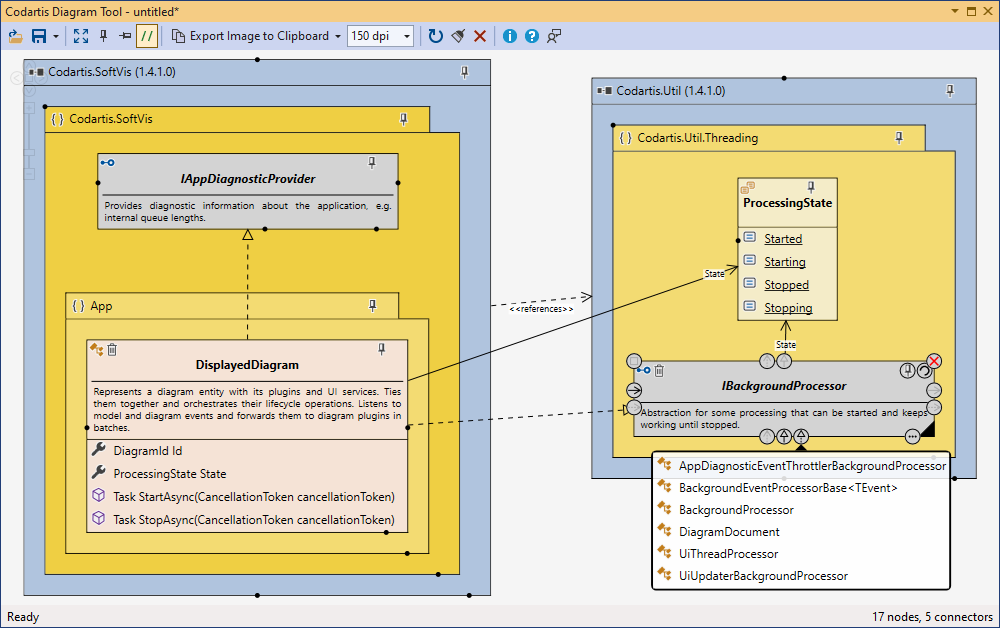
- Build interactive diagrams of your codebase structure.
- Visualize types, members, namespaces, and assemblies.
- See relationships like inheritance, associations, interface implementations, generic constructions, and containment.
- UML-style notation familiar to developers.
- Click diagram nodes to expand related items or jump straight to source code.
✏️ Easy Diagram Creation & Editing
- Add items from the editor or Solution Explorer with context menus.
- Automatic layout with optional manual control (drag, resize, pin).
- Align to grid, customize colors, and add descriptive notes.
- Diagrams refresh and re-link automatically with source changes.
- Export diagrams as images or copy for documentation.
🔌 Seamless Visual Studio Integration
- Open and work with multiple diagrams concurrently.
- Save diagrams in a version-friendly JSON format within your project/solution.
- Full support for light & dark themes.
- Compatible with Visual Studio 2019, 2022, and 2026 (all editions).
See the Help page for more details.
Visit codartis.com for licensing and pricing information.
| |

