Restack
Visualize GitHub stacked pull requests
in VS Code or Cursor, drag branches into a new order, and see exactly which git
commands that reorder would require.
Restack shows you the plan before anything runs, then runs it on your say-so.
Nothing executes until you confirm, and the local half is reversible.
Requires the gh CLI with
gh-stack:
gh extension install github/gh-stack.
Restack reads and writes gh-stack's state — it is a UI for it, not a
replacement. See Requirements.
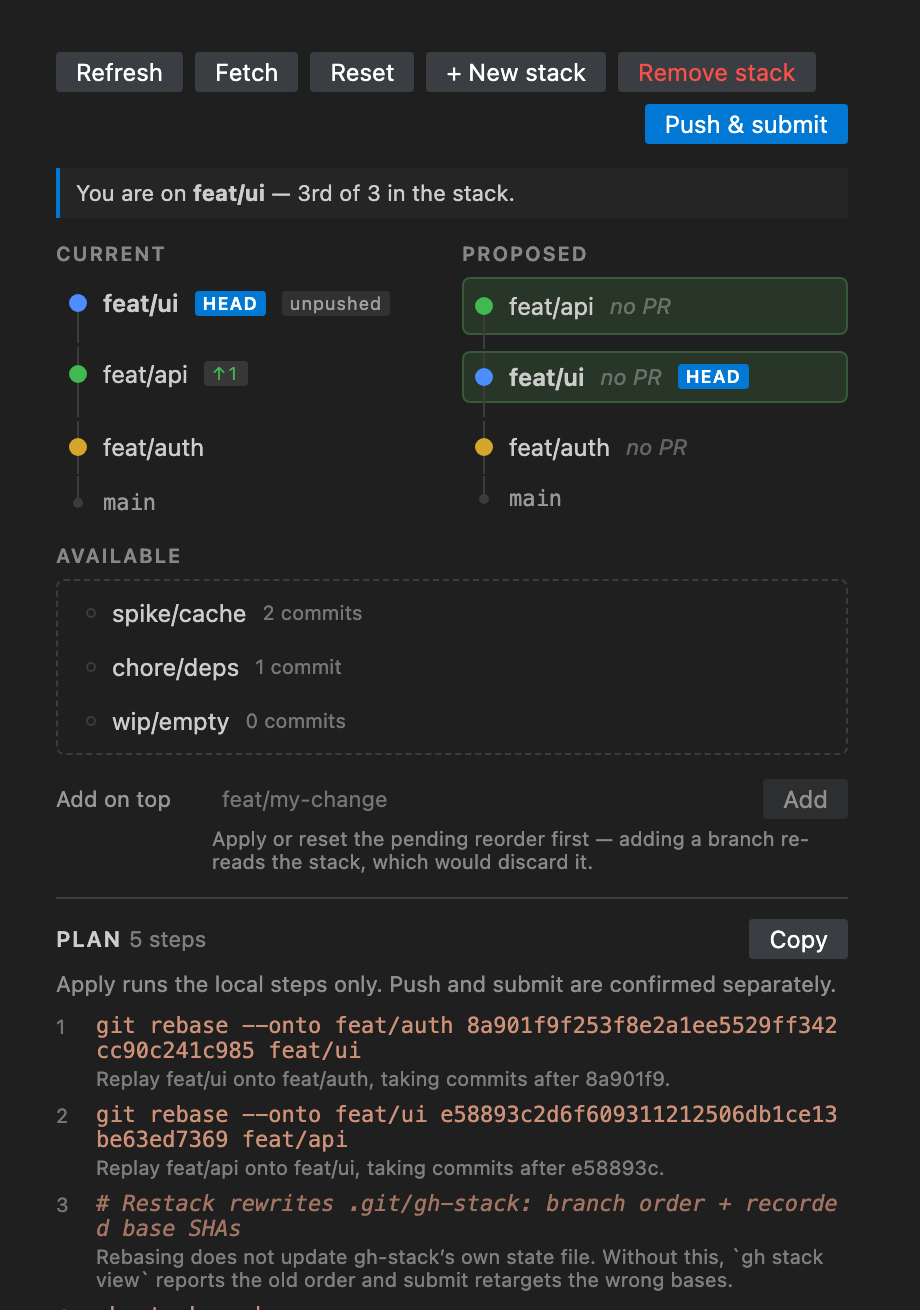
What stacking is, and what this does
A stack is a chain of branches where each one is based on the one below it
rather than on trunk, so a large change ships as a series of small, reviewable
PRs. feat/auth → feat/api → feat/ui: each PR's diff shows only its own work,
and each targets its parent instead of main.
The cost is that the chain is fragile. Reordering it, inserting a branch, or
pulling one out means rebasing every branch above the change — each onto a
parent whose commits have just been rewritten. Do it by hand and one wrong
upstream argument silently folds another branch's commits into yours, with no
error and nothing to warn you.
Restack does that arithmetic. Drag to reorder, and it shows the exact git rebase --onto sequence before running anything.
Why
gh stack modify can reorder a stack, but it is TUI-only — its only flags are
--abort and --continue, so there is no way to hand it a plan headlessly.
Restack computes the plan itself and shows it to you before anything runs.
How it works
- Reads
gh stack view --json in the workspace folder. No stack there yet?
See Initializing a stack.
- Renders the stack top-down (trunk at the bottom), matching
gh stack view.
- Dragging reorders a local copy only — nothing touches git.
- Recomputes the plan on every drop.
- Apply runs the plan, pausing on conflicts.
Initializing a stack
On a repo with no stack, the panel is a builder rather than a dead end: pick a
trunk, drag local branches in bottom-first, optionally type the name of a branch
that does not exist yet, and Initialize stack runs the
gh stack init --base <trunk> … shown right above the button.
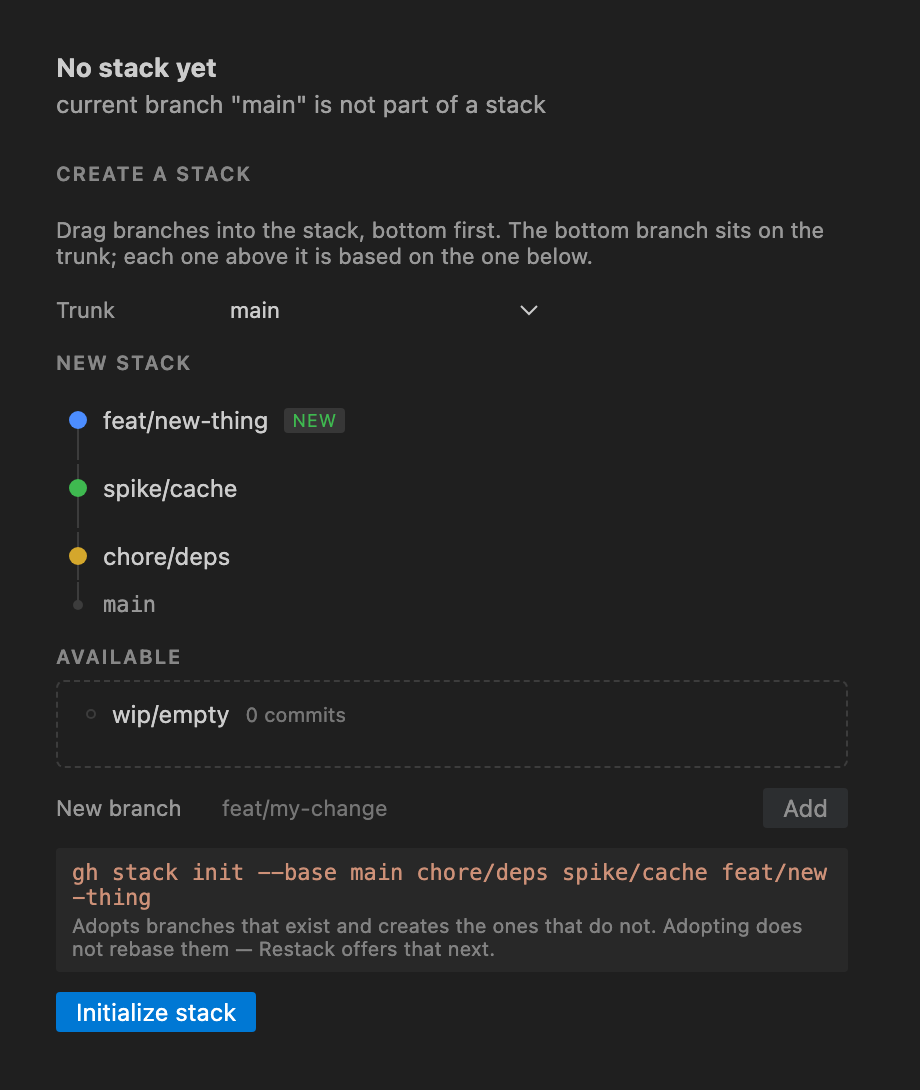
Two things about gh stack init are worth knowing, because both are visible
afterwards:
- Adopting does not rebase. Branches that already exist keep sitting wherever
they were; init only records the order. gh-stack then flags them
needsRebase,
and Restack shows a banner naming them with a Rebase stack button. That
runs the same plan-then-apply path as a reorder — steps on screen first,
conflicts pause, undo available.
- It checks out the top branch, after writing
.git/gh-stack. A dirty tree
that blocks that checkout leaves a stack half-created, so Restack will not run
init at all until the tree is clean — it offers to stash for you first, and
refuses if you decline.
If stacks exist but the current branch is not in one, the panel lists them with
a Check out button above the builder — that is usually what you wanted, not
a second stack. Once you are in one, the same list is a step away in the
switcher: see Several stacks in one
repository.
Working against another branch
A stack does not have to sit on the default branch. gh stack init --base takes
any branch, and the case it exists for is building on top of a colleague's work
before it merges: their branch becomes your trunk, your bottom PR targets it,
and the whole stack lands after theirs does.
The Trunk dropdown lists local branches and, in a second group, remote-tracking
ones. A colleague's branch usually only exists as origin/their-work, so picking
it creates a local branch tracking it first — gh-stack records a trunk by name
and needs it to resolve locally. That happens before gh stack init, and a
failure aborts the whole thing rather than recording a trunk that is not there.
Picking a remote branch also fetches first, and the reason is the second time you
do it. By then their-work already exists locally, sitting at the commit it was
created at, while its owner has pushed twice since — so creating it is right once
and wrong every time after. Restack fast-forwards it instead, which cannot lose
anything, and says by how many commits in the output channel. If the local copy
has commits of its own it is neither adopted nor rewritten: someone else's branch
is not ours to rebase, so Restack names the drift and stops.
Change base… on the trunk row moves an existing stack, which is the other
half of the same story: once their branch merges into main, the stack should
sit on main. It opens a picker of local and remote branches, then replays the
bottom branch onto the new base and cascades everything above it — an ordinary
apply, with the plan on screen first, conflicts pausing, and undo available.
Picking a remote branch goes through the same fetch-and-catch-up as init; picking
a local one does not, so if it has fallen behind its own upstream the
confirmation says so before you commit to it, rather than silently landing the
stack on an old commit. That one is a note and not a refusal — basing on an
older commit deliberately is legitimate, and Sync stack is the fix if it was not.
The
metadata write records the new trunk, which is what makes the next
gh stack submit retarget the bottom PR. Restack says so in the confirmation,
naming the PR, because that retarget is the part that reaches GitHub.
Nothing about this is special-cased in the rebase arithmetic. Changing the base
is {...stack, trunk: newBase} handed to the same computePlan; the bottom
branch's recorded base still anchors its replay, so it takes its own commits
and not the new base's. See the recorded-SHA detail.
Knowing where you are, and moving
The row you are standing on carries a HEAD pill and a filled node, and a
line above the columns says it in words: You are on feat/api — 2nd of 3 in the stack. Trunk is a position like any other — gh stack view still reports the
whole stack from there — so standing on main marks the trunk row rather than
falling back to the empty state. Standing on a branch gh-stack does not track is
the one case shown as a warning, because nothing you drag will move where you
are.
To move somewhere else, take whichever route is nearest:
- the
⇣ button that appears on a row when the pointer is over it, or when it
takes keyboard focus;
- the status bar item (
$(git-branch) feat/api 2/3), which opens the picker;
Restack: Check Out Branch in Stack, listing the stack top-down with trunk
last and the current branch ticked;- double-clicking a row in the Proposed column, as before.
All four refuse for the same reasons: a dirty worktree, an apply in flight, or a
rebase already in progress — checking out mid-rebase abandons it.
A dirty working tree
Every operation that moves HEAD needs a clean tree, and rather than refusing
outright Restack offers to do the two commands you would otherwise run by hand.
Check out a branch, add or remove one, initialize a stack, apply a reorder,
rebase, sync, or change the base with uncommitted changes and you get a dialog
naming the files, with Stash and continue. Decline it and you get the
refusal you always got.
Say yes and Restack runs git stash push before the operation and
git stash pop after it. Two details are deliberate:
- Untracked files are left alone — no
-u. That matches every dirty check
in Restack, all of which pass --untracked-files=no, so a stash never carries
away a file the refusal was not about.
- The stash is found by commit SHA, never
stash@{0}. The stash is a stack
and you have a terminal; if you push another one while a reorder is running,
Restack still pops the right entry.
For an apply the stash is held for the whole session rather than popped the
moment the rebases land. A finished local apply still offers Roll back,
which reaches its snapshot through git checkout --force — restoring your
changes in front of that would put them where that command destroys them. So
the stash comes back on whichever of publish, roll back, or dismiss happens
first, and the panel says so while it is waiting. It survives a window reload
along with the rest of the session. Dismissing an apply that is paused on a
conflict is the one case where nothing is popped: the tree cannot take it. You
are told the stash@{N} to pop yourself, and the same goes for a pop that
conflicts — nothing is dropped until you drop it.
What is actually in a branch
A stack view that shows only branch names asks you to remember what you put in
each one. Reordering is a decision about content — whether feat/api really
sits on top of feat/auth depends on what each of them touches — and until now
answering that meant leaving for a terminal.
Every row in the Current column carries a count of the commits it owns, and a
twisty that opens it:
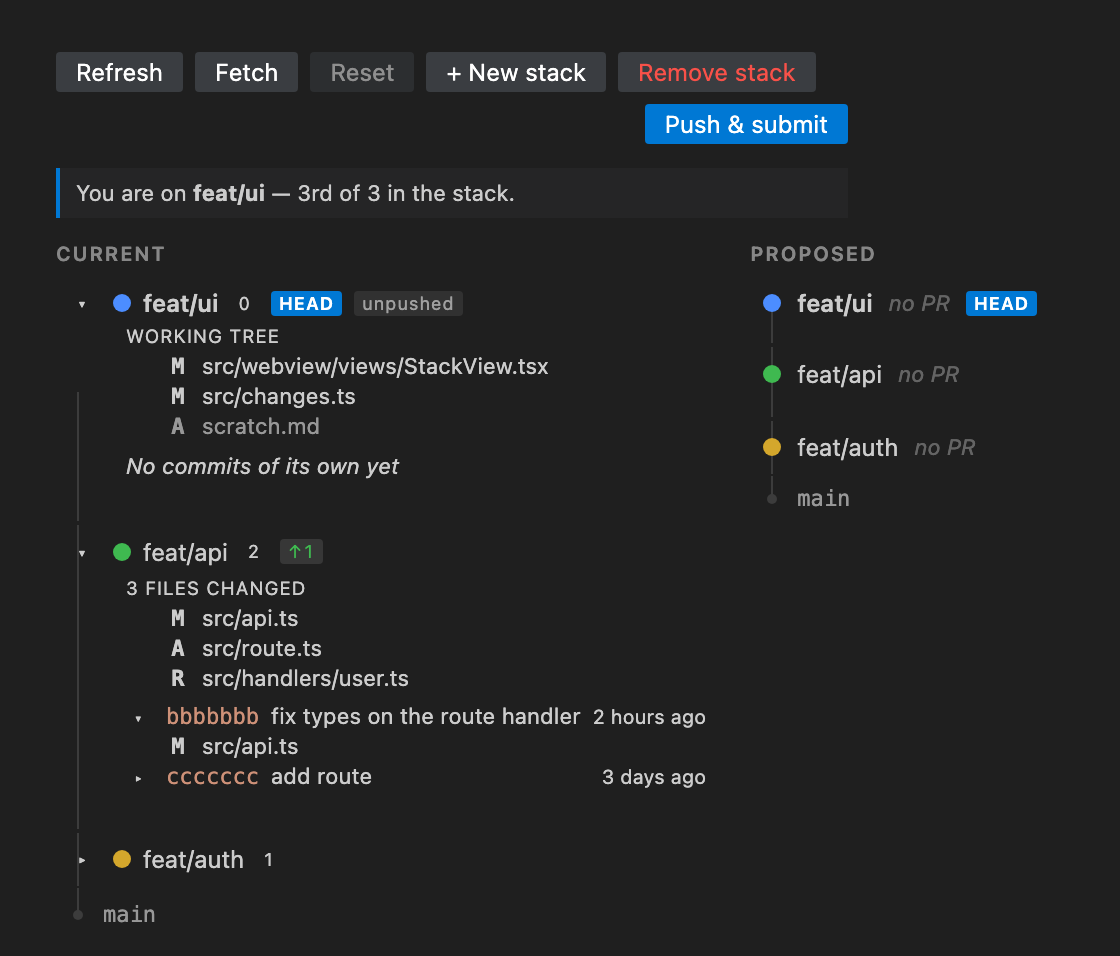
An expanded branch shows three things, top to bottom:
- The working tree, but only on the branch you are standing on — staged,
unstaged, and untracked, kept separate, because "modified" and "modified and
staged" are different answers to is this safe to rebase. It updates when you
save and when you stage, without re-reading the stack.
- The branch's own file summary — everything between its base and its tip,
which is the diff its pull request will contain. A rename shows as one entry
with both paths, not as a delete and an add.
- Its commits, newest first, each of which opens to the files that one
commit touched.
Clicking any file opens a real diff in the editor: a commit's file against its
parent, a branch summary file against the branch's base, and a working-tree file
against HEAD. They are read-only views built from git's object database
through a restack: URI, so nothing is written to disk to show you a diff, and
a binary file opens as a single pane rather than two panes of mojibake.
Counts and trees hang off Current only. The Proposed column describes a
state that does not exist yet, and file counts for it would be a guess.
Adding and removing branches
Below the stack, Available lists the repo's other local branches — every
refs/heads entry that is not trunk, not already stacked, and not fully merged
into trunk. Drag one onto the stack at any position to insert it; drag a stacked
branch down into the tray to take it out.
Under the tray, Add on top is the other way in, and covers what dragging
cannot: a branch that does not exist yet. It runs gh stack add <name>, which
creates the branch if the name is new and adopts it if it is not, then checks it
out. Top-only, because gh-stack is — anywhere else it exits 5 with can only add
branches to the top of the stack — so Restack checks the top branch out first
rather than passing that refusal on. To put a branch further down, drag it in.
Two consequences worth knowing. Adding is not an apply: no commit is rewritten,
so there is no plan to preview and nothing to undo. And an adopted branch
arrives exactly as gh stack init leaves one — recorded in order but not
rebased onto its new parent — so gh-stack flags it needsRebase and the drift
banner's Rebase stack button is the step that replays it, with the usual
snapshot behind it.
The dirty-tree refusal here is Restack's, not gh-stack's: gh stack add will
happily run with uncommitted changes, but the checkout to the top of the stack
in front of it will not.
A branch gh-stack has never seen has no recorded base, so Restack uses
git merge-base <branch> <trunk> as the anchor. That is the same kind of value
as gh-stack's own base — a pre-rebase SHA — so an inserted branch replays
exactly like a stacked one, and the recorded-SHA rule below applies unchanged.
Un-stacking rebases the branch back onto trunk rather than discarding anything:
its commits survive, it just stops being part of the stack. If it already has a
PR, the panel says so — that PR keeps pointing at a base that is no longer its
parent, and gh stack submit will not retarget a branch it no longer tracks.
Removing the whole stack
Remove stack in the toolbar is the counterpart to init: it runs
gh stack unstack on the stack you are standing in. Worth separating from the
paragraph above, because the two are not the same kind of operation. Dragging one
branch out is a rebase — real commits are rewritten, and it goes through the
usual plan-then-apply path with a snapshot behind it. Removing the stack rewrites
nothing. Every branch stays on the commit it is on; gh-stack simply stops
recording them as a stack, and the panel falls back to the builder.
Like apply, it is split by how far it reaches:
- Remove Locally runs
gh stack unstack --local, which touches only
.git/gh-stack. Any pull requests stay stacked on GitHub.
- Remove & Unstack PRs runs the full
gh stack unstack, which also detaches
the PRs on GitHub. Restack cannot undo that, so it is only offered when the
stack actually has PRs and an origin to reach them through.
One gh-stack behaviour to know about: GitHub refuses to unstack PRs that are
queued for merge or have auto-merge enabled. When that happens the whole stack is
kept — local tracking included — even though the command exits successfully. So
Restack re-reads the stack afterwards rather than trusting the exit code, and
says plainly when the stack is still there.
To remove a different stack, switch to it first: gh stack unstack with no
argument targets the active one. See Several stacks in one
repository.
Several stacks in one repository
A repository can hold as many stacks as you like. gh-stack models this outright
— .git/gh-stack is an array, and gh stack checkout takes a stack number —
but only one is active at a time, and which one is decided by where HEAD is.
gh stack view reports the stack the current branch belongs to and nothing
else.
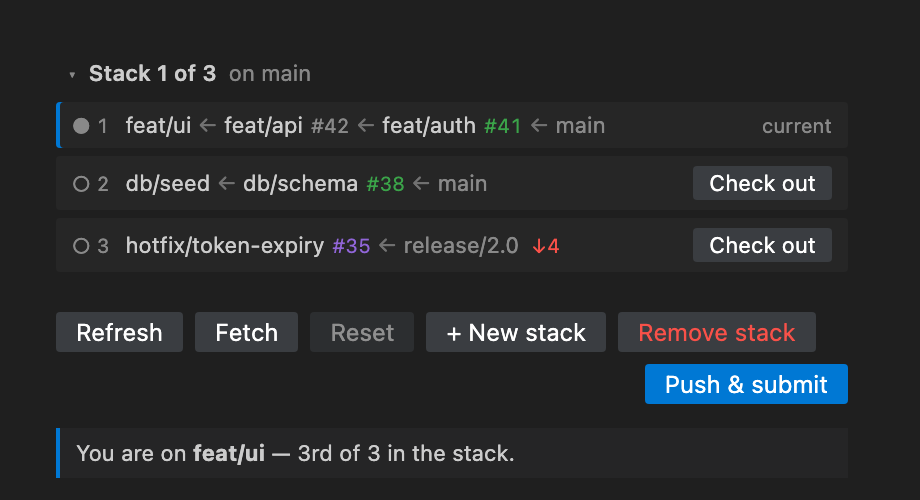
The switcher above the toolbar is where they all live. It stays collapsed to a
single line (Stack 2 of 3 · on main) and disappears entirely when there is
only one stack, so a one-stack repository is unchanged. Expanded, each row is a
stack: its number, its branches top-down with the trunk last, a PR badge per
branch, and ↓N when the remote has commits that would block a rewrite.
Switching is a checkout, not a display mode. Restack checks out that stack's
top branch — the one branch guaranteed to belong to it and no other, since a
stack's trunk is routinely another stack's branch — and gh stack view then
reports it in full. That means one render path rather than two, and everything
below the switcher behaves identically whichever stack you are in. It refuses
for the same reasons every other checkout does: a dirty worktree, an apply in
flight, or a rebase already in progress.
+ New stack creates another one. gh stack init refuses while HEAD is part
of a stack, so Restack asks first and then checks out the trunk — the existing
stack is untouched, and the builder appears with the trunk's other branches
available. Branches already claimed by any stack are kept out of the tray,
because a branch in two stacks is the ambiguity gh-stack refuses outright.
Restack: Switch Stack and Restack: New Stack do the same from the command
palette.
Standing on a trunk shared by several stacks is its own position: gh-stack has
no single stack to report, so Restack shows the switcher rather than an error.
Several folders in one workspace
Restack reads one repository at a time. In a single-root window that is the
folder you opened and there is nothing to decide; in a multi-root workspace it
resolves in the cheapest order that can be right:
- One folder — that one. No probe, no stored value, no question, so a
single-root window costs exactly what it always did.
- A folder you have already chosen here, if it is still open.
- Otherwise Restack checks each folder for a
.git/gh-stack — a local file
read, no gh and no network — and if exactly one has stacks, picks it
and remembers it. A repository beside a docs folder needs no input.
- If several do, or none does, the view lists the folders and asks. Your answer
is remembered for that workspace.
Restack: Select Folder… shows the list again, marking the current one; in a
multi-root workspace it also appears in the view's ⋯ menu. Switching is refused
while an apply is in flight — the session holds a working directory, a branch
snapshot, and possibly a stash, all belonging to one repository — and switching
clears everything cached about the folder being left, so no PR badge or commit
count crosses over from the other repository.
Applying
Apply is split in two, and the halves are not equally recoverable.
The local half is the rebases plus the .git/gh-stack write. Before the
first rebase, Restack records every branch SHA and the verbatim bytes of the
metadata file; Undo restores both. It refuses to start over a dirty worktree
you declined to stash, mid-rebase, or on a stack with merged branches.
The remote half is gh stack push, gh stack submit --auto, and
gh stack link. It takes its own confirmation even if you chose "Apply &
Publish" up front, and once it runs, Undo is withdrawn rather than offered and
quietly useless. Without an origin remote that button is not offered at all —
preflight refuses the whole apply on an impossible scope, so offering it would
cost you the local reorder too.
gh stack push rather than a hand-rolled git push --force-with-lease: it does
the per-branch lease itself and skips merged and queued branches, rules that
would otherwise have to be reproduced here and would drift as gh-stack changes
them. It reads its branch list from .git/gh-stack, so it has to run after
the metadata write. Pushing before submitting is not redundant even though
submit pushes too — a rejected lease surfaces before any PR base is retargeted.
gh stack link is what makes the pull requests read as a stack on GitHub
rather than as unrelated PRs that happen to be chained by base branch. Submit
does attempt it, but when it cannot it says so in a warning and still exits 0
— so a submit that opens every PR and groups none of them looks, by exit code,
exactly like one that worked. Linking explicitly is idempotent, and unlike
submit it does not read .git/gh-stack, so it still works when local tracking
state and GitHub disagree. It is skipped below two linkable pull requests, since
a stack needs two, and merged branches are left out because their PRs are
closed.
On a conflict the rebase pauses in place. Resolve the listed files, stage them,
and hit Continue; or Abort to roll everything back. See
Resolving a conflict.
Resolving a conflict
Each conflicted file gets a Resolve button that opens VS Code's own
three-way merge editor — git.openMergeEditor, the same command the SCM view
offers, which handles the rebase case by diffing REBASE_HEAD against HEAD.
Its Complete Merge stages the file, which is exactly what Continue needs. The
path itself stays a plain-text link for when the merge editor is not what you
want, markers and all.
While paused, Restack watches .git/index and re-reads the unmerged paths on
every write, so files flip to ✓ staged as you resolve them and Continue stays
disabled until none are left. Watching the index rather than the merge editor is
what makes git add in a terminal and the ➕ in the SCM view work identically —
whatever stages the file is what the panel reacts to.
Resolved files stay in the list rather than disappearing: a list that shrank as
you went would erase the record of what you had already done. And the disabled
button is a hint, not the guard — Continue re-reads the index host-side before
running anything.
Publishing without a reorder
Push & Submit is also a toolbar button and a command (Restack: Push & Submit Stack), independent of any apply session. Reorder and dismiss the panel, reload
the window, land the reorder some other way — the branches are still sitting
there rebased and unpushed, and this is the route to origin. It runs the same
two steps through the same progress UI, with Undo correctly unavailable: there
is no local snapshot behind it because nothing local was rewritten.
Remote state
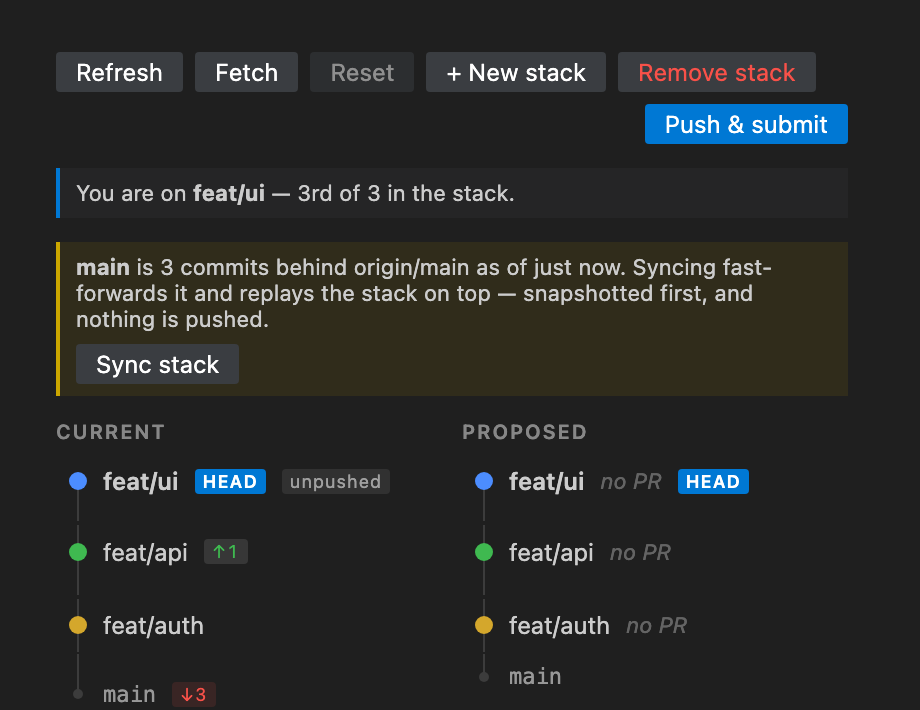
Every count Restack shows about the remote is read from refs/remotes and the
branch config — one git for-each-ref, no network. That is what makes it safe to
re-read on every .git/HEAD change, and it is also the catch: those refs are
only as fresh as your last fetch. Fetch in the toolbar is the control that
goes and asks (git fetch --prune <remote>), and its tooltip says how long ago
that last happened. Nothing polls on a timer — a network call on a schedule is
not something an editor panel should be doing on your behalf. The only other
call that leaves the machine unasked is the one GitHub read described in
Stacks that live on GitHub, which happens once
when the view first loads and again on Fetch.
--prune is not incidental. Without it, a branch deleted on the remote keeps a
stale refs/remotes entry and reads as level forever, so gone would never
appear.
Rows carry a small pill for where they stand: ↑2 ahead, ↓3 behind, ↑2 ↓1
diverged, plus unpushed and gone — those two spelled out because an absence
of counts is otherwise indistinguishable from being level. A branch that matches
its upstream gets nothing at all; a row of in sync badges would bury the two
states that matter. The trunk row carries the same pill, so "3 behind
origin/main" is visible without opening a plan. The Proposed column does not,
because it describes a future arrangement and these counts are about the present.
When the trunk is behind, a banner offers Sync stack. It fetches first —
always, because a plan built from stale refs would fast-forward the trunk to a
commit that is no longer its tip — then re-reads the stack and builds an ordinary
plan: a fast-forward step, then the whole cascade replayed on top, then the
metadata write. The fast-forward has two forms, because git does. With the trunk
not checked out it is git fetch <remote> <trunk>:<trunk>, which git refuses
unless it really is a fast-forward; standing on the trunk it is
git merge --ff-only <remote>/<trunk>, because git will not fetch into a branch
you have checked out. Everything after that is a normal apply — snapshot,
conflict pause, undo — and nothing is pushed.
The other banner blocks. If a stack branch is behind its upstream, somebody
pushed commits to your branch that you do not have, and preflight refuses the
apply outright:
feat/api is 2 behind origin/feat/api. Fetch and sync before rewriting —
gh stack push force-pushes with a lease against a stale remote ref, which
would drop those commits.
--force-with-lease is not protection here. It compares against the
remote-tracking ref, which is the stale one; the lease passes and the commits
go. Restack has no safe automatic answer either, since both sides have moved —
so it names the branches and stops, and the banner renders above the sync one and
disables its button, so the UI never offers an action preflight will reject.
gone is excluded from all of this on purpose: a branch deleted after its PR
merged has nothing left to clobber, and refusing there would block every stack
that had ever landed anything.
Stacks that live on GitHub
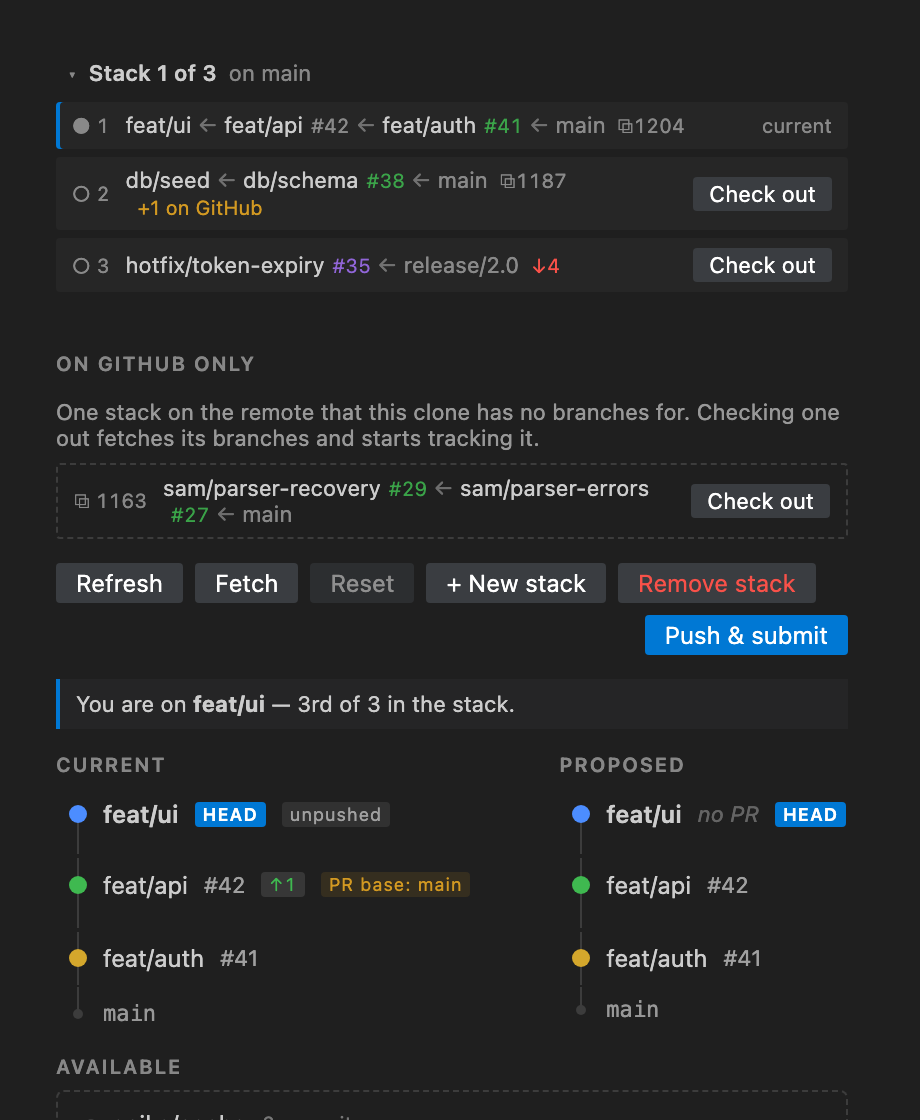
Everything above is local-first by construction, and that leaves a blind spot.
gh stack view reports the stack HEAD is standing in; .git/gh-stack records
the stacks this clone knows about. A stack that exists only on the server is
invisible to both — a colleague's, your own from another laptop, or a PR someone
appended to your stack on GitHub while you were working.
GitHub's GraphQL API now models stacks natively (PullRequest.stack, with
number, size, baseRefName, and its ordered entries), so Restack asks for
them in the same call that fetches PR badges. That call already existed and was
already authenticated; it went from gh pr list --json to gh api graphql, so
this costs one request, not two. Three things come out of it:
- A
⧉14025 badge on a switcher row whose PRs all report the same GitHub
stack. When they report two, the badge is omitted rather than guessed at —
the same ambiguity gh-stack refuses locally with belongs to multiple stacks.
- A
+1 on GitHub warning when that stack has an open PR this clone has no
branch for. The tooltip names the branches and points at gh stack sync,
which is the command that reconciles it. The reverse — a local branch not yet
submitted — is ordinary and gets no warning. Merged and closed entries count
as neither; the normal end of a stack's life is not drift.
- An "On GitHub only" list, for stacks sharing no branch with anything here,
with a Check out button running
gh stack checkout <pr>. Fully-merged stacks
are dropped, and the button targets the bottom-most open PR, since a merged
one may have had its branch deleted. It renders nothing when the list is
empty, so a solo repository sees no new chrome.
Per-branch, the Current column gains a PR base: X badge when a PR targets
something other than the row beneath it. gh-stack records a base SHA locally
and never reads the PR's own baseRefName, so a base retargeted on the server
leaves the local view complete and wrong.
The freshness rule is the one above: read once when the view first loads, then
on Fetch and on a stack switch, and cached in between so the .git/HEAD watcher
stays network-free. The first read is deferred and not awaited — it lands after
first paint rather than delaying it.
Set restack.readRemoteStacks: false to skip the whole path. Restack then
falls back to the gh pr list call it always made, so the PR badges stay and
only the three surfaces above disappear. The same fallback happens
automatically on a GitHub Enterprise Server old enough to have no stack field
— the API answers undefinedField, which Restack reads as "ask the old way"
rather than as an error.
Why Restack writes .git/gh-stack
Rebasing moves branch refs but leaves gh-stack's own state file alone. Verified
against v0.1.0: after reordering a stack by hand, gh stack view still printed
the old order with a drift marker, and the recorded base SHAs were
unchanged. Since gh stack submit retargets PR bases from that file, submitting
on top of it would point PRs at the wrong parents.
So Restack rewrites it — the reordered branch list, and each branch's new base
resolved after the rebases. Writing another tool's pre-1.0 data is a real
liability, so: the schemaVersion is checked and an unfamiliar one aborts,
every unrecognized key is carried through untouched, and the original bytes are
restored on abort. See src/metadata.ts.
This is also why the plan shows a #-commented metadata step. If you copy the
commands and run them yourself, you inherit the same problem — reorder that file
too, or use gh stack modify.
The recorded-SHA detail
Each generated git rebase --onto passes the branch's recorded base SHA as
the upstream argument, captured before any rebase runs. gh-stack hands us that
SHA directly — its base field is already resolved, not a ref name.
Using a branch name as upstream is what breaks. Moving the bottom branch of
auth → api → ui to the top with name-based upstreams produces:
feat/ui: 070c59b feat: add ui components 144f76f feat: add auth layer 1b42e58 feat: add api routes
feat/ui has silently absorbed auth's commit. With recorded SHAs the same
reorder yields one commit per branch, correctly. Both outcomes were verified by
executing the commands against a real repository; see test/plan.test.ts.
Install
VS Code — search "Restack" in the Extensions view, or:
code --install-extension felixzhang.restack
Cursor — Cursor pulls from Open VSX, not the VS Code
Marketplace, so search there or:
cursor --install-extension felixzhang.restack
From a .vsix — for either editor, or for a build that is not published yet.
Grab one from Releases, then use
Extensions: Install from VSIX… in the command palette, or:
code --install-extension restack-0.1.0.vsix # or: cursor --install-extension
Requirements
Restack is a UI over the gh stack CLI, not a reimplementation of it. Without
these it will tell you what is missing rather than doing anything:
gh, authenticated (gh auth login).- gh-stack:
gh extension install github/gh-stack. If it is not installed, Restack says
so and offers to run that command for you — the one dependency it can fix
itself. A missing gh it cannot, since installing the CLI would need the CLI.
- A git repository. A stack is not a prerequisite: on a repo without one
Restack offers to create it (see Initializing a stack).
- An
origin remote, for Push & Submit only. Everything local works
without one, and the publish button is disabled rather than failing.
- Built against gh-stack v0.1.0. That schema is pre-1.0 and will drift —
the parser is deliberately tolerant, but check here after a gh-stack upgrade.
Set restack.ghPath if gh is not on your PATH. It is a machine-scoped
setting, so it lives in your user settings and a workspace cannot override it —
Restack executes that path on startup, and a repository you have just cloned
should not get to choose what runs.
restack.readRemoteStacks (default on) controls the GitHub read described in
Stacks that live on GitHub. It needs no scope
gh does not already have, and turning it off costs only the badges it feeds.
restack.autoFetch (default 0, meaning off) fetches on a timer, so the
ahead/behind counts and the sync banner stay current without you pressing
anything. Set it from Background Fetch… in the view's ⋯ menu — Off, 3, 10
or 30 minutes, or a custom interval — or as a number of seconds in settings;
anything below 60 is treated as 60.
It is off by default on purpose. The default install makes no network call you
did not ask for, and an upgrade should not quietly change that. When it is on,
it stays out of the way: no spinner, no error popup, nothing while the view is
hidden or an apply is running, and failures go to the Restack output channel
rather than a notification that would reappear every interval.
Development
npm install
npm run build      # or: npm run watch
npm test           # parser, plan, metadata + apply against real temp repos
npm run typecheck
npm run media      # regenerate the icon and every screenshot
Press F5 in VS Code to launch an Extension Development Host.
Every screenshot is rendered from the real webview bundle through
test/harness/index.html — a scripted reorder for screenshot.png,
drag-and-type for screenshot-init.png, the harness's ?view=behind scene for
screenshot-remote.png, which needs no gesture because the state is the
subject, ?view=multi with the disclosure clicked open for
screenshot-switcher.png, and ?view=github for screenshot-github.png, whose
three subjects sit far enough apart on the screen to need a taller frame than
the rest. screenshot-changes.png uses ?view=changes with two rows and one
commit clicked open, and is the one wider frame — a file tree under a row asks
the Current column for more room than 460px, and a clipped path is the one thing
that screenshot must not show. They cannot drift from the UI, because they are
the UI.
Sandbox
sandbox/ (gitignored, has its own .git) is a throwaway repo with a
three-branch stack, used to capture real CLI output:
mkdir sandbox && cd sandbox && git init -b main
# ...commit three stacked branches...
gh stack init feat/auth feat/api feat/ui
gh stack view --json > ../fixtures/stack-no-prs.json
sandbox-conflict/ (also gitignored) is a second throwaway stack whose three
commits all rewrite the same line, so reordering any pair conflicts — that is
the one to use when exercising the pause / continue / abort path. Applying
mutates it, so rebuild it between runs rather than unpicking the last attempt:
./test/make-conflict-sandbox.sh
sandbox-multi/ (gitignored too) holds two independent stacks off main, plus
a branch in neither — the state the switcher exists for, and the one to use when
checking that an apply in one stack leaves the other's .git/gh-stack entry
alone:
./test/make-multi-stack-sandbox.sh
The first two are wired up in .vscode/launch.json; pick a config from the Run
panel.
Browser harness
test/harness/ renders the real webview bundle in Chrome with the VS Code API
stubbed, driven by the same parseStack/computePlan the extension host uses,
fed by the captured fixture. This is how drag behavior is verified without
launching an Extension Development Host.
npm run build && node test/harness/build-driver.mjs
open test/harness/index.html
?view= reaches the states a single fixture cannot be in at once — init,
outside, drift, trunk, away, multi, github, and conflict. The
github view is the only one carrying data no local command can produce, so it
is also the only place the GitHub surfaces are reachable without a remote. The
conflict view is
interactive rather than a still: clicking Resolve marks the file staged and
re-emits after a beat, standing in for the merge editor and the index watcher, so
the gating on Continue can be exercised with no repository behind it.
Releasing
Restack ships to both the VS Code Marketplace and Open VSX — Cursor and the
other forks cannot install from the Marketplace, so shipping to one leaves half
the audience behind. A tag push cuts the GitHub release; sending it to the
registries is a separate, hand-started workflow behind an approval gate,
because neither registry lets you unpublish a version.
The full procedure, token setup, and the reasoning behind the split are in
docs/RELEASING.md.
Status
Working:
- Reads and renders the stack, with PR numbers, merged/queued/needs-rebase badges
- Drag to reorder, with moved rows highlighted
- Insert an unstacked local branch at any position; drag one out to un-stack it
- Add a branch on top of an existing stack, created or adopted, via
gh stack add
- Plan generation, verified against real git
- Distinct UI for: not on a stack, not a git repo, gh missing, parse failure
- Reordering disabled when the stack has merged branches — gh-stack rejects
inserting next to one
- Executing the plan: rebases, the gh-stack metadata rewrite, push, submit,
and the link that joins the resulting PRs into a stack on GitHub
- Push & Submit as a standalone toolbar action, with no apply session
- Conflict pause / continue / abort, with snapshot-based rollback, resolved in
VS Code's three-way merge editor and tracked live off
.git/index
- A HEAD indicator showing where you are in the stack, and checkout from a row
button, the status bar, or the command palette
- Many stacks per repository: a switcher listing every one with PR badges,
switching between them, and a + New stack button that parks on the trunk
first because
gh stack init refuses from inside a stack
- Basing a stack on any branch, local or remote-only — a colleague's work rather
than the default branch — and moving an existing stack onto a different base
- Remote state read from local refs: ahead/behind pills per row, a Fetch button
as the only git network call unless you opt into
restack.autoFetch, and Sync
stack to fast-forward a trunk that moved
- Stacks read from GitHub itself, via the GraphQL
PullRequest.stack field: a
stack-number badge and a drift warning on stacks you already have, a
checkout-able list of stacks that exist only on the remote, and a PR base
badge when a PR targets something other than the row beneath it
- Dirty-worktree and mid-rebase refusal before anything runs, with a
Stash and continue offer on the dirty half that puts your changes back
afterwards — held for the whole session on an apply, so Roll back stays safe
- Refusal to rewrite a branch that is behind its upstream, which
gh stack push
would then force-push over
- Apply state persisted to
workspaceState, so a window reload mid-apply comes
back with Continue/Abort/Undo live
- Clickable PR links and conflicted files;
Alt+↑/Alt+↓ to reorder a focused
row, double-click to check a branch out
- Multi-root workspaces: one folder is picked automatically when only one holds
a stack, remembered afterwards, and changeable from Restack: Select Folder…
- A Restack output channel logging every command, exit code, and full stderr
Not built yet:
- A stack branch that is behind its upstream is refused, not reconciled. Pulling
it is left to you: once both sides have moved there is no safe automatic
answer, and guessing one is how commits go missing.
- Remote stacks are read, not written. Restack can check one out, but reordering
or appending to a stack still happens locally and reaches GitHub through Push
& Submit.
- Push and submit are verified by unit tests and by hand, not end to end in CI —
that needs a throwaway GitHub repo.
Upstream ask
If gh stack modify gained a headless --plan <json> mode, the entire
execution layer would collapse into one CLI call. The binary already carries an
internal plan model (BuildPlan/ApplyPlan/StateFile). Worth requesting via
gh stack feedback.
License
MIT

