TinyFalcon
Your data, your compute. A local-first agentic coding assistant for VS Code.
TinyFalcon plans tasks, edits files, runs terminal commands, reads the results, and iterates — all driven by a local LLM served by Ollama. Designed from the ground up for small local models (7B–32B), with FSM-enforced safety gates that keep the agent honest on hardware that doesn't run frontier models.
For developers in regulated industries, air-gapped environments, or anyone who wants AI assistance without streaming their codebase to a third party.
⚠️ Requires Ollama (free)
Before TinyFalcon can do anything, you need:
Ollama installed and running (ollama serve).
At least one model pulled. Start with qwen2.5-coder:7b:
ollama pull qwen2.5-coder:7b
If Ollama isn't running when you send your first prompt, TinyFalcon shows a one-click error pane with the install link and copy-buttons for the commands above — but it's faster if you set them up first.
Install
- Install Ollama and run
ollama serve.
- Pull a model:
ollama pull qwen2.5-coder:7b.
- Install TinyFalcon from the VS Code Marketplace (this listing).
- Click the TinyFalcon icon in the activity bar.
- Send your first prompt — TinyFalcon will plan, write code, run it, and iterate until it's done.
Screenshots
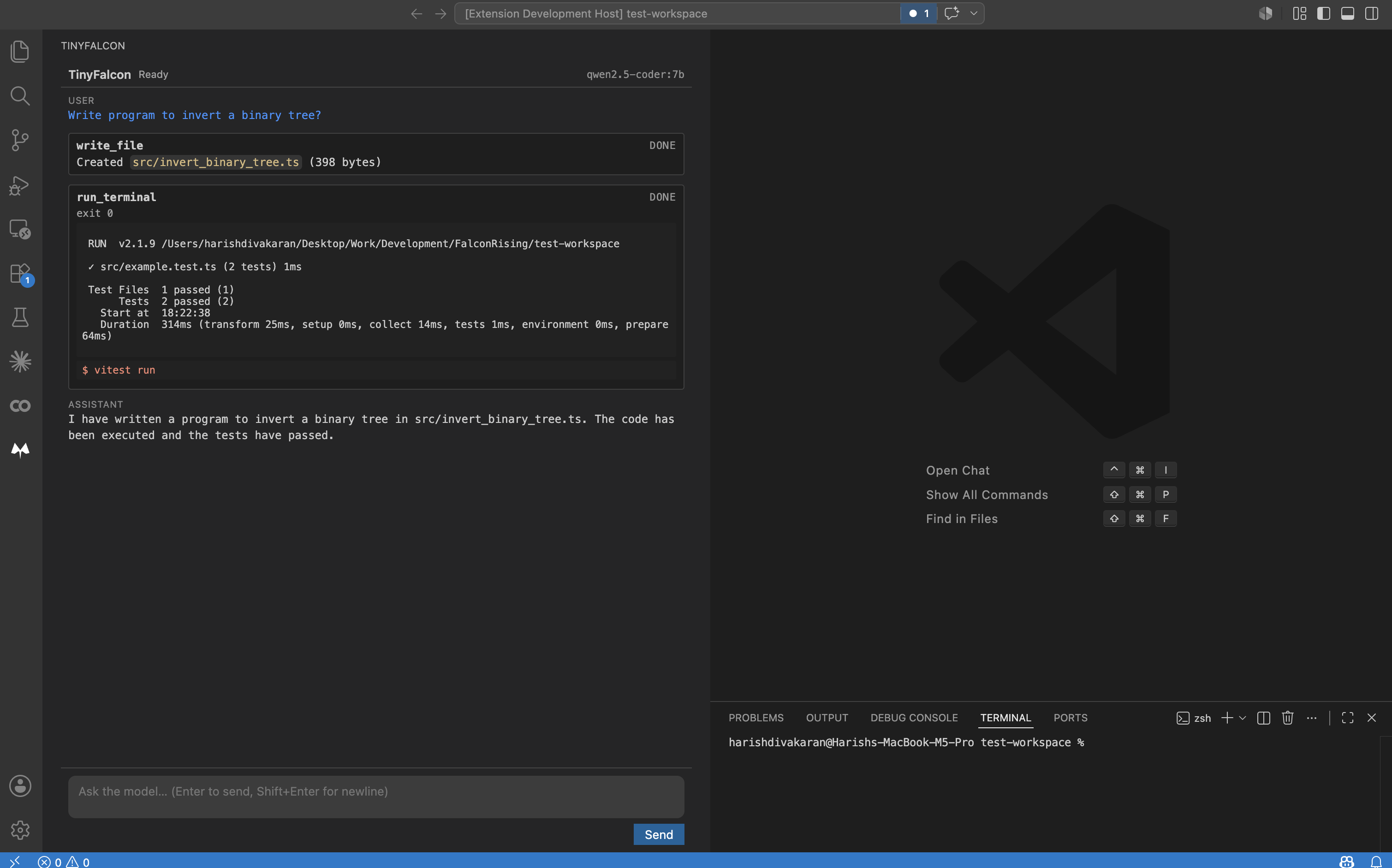
A typical TinyFalcon run: the agent wrote a binary-tree inversion program (write_file), ran the test suite (run_terminal), and confirmed everything passed — all from a single prompt.
What makes TinyFalcon different
Other agentic VS Code tools (Copilot, Cursor, Cline's cloud mode) need to stream your code to a third party. Local-first alternatives (Cline + Ollama, Continue, Aider) were built around cloud frontier models and retrofitted for local — pointed at a 7B–32B model they tend to malformed-tool-call, infinite-loop, or give up early.
TinyFalcon goes the other direction. The agent loop, tool schemas, and recovery logic are all designed for small local models on developer-grade hardware:
- Deterministic safety gates. The FSM blocks success-claiming replies after failures and identical tool retries — fixes the two most common small-model failure modes without depending on the model to "behave".
- Status-led tool results. Tool results lead with a clear
SUCCEEDED / FAILED verdict so the model can't mistake "ran the tool" for "the command worked".
- Workspace ledger. A live snapshot of files written and recent commands is injected each turn so the model has ground truth, not hallucinated paths.
- Cross-turn memory. Multi-turn conversations preserve history and the workspace state across user prompts.
- Per-model prompt packs. Built-in packs tuned for Qwen, DeepSeek, and Gemma quirks; auto-selected from the model tag.
- Friendly first-run errors. No cryptic "OllamaUnreachable" — actionable buttons (Install Ollama, copy
ollama serve, copy ollama pull <model>, retry).
How it works
TinyFalcon runs a recursive agentic loop:
- Ingest — Workspace context + your prompt.
- Plan — The local model proposes a tool call (read file, write file, run command).
- Act — The extension executes via the VS Code API.
- Observe — The agent reads the result: file contents, exit codes, stderr.
- Refine — Loop, or finish with a reply summarizing what it did.
What's different from "ReAct-style" loops written for cloud models: every step is gated by a small FSM that enforces invariants the model can't be trusted to enforce itself. The model picks the actions; the FSM enforces correctness.
Supported Models
Any model Ollama can serve will work. Recommended starting points:
| Model tag |
Pack |
Notes |
qwen2.5-coder:7b |
qwen |
Best balance of size/quality for most hardware. Default starting point. |
qwen2.5-coder:14b / :32b |
qwen |
Higher quality on stronger GPUs. |
deepseek-coder:6.7b |
deepseek |
Strong code-focused alternative. |
gemma2:9b |
gemma |
Good general-purpose backup. |
Switch models in Settings → TinyFalcon → Ollama: Model. The matching prompt pack is selected automatically.
Not yet supported (post-v1): Reasoning models like deepseek-r1 — their <think> block prefixes break the JSON parser. Tracked separately.
Settings
| Setting |
Default |
What it does |
tinyfalcon.ollama.host |
http://localhost:11434 |
Where to reach Ollama. |
tinyfalcon.ollama.model |
qwen2.5-coder:7b |
Which Ollama model to use. |
tinyfalcon.agent.promptPack |
auto |
Which prompt pack: auto, default, qwen, deepseek, gemma. |
tinyfalcon.agent.maxIterations |
25 |
Max plan-act-observe cycles per prompt before giving up. |
tinyfalcon.tools.enabled |
true |
Enable agentic tool use. Disable to fall back to plain chat. |
tinyfalcon.tools.autoApprove.readFile |
true |
Auto-approve read_file (non-destructive). |
tinyfalcon.tools.autoApprove.writeFile |
false |
Auto-approve write_file. Off by default for safety. |
tinyfalcon.tools.autoApprove.runTerminal |
false |
Auto-approve run_terminal. Off by default for safety. |
Privacy
TinyFalcon's default mode is fully local — your code, prompts, and the model's outputs stay on your machine. No telemetry. No accounts. No usage metering.
This isn't an absolute claim — cloud-fallback support may be added later as an explicit opt-in. The current release (v0.1.0) has no such mode and makes no network calls beyond localhost:11434.
Notes
- Diagnostic queries can be empty on a cold start. TinyFalcon's
get_diagnostics tool reads from VS Code's existing language servers. On a freshly-opened workspace, the TypeScript language server (and others) may take a few seconds to finish analyzing files before diagnostics are available. If the agent reports "no problems found" immediately after opening a folder, give it a moment and ask again.
If something doesn't work, please use the Q&A tab on the marketplace listing.
License
Proprietary. Use granted under the terms in the LICENSE file (linked from the marketplace Resources sidebar); redistribution, reverse engineering, and derivative works are not permitted.
Your data, your compute. TinyFalcon is small by design, not by ambition.

