greenlint for VS Code
greenlint flags energy-wasteful
patterns — busy loops, sub-100ms polling, every-minute crons, SELECT *,
full-history CI clones, full-fat base images, missing resource limits, N+1
queries, manual O(n²) sorts. This extension runs the same rule set, unmodified,
while you type.
Every rule the CLI knows, the editor knows: there is no second implementation
here. The extension drives greenlint.py itself through a small scan server, so
a rule added to the linter shows up in the editor with no change on this side.
greenlint itself is a separate install. This extension runs the linter; it
does not bundle it. Install it once — pipx install git+https://github.com/fabiocicerchia/greenlint, or pip, or an editable
checkout — and the extension finds it. Without it, greenlint says so on
startup, names what it tried, and offers to run the install for you in a
terminal. Python 3.11+ is the only other requirement;
see Requirements.
What you get
- Squiggles on the offending line, severity-mapped and configurable.
- Hover tooltips with the rule id, what was found, what to do instead, and
an order-of-magnitude CO2e figure — the "why" is the point of the tool.
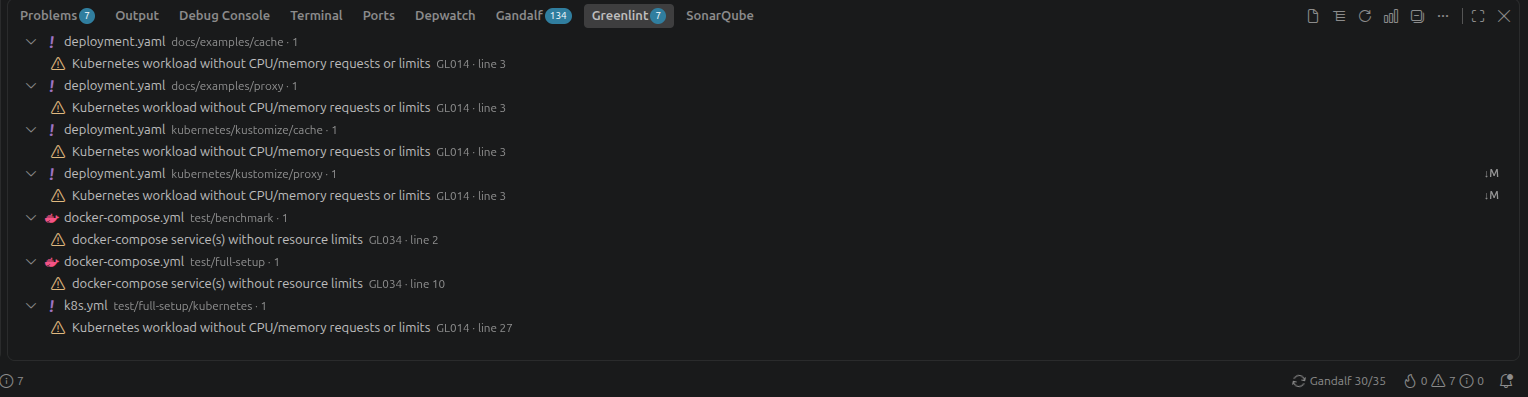
- A Findings panel at the bottom of the window, showing the current file or
the whole project, grouped by file (or by severity or rule, from the toolbar). A project scan streams
into it — findings appear as they are made rather than after the walk
finishes — and the totals land at the end, in the log and in the status bar's
tooltip.
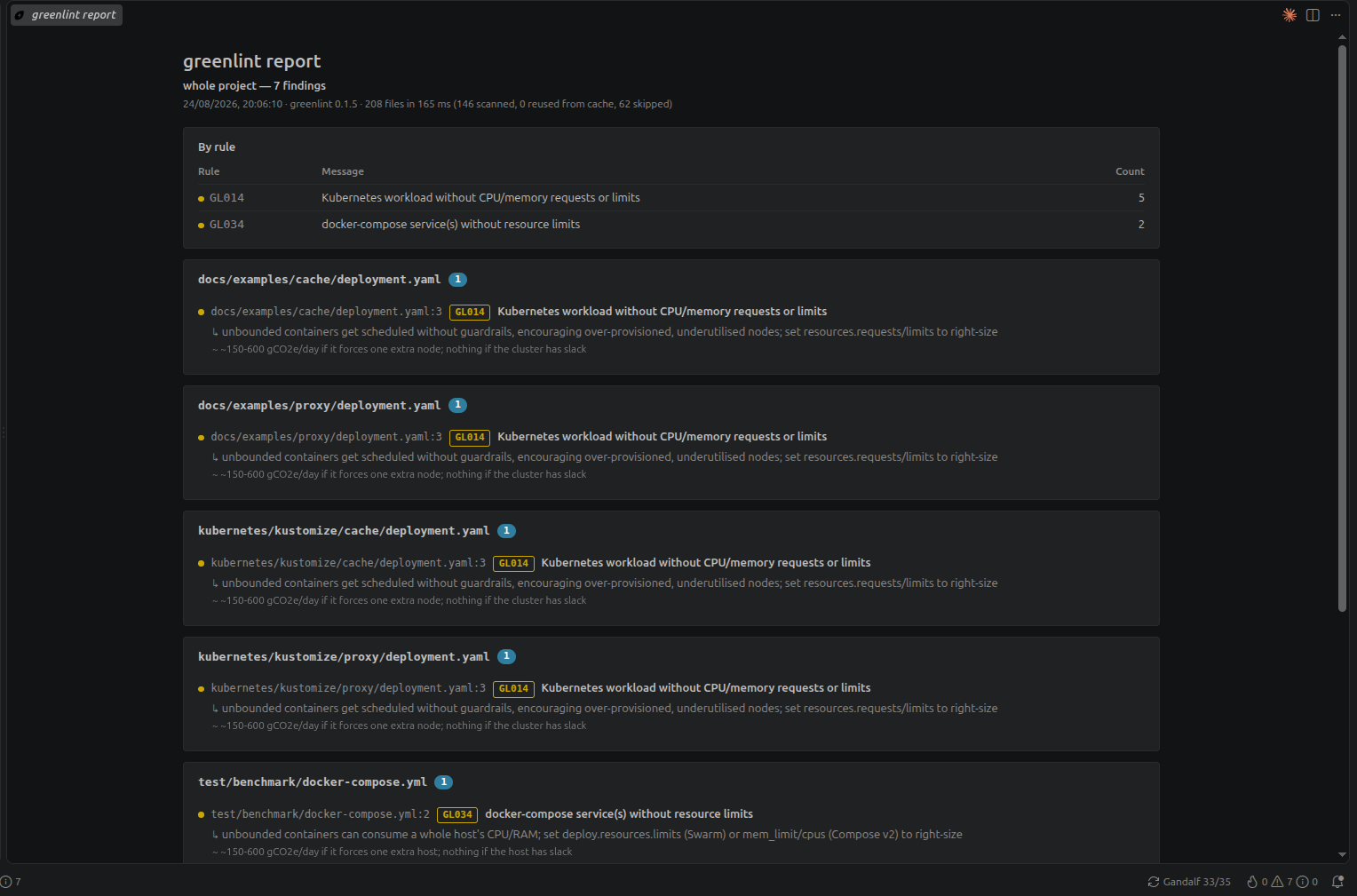
- An HTML report in a webview, drawn from VS Code's own theme variables so
it follows your theme, contrast setting and font size. The rest of the UI is
native VS Code throughout: diagnostics, the tree view, the Problems panel.
- A baseline: Write Baseline accepts everything currently found, so an
existing codebase starts green and only new findings nag. It writes
.greenlint-baseline.json, which the CLI reads too — greenlint . in CI
honours the same file, so the two never disagree.
- Cancellable scans — the progress notification has a cancel button, and
the walk stops at the next batch of files.
.greenlint.toml is honoured exactly as the CLI honours it: same walker,
same ignore globs, same disable list. What CI blocks on is what you see.
Install
From the VS Code
Marketplace:
open the Extensions view (Ctrl/Cmd+Shift+X),
search for greenlint, and press Install. Or from a terminal:
code --install-extension fabiocicerchia.greenlint
VSCodium, Cursor and the other editors that use Open
VSX get the same
extension from there — same id, same version:
codium --install-extension fabiocicerchia.greenlint
From a checkout instead, make ext-install builds the .vsix and installs it.
Requirements
Python 3.11+ and greenlint on the machine — any of:
pip install git+https://github.com/fabiocicerchia/greenlint
pipx install git+https://github.com/fabiocicerchia/greenlint
pip install -e .    # from a checkout: `make dev`, and rule edits are live
It looks for greenlint in this order, and logs the list it will try:
greenlint.greenlintPath, if you set it — the only candidate, because a
typo there should be an error rather than a silent fallback to some other
greenlint whose rules you never asked for;- a
greenlint.py in a workspace root, so a checkout of the linter is linted
by its own working copy;
import greenlint from python3, then python (python then py on
Windows), then the interpreter that owns the greenlint command — read
from its shebang — and pipx's venv. A pipx install is deliberately
invisible to the python3 on PATH, so looking only there would fail for
exactly the people who followed the pipx instruction.
It needs a greenlint with the editor scan API (iter_files, scannable,
is_ignored, scan_file(text=)). An older release refuses to start and says
which names are missing, and the search moves on to the next candidate. The
check is on the names rather than a version number, so it stays honest without
anyone maintaining a floor.
Settings
| Setting |
Default |
What it does |
greenlint.enable |
true |
Master switch. |
greenlint.run |
onType |
onType, onSave or manual. |
greenlint.debounceMs |
400 |
Idle time before an onType scan runs. |
greenlint.scanProjectOnStartup |
true |
Populate the panel before you open a file. |
greenlint.maxFileBytes |
1000000 |
Skip files bigger than this. |
greenlint.respectEditorExcludes |
true |
Skip whatever files.exclude and search.exclude already hide. |
greenlint.exclude |
[] |
Extra ignore globs for the editor only. |
greenlint.trace |
false |
Log every request, its timing and its cache outcome. |
greenlint.pythonPath, greenlint.greenlintPath |
auto |
Override discovery. |
How it stays cheap
A linter that re-reads your repository on every keystroke is a strange thing to
ship with a tool about not wasting energy. Six things keep it honest.
One warm process, not one per scan. A greenlint CLI run spends ~100 ms
starting Python, importing the module and compiling ~40 regexes before it reads
a byte. Per save that is tolerable; per keystroke it is the entire cost. The
extension starts one scan server for the window instead and keeps it warm, so
that work happens once per session. Restart it with greenlint: Restart Scan
Server if you change interpreters.
Debounce, never poll. Typing resets a timer; it does not queue a scan. A
burst of thirty keystrokes costs one scan, and the cost of each keystroke is a
clearTimeout. Raise greenlint.debounceMs on a slow machine or a large file;
onSave is the cheapest setting that still keeps up with your work.
A two-layer cache, so a rescan usually reads nothing. Every file's findings
are stored against both its (mtime, size) and a hash of its contents:
- unchanged stat → the findings come back without opening the file;
- changed stat, same bytes → one read, no rules run. This is the common case
after a branch switch, a
git stash pop, or a formatter that reformatted
nothing;
- genuinely changed → scanned, and only then.
A second project scan of an untouched tree therefore does one stat per file
and nothing else. Turn on greenlint.trace and the output channel prints the
mix for every scan — 312 files in 74 ms (8 scanned, 304 reused from cache, 41 skipped) — so this is something you can check rather than take on trust.
The scan itself got cheaper. The rules share one pass over each Python
file's syntax tree instead of walking it once per rule, and the comment blanker
jumps between the characters that matter instead of visiting every one. That is
~2.8x on real Python code, for identical findings — see
docs/architecture.md.
A 30,000-file tree takes ~9 s rather than ~23 s, and the second scan of it
takes none of that.
Files no rule targets are never opened. The set of extensions comes from the
rule table itself, so it is exactly right and stays right as rules are added. In
a normal repository this drops most of the tree — images, lockfiles, binaries —
before any I/O. greenlint.maxFileBytes drops the vendored megabytes on top of
that, and .greenlint.toml's ignore globs drop whatever you say they do.
And nor are the directories you already told VS Code to ignore. Whatever
files.exclude and search.exclude hide — dist, .venv, node_modules,
__pycache__, whatever you have added — is handed to the scanner as ignore
globs, and a directory covered by one is skipped without being opened rather
than listed and then discarded. .git and node_modules are always skipped
this way. Turn it off with greenlint.respectEditorExcludes, and add editor-only
globs with greenlint.exclude.
Worth knowing which knob to reach for. .greenlint.toml's ignore is the
shared one: CI reads the same file, so a path excluded there is excluded
everywhere and stays that way. The editor excludes only narrow what this
window walks — useful for local build output, and deliberately not something
that can quietly stop CI from checking a directory. Excluded files get no
diagnostics even when you open one directly, so the panel and the squiggles
agree about what is in scope.
Bursts collapse. A git checkout fires hundreds of file events. They are
batched for 1.5 s, and past 50 files the extension stops scanning them
individually and runs one project scan instead — which walks with the stat cache
and reads only what actually changed.
On periodic scanning
There is none, deliberately. A timer's job would be to notice changes, and the
extension is already told about every one of them: saves, external writes,
creations, deletions and .greenlint.toml edits all arrive as events. A
periodic scan on top of that can only re-examine files nothing has touched — it
wakes the CPU, defeats the disk's idle states, and its expected yield is zero
findings. If you are on a mount where file watching is unreliable, greenlint:
Scan Workspace is a keystroke away.
Memory
The cache is a bounded LRU of about 4,000 files at roughly a kilobyte each, so
a few megabytes, and a repository ten times that size costs nothing extra — the
oldest entries fall out. Diagnostics for the whole project live in VS Code, and
those are proportional to findings, not files.
If your repository is very large
In rough order of effect: add ignore globs to .greenlint.toml (they are
shared with CI, so this is worth doing anyway), turn off
scanProjectOnStartup, set run to onSave, and lower maxFileBytes.
The one to check first is what the workspace root actually is. A root one level
too high — a folder of projects rather than a project — turns a scan of a few
hundred files into a scan of a disk, and nothing in the editor makes that
obvious. The scan says how many files it walked, and warns once past 20,000.
The log line is the ground truth:
[greenlint] scanning /home/you/Projects
[greenlint] scanned /home/you/Projects: 31,402 files in 24,110 ms (…)
A project scan is never silent while it works, so a slow one and a stuck one
are distinguishable: findings stream into the panel twice a second, and the
timeout measures silence rather than duration. Typing stays responsive
throughout — buffer scans are answered between batches of files, in
milliseconds, while the walk continues.
On a 30,000-file tree the first findings land in the panel at ~0.5 s rather
than at ~30 s, and each one crosses the pipe once: the batches are the
delivery, so the final message carries the totals rather than repeating the
findings. Those totals — per severity, per rule, per file — are computed once
at the end over the finished set, which is also when the report repaints and
the status bar tooltip updates. They are counts and nothing else: the CO2e
hints describe different physical quantities (grams per GB, grams per
instance-day, "negligible per call"), so adding them into a single score would
produce a number with no unit and a false air of precision.
Development
cd extensions/vscode
npm install
npm run build       # or: npm run watch
Then F5 in VS Code to launch an Extension Development Host, which
loads the extension without installing it.
The scan server is server/greenlint_server.py; it speaks newline-delimited
JSON over stdio and is covered by the repository's pytest suite
(tests/test_vscode_server.py), so its caching behaviour is asserted rather
than assumed.
npm run package (what make ext-package calls) produces the .vsix. It copies
the repository's LICENSE in first, which is why that file is gitignored here.
npm test runs the unit tests: node --test against a small vscode shim, so
the pure parts — glob translation, the finding store, ordering, the report —
are covered without downloading an editor. CI runs it.
The extension is about 1,400 lines of TypeScript over seven files, plus a
400-line Python scan server, bundled by esbuild into one ~29 KB file. There is
no framework and no state container: a FindingStore holds findings per file,
a ScanServer owns the subprocess and the protocol, and one Controller wires
VS Code's events to them.
Releasing
The extension ships at the repository's version, on the repository's release.
release-please keeps the release PR; merging it bumps pyproject.toml and
this manifest in the same commit (via extra-files in
release-please-config.json) and cuts a draft release for vX.Y.Z. The
same run then calls .github/workflows/publish-extension.yml — a release
created with GITHUB_TOKEN does not start workflows of its own — and a final job
publishes the draft, which is what creates the tag. Draft first because this
repository has immutable releases: once published, a release's assets are
frozen, so the .vsix has to be attached before that.
One version for both matters more here than it looks: the extension drives
greenlint.py and needs a greenlint new enough to have the scan API, so
"the extension and the CLI are the same version" is a claim worth being true by
construction rather than by remembering.
The workflow is inert until the tokens exist. Each publish step is skipped when
its secret is missing and the job summary says which and why, so a release
without them packages the VSIX and attaches it to the release rather than
failing.
VSCE_PAT — an Azure DevOps Personal Access Token for an account owning the
fabiocicerchia publisher, scoped to All accessible organizations and
Marketplace > Manage. A token scoped to one organisation is rejected,
which is the usual first failure.OVSX_PAT — an Open VSX token, where VSCodium and Cursor look. A separate
registry with its own namespace, not a mirror.
Marketplace versions are immutable: a version published once can never be
replaced, only superseded. That is why the workflow validates the version
before it does anything else.
Licence
Apache 2.0, the same as greenlint.

