CALM Visual Studio Code Extension
Live-visualize CALM architecture models while you edit them. Features an interactive preview, tree navigation, intelligent validation, and documentation generation.
Features
🎯 Interactive Preview Panel
- Live Architecture Visualization: Real-time diagram generation as you edit
- Smart Layout: Automatic positioning with multiple layout options
- Interactive Elements: Click to inspect, navigate between components
🌳 Tree View Navigation
- Structured Overview: Browse Nodes, Relationships, and Flows
- Quick Navigation: Jump between editor and preview
- Search & Filter: Find elements across large models
📅 Timeline Navigation
- Architecture Evolution: View milestones in your architecture timeline
- One-Click Navigation: Click any milestone to open its detailed architecture
- Current Moment Indicator: Star marker shows the current architecture state
- Relative Path Support: Navigate to architecture files using relative paths
✅ Real-Time Validation
- Automatic Validation: Documents are validated on open, save, and when switching editors
- Problems Panel Integration: Errors and warnings appear in the VS Code Problems panel
- Click-to-Navigate: Click any issue to jump directly to the problematic line in your document
- Bundled Schemas: CALM schemas are bundled with the extension - no network access required
- Schema Detection: Documents are identified as CALM files by their
$schema reference
✨ Smart Editor Features
- Hover Information: Rich tooltips for model elements
- Auto-Refresh: Preview updates automatically on save
- Diagnostics Integration: Validation errors in Problems panel
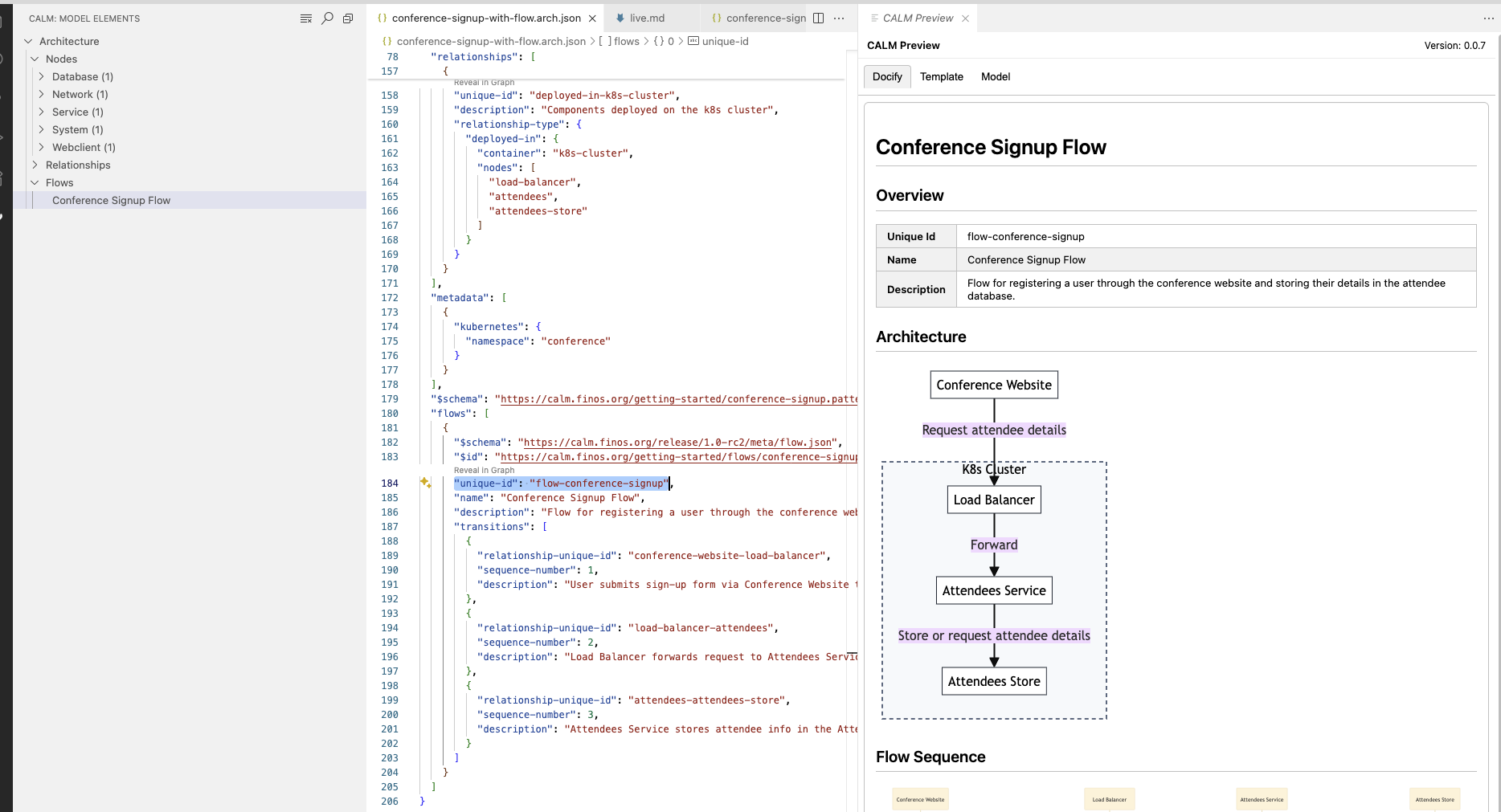 Interactive preview with tree navigation, editor integration, and live visualization
📋 Template & Documentation Mode
- Documentation Generation: Create docs from CALM models
- Live Mode: Auto-refresh as you edit
- Multiple Formats: HTML and Markdown output
- Custom Templates: Use built-in or custom templates
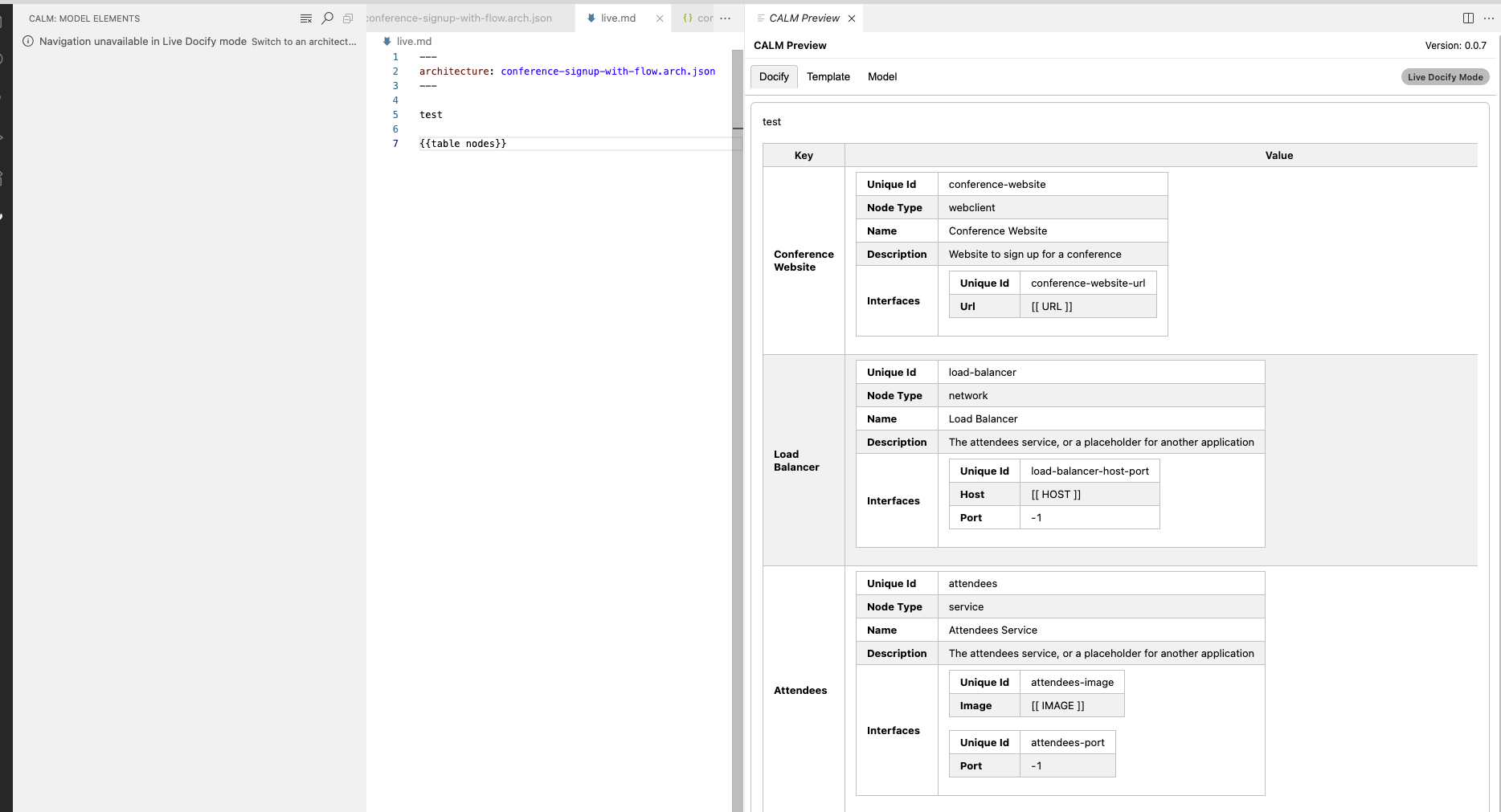 Live templating mode with real-time documentation generation
🖼️ Diagram Export
Export any rendered Mermaid diagram directly from the Docify preview panel to a local file — no need to run the CLI separately.
- Export as SVG: Click the Export ▾ dropdown in the diagram toolbar and select Export as SVG. A vector image is saved with the viewBox and font-family preserved so it renders correctly in any browser or document editor.
- Export as PNG: Select Export as PNG for a rasterised image at 2× pixel ratio, suitable for presentations and sharing with people who don't have the extension installed.
- Native save dialog: VSCode's save dialog opens pre-filled with
<architecture-name>-diagram-<n>.<ext> in the same directory as the open CALM file.
Configuration
The extension can be configured via VS Code settings (.vscode/settings.json or User Settings).
Multi-Document Navigation
Navigate between related CALM files using detailed-architecture references.
- Create a mapping file (e.g.,
calm-mapping.json) in your workspace:
{
  "https://specs.internal/payment-service": "./services/payment-service.json",
  "https://specs.internal/inventory": "./services/inventory.json"
}
- Configure the extension to use this mapping:
"calm.urlMapping": "calm-mapping.json"
Schema Development
For schema developers working on custom CALM schemas, you can configure additional local folders to load schemas from:
"calm.schemas.additionalFolders": ["./my-schemas", "./custom-calm-schemas"]
Schemas in these folders are indexed by their $id field and can be referenced in your CALM documents.
File Discovery
Customize how the extension finds your CALM models and templates.
calm.files.globs: Patterns for CALM model files (Default: ["calm/**/*.json", "calm/**/*.y?(a)ml"])calm.template.globs: Patterns for template files (Default: ["**/*.md", "**/*.hbs", ...])calm.schemas.additionalFolders: Additional folders containing CALM schemas for validation (Default: [])
Visualisation Themes
Four themes are supported for the live preview diagrams:
calm.docify.theme - set to light, dark, high-contrast-light or high-contrast-dark, or auto to automatically align to your VSCode theme.
Layout Engine
Choose the diagram layout engine for architecture visualizations:
calm.preview.layout - set to elk (default) or dagre
- ELK (Eclipse Layout Kernel): Provides better automatic layout for complex diagrams with improved edge routing and hierarchy handling. Recommended for most use cases.
- Dagre: Classic Mermaid layout engine. Use if you prefer the traditional Mermaid layout behavior.
This setting applies workspace-wide to all block-architecture diagrams. Individual templates can override this setting using widget frontmatter:
---
widget-options:
  block-architecture:
    layout-engine: dagre
---
Or inline in the template:
{{block-architecture this layout-engine="dagre"}}
Getting Involved
Architecture as Code was developed as part of the DevOps Automation Special Interest Group before graduating as a top level project in it's own right. Our community Zoom meetups take place on the fourth Tuesday of every month, see here for upcoming and previous meetings. For active contributors we have Office Hours every Thursday, see the FINOS Event Calendar for meeting details.
Have an idea or feedback? Raise an issue in this repository.
Contributing: Issues and PRs welcome!

