StatusCode
What is StatusCode?
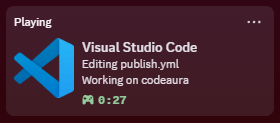
StatusCode connects Visual Studio Code to Discord and displays what you are working on in real time. Friends and server members can see the file you are editing, the language you are coding in, the project you are in, and how long you have been at it.
It works out of the box with sensible defaults, updates your presence live as you switch files and languages, and gives you full control over exactly what is shared — down to the text on each line.
Features
- Real-time activity tracking — your Discord status follows you as you code, open, close and switch files
- Language detection — icons for 60+ languages and formats (unknown ones fall back to a generic icon with a capitalized label)
- File & workspace display — show the project and the exact file you are working on
- File type icon — the current file's language icon as the small image
- GitHub repository button — a clickable button linking to your workspace's repository (supports HTTPS and SSH remotes)
- Error & warning count — surface the diagnostics for the current file, e.g.
(2 ❌, 1 ⚠️)
- Elapsed time counter — Discord's native "elapsed" display for how long the session has been running
- Highly customizable — tweak every line of text shown on your profile with template variables
- Privacy controls — choose exactly what information to share, field by field
- Auto-reconnect — transparently handles Discord restarting without touching VS Code
- Lightweight — minimal performance impact on your editor
Requirements
- Discord desktop app running on the same machine (the browser version does not support Rich Presence)
- Visual Studio Code 1.138 or newer
Installation
Option 1: VS Code Marketplace
- Open the Extensions panel (
Ctrl+Shift+X / Cmd+Shift+X)
- Search for StatusCode
- Click Install
Or open the StatusCode Marketplace page and click Install.
Option 2: Install from VSIX
- Download
statuscode-{version}.vsix from the latest release
- Open VS Code, press
Ctrl+Shift+P (Cmd+Shift+P on macOS)
- Run Extensions: Install from VSIX and select the downloaded file
- Reload VS Code
Quick Start
- Make sure the Discord desktop app is running
- Open VS Code — StatusCode connects automatically on startup
- Check your Discord profile — your activity appears within a few seconds
That's it. Nothing else to configure.
How it looks
| Discord shows |
Example |
| Details |
Coding in Visual Studio Code |
| State |
Editing extension.ts |
| Small image |
TypeScript icon + language name |
| Button |
GitHub Repository → your workspace's repo |
| Problems |
(2 ❌, 1 ⚠️) when the current file has diagnostics |
| Timer |
elapsed time since the session started |
The StatusCode item in the status bar (bottom right) shows the live connection state — click it to reconnect at any time.
Configuration
Open VS Code Settings and search for StatusCode.
Display
| Setting |
Description |
Default |
statuscode.enabled |
Enable or disable Rich Presence |
true |
statuscode.showFileName |
Display the current file name |
true |
statuscode.showWorkspace |
Display the workspace/folder name |
true |
statuscode.showLanguage |
Show the programming language icon |
true |
statuscode.showElapsedTime |
Show the elapsed-time counter |
true |
statuscode.showFileIcon |
Show the file type icon as the small image |
true |
statuscode.showGitHubRepo |
Show the GitHub repository button |
true |
statuscode.showIssues |
Show the error/warning count for the current file |
true |
Custom text
| Setting |
Description |
Default |
statuscode.details |
Custom details text |
"Coding in Visual Studio Code" |
statuscode.state |
Custom state text |
"Editing {filename}" |
statuscode.largeImageText |
Hover text on the large image |
"Visual Studio Code" |
Template variables
Use these placeholders in details, state and largeImageText — every occurrence is replaced:
| Variable |
Meaning |
Example value |
{filename} |
Current file name |
index.ts |
{workspace} |
Workspace folder name |
my-project |
{language} |
Programming language |
TypeScript |
Example custom state: "Working on {filename} in {workspace} ({language})" — renders as
Working on index.ts in my-project (TypeScript).
Advanced
| Setting |
Description |
Default |
statuscode.idleTimeout |
Hide the presence after X minutes of inactivity (0 = disabled) |
0 |
statuscode.reconnectInterval |
Reconnect interval in milliseconds |
5000 |
statuscode.updateInterval |
Activity update interval in milliseconds |
15000 |
Commands
All commands are available from the Command Palette (Ctrl+Shift+P / Cmd+Shift+P):
| Command |
Description |
| StatusCode: Enable Rich Presence |
Turn the presence back on |
| StatusCode: Disable Rich Presence |
Turn the presence off |
| StatusCode: Reconnect to Discord |
Force a reconnect — useful after Discord was restarted |
Tip: the status bar item ($(radio-tower) StatusCode, bottom right) is itself the Reconnect command — a single click retries the connection.
Supported languages
StatusCode ships with icons and labels for 60+ languages and formats:
| Group |
Languages |
| Web |
JavaScript, TypeScript, React (JSX/TSX), HTML, CSS, SCSS, Sass, Less, Vue, Svelte |
| Systems & general |
Python, Java, C#, C++, C, Go, Rust, PHP, Ruby, Swift, Kotlin, Scala, Dart |
| Scripting |
Shell Script / Bash, PowerShell, Perl, Lua |
| Data & config |
JSON, YAML, TOML, XML, SQL, GraphQL, INI, Properties |
| Docs & markup |
Markdown, LaTeX, reStructuredText, AsciiDoc |
| DevOps & build |
Docker / Docker Compose, Nginx, Makefile, CMake, Gradle |
| Functional & others |
Haskell, Elixir, Erlang, Clojure, F#, OCaml, R, Julia |
| Low-level & misc |
Assembly, LLVM, Plain Text, Log, Git Ignore / Git Config |
Missing your language? Unknown languages fall back to a generic icon with a capitalized label — or open an issue and we'll add it.
Troubleshooting
Discord doesn't show my activity
- Start the Discord desktop app before VS Code
- In Discord, go to Settings → Activity Privacy and enable Display current activity
- Run the command StatusCode: Reconnect to Discord
- Still stuck? Restart both Discord and VS Code
Status bar shows "Disabled"
The presence is turned off. Run StatusCode: Enable Rich Presence, or check the statuscode.enabled setting.
Connection keeps failing
- Make sure the Discord desktop app is installed — the browser version cannot provide Rich Presence
- Close other apps that use Discord RPC — only one client may connect at a time
- On Windows, try restarting Discord as administrator
Privacy
StatusCode only sends the information you configure to Discord, on your local machine. By default that means: the file name, the workspace name, the language, and the elapsed time — each of which can be turned off individually.
StatusCode does not:
- Send file contents
- Track your keystrokes
- Collect any personal data
- Contact external servers — it talks only to Discord's IPC endpoint on your own machine
Building from Source
git clone https://github.com/extrise/statuscode.git
cd statuscode

# Install dependencies (npm 12 users: run scripts are allowlisted in package.json)
npm ci

# Compile the extension
npm run compile

# Package as a VSIX
npm run package
Development
npm run watch        # recompile on every change
npm run lint         # ESLint
npm run format       # Prettier
npm run format:check # Prettier check
npm test             # compile + unit tests
Contributing
Bug reports and feature requests are welcome — open an issue.
To contribute code:
- Fork the repository
- Create a feature branch (
git checkout -b feature/amazing-feature)
- Commit your changes
- Push the branch and open a Pull Request
Please make sure npm test, npm run lint and npm run format:check pass before submitting.
License
Distributed under the MIT License.
Acknowledgments
- Built on discord-rpc for seamless Discord integration
- Language icons hosted through the extension's Discord Rich Presence assets
- Inspired by developers everywhere who love showing off their code
Support
Having trouble or want to help?
Made with ❤️ by Extrise — Happy Coding!