Explicode
Explicode lets you write rich Markdown documentation directly inside your code comments, turning a single source file into both runnable code and clean documentation.
Because the documentation lives inside comments, it doesn't affect your program, runtime, or build process — no special tooling required. Explicode works across many programming languages, allowing teams to adopt it without changing their existing workflows or project structure. Documentation stays close to the code it describes, making it easier to keep information accurate as the codebase evolves. Since both code and documentation live in the same file, updates happen together and are automatically versioned in Git, reducing the risk of stale or forgotten documentation.
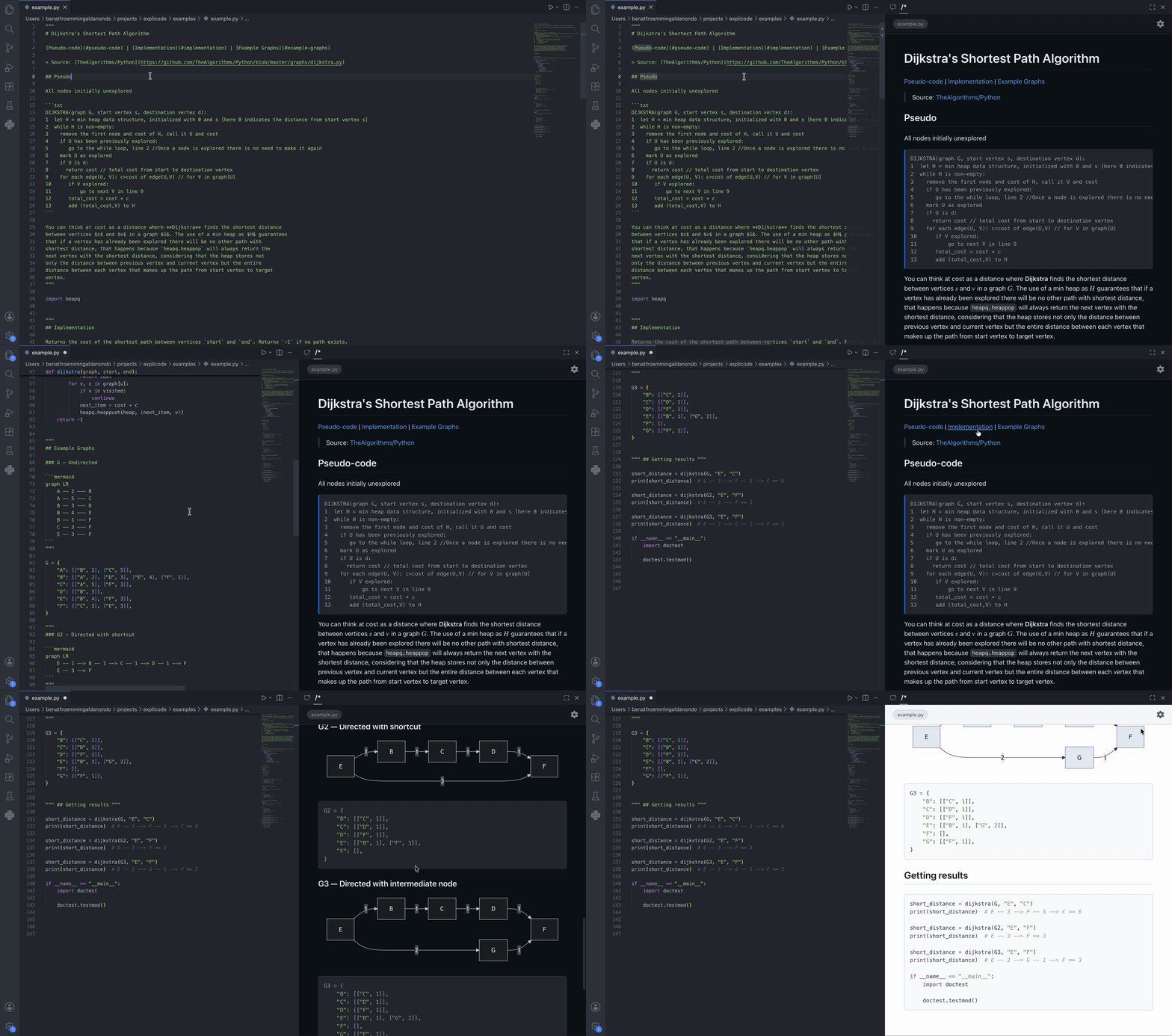
Open a live preview in VSCode to see beautifully rendered documentation side-by-side with your code while you write. When you're ready to share your work, export to Markdown or HTML for publishing, collaboration, or integration with existing documentation sites.

Coding Agents
Explicode keeps code and docs tightly coupled, providing high-quality context that helps agents understand what the code does and why without jumping between files. Teach your AI to write code with documentation using this skill.
How It Works
Use Markdown syntax inside the multiline comments of your favorite language:
Python — Docstring triple-quotes
Explicode looks for triple-quoted strings (""" or ''') that start at the beginning of a line (only whitespace before them). These are the same positions Python uses for docstrings — at the top of a module, class, or function. Triple-quotes used as regular string values mid-expression are ignored.
"""
This is a Markdown doc block — triple-quote is at the start of the line.
"""
x = """this is NOT a doc block — it's a string value assigned to a variable"""
/*
This is a Markdown doc block.
*/
/** This too — leading asterisks are stripped automatically. */
// Single-line comments are NOT rendered as Markdown, they stay as code.
Everything outside a doc block is rendered as a syntax-highlighted code block. Full CommonMark syntax is supported, including headings, lists, math, images, tables, diagrams, and more.
Quick Start
Open any supported file in VSCode, then either:
- Press
Ctrl+Alt+E (or Cmd+Alt+E on Mac)
- Right-click in the editor and select Open with Explicode
- Find the Explicode icon in your sidebar
This opens a live preview panel in the sidebar that updates as you edit. We recommend moving the extension to the second sidebar.
The ⚙️ button in the header provides additional options:
- Toggle Dark/Light theme
- Open the guide
- Export the render as
.md or .html
Additional Features
Supported file types: png, jpg, jpeg, gif, svg, webp. Use external URLs or relative paths — relative paths resolve from the current file's location.


Links
Repository files can be interlinked using relative paths. External URLs open in a new browser tab.
[Same folder](https://github.com/benatfroemming/explicode/blob/HEAD/app.py)
[Subfolder](https://github.com/benatfroemming/explicode/blob/HEAD/src/app.py)
[Parent folder](https://github.com/benatfroemming/explicode/blob/HEAD/../README.md)
[External](https://explicode.com)
To link to a specific heading in another file, use # followed by the heading title in lowercase with spaces replaced by hyphens and special characters removed.
[Link to heading](https://github.com/benatfroemming/explicode/blob/HEAD/src/app.py#how-to-test-code)
[Same page heading](#how-to-test-code)
Math (KaTeX)
Inline math uses single dollar signs, block math uses double dollar signs or a fenced code block with the math language tag.
Inline: $E = mc^2$
Block:
$$
\frac{d}{dx}\left(\int_{a}^{x} f(t)\,dt\right) = f(x)
$$
or
```math
\frac{d}{dx}\left(\int_{a}^{x} f(t)\,dt\right) = f(x)
```
Diagrams (Mermaid)
Use a fenced code block with the mermaid language tag to render diagrams.
```mermaid
graph TD
A[Start] --> B{Is it working?}
B -->|Yes| C[Great!]
B -->|No| D[Debug]
D --> A
```
Examples
Python
"""
# Fibonacci Sequence
Generates the first `n` Fibonacci numbers iteratively.
- **Input**: `n` (int) — how many numbers to generate
- **Output**: list of the first `n` Fibonacci numbers
"""
def fibonacci(n):
if n <= 0:
return []
elif n == 1:
return [0]
seq = [0, 1]
for _ in range(2, n):
seq.append(seq[-1] + seq[-2])
return seq
fibonacci(5) # [0, 1, 1, 2, 3]
JavaScript
/*
# Fibonacci Sequence
Generates the first `n` Fibonacci numbers iteratively.
- **Input**: `n` (int) — how many numbers to generate
- **Output**: list of the first `n` Fibonacci numbers
*/
function fibonacci(n) {
if (n <= 0) return [];
if (n === 1) return [0];
const seq = [0, 1];
for (let i = 2; i < n; i++) {
seq.push(seq[i - 1] + seq[i - 2]);
}
return seq;
}
fibonacci(5); // [0, 1, 1, 2, 3]
Supported Languages
- Python
- JavaScript / TypeScript
- JSX / TSX
- Java
- C / C++ / C#
- CUDA
- Go
- Rust
- PHP
- Swift
- Kotlin
- Scala
- Dart
- Objective-C
- SQL
- Markdown
- Plain text
Need support for another language? Open an issue or reach out.
Contact us here with bug reports, feature requests, or collaboration inquiries.