Tree Join
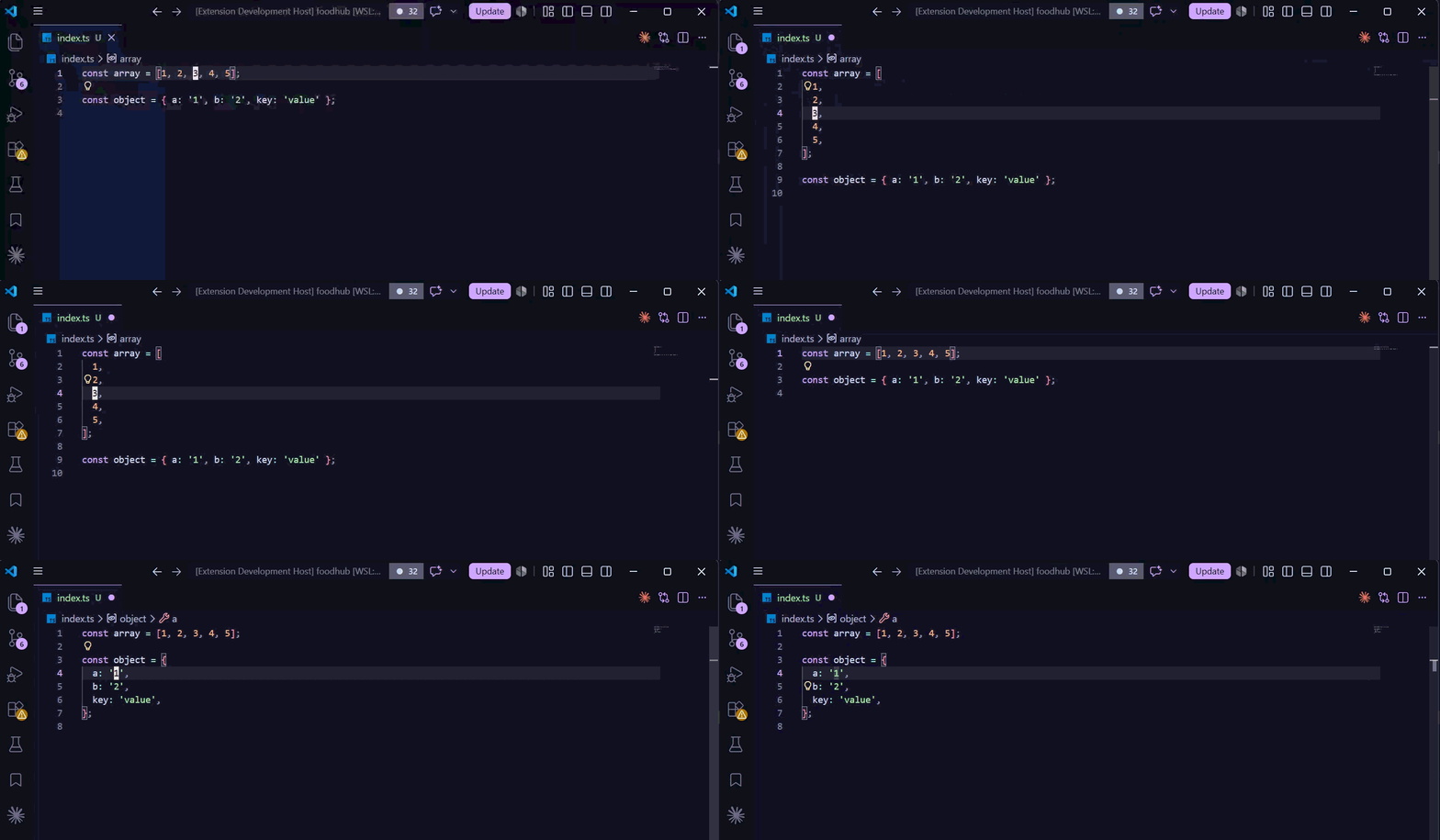
Toggle, split, and join TypeScript/JavaScript, PHP, and JSON constructs with a single keystroke — a tree-sitter-powered, formatter-friendly analogue of treesj for VSCode.
Put your cursor anywhere inside an array, object, function call, parameter list, import, JSX tag, TypeScript type, PHP array/argument list, or JSON array/object and flip it between its single-line and multi-line form. Output follows Prettier-compatible defaults, so it stays out of your formatter's way.
Features
- One keybinding to toggle any supported construct: single-line splits, multi-line joins.
- Tree-sitter accurate — selection is based on the real syntax tree, not regex, so nested constructs resolve to the innermost one under your cursor.
- Multi-cursor aware — every cursor transforms independently and the whole thing lands as a single, atomic undo.
- Recursive variants for splitting/joining a construct and all its supported descendants in one shot.
- Safe joins — refuses to join when the result would exceed your max line length or would swallow a
// line comment.
- Runs in the browser too — works in vscode.dev and github.dev.
Commands
| Command id |
Title |
Behavior |
tree-join.toggle |
Tree Join: Toggle |
Single-line target → split; multi-line target → join. |
tree-join.split |
Tree Join: Split |
Force split (no-op if already multi-line). |
tree-join.join |
Tree Join: Join |
Force join (subject to width / line-comment guards). |
tree-join.splitRecursive |
Tree Join: Split Recursive |
Split the target and recurse into supported descendants. |
tree-join.joinRecursive |
Tree Join: Join Recursive |
Join the target and recurse into supported descendants. |
All commands are available from the Command Palette (Ctrl/Cmd+Shift+P) while a supported file is open — in any other language they are hidden, since there is no grammar behind them. No keybindings are registered by default — see Keybindings.
Supported node types
In typescript, typescriptreact, javascript, and javascriptreact:
| Category |
tree-sitter node types |
| Literals |
array, object |
| Destructuring |
array_pattern, object_pattern |
| Calls & signatures |
arguments, formal_parameters |
| Modules |
named_imports, export_clause |
| TypeScript types |
type_arguments, type_parameters, tuple_type, object_type |
| TypeScript bodies |
interface_body, enum_body (including const enum) |
| JSX |
attribute list of jsx_opening_element / jsx_self_closing_element |
In php:
| Category |
tree-sitter node types |
| Arrays |
array_creation_expression (both […] and array(…) forms) |
| Destructuring |
list_literal (both […] and list(…) forms) |
| Calls & signatures |
arguments, formal_parameters |
| Imports |
namespace_use_group (group use Foo\{A, B}) |
| Match |
match_block |
In json and jsonc:
| Category |
tree-sitter node types |
| Containers |
array, object |
Object-like constructs (object, object_pattern, object_type, interface_body, enum_body, named_imports, export_clause, PHP match_block) get padded braces on join ({ a: 1 }); everything else is unpadded ([1, 2]).
A trailing separator is never added where the language rejects one, whatever tree-join.trailingComma says: after a rest element or variadic parameter (function f(a, ...rest), const { a, ...rest } = o, PHP function f(int ...$rest)), in a type argument list (Map<string, number>), after PHP's first-class-callable placeholder (strlen(...)), and in a PHP group-use list (use Foo\{A, B}).
JSON never takes one either, whatever tree-join.trailingComma says: a trailing comma is invalid JSON, and even in jsonc the JSON grammar cannot parse one. In jsonc, a // comment inside the construct refuses a join (it would swallow the rest of the line); a /* … */ comment joins inline.
Settings
| Setting |
Type |
Default |
Description |
tree-join.maxJoinLength |
number |
100 |
Max line length for a join result; longer joins are refused. Set to 0 to use the first editor.rulers column (falling back to 100). |
tree-join.trailingComma |
"add" | "preserve" | "never" |
"preserve" |
Trailing comma/separator behavior on split. preserve keeps a trailing separator only if the source had one. Join always strips trailing separators. |
tree-join.bracketSpacing |
boolean |
true |
Pad inside object-like braces on join ({ a: 1 } vs {a: 1}). |
All three are language-overridable, so you can scope them per language (e.g. a different maxJoinLength for typescriptreact).
Keybindings
No keys are bound out of the box. To bind toggle to Alt+Shift+J in TS/JS files, add this to your keybindings.json (Preferences: Open Keyboard Shortcuts (JSON)):
{
  "key": "alt+shift+j",
  "command": "tree-join.toggle",
  "when": "editorTextFocus && !editorReadonly && editorLangId =~ /^(typescript|typescriptreact|javascript|javascriptreact|php|json|jsonc)$/",
}
Other commands you may want to bind:
[
  {
    "key": "alt+shift+s",
    "command": "tree-join.split",
    "when": "editorTextFocus && editorLangId =~ /^(typescript|typescriptreact|javascript|javascriptreact|php|json|jsonc)$/",
  },
  {
    "key": "alt+shift+k",
    "command": "tree-join.join",
    "when": "editorTextFocus && editorLangId =~ /^(typescript|typescriptreact|javascript|javascriptreact|php|json|jsonc)$/",
  },
]
How it works
Tree Join loads the web-tree-sitter WASM runtime plus the grammar for the active language (TypeScript, TSX, PHP, or JSON) on first command invocation — each grammar is lazy-loaded only when you first run a command in that language. For each cursor it walks up the syntax tree to the innermost supported ancestor, computes the transformed text, and applies all edits in one WorkspaceEdit so undo is atomic. Indentation follows the active editor's tabSize / insertSpaces.
Contributing
npm install               # also installs the pre-commit hook via simple-git-hooks
npm run typecheck         # tsc --noEmit (strict)
npm run lint              # eslint .            (lint:fix to auto-fix)
npm run format:check      # prettier --check .  (format to write)
npm run build             # esbuild → dist/extension.js + dist/extension.web.js
npm test                  # vitest: unit + fixture-snapshot suites
npm run test:integration  # @vscode/test-electron smoke suite (needs a display)
npm run test:web          # @vscode/test-web headless browser smoke
npm run package           # vsce package → .vsix
Transform behavior is covered by ~300 *.in.ts/*.out.ts snapshot fixtures under tests/fixtures/ — see tests/fixtures/README.md. Add a fixture pair (and run npm run test:update to record the snapshot) when changing transform output.
CI runs typecheck, lint, format-check, build, unit/fixture tests, the Electron integration smoke, and the headless web smoke on every push and PR.
License
MIT © Eric Newton

