Offline dbt Lineage
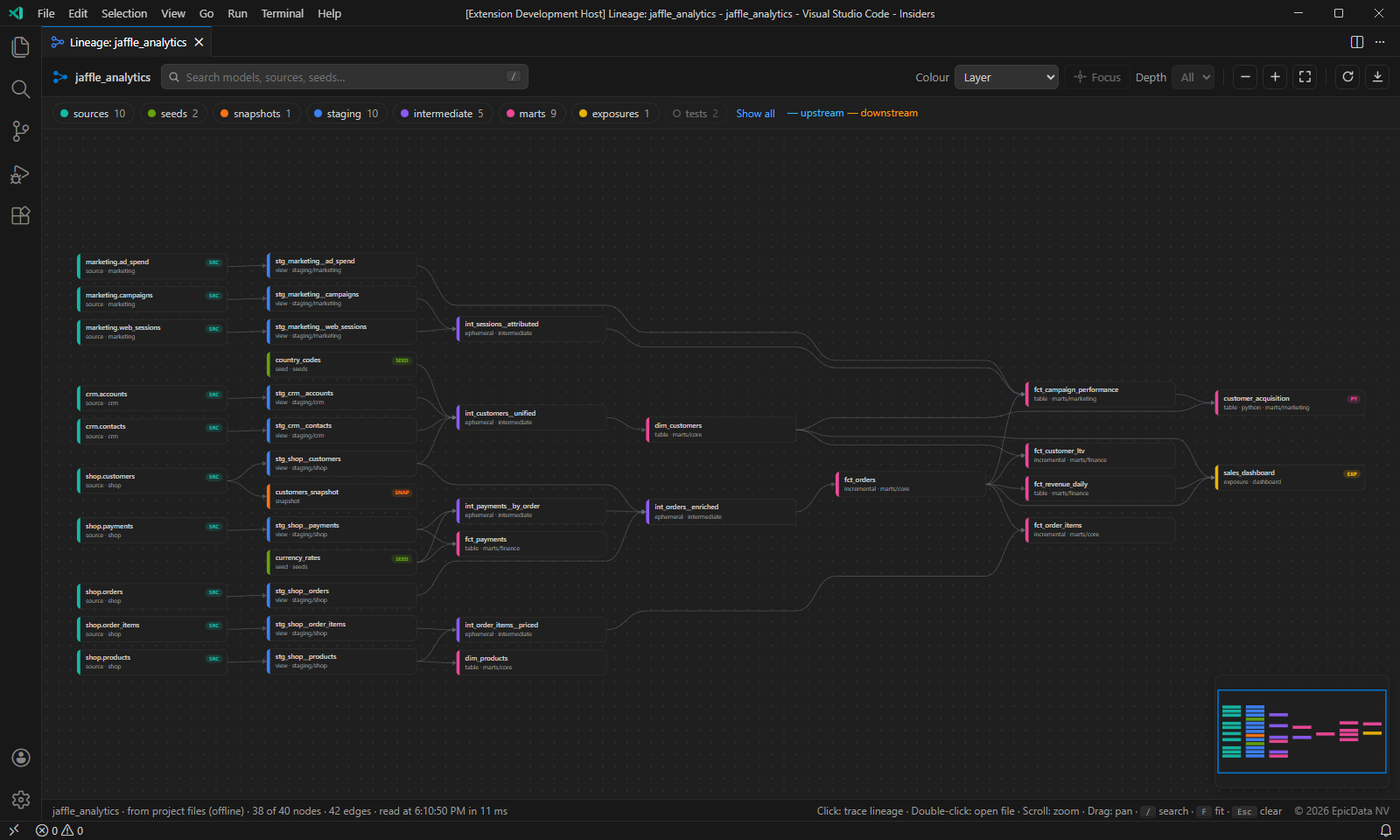
See the whole lineage of your dbt project as a clean, interactive graph, right inside VS Code. 100% offline.
No dbt run, no dbt docs, no warehouse connection, no Python environment, no API key and no account. The extension reads your .sql, .py, .yml and .csv files directly, so it works on a plane, behind a strict firewall, or on a project whose packages you cannot install.
Features
- Whole-project DAG: every model, source, seed, snapshot and exposure in one clean left-to-right layout with minimal edge crossings.
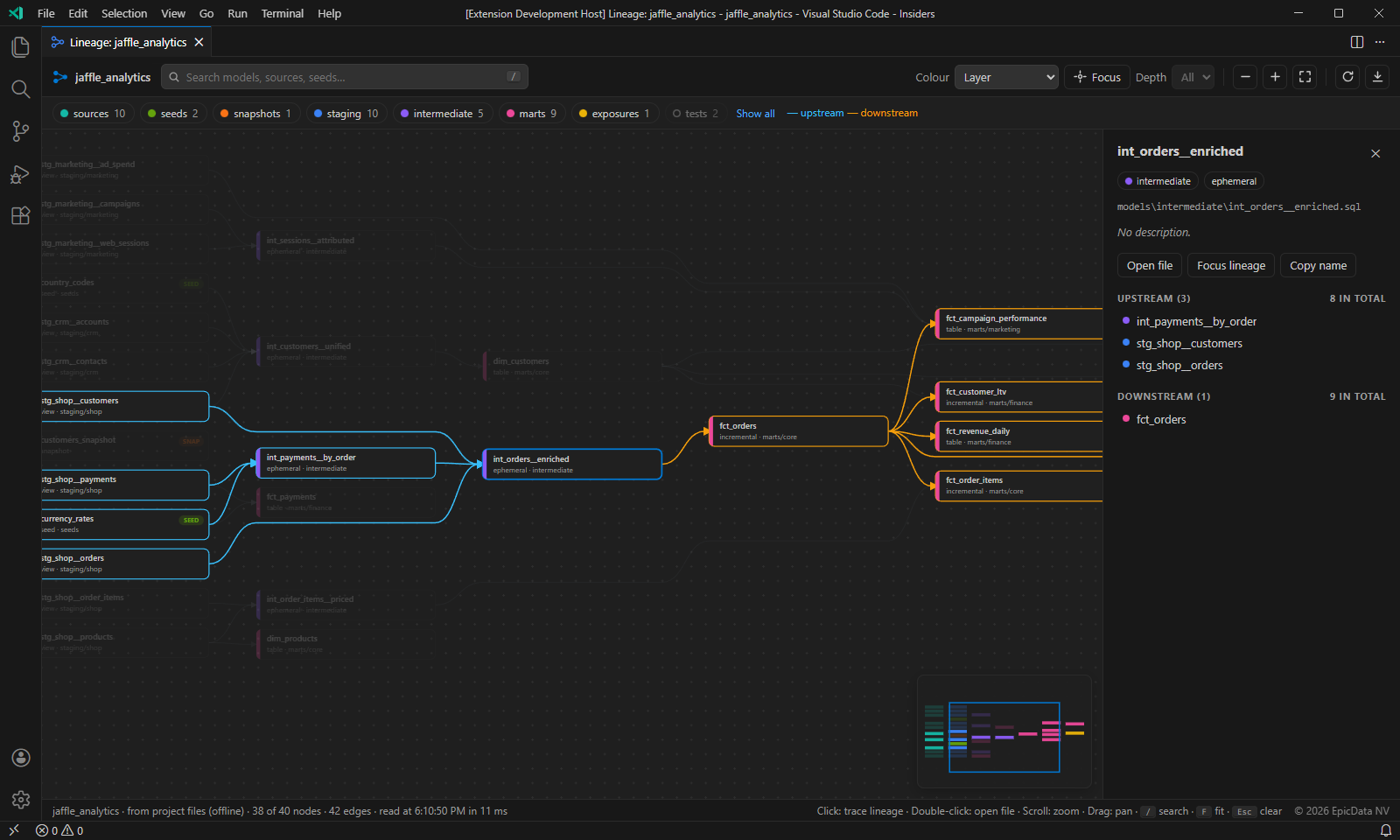
- Trace lineage with one click: click any node to highlight everything upstream (blue) and downstream (orange). The side panel shows its description, file, direct parents and children, and documented columns.
- Focus mode: show only the lineage of one model, optionally limited to 1, 2, 3 or 5 steps.
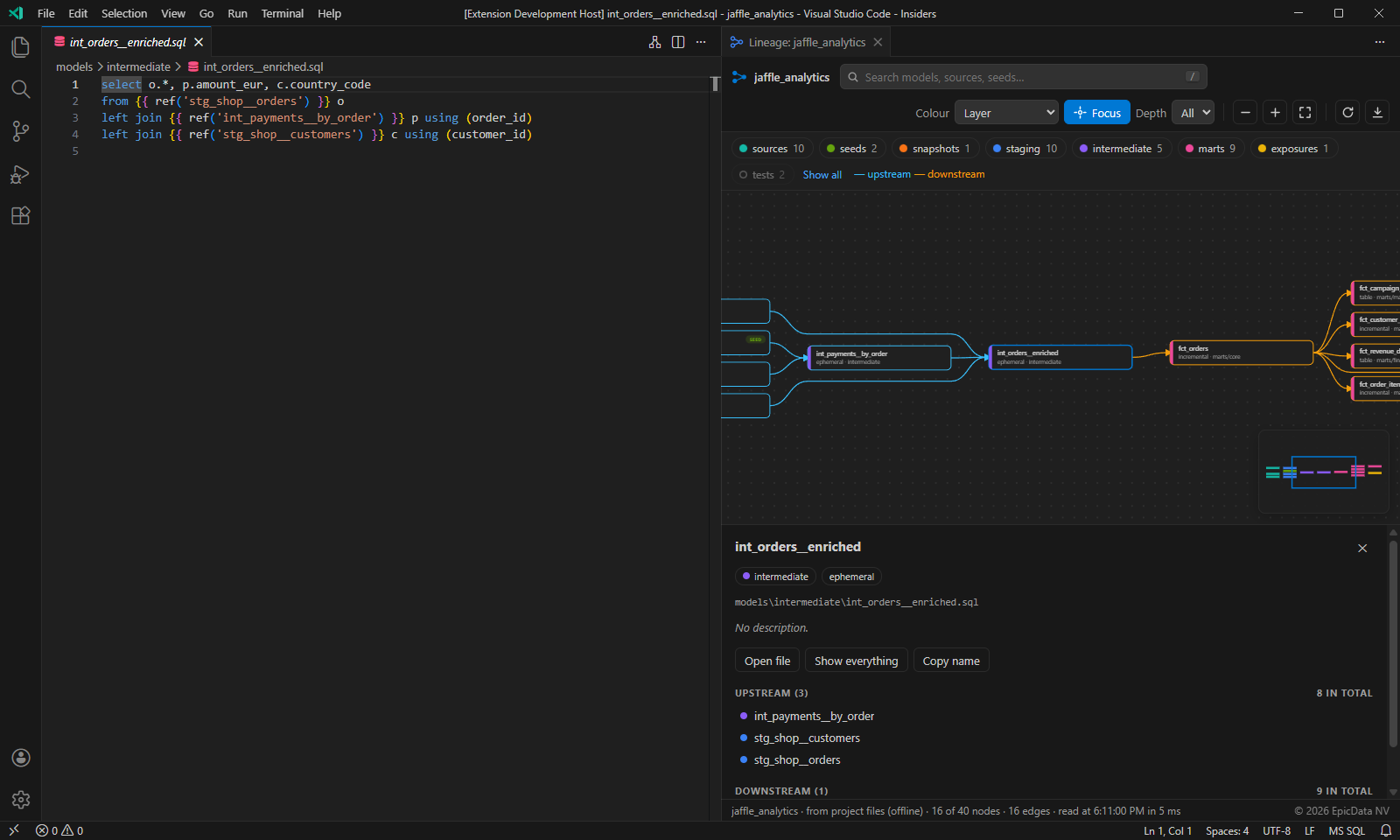
- Follows your editor: open a model and the graph jumps to it. Use the lineage button in the editor title bar to open the graph beside your SQL.
- Search: press
/ and type part of a name.
- Colour by layer (top folder), full folder, or materialisation (view, table, incremental, ephemeral and so on).
- Filter by clicking legend chips. Alt+click shows one group only.
- Minimap, fit to screen, smooth zoom and pan.
- Export as SVG for documentation, wikis and slides.
- Auto refresh when you save, add or delete a file.
- Follows your VS Code colour theme (dark, light and high contrast).
Getting started
- Open the folder that contains your
dbt_project.yml.
- Run dbt Lineage: Show Project Lineage from the Command Palette (
Ctrl+Shift+P, or Cmd+Shift+P on macOS).
- Or open any model and click the lineage icon in the editor title bar.
| Action |
How |
| Trace upstream and downstream |
Click a node |
| Open the file |
Double-click a node, or "Open file" in the side panel |
| Search |
/ |
| Fit to screen |
F |
| Zoom |
Mouse wheel, + and - |
| Pan |
Drag the background, or Shift + wheel |
| Clear the selection |
Esc or click the background |
Where the lineage comes from
dbtLineage.dataSource |
Behaviour |
auto (default) |
Uses target/manifest.json when it is newer than every project file. Otherwise reads the files directly. |
files |
Always reads the files. Needs nothing installed. |
manifest |
Prefers target/manifest.json from your last dbt command, falling back to the files. |
When reading files, the extension finds every ref() and source() call (including dbt.ref() in Python models and two-argument package refs), reads sources:, models:, seeds:, snapshots: and exposures: from your YAML files, and applies folder-level +materialized and +enabled settings from dbt_project.yml.
Settings
| Setting |
Default |
Description |
dbtLineage.dataSource |
auto |
Where the lineage comes from (see above). |
dbtLineage.followActiveEditor |
true |
Select the model you are editing in the graph. |
dbtLineage.showTests |
false |
Show singular data tests (tests/*.sql) by default. |
dbtLineage.autoRefresh |
true |
Re-read the project when files change. |
Known limitations
- In
files mode, refs that are built dynamically inside macros (for example ref(var('table'))) cannot be resolved. Switch to manifest mode after a dbt parse if you rely on this.
- Models from installed packages appear as "missing refs" in
files mode, because dbt_packages/ is not read.
- Column-level lineage is not supported.
Privacy
The extension makes no network requests and collects no telemetry. Everything happens on your machine.
Licence
Copyright (c) 2026 EpicData NV. Released under the MIT License.
| |

