PyCallMap
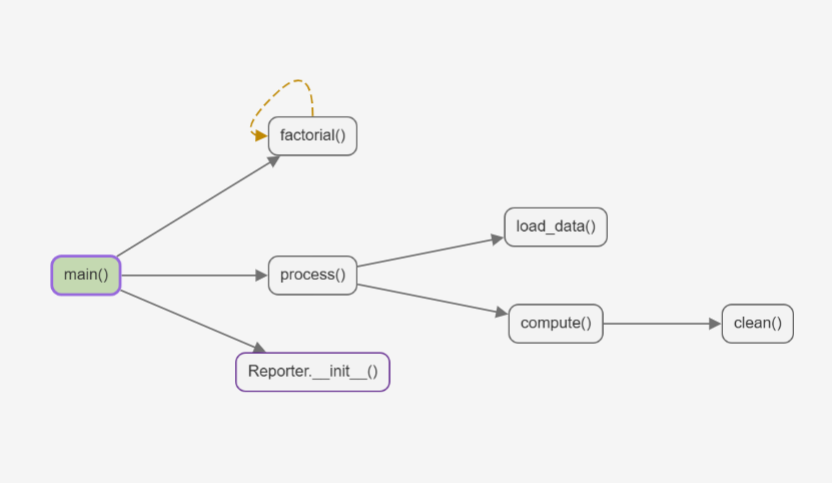
Visualize the function call graph of a single Python file or Jupyter notebook as an
interactive left-to-right diagram. Click a node to jump to its definition.
Features
- Left-to-right directed call graph; every function appears only once
- Jupyter notebook support: all code cells are analyzed as one program
- Recursion and mutual recursion shown as dashed amber back edges
- Top-level functions, class methods, and nested functions
- Automatic entry detection (module-level calls,
if __name__ == "__main__":, main)
- Uncalled functions hidden by default, shown with one click
- Click a node to jump to the function definition; click an edge to jump to the call site
- The function under the cursor is highlighted as you move through the code
- Auto-refresh when the file is saved or a notebook cell changes
- Four graph color schemes from the toolbar: Default, Vivid, Soft, and High contrast
- Follows the VSCode dark/light theme
- All analysis runs locally: no network requests, no telemetry
Installation
Requires Python 3.9 or later (the analyzer uses built-in generics). CI tests Python 3.10–3.12.
From VSIX
- Download the
.vsix file from the release attachments.
- In VSCode, open the Extensions view, click
... in the top-right corner, and choose Install from VSIX....
- Select the downloaded
.vsix file.
Development mode
npm install
npm run build
Press F5 in VSCode to launch the Extension Development Host.
Usage
- Open a
.py file or an .ipynb notebook.
- Run the command
PyCallMap, or click the graph icon in the editor / notebook toolbar.
- View the call graph in the panel on the right.
Supported constructs
- Top-level functions, class methods, and nested functions in the same file
self.foo(), cls.foo(), ClassName.foo(), and no-argument super().foo()- Class inheritance within the same file
ClassName() and cls() inside class methods connect to __init__- Recursion and mutual recursion
async def
Known limitations
- Only the current file is analyzed; imports and other files are not followed
- No local variable type inference, so
obj = MyClass(); obj.foo() does not produce an edge
- Function aliases,
getattr, eval, callback registration, and calls inside decorators are not resolved
- Multiple inheritance uses a depth-first approximation over same-file parents; exact MRO is not guaranteed
- Skipped decorators, default values, and annotation calls are ignored; only unresolvable calls count toward a function's external call count
- Notebooks are analyzed in document order and ignore
execution_count
- Cells starting with
%% are skipped entirely; lines starting with %, !, or ? are treated as pass, so code on those lines is not analyzed
- Only code cells are analyzed; markdown and outputs are ignored
Settings
| Setting |
Default |
Description |
pyCallMap.pythonPath |
"" |
Path to the Python interpreter. Leave empty to auto-detect .venv and PATH. |
pyCallMap.autoRefreshOnSave |
true |
Refresh the graph when the bound Python file is saved. |
pyCallMap.showUncalledByDefault |
false |
Show unreachable functions when the panel first opens. |
Privacy
PyCallMap reads only the current Python file or the code cells of the current notebook.
For notebooks, cells are concatenated into a temporary local .py file and passed to the
standard-library analyzer; that temporary file is deleted immediately after analysis. No
data is sent anywhere, there is no telemetry, and user code is never executed.
Development
npm run typecheck
npm test
python -m unittest discover -s test/python -p "test_*.py" -v
npm run build
npm run package
License
MIT
| |

