CacheWarden
Keep Claude Code and Codex prompt caches warm with bounded, per-session keep-alive turns.
CacheWarden is a VS Code extension that watches Claude Code sessions and, with an
opt-in, Codex sessions. It fires an inert keep-alive turn before the configured
cache window lapses. This can avoid the latency and cache rebuild cost otherwise
paid on the next real message after an idle gap.
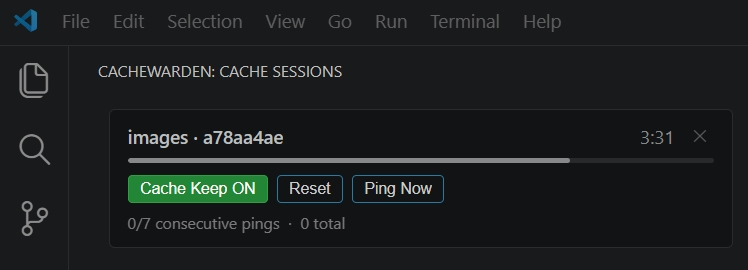
It works per session: open multiple assistant sessions and each gets its own
independent countdown, ping streak, and on/off switch.
Why
Anthropic's prompt caching keeps your conversation context "hot" for 5 minutes
after each turn. Step away longer than that and the cache expires — the next
message has to rebuild it, which is slower and bills cache_creation tokens.
CacheWarden sends a tiny no-op turn (no tools, no prose) a few seconds before the
TTL, re-anchoring the window so your context stays cached while you're idle.
Features
- Per-session tracking — one card per active Claude Code session, scoped to the
current workspace.
- Automatic keep-alive — a Claude Code
Stop hook fires the ping when a reply
finishes; the chain re-anchors after each successful ping.
- Per-session pause — turn keep-alive off for one session without touching the
others. The button is green when armed, red when paused, with a
PAUSED badge.
- Status bar countdown — the most-urgent session's remaining time, at a glance.
- Bounded — caps consecutive pings and total idle duration so it stops on its
own when you've clearly walked away.
- Codex support — incrementally observes local rollout files to show your
Codex sessions, and (opt-in) resumes the exact idle session with a guarded
read-only turn, failing closed if the session is active, forks, invokes a tool,
times out, or returns an error. A transient Codex thread-writer conflict is
skipped and retried after a short cooldown instead of disabling the session.
- Cache metrics — shows cached versus total input tokens from the latest turn
for both Claude Code and Codex when the provider reports them.
How it works
On activation CacheWarden installs a small Stop / UserPromptSubmit hook into
~/.claude/settings.json and a keep-alive script at
~/.claude/cache-warden-keepalive.js. When a Claude reply finishes, the hook
arms a per-session countdown; just before the TTL it resumes the session headless
(--fork-session --print, with all hooks disabled) to send an inert keep-alive
turn. The subprocess also uses Claude Code safe mode with skills, plugins, MCP,
browser integration, slash commands, and built-in tools disabled, then deletes
the throwaway fork. The Claude binary is auto-detected at runtime (override with
cacheWarden.claudePath if needed).
Codex does not use or modify Codex hooks or configuration. CacheWarden watches
new activity appended to ~/.codex/sessions/ after extension activation. It
does not populate the sidebar with historical sessions on reload. When an armed
session expires, it runs a guarded, ephemeral codex exec resume with user
configuration, project instructions, rules, hooks, MCP servers, shell tools, and
web search disabled for that invocation. It uses a read-only sandbox, rejects
approval requests, enforces a 90-second timeout, and accepts only the same
session ID, an exact inert acknowledgement, successful completion, and zero
tool calls. Before spawning Codex, CacheWarden validates the rollout's location
and session metadata, copies it into a permission-restricted disposable
CODEX_HOME, and points the maintenance process there. The temporary copy is
removed after the process exits, so even Codex CLI versions that persist an
ephemeral resume cannot append the maintenance turn to your original rollout.
The keep-alive turn is deliberately inert:
[AW_TURN_TYPE: keep-alive]
This is a cache keep-alive maintenance turn.
Do not use tools.
Do not post to the board.
Do not inspect or edit files.
Do not emit natural-language prose.
If the CLI requires a reply, emit only the inert marker [AW_KEEPALIVE_OK].
What it changes on your system
CacheWarden is transparent about touching your Claude Code setup. When enabled it:
- Writes a hook into
~/.claude/settings.json — adds Stop and
UserPromptSubmit entries that run its keep-alive script. It only inserts/removes
its own entries and leaves your other hooks untouched. Disabling the extension
removes them.
- Installs a script at
~/.claude/cache-warden-keepalive.js — the keep-alive
runner, rewritten on each activation to match the installed version.
- Stores per-session state under
~/.claude/cache-warden/ — countdown anchors
and ping counts, pruned automatically after 24h.
- Sends keep-alive turns to Claude Code — each ping resumes your session
headlessly in a throwaway fork (with all hooks disabled), submits the inert
message above, then deletes the fork. These turns are real API calls; they
consume
cache_read tokens (the point is to avoid the larger cache_creation
cost on your next message), and they count against your usage like any turn.
- Creates a temporary isolated Codex home for each opted-in Codex ping — it
contains a copy of only the validated target rollout and a local link to the
existing Codex authentication file when present. It is private to your user
and removed after the Codex process exits.
CacheWarden has no telemetry, analytics, update ping, or network client of its
own. Network traffic for keep-alives comes only from the Claude Code or Codex CLI
turns described here. Turning off the Claude hook setting removes CacheWarden's
hook entries and cancels active chains. When the last active VS Code window
deactivates or the extension is disabled/uninstalled, CacheWarden also removes
its installed script and state. Malformed Claude settings are left untouched and
reported instead of being overwritten.
Codex keep-alive pings are also real Codex turns and count against your Codex
usage — which is why Codex keep-alive is opt-in and off by default. CacheWarden
reads Codex rollout files but never edits them; maintenance writes are contained
in the disposable copy. Codex session tracking (the cards) is read-only and does
not spend any Codex usage.
Actively developed and tested mainly on Windows. Please file issues for anything
rough.
Install
Visual Studio Marketplace: search for CacheWarden in VS Code, or run:
code --install-extension Efsoo.cache-warden
Open VSX: search for CacheWarden in VSCodium or another Open VSX client,
or use the Efsoo.cache-warden listing.
From VSIX: download the release artifact, then use the Extensions panel →
… menu → Install from VSIX…, or run:
code --install-extension <downloaded-file>.vsix
Settings
| Setting |
Default |
Description |
cacheWarden.ttlSeconds |
280 |
Idle seconds before a keep-alive ping (20s before the 5-min TTL). |
cacheWarden.keepAliveDurationSeconds |
1800 |
Stop pinging after this much total idle (30 min). |
cacheWarden.keepAliveMaxPings |
7 |
Max consecutive pings per idle session (~28 min coverage). |
cacheWarden.targets |
["claude"] |
Providers to watch: claude, codex, or both. |
cacheWarden.hookEnabled |
true |
Install the Claude Code hook that fires pings automatically. |
cacheWarden.showStatusBar |
true |
Show the cache countdown in the status bar. |
cacheWarden.claudePath |
"" |
Absolute path to the Claude Code binary. Empty = auto-detect. |
cacheWarden.codexPath |
"" |
Absolute path to the Codex binary. Empty = auto-detect. |
cacheWarden.codexKeepAlive |
false |
Enable guarded Codex countdowns and pings. Off by default; pings consume Codex usage. |
Enable Codex support
Codex tracking and keep-alive are off during installation. Add this to VS Code's
user or workspace settings.json:
{
  "cacheWarden.targets": ["claude", "codex"],
  "cacheWarden.codexKeepAlive": true
}
Reload the VS Code window after changing the settings. Existing rollout history
stays hidden; a Codex card appears and starts counting only after new activity
in that session. To opt out, remove "codex" from targets, or set
codexKeepAlive to false to keep the read-only cards without any pinging.
Current support
- Claude Code — implemented and enabled by default.
- Codex — session tracking plus opt-in keep-alive. Keep-alive is off by
default and fires real Codex turns that consume your Codex usage.
Build from source
npm install
npm run build     # esbuild bundle → dist/
npm run watch     # incremental
npm run package   # produce a .vsix
Press F5 in VS Code to launch an Extension Development Host.
License
Apache-2.0 © Efs-O

