Leptos RSX (HTML)
Proper HTML syntax highlighting and IntelliSense inside Leptos view! macros.
This extension is built around two core ideas:
Completions and hovers driven by the same W3C/MDN HTML data and theme colors as
VS Code's built-in HTML support — not a hand-typed list.
Handling syntax highlighting at BOTH the semantic token layer and the TextMate grammar
layer. Semantic tokens always override grammars, and view! HTML tags are implemented as functions, so rust-analyzer's tokens ruin any HTML grammars.
Problem Statement
Existing RSX extensions fail to address IDE issues with rust-analyzer enabled:
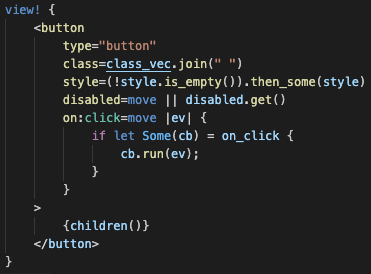
rust-analyzer adds semantic tokens that override extension syntax highlighting, coloring
html opening tags and attributes as functions, and closing tags with the generic catch-all color:
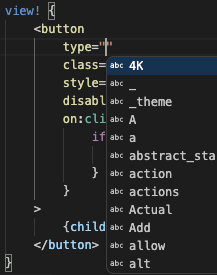
Code completion is inaccurate or missing entirely for html attributes:
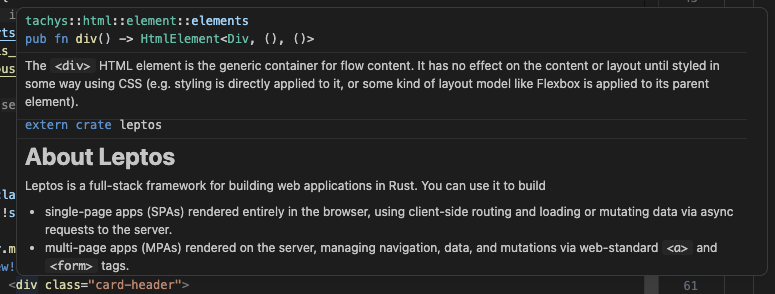
rust-analyzer hover info inside of the view! macros resolves through the WHOLE macro
expansion. The result is a combo of the tachys type (useful) and ALSO the entire Leptos crate-level intro docs (useless):
Problem Resolutions
With this extension installed, you can expect:
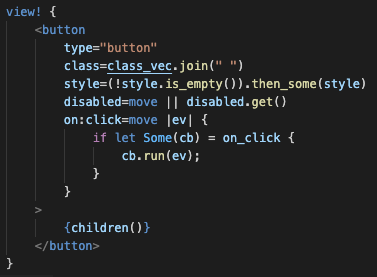
Correct HTML syntax highlighting for tags and attributes, without affecting nested Rust
code closures:
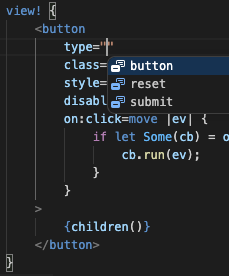
Accurate code completion, consistent with behavior inside a .html file:
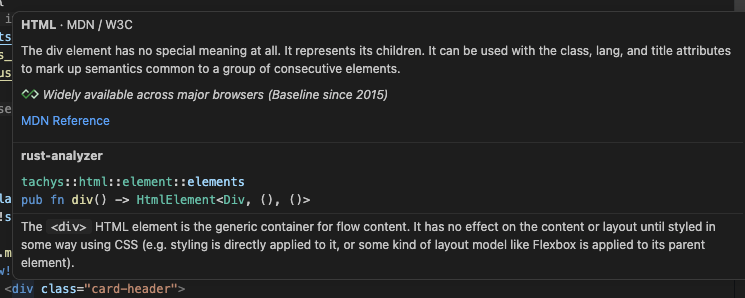
Sane hover info, starting with the info you get in a .html file, followed by the tachys
type info. Each section (HTML and rust-analyzer) is labeled for clarity:
Features
Highlighting that survives real code
- Element tags, component tags (colored like types, including paths like
my_crate::widgets::Fancy), and fragments <>…</>
- Leptos attribute namespaces:
on:, class:, style:, prop:, attr:,
bind:, use:, node_ref
- Attribute values and
{…} text nodes re-embed real Rust highlighting,
recursively — closures, method calls, format! interpolation, nested view!
IntelliSense that knows HTML
- Tag completion after
<, and close-the-enclosing-tag after </
- Per-element attribute completion:
<span offers span-valid + global +
full aria-* attributes, with MDN documentation
- Attribute value completion:
type=" inside a <button> offers
button | submit | reset; works for every value set in the HTML spec data
- DOM events in Leptos form:
on:click, on:input, … with docs
- Leptos namespaces (
class:, prop:, bind:value, …) with usage hints
- Hover docs for tags and attributes, sourced from MDN
- Stays out of rust-analyzer's way: inside
{…} blocks and bare Rust attribute
values, no HTML suggestions are offered
Playing nicely with rust-analyzer
Once rust-analyzer finishes indexing, its semantic highlighting normally
paints over TextMate colors inside view! macros (the macro maps spans back
to your source, so nearly every RSX token gets a semantic token, and semantic
tokens always beat grammars). Other RSX extensions either live with the mush
or tell you to disable semantic highlighting for Rust entirely.
This extension does neither. It attaches a middleware to rust-analyzer's
language client (via the API the rust-analyzer extension exports) and
filters out only the semantic tokens that overlap RSX markup — tags,
attribute names, quoted values. The result:
- markup keeps the RSX grammar's colors, permanently;
- embedded Rust inside
view! (closures, {…} blocks) and every other
line of Rust keep full semantic highlighting — mutable-variable
underlines and all. Nothing is disabled anywhere.
Controlled by leptosRsxHtml.filterSemanticTokens (default on). The hook
leans on semi-official rust-analyzer surface; if a future update breaks it,
the extension degrades gracefully: leptosRsxHtml.decorationsFallback
(default auto) then paints the markup with editor decorations — sane
colors from the extension's palette rather than your theme's, and never a
functional loss.
The same hook also improves hovers inside markup. Two things happen:
- rust-analyzer's hover on a tag like
div resolves through the macro
expansion and appends the generic extern crate leptos / "About Leptos"
crate intro below the useful element docs. The middleware trims that section
off (leptosRsxHtml.filterHovers, default on).
- It adds an HTML card — the same content VS Code's built-in HTML support
shows in a plain
.html file: description, the Baseline availability line,
and the MDN Reference link — and renders it above rust-analyzer's card
in the same hover, each block under a heading with a clear labeled break
between them. (VS Code offers no way to reorder separate hover cards, so we
merge into rust-analyzer's rather than stacking a second card.)
Controlled by leptosRsxHtml.hovers (default all = tags, attributes, and
Leptos namespaces; attributes skips tags since tachys already documents them;
off shows only rust-analyzer's trimmed hover). When rust-analyzer isn't
attached, the HTML card shows on its own instead.
Known limitations
- Unbraced attribute values containing a bare
> (e.g.
when=move || count.get() > 0) confuse the highlighter — wrap the expression
in braces: when=move || { count.get() > 0 }. (Every RSX grammar shares this
ambiguity; braces are also what leptosfmt produces.)
view! bodies using () or [] delimiters instead of {} are not recognized.
These syntaxes are rarely used, and are functionally identical.
Roadmap
- Typed
on: event payload docs, style: CSS property completion
- Snippets:
view!, #[component], <Show>, <For>, <Suspense>
- Completion for Leptos control-flow components and their props
- Workspace scanning for
#[component] functions → complete your own
components and their props
- leptosfmt formatter integration
Issues and ideas welcome.
License
MIT
| |

