EF QueryLens for VS Code
Preview your EF Core SQL in real time, without leaving your IDE.
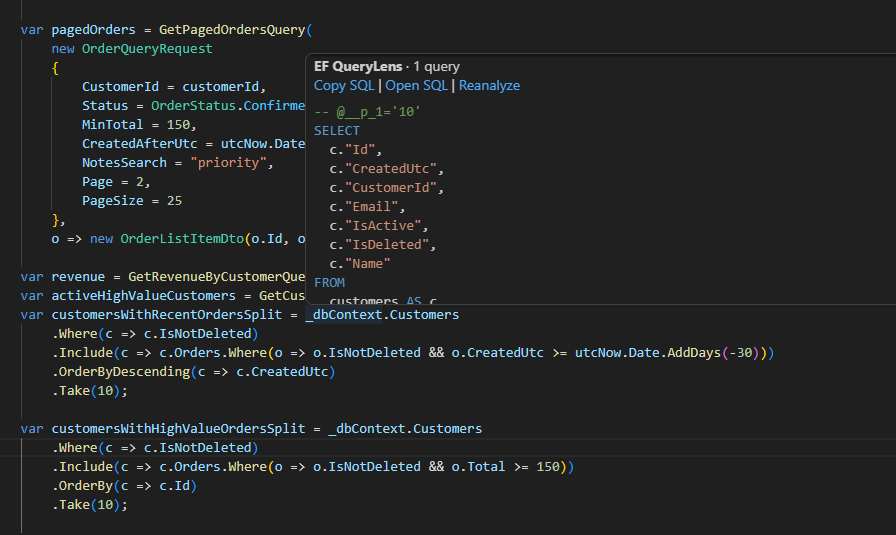
EF QueryLens for VS Code connects to the QueryLens language server and shows generated SQL directly from your LINQ queries.
Features
- Hover SQL preview for EF Core LINQ
- Copy SQL from hover actions
- Open SQL in a dedicated preview window
- Refresh query analysis without leaving the editor
- Provider-aware SQL formatting controls
Screenshot
Requirements
- VS Code 1.80+
- .NET 10 Runtime + ASP.NET Core Runtime (required to run the bundled QueryLens backend)
- .NET 10 SDK (only for local development/build)
- An EF Core project
Commands
EF QueryLens: Show SQL PreviewEF QueryLens: Copy SQLEF QueryLens: Open SQLEF QueryLens: RefreshEF QueryLens: Restart Language ServerEF QueryLens: Open Output
Settings
| Setting |
Type |
Default |
Description |
efquerylens.codeLens.maxPerDocument |
number |
50 |
Max query CodeLens entries per document. |
efquerylens.codeLens.debounceMs |
number |
250 |
Cache window for unchanged document text. |
efquerylens.codeLens.useModelFilter |
boolean |
false |
Validate roots against model DbSet names. |
efquerylens.sql.formatOnShow |
boolean |
true |
Format SQL before showing or copying. |
efquerylens.sql.dialect |
string |
auto |
SQL formatter dialect. |
efquerylens.debug.enableVerboseLogs |
boolean |
false |
Enable verbose client/server logs. |
efquerylens.dotnetPath |
string |
"" |
Optional full path to dotnet when VS Code cannot find it on PATH. |
Ubuntu Troubleshooting
If VS Code reports Server initialization failed or Server process exited with code 134, check the runtime from the same environment VS Code uses:
which dotnet
dotnet --list-runtimes | grep -E 'Microsoft\.(NETCore|AspNetCore)\.App 10'
EF QueryLens requires both Microsoft.NETCore.App 10.x and Microsoft.AspNetCore.App 10.x. On Linux desktop sessions, GUI-launched VS Code may not inherit the shell PATH where dotnet works. Set efquerylens.dotnetPath to the full executable path, for example:
{
  "efquerylens.dotnetPath": "/usr/share/dotnet/dotnet"
}
You can also run the packaged backend directly to capture startup errors:
EXT="$HOME/.vscode/extensions/efquerylens.ef-querylens-vscode-1.0.22-linux-x64"
QUERYLENS_DEBUG=1 dotnet "$EXT/daemon/EFQueryLens.Daemon.dll" --workspace "$HOME/Desktop/ef-querylens"
QUERYLENS_DEBUG=1 QUERYLENS_DAEMON_DLL="$EXT/daemon/EFQueryLens.Daemon.dll" QUERYLENS_WORKSPACE="$HOME/Desktop/ef-querylens" dotnet "$EXT/server/EFQueryLens.Lsp.dll"
ls -lt /tmp/querylens-crash-*.log 2>/dev/null | head -3
Build From Source
npm ci
npm run compile
More

