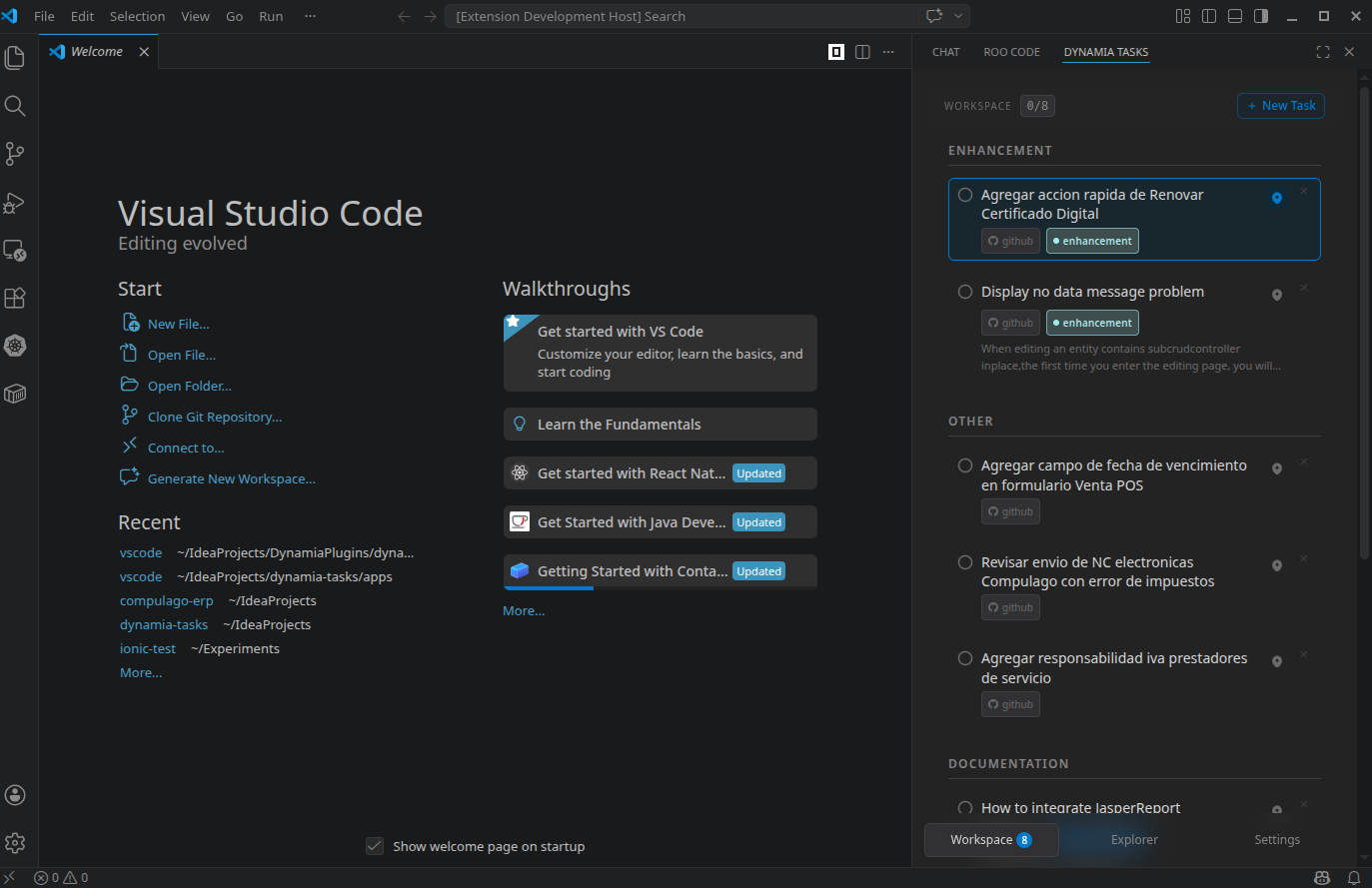
Your tasks, your IDE, your rules. Manage GitHub Issues & local tasks without leaving VS Code — no cloud, no accounts, just focus.
What is Dynamia Tasks?
Dynamia Tasks is a task manager that lives inside your editor. Instead of switching between browser tabs, Jira boards, or sticky notes, you get a clean task panel right in VS Code — always visible, always in context.
Everything runs locally on your machine. No cloud, no telemetry, no accounts required.
Features
📋 Unified task list — see GitHub Issues and local tasks together in one panel.
⚡ Workspace checklist — pin only the tasks you're actively working on. Your personal sprint, per project.
🔍 Task Explorer — browse and pick tasks from any connected source without leaving VS Code.
📂 Open files from tasks — jump to the relevant file mentioned in a task with a single click.
🏷️ Labels & filters — filter by status, label, or assignee to stay focused.
🔌 Extensible — works with GitHub Issues out of the box. Local JSON task files require zero configuration.
Getting Started
Install the extension from the VS Code Marketplace.
Open any project folder.
Click the Dynamia Tasks icon in the Activity Bar (left sidebar).
Start adding local tasks immediately — no setup needed.
Connecting GitHub Issues
To manage GitHub Issues from VS Code:
Go to Settings (gear icon inside the Dynamia Tasks panel).
Select the GitHub Issues connector.
Enter your repository (e.g. owner/repo).
Paste a GitHub Personal Access Token with the repo scope.
Generate one at github.com/settings/tokens → Personal access tokens (classic) → scope: repo (or public_repo for public repos only).
Save — your issues will appear in the panel instantly.
Your token is stored locally and never leaves your machine.
Local Development Notes
The extension bundles the Nuxt SPA from apps/web. Build it before launching, or the panel stays blank (build.mjs only warns when apps/web/.output/public is missing). From the repo root:
pnpm install
pnpm --filter "./packages/*" build   # compiles core + connectors into dist/ (the web build needs them)
pnpm build                           # nuxt generate → apps/web/.output/public
pnpm --filter ./apps/vscode build    # bundles the extension and copies the SPA to dist/web
Then open apps/vscode in VS Code and press F5 (Run Extension).
Re-run the relevant build step after changing packages/* or apps/web.
ide-bridge must be checked out as a sibling repo (../ide-bridge).
Privacy
✅ No cloud backend
✅ No analytics or telemetry
✅ No account or login required
✅ All data stays on your machine
Feedback & Issues
Found a bug or have a feature request? Open an issue on GitHub.