Vue Component Usage Counter for VS Code



Find Vue component usage, import references, and unused components directly in VS Code.
Vue Component Usage Counter is a lightweight VS Code extension for Vue 2 and Vue 3 projects. It counts import references for .vue components across your workspace and displays the result with CodeLens and the status bar, helping you identify unused Vue components, inspect component dependencies, and navigate large TypeScript or JavaScript Vue codebases with confidence.
Search-friendly highlights:
- Vue component usage counter for VS Code
- Find Vue component references and import locations
- Detect unused Vue components and dead component code
- CodeLens usage counts above
.vue files
- Supports Vue 2, Vue 3, TypeScript, JavaScript, path aliases, barrel files, and monorepos
Table of Contents
Features
📦 CodeLens — Inline Usage Count
When you open any .vue file, a CodeLens annotation appears at the very first line showing how many files import this component:
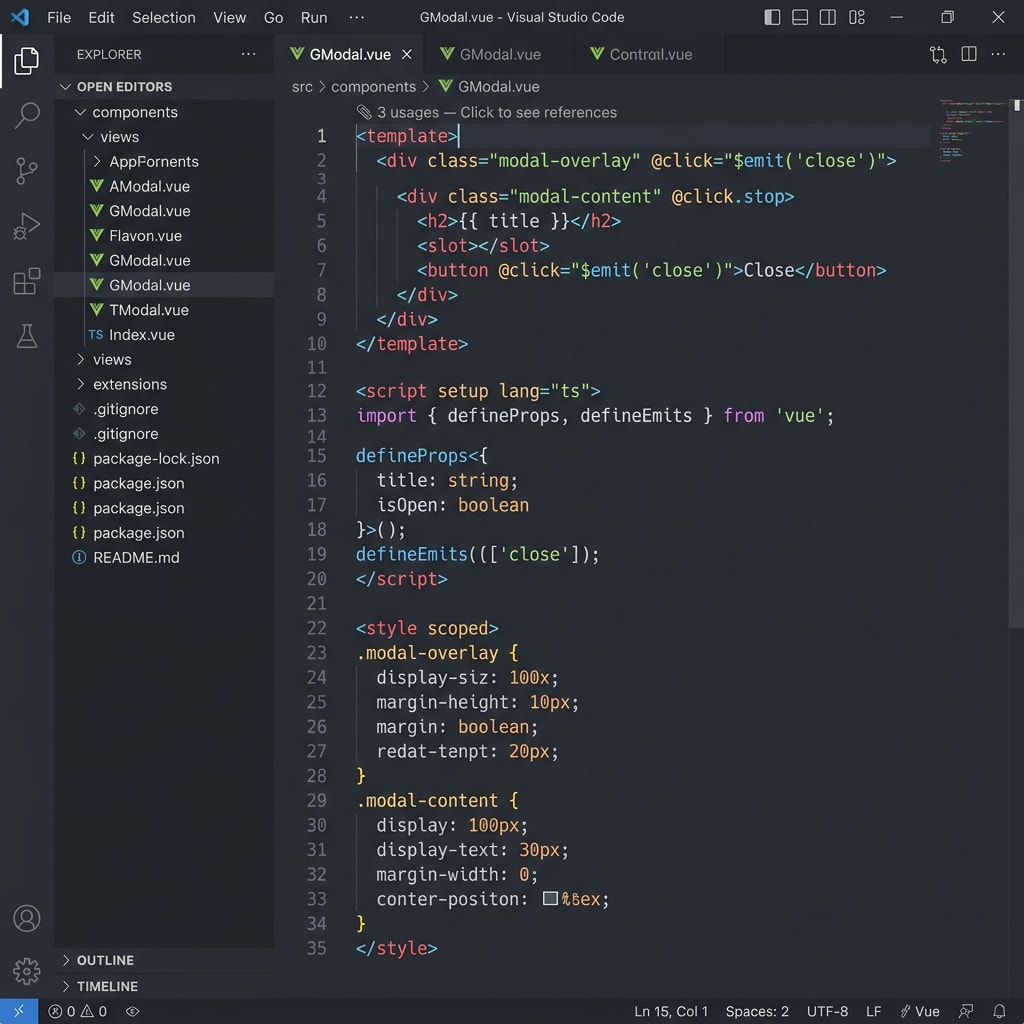
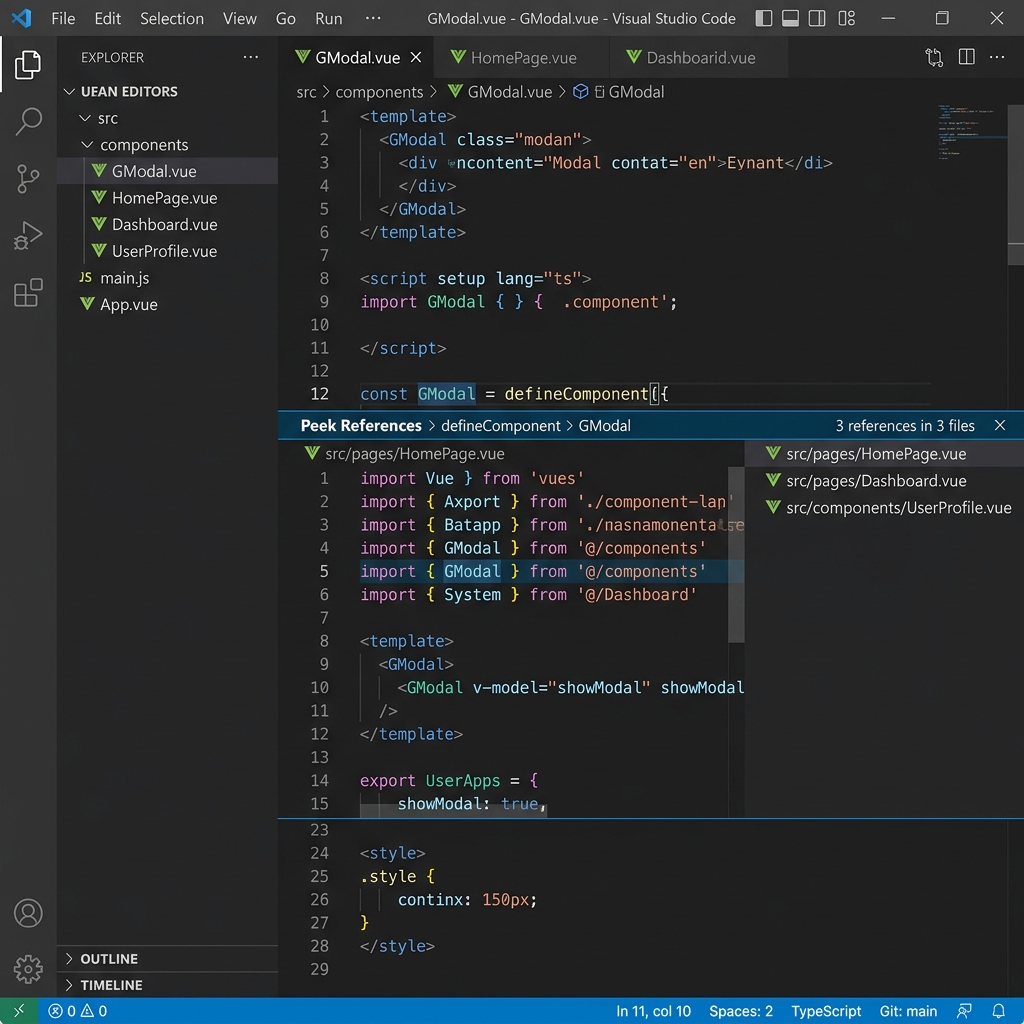
- Click the CodeLens to open a peek references view listing every import location.
- Shows
$(info) No usages found when the component has zero imports.
- Automatically refreshes when files are saved, created, or deleted.
Click on CodeLens to open the Peek References View:
📊 Status Bar — Quick Glance
The status bar (bottom-left) displays the usage count for the currently active Vue component:
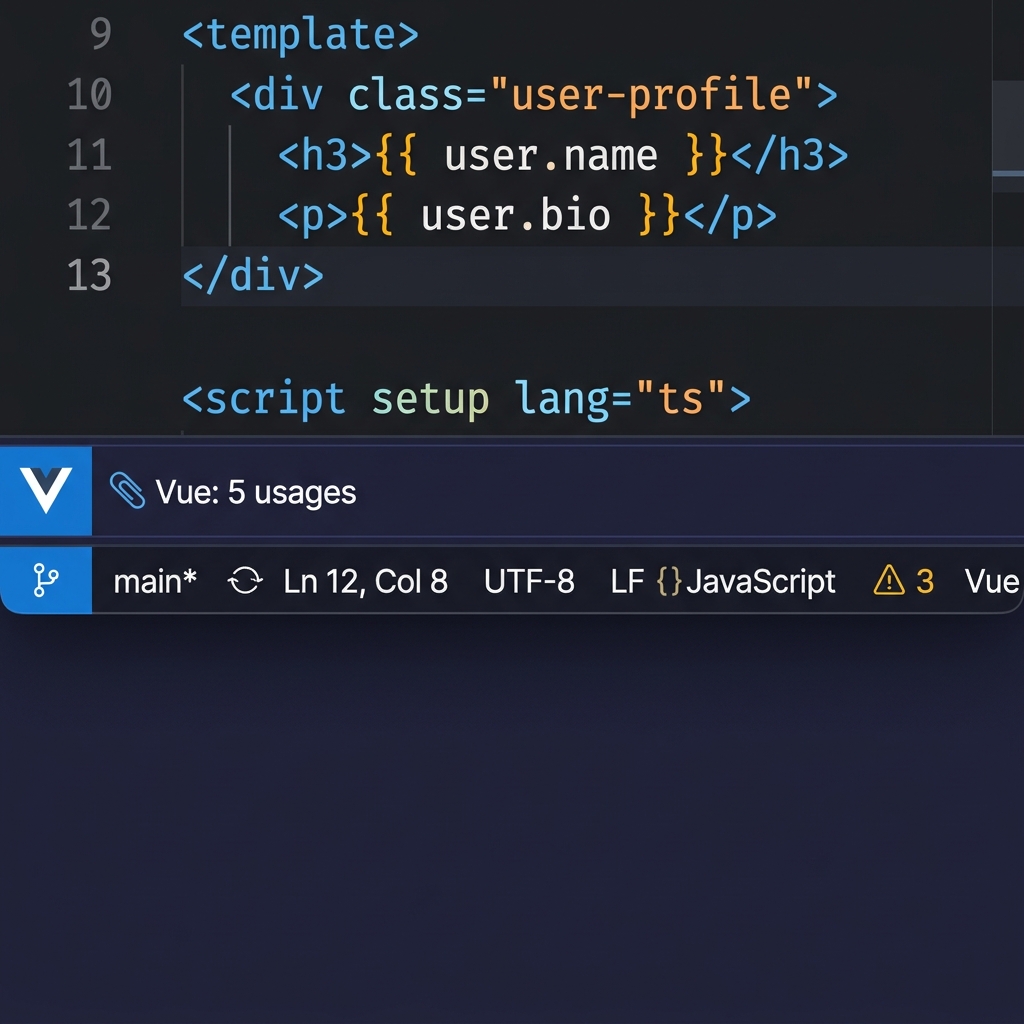
- Only visible when a
.vue file is the active editor.
- Shows a spinning icon (
$(sync~spin) Vue: scanning...) during scanning.
- Click to jump directly to the peek references view.
The extension uses a two-phase scanning strategy to stay fast even in large monorepos:
- Phase 1 — System
grep: Runs grep -rnE at the OS level to find candidate files in milliseconds, avoiding the overhead of VS Code's document API.
- Phase 2 — Path Verification: Each candidate's import path is resolved to an absolute file path and compared against the current component to eliminate false positives.
🗂️ Smart Caching
- Scan results are cached per component with a 30-second TTL.
- Cache is automatically invalidated when:
- Any file is saved (
onDidSaveTextDocument)
- Any matching file is created or deleted (via
FileSystemWatcher)
- Manual cache refresh is available via the Command Palette.
🔗 Barrel File / Re-export Support
The scanner understands barrel files (index.ts/index.js) that re-export components:
// components/index.ts
export { default as GModal } from "./GModal.vue";
export { MarkImage } from "./MarkImage";
When another file imports from the barrel (import { GModal } from '@/components'), the extension correctly traces this import back to GModal.vue.
🏷️ Path Alias Resolution
Automatically reads tsconfig.json to resolve path aliases like @/:
{
  "compilerOptions": {
    "paths": {
      "@/*": ["./src/*"]
    }
  }
}
Falls back to @ → src/ if no tsconfig.json is found.
How It Works
┌──────────────────────────────────────────────────────────┐
│  Active .vue file opened                                 │
│  → vueParser extracts component name from file path      │
│  → CodeLens & StatusBar request usages from CacheManager │
└──────────────────────┬───────────────────────────────────┘
                       │
                       ▼
┌──────────────────────────────────────────────────────────┐
│  CacheManager                                            │
│  → Returns cached result if fresh (< 30s)                │
│  → Otherwise delegates to ComponentScanner               │
└──────────────────────┬───────────────────────────────────┘
                       │
                       ▼
┌──────────────────────────────────────────────────────────┐
│  ComponentScanner (Two-Phase)                            │
│                                                          │
│  Phase 1: grep -rnE for import/export statements         │
│           matching the component name                    │
│                                                          │
│  Phase 2: For each candidate:                            │
│    1. Extract import path from the statement             │
│    2. Resolve to absolute path (aliases, extensions)     │
│    3. Check direct match OR barrel re-export             │
│    4. Keep only verified usages                          │
└──────────────────────────────────────────────────────────┘
Supported Import Patterns
| Pattern |
Example |
| Default import |
import MyComponent from './MyComponent.vue' |
| Named import |
import { MyComponent } from '@/components' |
| Re-export |
export { MyComponent } from './components' |
| Dynamic import |
import('./MyComponent.vue') |
| Kebab-case dynamic |
import('./my-component.vue') |
| Barrel re-export |
import { MyComponent } from '@/components' (via index.ts) |
The scanner matches both PascalCase and kebab-case variants of the component name.
Configuration
All settings live under the vueUsageCounter namespace in VS Code settings.
| Setting |
Type |
Default |
Description |
vueUsageCounter.excludePatterns |
string[] |
["**/node_modules/**", "**/dist/**"] |
Glob patterns to exclude from scanning |
vueUsageCounter.includeFileTypes |
string[] |
["**/*.vue", "**/*.ts", "**/*.js", "**/*.tsx", "**/*.jsx"] |
File types to scan for imports |
vueUsageCounter.showCodeLens |
boolean |
true |
Show/hide the CodeLens annotation |
vueUsageCounter.showStatusBar |
boolean |
true |
Show/hide the status bar item |
Example settings.json
{
  // Exclude test files and storybook stories
  "vueUsageCounter.excludePatterns": [
    "**/node_modules/**",
    "**/dist/**",
    "**/*.spec.ts",
    "**/*.stories.ts",
  ],
  // Only scan Vue and TypeScript files
  "vueUsageCounter.includeFileTypes": ["**/*.vue", "**/*.ts"],
  // Disable status bar, keep CodeLens
  "vueUsageCounter.showStatusBar": false,
}
Commands
Available via the Command Palette (Ctrl+Shift+P / Cmd+Shift+P):
| Command |
Description |
Vue Usage: Show Component References |
Open a peek view with all import locations |
Vue Usage: Refresh Cache |
Clear the cache and force a re-scan |
Requirements
- VS Code ≥ 1.85.0
- OS: Linux, macOS, and Windows (uses VS Code's bundled ripgrep — no extra setup needed)
- Works with Vue 2 and Vue 3 projects
License
MIT

