Decision Anchors
See why code is the way it is, without leaving the editor — and record a
decision the moment you make one.
An anchor ties a decision to the exact lines it governs. It is not a line
number: it stores a content fingerprint and the lines themselves, so it follows
the code through refactors, renames and edits, and tells you when the code has
drifted away from what the decision claims.
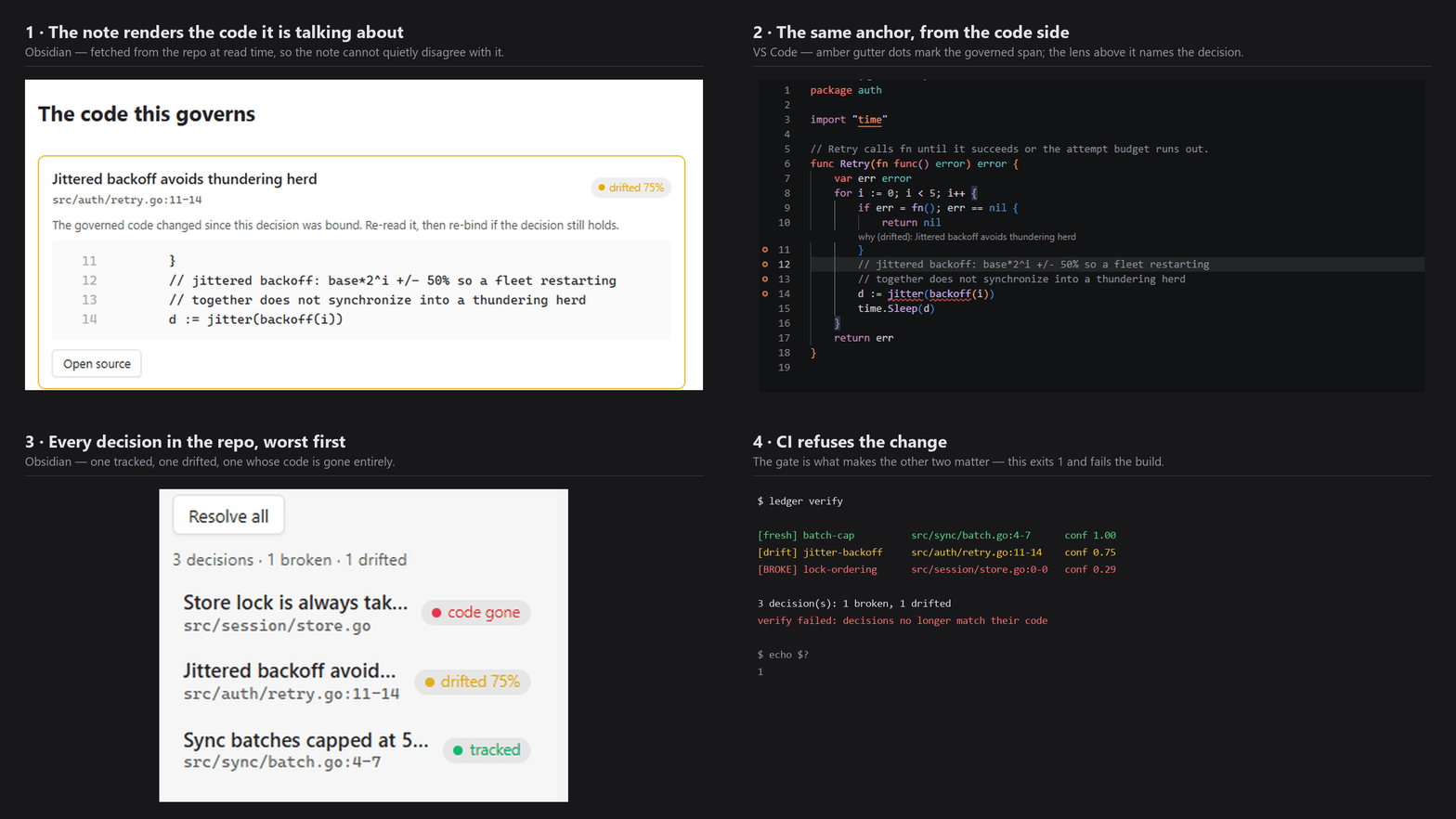
One decision followed across the note, the code and the CI gate. Every surface
reports the same drift, because all three are thin clients over one engine.
What it does
A design decision gets anchored to the exact lines of code it governs. The
anchor survives refactors, renames and line shifts. This extension surfaces
that in the editor:
- Gutter dot on every governed line — green tracked, amber drifted, red gone
- CodeLens above the span:
why: Idempotency key is the order ID
- Hover for status, match confidence, and a link to the decision note
- "Why does this code exist?" — command palette, for the line at your cursor
- "Bind selection to a decision" — right-click a selection to record a new
decision, or add another anchor to an existing one
Requirements
This extension is a front end for the ledger CLI, which does the git work.
Install it first:
go install github.com/Din-es/Ledger_c/cmd/ledger@latest
Or download a binary from
Releases.
Why is the binary called ledger when the extension is called Decision
Anchors? Marketplace extension names are globally unique, and
decision-ledger was already taken by an unrelated publisher. Only this
extension was renamed — the CLI, the .ledger/ records and the Obsidian
plugin all keep the ledger name, as do this extension's own
decisionLedger.* settings. Same project, one name it could not have.
Setup
Point the extension at the binary — in your workspace .vscode/settings.json:
{
  "decisionLedger.binaryPath": "C:/path/to/ledger.exe",
  "decisionLedger.showCodeLens": true
}
Use forward slashes even on Windows; they work and avoid JSON escaping
mistakes. If ledger is already on your PATH, you can leave binaryPath
alone.
Then, in your repo:
ledger init
Settings
| Setting |
Default |
Meaning |
decisionLedger.binaryPath |
ledger |
Path to the compiled CLI |
decisionLedger.showCodeLens |
true |
Show the why: lens above governed spans |
Troubleshooting
Nothing appears. Run ledger list --json in your workspace root. The
extension shows exactly what that command returns, so if it is empty or errors,
that is the thing to fix.
spawn ledger ENOENT. The binary is not on your PATH — set
decisionLedger.binaryPath to its full location.
Links
MIT licensed.

