Kanagawa Neutral Light
A light color theme for Visual Studio Code that keeps the calm, ink-wash character of the Kanagawa palette — without the cream.
Where Kanagawa Lotus sits on warm yellow paper, this theme sits on a restrained near-white (#F5F5F2). The surface stays neutral under any monitor calibration, while the syntax colors keep the muted, slightly earthy warmth that makes Kanagawa easy to read for hours.
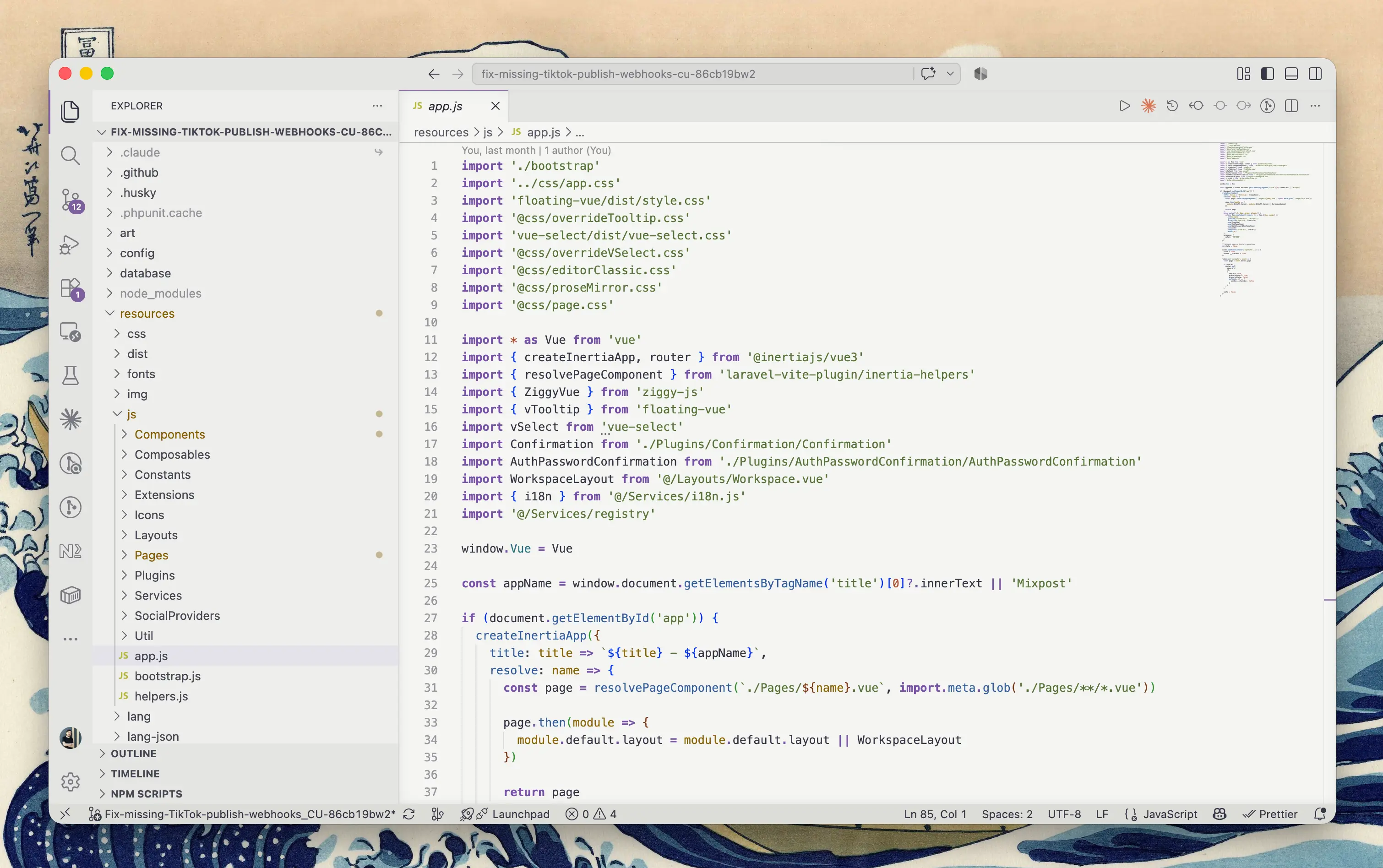
Why this theme
- Neutral, not yellow. The editor sits on a near-white grey. No color cast, no "aged paper" tint.
- Layered chrome. Editor
#F5F5F2 → sidebar and panels #EEEEEB → activity bar and tab strip #E5E5E1 → status bar #DCDCD7. Regions separate by tone, not by hard borders.
- Contrast tuned for daylight. Body text hits ~10.8:1 against the editor background. Syntax colors land in the 4.5–6:1 range; comments are deliberately quieter at ~4:1 so they recede without disappearing.
- A single muted-purple accent (
#7E5D9E) for the cursor, focus rings, badges, active tab and active panel borders — so the eye always knows where focus is.
- Semantic highlighting on by default, with matching TextMate scopes as a fallback for languages without a semantic provider.
- Complete, not partial. Full 16-color ANSI terminal palette, git decorations, diff backgrounds, peek view, hover and suggest widgets, notifications.
Install
From the Extensions view (Ctrl+Shift+X / ⇧⌘X), search for Kanagawa Neutral Light and click Install.
Or from the command line:
code --install-extension DimaBotezatu.kanagawa-neutral-light
Then pick the theme with Ctrl+K Ctrl+T / ⌘K ⌘T → Kanagawa Neutral Light.
Recommended settings
{
  "workbench.colorTheme": "Kanagawa Neutral Light",
  // The theme ships semantic token colors — leave this on for the best results.
  "editor.semanticHighlighting.enabled": true
}
If you switch between light and dark with the system, pair it with a Kanagawa dark variant:
{
  "window.autoDetectColorScheme": true,
  "workbench.preferredLightColorTheme": "Kanagawa Neutral Light"
}
Palette
Interface
| Role |
Color |
| Editor background |
#F5F5F2 |
| Sidebar, panel, peek |
#EEEEEB |
| Activity bar, tab strip |
#E5E5E1 |
| Status bar |
#DCDCD7 |
| Foreground |
#363646 |
| Selection |
#D8D8E5 |
| Accent — cursor, focus, badges |
#7E5D9E |
Syntax
| Role |
Color |
| Comments (italic) |
#777780 |
| Strings |
#587539 |
| Numbers, constants, enum members |
#B05238 |
| Keywords (bold), operators |
#7851A9 |
| Functions, methods |
#345E9D |
| Types, classes, interfaces |
#2A7081 |
| Parameters, attributes |
#8A6508 |
| Tags, decorators |
#C84053 |
| Variables, properties |
#363646 |
Feedback
Bugs, scope requests and color tweaks are welcome on the issue tracker.
Credits
Built on the color sensibility of Kanagawa by rebelot, itself inspired by Katsushika Hokusai's The Great Wave off Kanagawa. This is an independent light interpretation, not an official port and not affiliated with the original project.
License
MIT

