Skip to content
| Marketplace
Sign in
Visual Studio Code>Visualization>DoraCodeLensNew to Visual Studio Code? Get it now.
DoraCodeLens

DoraCodeLens

Devendra Dora

|
34 installs
| (1) | Free
A VS Code super-power for Python devs. It builds mind maps of modules, classes, functions with complexity scores, sketches DB diagrams and JSON tools - making code exploration visual & lightning-fast.
Installation
Launch VS Code Quick Open (Ctrl+P), paste the following command, and press enter.
Copied to clipboard
More Info

DoraCodeLens VS Code Extension

DoraCodeLens

Every developer knows the pain of diving into an unfamiliar codebase — endless scrolling, manual tracing, and juggling scattered tools. We wanted to replace that friction with clarity: a single workspace inside VS Code where a Python project comes alive as a visual mind map.

That’s how DoraCodeLens was born.

What it does It analyzes Python projects and delivers:

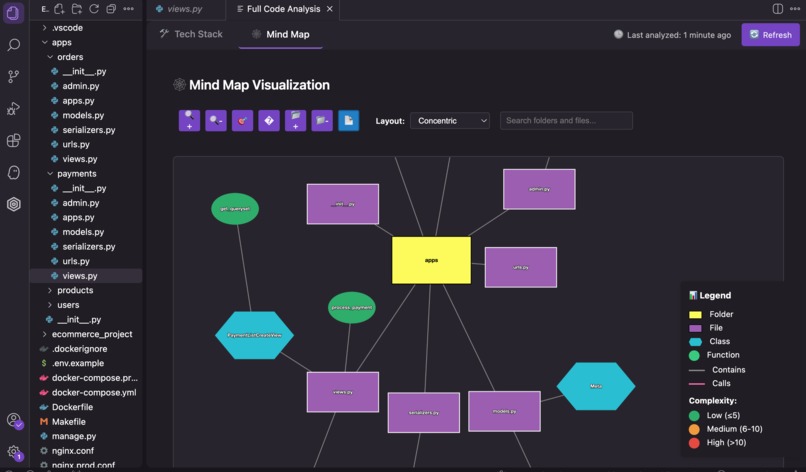
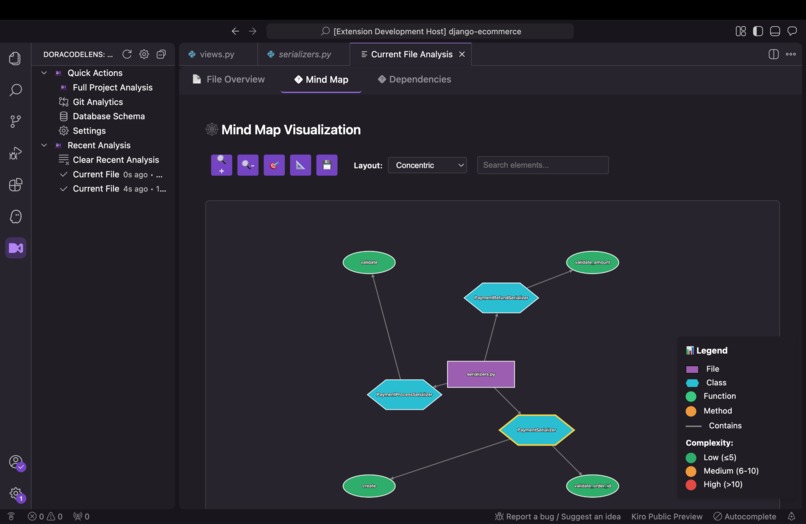
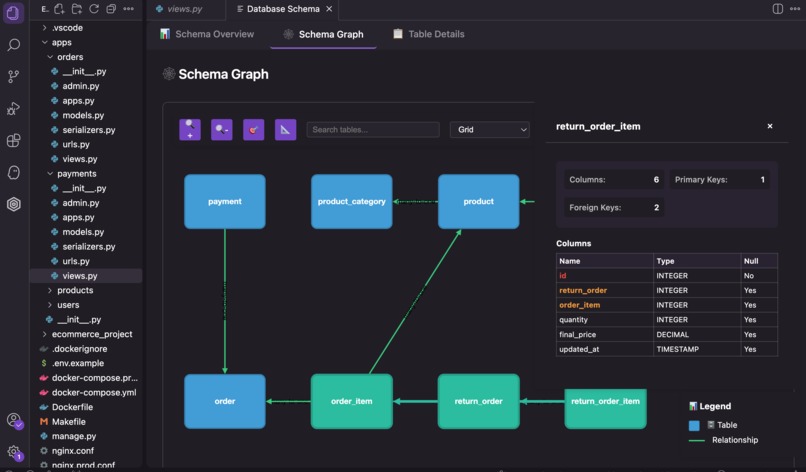
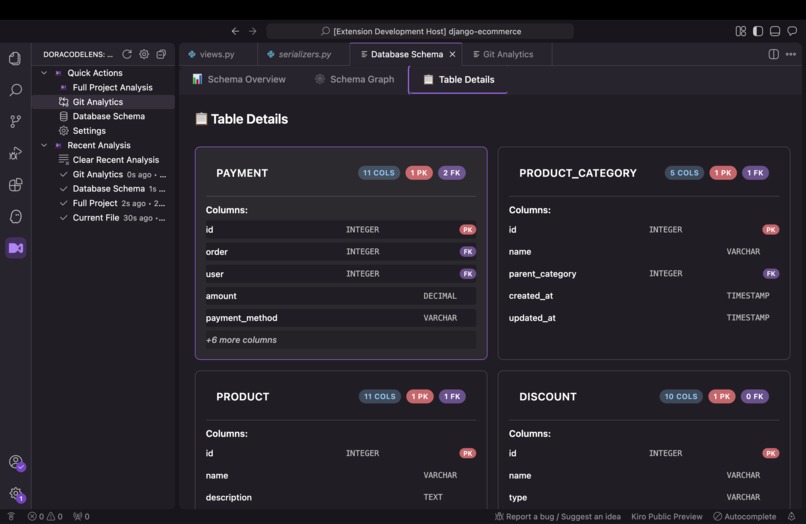
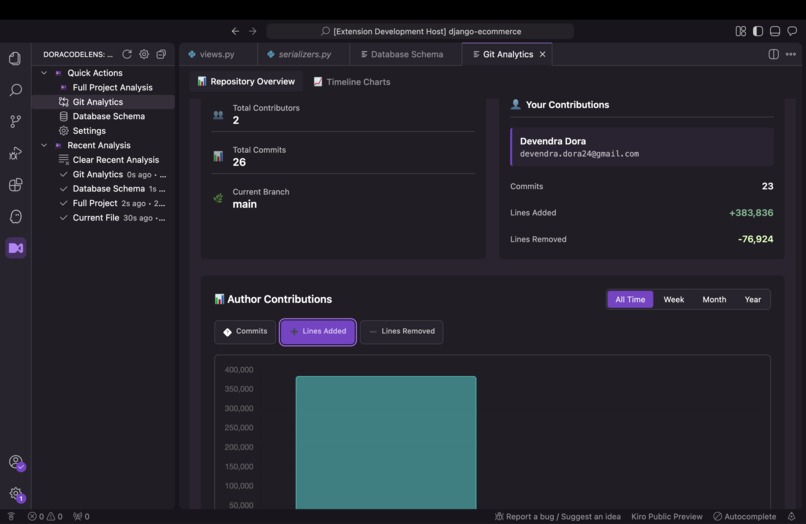
🗺️ Mind maps of modules, classes, methods, and functions — annotated with real-time complexity scores. 🗃️ Database-schema diagrams, extracted directly from ORM models. 📊 Git analytics, including contributor timelines and activity stats. ⚡ Productivity tools such as JSON minify/beautify and a tree viewer. All of this runs right inside the editor — no context switching, no clutter.

Features

🔍 Comprehensive Code Analysis

  • Full Project Analysis: Complete codebase analysis with interactive visualizations
  • Current File Analysis: Quick insights for the file you're working on
  • Complexity Metrics: Color-coded complexity indicators (🟢 Low, 🟡 Medium, 🔴 High)
  • Framework Detection: Automatic detection of Django, Flask, FastAPI patterns

📊 Interactive Visualizations

  • Module Graph View: Interactive dependency graphs with styled module cards
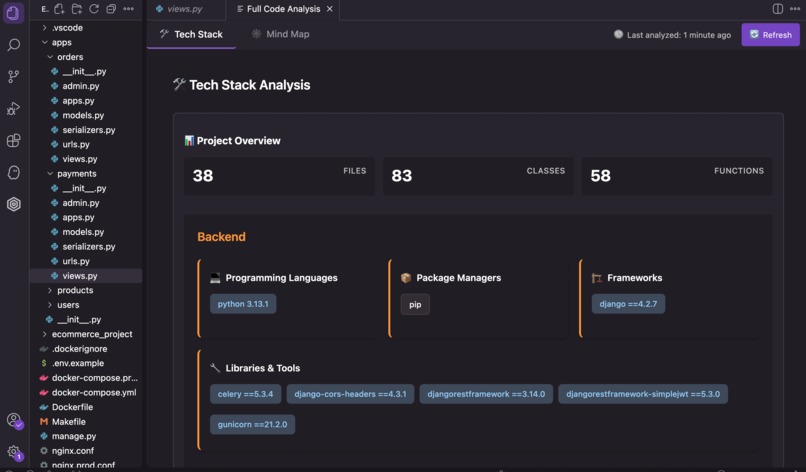
  • Tech Stack Dashboard: Categorized view of detected technologies and frameworks
  • Database Schema Graphs: Visual representation of database relationships
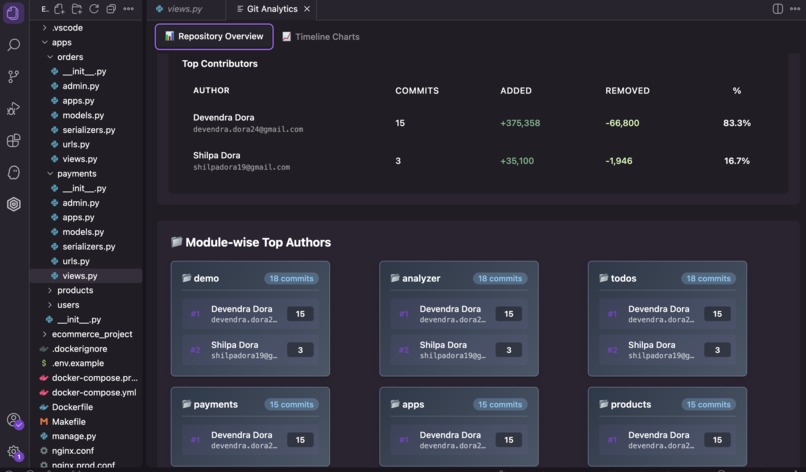
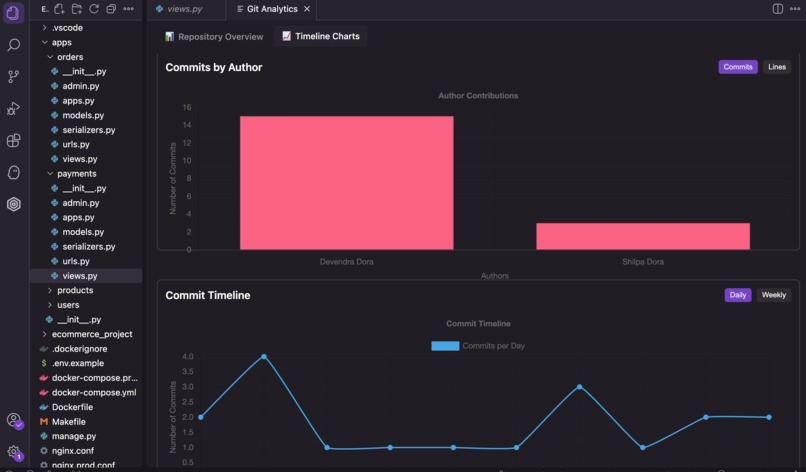
  • Git Analytics Charts: Contributor statistics and commit timeline visualizations

🔧 Developer Productivity Tools

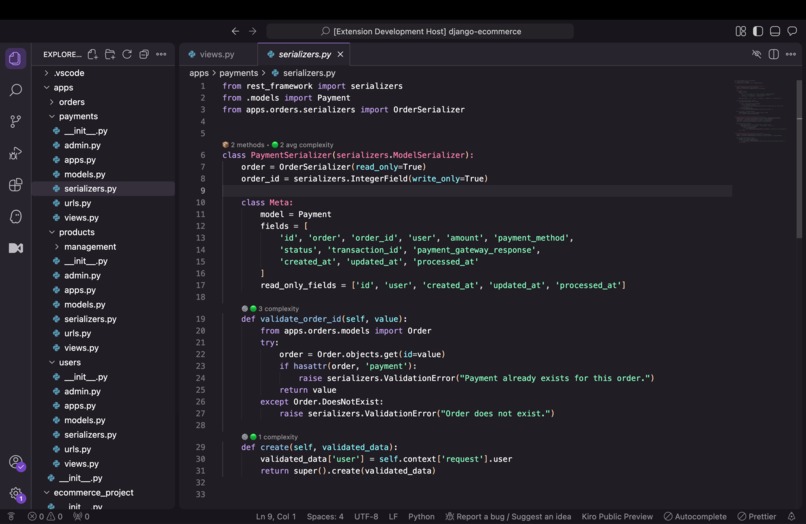
  • Inline Code Lens: Automatic complexity indicators (🟢🟡🔴) that appear after current file analysis
  • JSON Utilities: Format, validate, and explore JSON with tree view
  • Context Menu Integration: Organized right-click menu for quick access
  • Background Analysis: Automatic file analysis with intelligent caching
  • Export Capabilities: Export analysis results in multiple formats (JSON, CSV, HTML, PNG)

📈 Git Analytics & Team Insights

  • Author Statistics: Detailed contributor analysis with commit counts and line changes
  • Module Contributions: Track who works on which parts of your codebase
  • Commit Timeline: Visual timeline of development activity
  • Code Ownership: Identify primary maintainers of each module

🗄️ Database Schema Analysis

  • Schema Visualization: Interactive graphs showing table relationships
  • SQL Extraction: Parse and categorize SQL statements from your codebase
  • Model Analysis: Support for Django ORM and SQLAlchemy models
  • Migration Tracking: Analyze database migration files

Usage

Quick Start

  1. Install the Extension

    • Open VS Code Extensions panel (Ctrl+Shift+X)
    • Search for "DoraCodeLens"
    • Click Install and reload VS Code
  2. Analyze Your Project

    • Open a Python project in VS Code
    • Right-click on any Python file
    • Select DoraCodeLens from the context menu
  3. Explore Analysis Options

    The context menu provides direct access to all DoraCodeLens features:

    Right-click on Python file:
    ├── Full Code Analysis          # Complete project analysis
    ├── Current File Analysis       # Quick analysis + auto-enable inline complexity indicators
    ├── Enable Code Lens Inline     # Enable inline complexity annotations (when disabled)
    ├── Disable Code Lens Inline    # Disable inline complexity annotations (when enabled)
    ├── Database Schema Analysis    # Visual database schema analysis
    ├── Git Analytics              # Repository insights and team statistics
    ├── JSON Format                # Beautify JSON in editor (when JSON context detected)
    ├── JSON Tree View             # Expandable JSON explorer (when JSON context detected)
    ├── JSON Fix (Python Dict)     # Convert Python dict to JSON (when JSON context detected)
    ├── JSON Minify                # Compress JSON content (when JSON context detected)
    ├── Setup Python Path         # Configure Python interpreter
    ├── Auto-Detect Python Path   # Automatically find Python
    ├── Settings                   # Open extension settings
    └── Clear Cache                # Clear analysis cache
    
  4. Navigate the Tabbed Interface

    • Analysis results open in a comprehensive tabbed interface
    • Switch between different views seamlessly
    • Export results for documentation or sharing

Configuration & Settings

DoraCodeLens provides extensive configuration options through VS Code settings:

Analysis Settings

  • Python Path: Configure custom Python interpreter path
  • Analysis Timeout: Set timeout for analysis operations (30-600 seconds)
  • Debug Logging: Enable detailed logging for troubleshooting

Code Lens Settings

  • Complexity Thresholds: Customize low/medium/high complexity boundaries (🟢 ≤5, 🟡 6-10, 🔴 >10)
  • Auto-Enable: Inline indicators automatically appear after current file analysis
  • Display Options: Toggle complexity indicators and suggestions
  • Max Suggestions: Control number of suggestions per function

Guidance System

  • Preferred Analysis Type: Set default analysis mode (current-file/full-project)
  • Auto-run Analysis: Automatically analyze when Code Lens is enabled
  • Welcome Messages: Control first-time user guidance

Access Settings

  1. Open VS Code Settings (Ctrl+,)
  2. Search for "DoraCodeLens"
  3. Customize options to fit your workflow

Supported Frameworks & Technologies

Web Frameworks

  • Django: Models, views, URLs, admin interface, migrations
  • Flask: Routes, blueprints, SQLAlchemy integration, templates
  • FastAPI: Routes, dependency injection, Pydantic models, async patterns

Database Technologies

  • Django ORM: Model relationships, migrations, admin integration
  • SQLAlchemy: Model definitions, relationships, query patterns
  • Raw SQL: DDL, DML, DQL statement parsing and categorization

Development Tools

  • Git Integration: Repository analysis, author statistics, commit tracking
  • JSON Processing: Validation, formatting, tree exploration
  • Testing Frameworks: pytest, unittest pattern detection
  • Package Management: requirements.txt, pyproject.toml, Pipfile support

Command Palette Integration

Access DoraCodeLens features through the VS Code Command Palette (Ctrl+Shift+P):

Analysis Commands

  • DoraCodeLens: Full Code Analysis - Complete project analysis
  • DoraCodeLens: Current File Analysis - Analyze current file only
  • DoraCodeLens: Refresh Full Code Analysis - Force refresh analysis cache
  • DoraCodeLens: Database Schema Analysis - Analyze database structure
  • DoraCodeLens: Git Analytics - Generate Git repository insights

Code Lens Commands

  • DoraCodeLens: Code Lens (On) - Enable inline complexity annotations
  • DoraCodeLens: Code Lens (Off) - Disable Code Lens display
  • DoraCodeLens: Apply Code Lens Suggestion - Apply suggested improvements
  • DoraCodeLens: Show Code Lens Suggestion Details - View detailed suggestions

JSON Utilities

  • DoraCodeLens: JSON Format - Format JSON in current editor
  • DoraCodeLens: JSON Tree View - Open JSON tree explorer
  • DoraCodeLens: JSON Fix (Python Dict) - Convert Python dict to JSON
  • DoraCodeLens: JSON Minify - Compress JSON content

Utility Commands

  • DoraCodeLens: Setup Python Path - Configure Python interpreter
  • DoraCodeLens: Auto-Detect Python Path - Automatically find Python
  • DoraCodeLens: Clear Cache - Clear analysis cache
  • DoraCodeLens: Cancel Analysis - Stop running analysis
  • DoraCodeLens: Settings - Open extension settings

Example Projects

The examples/ directory contains sample projects demonstrating the extension's capabilities:

  • django-ecommerce: Comprehensive Django e-commerce project with complex database schema, REST APIs, and Docker setup
  • django-todo: Django todo app with models, views, and URL patterns
  • flask-todo: Flask todo app using Blueprints and SQLAlchemy
  • fastapi-todo: FastAPI todo app with dependency injection and modern async patterns

Each example includes setup instructions and demonstrates different framework patterns that DoraCodeLens can analyze.

Troubleshooting

Common Issues

Extension not activating

  • Ensure you have a Python project open with .py files
  • Check that Python 3.8+ is installed and accessible
  • Verify workspace contains requirements.txt, pyproject.toml, or Python files
  • Try reloading VS Code window (Ctrl+Shift+P → "Developer: Reload Window")

Analysis fails or times out

  • Check Python interpreter path in DoraCodeLens settings
  • Increase analysis timeout in settings (default: 120 seconds)
  • Try Current File Analysis instead of Full Code Analysis for large projects
  • Review VS Code Output panel for detailed error messages

Inline complexity indicators not appearing

  • Run "Current File Analysis" first - indicators auto-enable after analysis
  • Check that you're in a Python file (.py extension)
  • Ensure the file contains functions with complexity data
  • Verify complexity thresholds in settings aren't too restrictive

  • Toggle Code Lens manually if needed (DoraCodeLens: Enable Code Lens Inline)

Git Analytics empty

  • Ensure the project is a Git repository (git init if needed)
  • Check that Git is installed and accessible from command line
  • Verify the repository has commit history
  • Try analyzing a specific date range if history is very large

Database Schema not detected

  • Ensure you have Django models (models.py) or SQLAlchemy models
  • Check that model files are in standard locations
  • Verify database models follow standard ORM patterns
  • Look for SQL files in migrations or schema directories

JSON utilities not working

  • Ensure the content is valid JSON syntax
  • Try formatting smaller JSON sections first
  • Check that the file has proper JSON structure
  • Use JSON Fix feature for Python dictionary conversion

Performance issues with large projects

  • Use Current File Analysis instead of Full Code Analysis
  • Enable analysis caching in settings
  • Close other resource-intensive VS Code extensions
  • Consider analyzing specific directories rather than entire project
  • Ensure sufficient RAM (4GB+ recommended for large projects)

Getting Help

  1. Check Extension Output

    • Open VS Code Output panel (View → Output)
    • Select "DoraCodeLens" from the dropdown
    • Review error messages and debug information
  2. Enable Debug Logging

    • Open VS Code Settings (Ctrl+,)
    • Search for "DoraCodeLens debug"
    • Enable "Enable Debug Logging"
    • Reproduce the issue and check output
  3. Recent Fixes Applied

    • Command Registration: Fixed duplicate command registration errors during extension activation
    • Inline Code Lens: Simplified and improved inline complexity indicators
    • Background Analysis: Added intelligent caching and automatic file analysis
    • Error Recovery: Enhanced error handling with automatic recovery mechanisms

System Requirements

  • VS Code: Version 1.74.0 or higher
  • Python: Version 3.8 or higher
  • Git: Any recent version (for Git analytics features)
  • Memory: At least 4GB RAM recommended for large projects
  • Storage: 100MB free space for extension and caching
  • Network: Internet connection for initial Python package installation

License

This project is licensed under the MIT License - see the LICENSE file for details.

Acknowledgments

  • VS Code Extension API for integration capabilities
  • Cytoscape.js for graph visualization
  • Radon for complexity analysis

Changelog

See CHANGELOG.md for version history and updates.

  • Contact us
  • Jobs
  • Privacy
  • Manage cookies
  • Terms of use
  • Trademarks
© 2025 Microsoft