Skip to content
| Marketplace
Sign in
Visual Studio Code>Other>SSL Proxy ProNew to Visual Studio Code? Get it now.
SSL Proxy Pro

SSL Proxy Pro

DePol DeMarco

|
2 installs
| (0) | Free
La herramienta definitiva para HTTPS local (mkcert) y túneles públicos seguros (Basic Auth, Ngrok, Cloudflare, LocalTunnel) para desarrolladores web.
Installation
Launch VS Code Quick Open (Ctrl+P), paste the following command, and press enter.
Copied to clipboard
More Info

SSL Proxy Pro

SSL Proxy Pro lets you create HTTPS locally or expose your projects to the internet through secure tunnels — all without leaving VS Code. It also adds username and password protection to your public URLs.

SSL Proxy Pro te permite crear HTTPS localmente o exponer tus proyectos a internet a través de túneles seguros — todo sin salir de VS Code. También añade protección con nombre de usuario y contraseña a tus URLs públicas.


What is SSL Proxy Pro for? / ¿Para qué sirve SSL Proxy Pro?

English:
SSL Proxy Pro is a VS Code extension designed for web developers who need HTTPS in their local development environment or need to share their work with others over the internet. It solves two main problems:

Español:
SSL Proxy Pro es una extensión de VS Code diseñada para desarrolladores web que necesitan HTTPS en su entorno de desarrollo local o necesitan compartir su trabajo con otros por internet. Resuelve dos problemas principales:

  1. HTTPS Local — Crea un certificado SSL válido para tu localhost, eliminando warnings de mixed-content y problemas de cookies SameSite.
  2. Túneles Públicos — Expone tu servidor local a internet a través de túneles, para que puedas mostrar tu proyecto a clientes, compañeros o probar webhooks sin hacer deploy.

Installation / Instalación

  1. Install the extension from VS Code Marketplace / Instala la extensión desde el Marketplace de VS Code
  2. Install required tools (mkcert, Node.js, Cloudflare, Localtunnel, Ngrok, Git) — the extension will prompt you / Instala las herramientas requeridas (mkcert, Node.js, Cloudflare, Localtunnel, Ngrok, Git) — la extensión te guiará
  3. Run Proxy: Iniciar Servidor from Command Palette (Ctrl+Shift+P) / Ejecuta Proxy: Iniciar Servidor desde Paleta de Comandos (Ctrl+Shift+P)

How to Use / Cómo Usar

Step 1: Open Command Palette / Abrir Paleta de Comandos

Press Ctrl+Shift+P (Windows/Linux) or Cmd+Shift+P (Mac) and type:

Presiona Ctrl+Shift+P (Windows/Linux) o Cmd+Shift+P (Mac) y escribe:

Proxy: Iniciar Servidor

Proxy Command

Step 2: Verify Tools / Verificar Herramientas

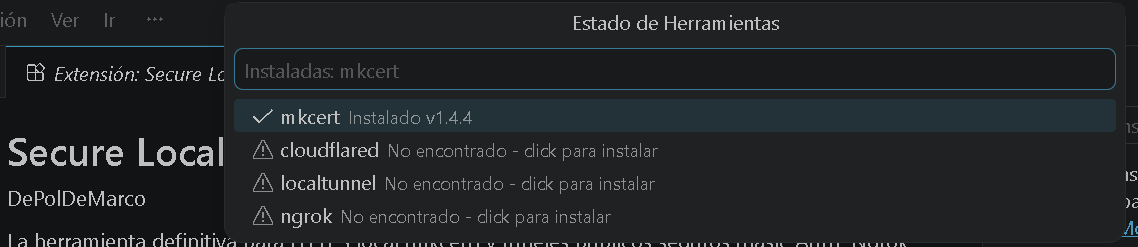
First time? The extension checks if you have the necessary tools installed. If something is missing, it will tell you.

Primera vez? La extensión verifica si tienes las herramientas necesarias. Si falta algo, te lo dirá.

Verify Tools

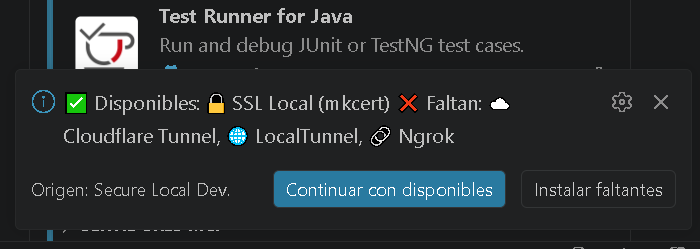
If tools are missing, you'll see a notification with install instructions:

Si faltan herramientas, verás una notificación con instrucciones de instalación:

Tools Notification

Click "Install Tools" to get the missing components:

Haz clic en "Instalar Herramientas" para obtener los componentes faltantes:

Install Tools

Step 3: Choose Connection Type / Elegir Tipo de Conexión

Choose what you need:

Elige lo que necesitas:

Start Server

  • Local SSL Puro (mkcert) — Get HTTPS on localhost (free) / Obtén HTTPS en localhost (gratis)
  • Túnel Público + Mitigación Segura — Expose to internet with protection / Expón a internet con protección

Option A: Local SSL / Opción A: SSL Local

Enter the port of your local server (e.g., 3000, 5173, 8000):

Ingresa el puerto de tu servidor local (ej. 3000, 5173, 8000):

SSL Port Input

The extension creates an HTTPS URL like https://localhost:3001 (port + 1). You can use this directly in your browser.

La extensión crea una URL HTTPS como https://localhost:3001 (puerto + 1). Puedes usarla directamente en tu navegador.

Option B: Public Tunnel / Opción B: Túnel Público

Select the tunnel provider:

Selecciona el proveedor de túnel:

Tunnel Options

  • [Gratis] LocalTunnel (Sin Registro) — Quick, no account needed / Rápido, sin cuenta
  • [Pro] Ngrok (Alta Estabilidad) — Stable, requires account / Estable, requiere cuenta
  • [Pro] Cloudflare Tunnels (Avanzado) — Advanced, more control / Avanzado, más control

For Cloudflare, you'll be asked to enter your credentials manually:

Para Cloudflare, se te pedirán tus credenciales manualmente:

Cloudflare Credentials

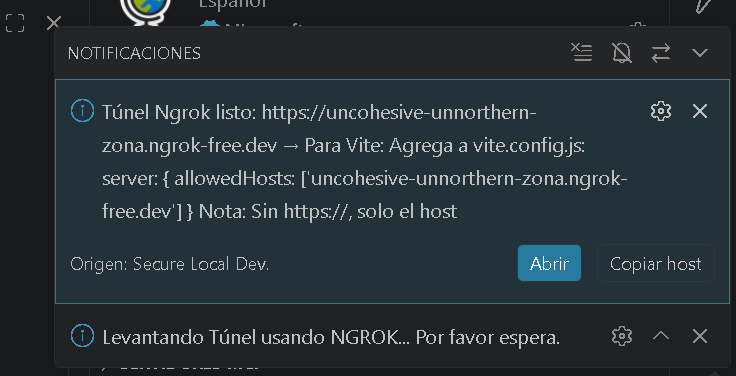
Once the tunnel is ready, you'll get a public URL with an option to open it in browser:

Una vez listo el túnel, obtendrás una URL pública con opción de abrir en navegador:

Tunnel Ready

Step 4: Share Your URL / Comparte Tu URL

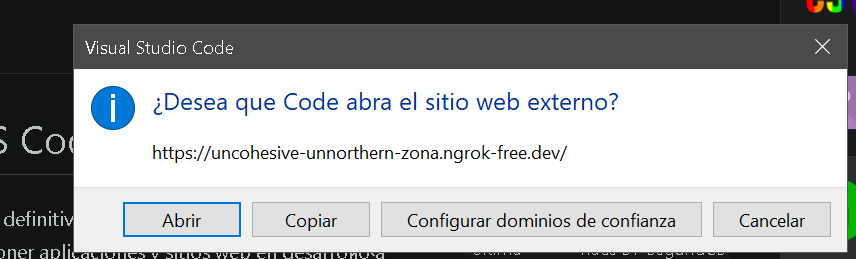
The extension asks if you want to open the URL in your browser or copy it to clipboard:

La extensión pregunta si quieres abrir la URL en tu navegador o copiar al portapapeles:

Share URL

Your public URL will look like: https://your-project.loca.lt

Tu URL pública será algo como: https://tu-proyecto.loca.lt

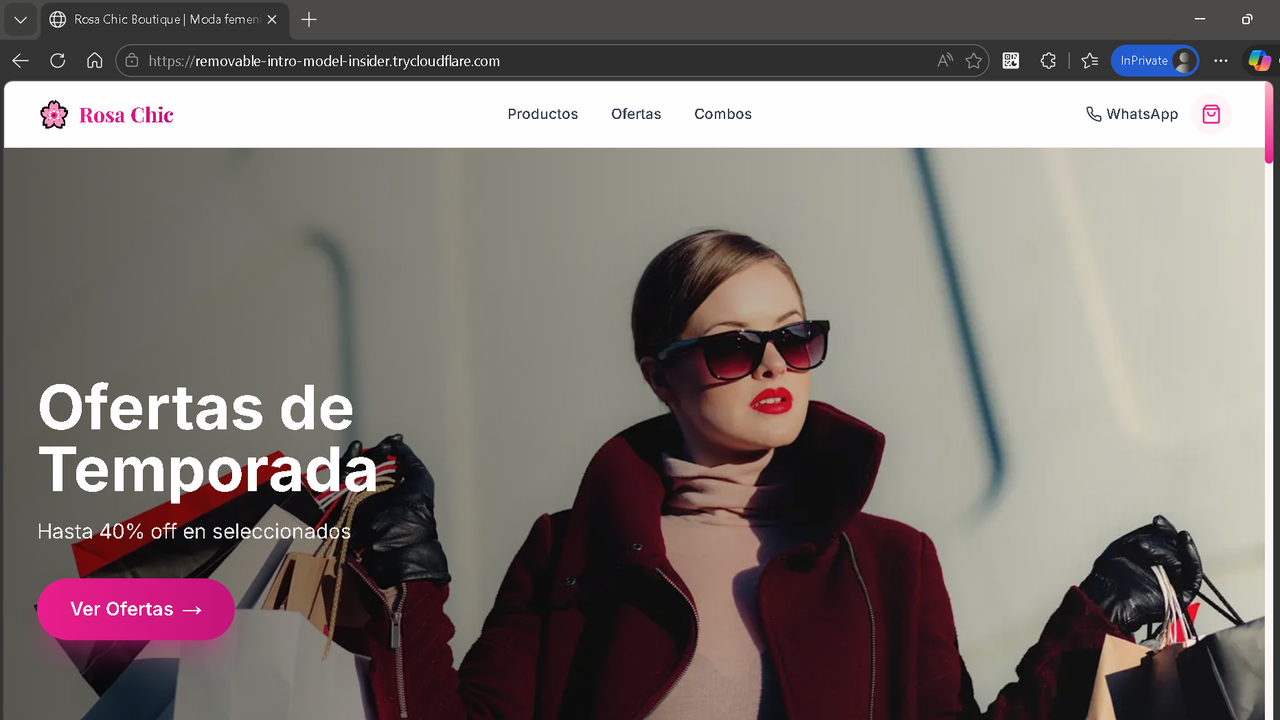
For Cloudflare tunnels, the URL looks like:

Para túneles Cloudflare, la URL se ve así:

Cloudflare URL

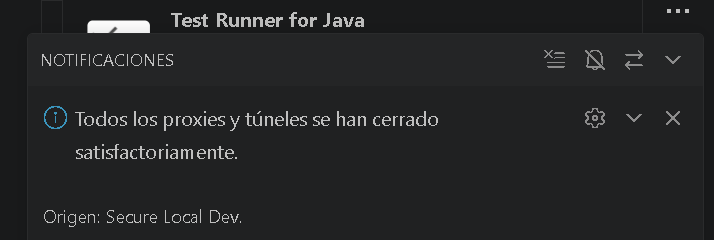
Step 5: Stop the Tunnel / Detener el Túnel

When done, run:

Cuando termines, ejecuta:

Proxy: Detener Servidores

Stop Tunnel


Activating Pro License / Activar Licencia Pro

What is Pro? / ¿Qué es Pro?

  • Unlimited tunnel usage / Uso ilimitado de túneles
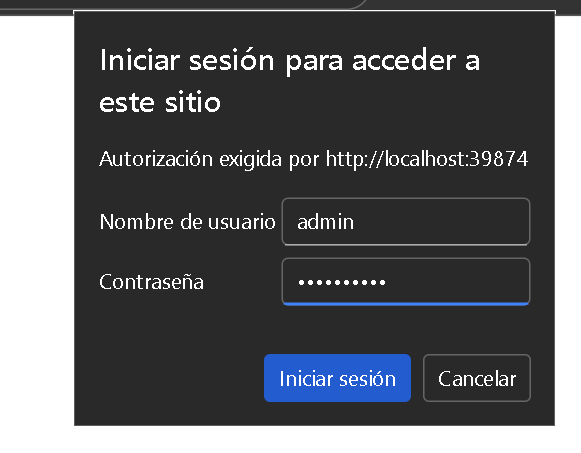
  • Basic Auth on public URLs / Basic Auth en URLs públicas
  • All tunnel providers (Ngrok, Cloudflare) / Todos los proveedores de túnel (Ngrok, Cloudflare)

Activate with Key / Activar con Key

Run:

Ejecuta:

Proxy: Activar Licencia Pro

Enter Key

Enter your license key (format: SLP-XXXX-XXXX-XXXX) and click OK.

Ingresa tu key de licencia (formato: SLP-XXXX-XXXX-XXXX) y haz clic en Aceptar.

Get a License / Obtener una Licencia

¡Obtén aquí tu licencia! / Get your license here!

You can pay with Bitcoin or PayPal (Monthly $5, Annual $29, Lifetime $39).

Puedes pagar con Bitcoin o PayPal (Mensual $5, Anual $29, Lifetime $39).


Why Use This? / Por Qué Usar Esto?

For Local Development / Para Desarrollo Local

  • Fixes mixed-content warnings — HTTPS prevents browser security blocks / Previene warnings de mixed-content
  • SameSite cookies work — Local cookies behave like production / Las cookies SameSite funcionan como en producción
  • Test PWA features — Service workers require HTTPS / Los service workers requieren HTTPS

For Sharing with Others / Para Compartir con Otros

  • No deployment needed — Show work in progress to clients / Sin deploy — muestra trabajo en curso a clientes
  • Test webhooks — Receive webhook calls on your local machine / Prueba webhooks en tu máquina local
  • Team collaboration — Share URLs with teammates in real time / Colaboración con compañeros en tiempo real

Connect Cloud Frontend to Local Backend / Conectar Frontend en la Nube con Backend Local

If your frontend is deployed on Netlify, Vercel, or any free hosting, but your backend API or database is local, you can use SSL Proxy Pro to create a public tunnel to your local backend. Then update your environment variables in the cloud to point to the tunnel URL. This gives you:

Si tu frontend está desplegado en Netlify, Vercel, o cualquier hosting gratuito, pero tu backend API o base de datos es local, puedes usar SSL Proxy Pro para crear un túnel público a tu backend local. Luego actualiza tus variables de entorno en la nube para que apunten a la URL del túnel. Esto te da:

  • Full API access from a hosted frontend to your local backend / Acceso completo a API desde frontend hosted a tu backend local
  • No time limits — Unlike free tiers that expire after 7-30 days / Sin límites de tiempo — a diferencia de tiers gratuitos que expiran en 7-30 días
  • Real production testing — Test with real cloud infrastructure / Pruebas reales con infraestructura de producción

Example / Ejemplo:

  1. Run Proxy: Iniciar Servidor and select "Túnel Público + Mitigación Segura" / Ejecuta Proxy: Iniciar Servidor y selecciona "Túnel Público + Mitigación Segura"
  2. Select "[Pro] Ngrok (Alta Estabilidad)" or "[Gratis] LocalTunnel (Sin Registro)" / Selecciona "[Pro] Ngrok (Alta Estabilidad)" o "[Gratis] LocalTunnel (Sin Registro)"
  3. Copy the generated URL / Copia la URL generada
  4. Update your cloud env variable: / Actualiza tu variable de entorno en la nube:
API_URL=https://your-tunnel-url.loca.lt

Commands Reference / Referencia de Comandos

Command / Comando Description / Descripción
Proxy: Iniciar Servidor Start local HTTPS or public tunnel / Iniciar HTTPS local o túnel público
Proxy: Detener Servidores Stop all active proxies/tunnels / Detener todos los proxies/túneles activos
Proxy: Configurar Ngrok/Tokens Open settings for tunnel configuration / Abrir configuración de túnel
Proxy: Activar Licencia Pro Enter your Pro license key / Ingresar tu key de licencia Pro
Proxy: Verificar Herramientas del Sistema Check installed tools status / Verificar estado de herramientas instaladas

Configuration / Configuración

Open VS Code Settings (Ctrl+,) and search for SSL Proxy Pro:

Abre Configuración de VS Code (Ctrl+,) y busca SSL Proxy Pro:

  • tunnelProvider — Default tunnel service / Servicio de túnel por defecto
  • ngrokToken — Your Ngrok auth token / Tu token de autenticación Ngrok
  • enableBasicAuth — Require username/password on public URLs (Pro) / Requerir usuario/contraseña en URLs públicas (Pro)
  • basicAuthUsername — Username for Basic Auth / Usuario para Basic Auth
  • basicAuthPassword — Password for Basic Auth / Contraseña para Basic Auth

Ngrok Token Setup / Configurar Token de Ngrok

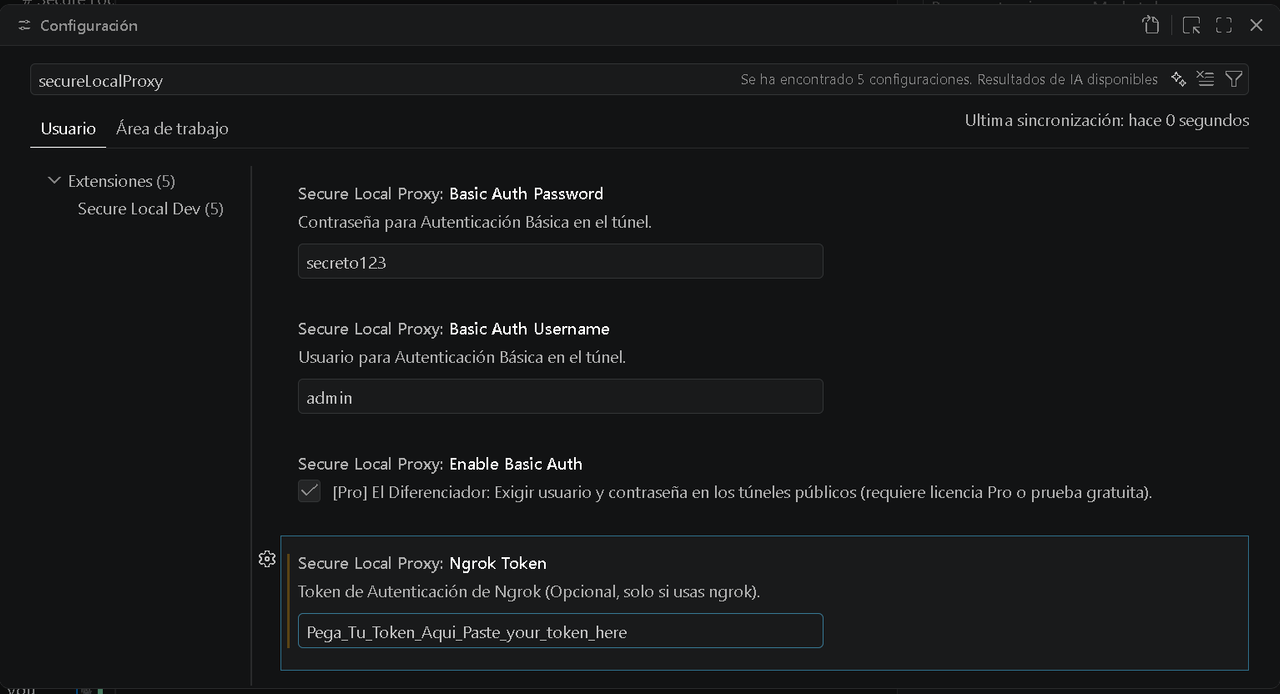
To use Ngrok, you need to get your auth token from your Ngrok dashboard and configure it in VS Code. Run:

Para usar Ngrok, necesitas obtener tu token de autenticación de tu dashboard de Ngrok y configurarlo en VS Code. Ejecuta:

Proxy: Configurar Ngrok/Tokens

Ngrok Token Config

Enter your Ngrok token in the settings. You can also change the username and password for Basic Auth authentication here.

Ingresa tu token de Ngrok en la configuración. También puedes cambiar el usuario y contraseña para la autenticación Basic Auth aquí.

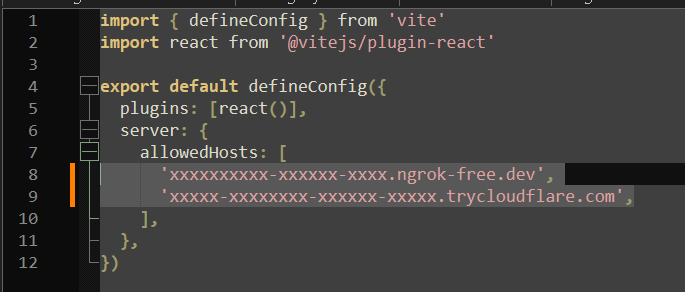
Vite Configuration / Configuración de Vite

If you're using Vite, the extension will automatically detect it and attempt to configure your vite.config.js to allow the tunnel URL. If automatic detection doesn't work, you can configure it manually:

Si usas Vite, la extensión automáticamente lo detectará e intentará configurar tu vite.config.js para permitir la URL del túnel. Si la detección automática no funciona, puedes configurarlo manualmente:

Vite Config

Add the server configuration in your vite.config.js:

Agrega la configuración server en tu vite.config.js:

export default {
  server: {
    host: '0.0.0.0',
    allowedHosts: ['your-tunnel-url.loca.lt']
  }
}

Troubleshooting / Solución de Problemas

"Tools not found" / "Herramientas no encontradas"

Install:
Instala:

  • Windows: choco install mkcert
  • macOS: brew install mkcert
  • Linux: Follow https://github.com/FiloSottile/mkcert#linux

"LocalTunnel connection failed" / "Conexión de LocalTunnel falló"

Check your internet connection. LocalTunnel sometimes has temporary issues.
Verifica tu conexión a internet. LocalTunnel a veces tiene problemas temporales.

"Ngrok token invalid" / "Token de Ngrok inválido"

Make sure you're using the correct auth token from your Ngrok dashboard.
Asegúrate de usar el token correcto de tu dashboard de Ngrok.

"Error 500 Cloudflare"

Internal error. It may fail on the first try, try again. Sometimes you need to try more than once.
Error interno. Puede fallar en el primer intento, reintentar. A veces se necesita más de una vez.


Support / Soporte

For issues or questions, open a GitHub issue or contact me directly. If this extension was useful for you, please consider supporting the project to encourage future improvements!

Para problemas o preguntas, abre un issue en GitHub o contactame directamente. Si esta extensión te fue útil, por favor considerá apoyar el proyecto para incentivar mejoras futuras!


SSL Proxy Pro — Developed with care for developers, by developers.
SSL Proxy Pro — Desarrollado con cuidado para desarrolladores, por desarrolladores.

  • Contact us
  • Jobs
  • Privacy
  • Manage cookies
  • Terms of use
  • Trademarks
© 2026 Microsoft