Skip to content
| Marketplace
Sign in
Visual Studio Code>Programming Languages>SCC InspectorNew to Visual Studio Code? Get it now.
SCC Inspector

SCC Inspector

Dave Kneeland

|
1 install
| (0) | Free
Analyze and debug SCC (Scenarist Closed Caption) files
Installation
Launch VS Code Quick Open (Ctrl+P), paste the following command, and press enter.
Copied to clipboard
More Info

SCC Inspector

Analyze and debug SCC (Scenarist Closed Caption / EIA-608) files in VS Code.

SCC files store captions as timecoded pairs of hex words — compact for broadcast workflows, opaque for humans. SCC Inspector decodes them in place: hover any code to see exactly what it does, read every caption at a glance from code lenses, and catch parity, timing, and buffer problems as you type.

Features

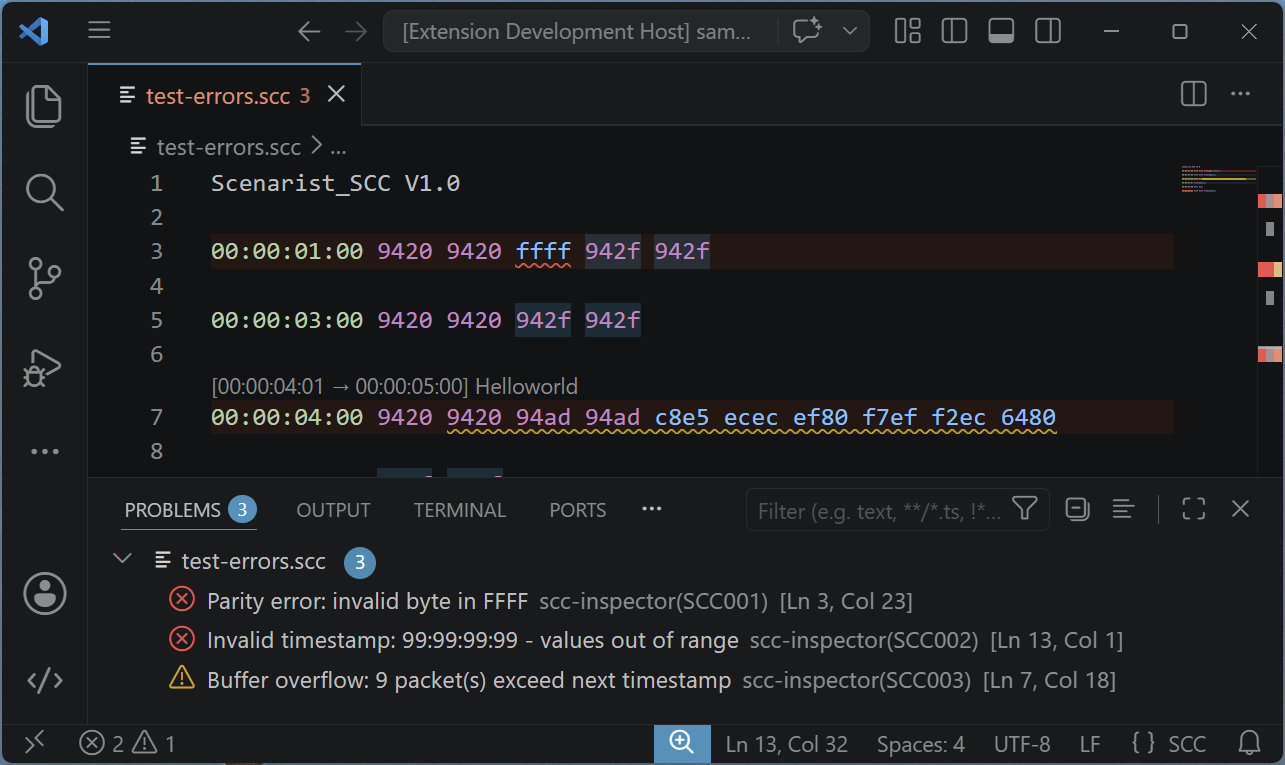
Real-time diagnostics

Problems are flagged as you edit and listed in the Problems panel, with red line tints and minimap bands so trouble spots stand out while scrolling.

Diagnostics

Code Severity Meaning
SCC001 Error Parity error — a byte fails the EIA-608 odd-parity check
SCC002 Error Invalid timestamp — field values out of range
SCC003 Warning Buffer overflow — more packets than fit before the next timestamp
SCC004 Warning Caption never displayed — has text but no EOC (End of Caption)
SCC005 Info Caption never erased — has EOC but no EDM (Erase Displayed Memory)
SCC006 Warning Non-monotonic timestamp — goes backwards from the previous line

Rich hover tooltips

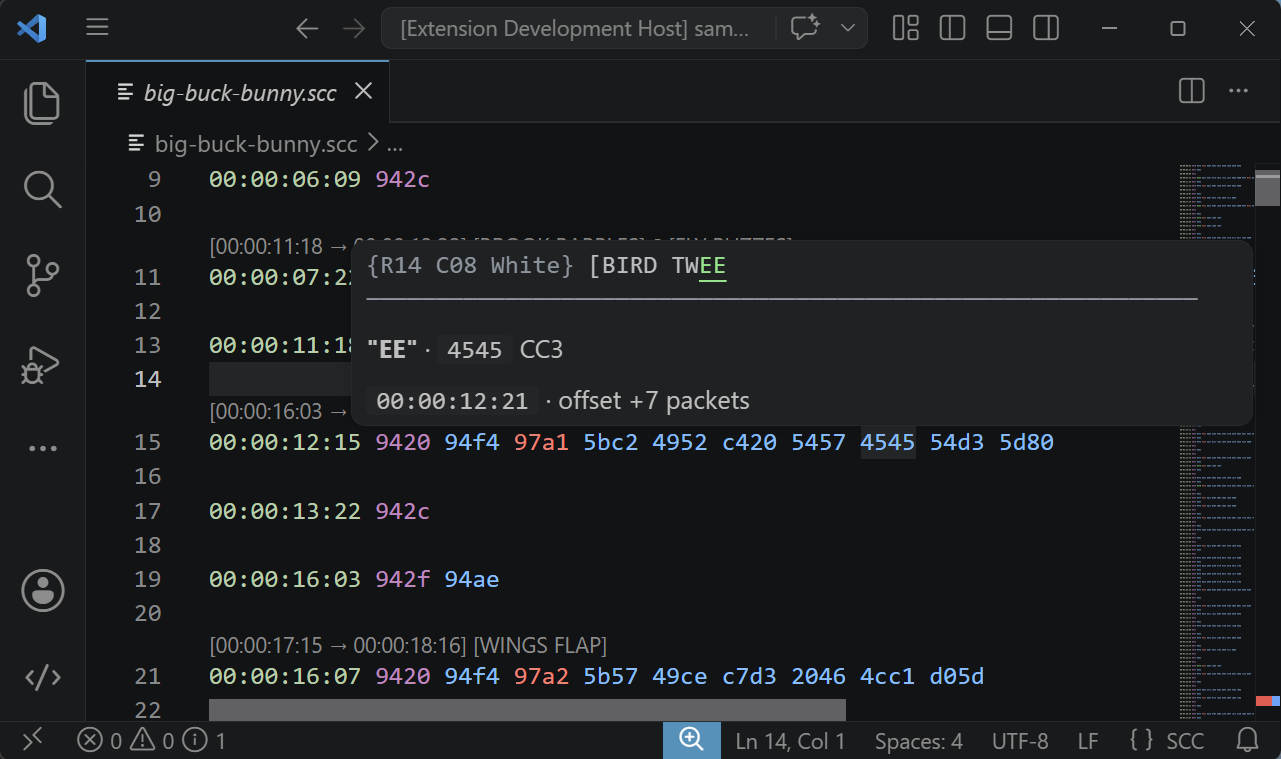
Hover any hex word to see the decoded command, the exact time that packet hits air (frame-accurate, drop-frame aware), and the caption buffer at that moment with the hovered code highlighted in context. Hover a timestamp for frame rate, packet count, and line duration.

Hover tooltip

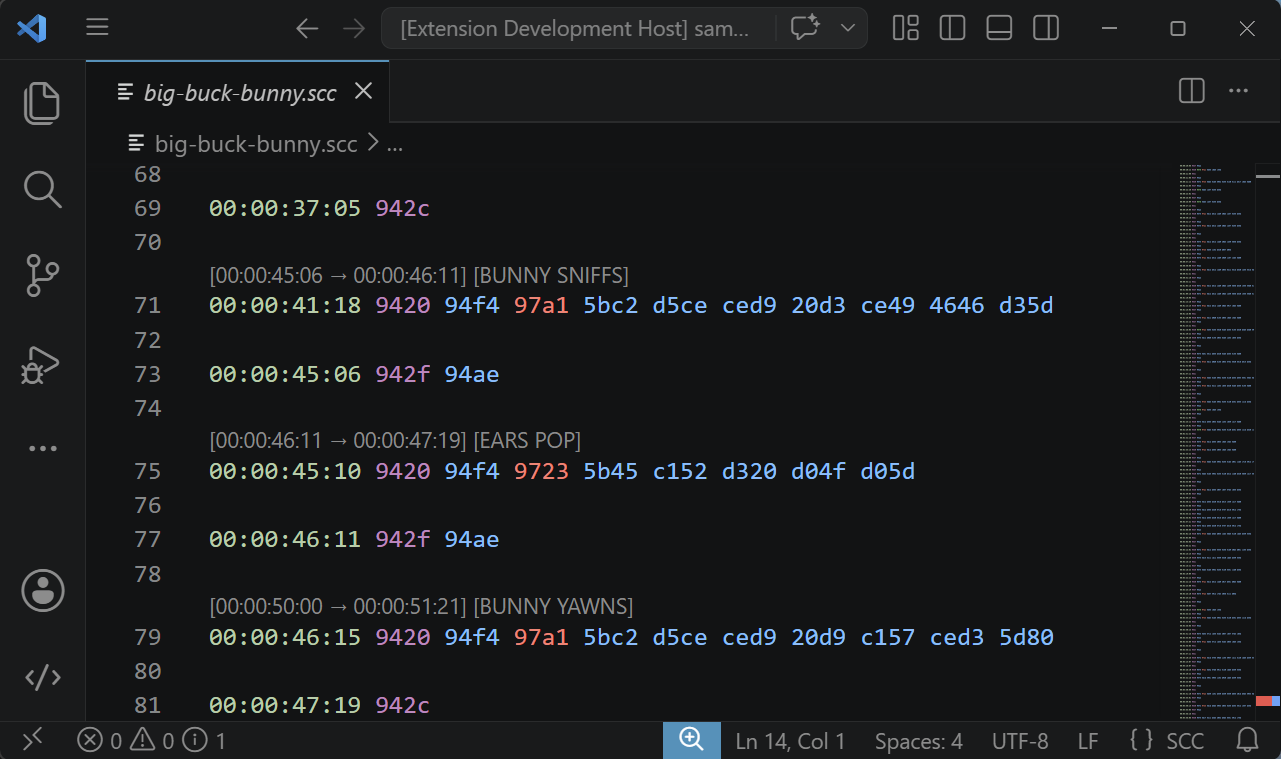
Decoded-caption code lenses

Every caption line gets a lens showing its decoded text and display timing — Hello [00:00:01:00 → 00:00:05:00] — so you can read the file top to bottom without decoding a single byte. Captions that never display or never erase are called out.

Code lenses

Outline navigation

Caption text appears in the Outline view and breadcrumbs. Jump to any caption with Ctrl+Shift+O.

Syntax highlighting

Timestamps, control codes, caption start/end commands, and text bytes are color-coded via a TextMate grammar.

Frame rate handling

The frame rate (23.98, 25, 29.97 drop-frame, 29.97 non-drop) is auto-detected from the file, and all timing math — including SMPTE drop-frame — follows it. Force a specific rate with the sccInspector.frameRateOverride setting when a file lies about itself.

Settings

Setting Default Description
sccInspector.hoverEnabled true Enable hover tooltips for SCC codes
sccInspector.decorationsEnabled true Enable line tint and minimap highlighting of problem lines
sccInspector.frameRateOverride "auto" Force a frame rate: 23.98, 25, 29.97 DF, or 29.97 NDF

Limitations

  • Pop-on captions only — roll-up and paint-on styles are not yet supported.
  • Frame rates — 23.98, 25, 29.97 NDF, and 29.97 DF; other rates are not implemented.

Acknowledgments

  • libcaption — reference implementation for EIA-608 decoding
  • McPoodle's SCC Tools — comprehensive SCC format documentation
  • Successor to the scc_inspector Notepad++ plugin

License

MIT

  • Contact us
  • Jobs
  • Privacy
  • Manage cookies
  • Terms of use
  • Trademarks
© 2026 Microsoft